Exact Lenovo model, machine type and regional part number
The Lenovo L22-42 is an L-series home and office monitor identified by machine type 68FA. Lenovo’s Product Specifications Reference lists global machine type model 68FAKAC6WW and Asia-Pacific model 68FAKAC6MY; an India-region 68FAKAC6IN may also appear. The physical box label should decide the precise regional MPN for an individual unit. Bangladesh retailer catalog numbers such as Star Tech product code 52507 and Ryans product ID 08.02.200.73 are retailer identifiers, not Lenovo part numbers and not BiponiBD SKUs. Keeping the model and MPN separate helps avoid contaminating a listing with other Lenovo screens. L22-42 should not be shortened to a generic “Lenovo 22-inch monitor,” which hides the exact family and regional suffix.
21.5-inch Full HD IPS screen
Lenovo specifies a 21.5-inch (54.6cm) viewable display with an active area of approximately 476.1 × 267.8mm. The flat IPS panel uses WLED backlighting and provides native Full HD 1920 × 1080 resolution at a 16:9 aspect ratio. Its pixel pitch is 0.2479 × 0.2479mm, about 102 pixels per inch. Lenovo lists 178-degree horizontal and vertical viewing angles. An anti-glare matte surface helps diffuse common indoor reflections, though it does not remove every reflection or make direct sunlight irrelevant. Full HD is suitable for ordinary office documents, web browsing, video and study tasks. The size refers to the viewable panel diagonal; the external frame and stand add to desk dimensions.
100Hz refresh and input-specific timing
The L22-42 supports 100Hz at its native Full HD resolution over HDMI 1.4. Use the digital HDMI connection and a compatible computer to reach that mode. The legacy VGA input has a lower analog timing limit; manufacturer and retailer timing references commonly show 60Hz, with some supported timings reaching up to 75Hz. Therefore, the page should not imply that both ports provide 100Hz. After connecting through HDMI, users may need to choose 100Hz in their operating system’s display settings. The screen can refresh up to 100 times per second, but the computer and software determine rendered frame rate. Adaptive-Sync support is listed, but exact behavior can depend on the graphics source and driver.
GtG response time by overdrive setting
Lenovo specifies Gray-to-Gray response times for three overdrive modes: 4ms in Extreme, 6ms in Normal and 14ms with overdrive Off. These are GtG figures tied to a selected panel setting. The L22-42 is not officially specified as a 1ms MPRT monitor, so 1ms claims from generic social posts or copied templates should not be carried into its product copy. Extreme overdrive may prioritize transitions at the expense of artifacts or overshoot on some content; Normal provides a balanced everyday mode. Response figures are not guarantees of zero motion blur, as the visible result also depends on refresh, frame rate, content and viewing conditions.
Brightness, contrast and color
The panel is rated at 250 cd/m² typical brightness and 1300:1 typical static contrast. Lenovo also lists a 3,000,000:1 dynamic contrast figure; that dynamic value is a different measure and should not be substituted for native static contrast in comparisons. Lenovo PSREF gives 99% sRGB coverage ratio using CIE 1931 and 106% sRGB color area ratio. It supports 16.7 million colors with 8-bit output described as 6-bit + FRC. These are published specifications, not independent instrument measurements or proof of factory calibration. They make the display a reasonable candidate for general web-oriented graphics and everyday photo viewing, while color-critical print workflows should verify calibration and gamut needs separately.
Low Blue Light and flicker-free operation
Lenovo lists TÜV Low Blue Light protection and a flicker-free backlight. These features are intended to support comfortable viewing for office and study use, but they do not guarantee that a user will avoid eye strain. Room lighting, viewing distance, brightness choice and regular breaks remain relevant. A low-blue-light mode may change perceived color depending on its setting, so users should consider the display mode before evaluating color-sensitive content. The monitor is not medical equipment and the listed optical features should not be described as a treatment or a promise of health outcomes.
HDMI, VGA and no monitor audio
The L22-42 provides one HDMI 1.4 input and one 15-pin VGA (D-Sub) input. HDMI is the documented path for Full HD at 100Hz, while VGA supports legacy analog devices at lower refresh rates. No DisplayPort or USB-C input is listed. The model has no built-in speakers and no 3.5mm audio output jack. Route sound through the PC, laptop, dock or a separate audio device. This is a critical model distinction: the older Lenovo L22i-40 is commonly listed with two 3W speakers and an audio jack, but those features do not belong to this L22-42.
Cloud Grey finish and near-edgeless design
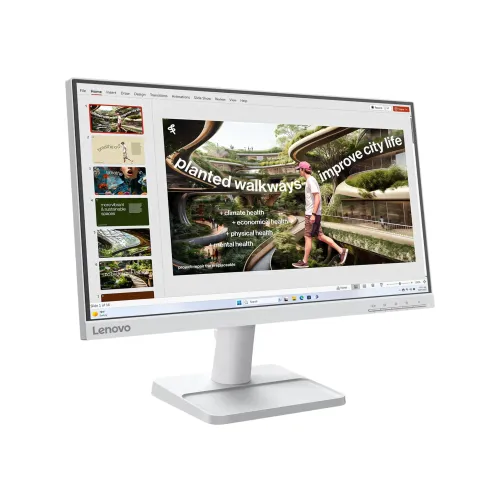
The L22-42 is finished in Lenovo Cloud Grey, rather than the all-black finish of many Lenovo D-series monitors. Lenovo describes a three-side NearEdgeless design with approximately 2.0mm top and side bezels and a 21.2mm lower chin. The product’s gallery should show the light grey housing and stand if it is to represent this exact model. An all-black D-series image, older L22i-40 stand or speaker grille can mislead shoppers. The exterior design is useful in multi-display desks where a restrained light finish is preferred, though the bezel specification does not mean the panel has no physical frame at all.
Stand adjustment, security and VESA mounting
The supplied stand tilts from approximately −5 to +22 degrees and includes integrated cable management. Height adjustment, swivel and portrait pivot are not listed for the factory stand. The monitor head supports a standard 100 × 100mm VESA mount, allowing use with a compatible arm or wall bracket. Lenovo also lists a Kensington lock slot measuring 3 × 7mm. Check a mount’s weight rating and installation hardware, and route cables without pinching them. The stand and monitor measurements are distinct: with stand the dimensions are about 489.3 × 174.0 × 379.4mm (W × D × H); the head without stand is 489.3 × 52.7 × 296.8mm.
Power supply, energy use and box contents
The L22-42 has an internal power supply accepting AC 100–240V at 50–60Hz, so it does not require an external adapter brick. Lenovo lists 10.5W typical and 20W maximum consumption, less than 0.5W in sleep/off and less than 0.3W in switched-off mode. The monitor weighs about 2.8kg with stand and 2.5kg as a head; the shipping carton is listed at 563 × 119 × 350mm and 4.1kg. Lenovo’s box list includes the display with stand, a 1.8m power cable, 1.8m HDMI 1.4 cable, quick setup guide and warranty booklet. Carton size and gross weight describe shipping, not the installed product.
Bangladesh warranty and price references
Bangladesh exact-model retailer pages list a three-year limited warranty and observed market prices around ৳10,200–৳10,800. Retailer listings can change and do not prove the source of a particular BiponiBD unit. Confirm the warranty provider and claim route on the invoice and warranty booklet. The physical regional part number may be MY, WW or IN depending on supply channel, so the carton suffix should be checked when matching an individual monitor. Public sources also do not establish BiponiBD live inventory, sale price, delivery availability or return terms; use the live BiponiBD offer and seller confirmation for those details.
Do not confuse L22-42 with Lenovo siblings
The older L22i-40 is a 75Hz IPS model with 1000:1 contrast and commonly listed 2 × 3W speakers plus a 3.5mm audio jack. The L22e-40 is a 75Hz VA model with higher VA contrast and lacks native VESA threading in some configurations. The L22-42 is instead 21.5-inch IPS, 100Hz via HDMI, 1300:1 static contrast, Cloud Grey, no speaker/audio jack and native 100 × 100mm VESA. Lenovo D-series products such as D20-30 or D22e-20 may have black housings and different display specifications. Do not reuse their gallery images or specs for this product.
Category fit and search-friendly information
The current Monitors category is appropriate. Useful filters include Lenovo, IPS, 21.5-inch, 100Hz and home/office display. The page title can retain “L22-42,” the 21.5-inch technical size, 100Hz and Full HD IPS so it answers model-specific searches. The existing canonical slug is preserved rather than changed. Attributes, long description, features, honest pros and cons, and focused FAQs explain refresh limits, response modes, audio omission, VESA, package and warranty qualification. These details help both shoppers and search systems distinguish L22-42 from closely named Lenovo models without inserting a competitor’s price, retailer code, unverified stock claim or fabricated review.