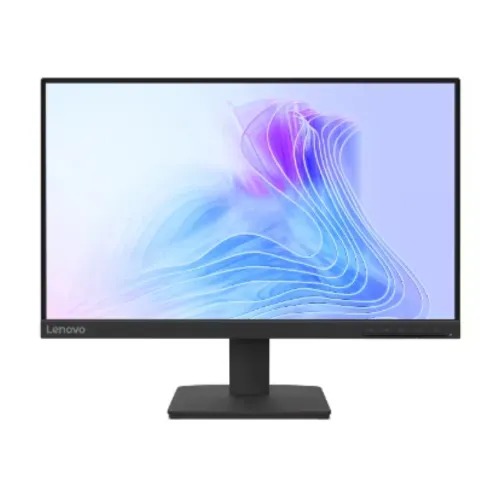
Lenovo L22-4e 21.5-inch 100Hz Full HD IPS Monitor
A compact professional Full HD monitor
The Lenovo L22-4e is a 21.5-inch IPS monitor designed for desk work, study and everyday entertainment. Lenovo lists a 1920 × 1080 Full HD resolution, 16:9 aspect ratio and 100Hz refresh rate. The 3-sided NearEdgeless design gives the screen a slim border on three sides and can help reduce the visible gap in a multi-monitor arrangement. Its WLED backlight, anti-glare surface and 178-degree horizontal and vertical viewing angles support common desktop use. The 100Hz rate can make scrolling and compatible motion look smoother than a standard 60Hz screen, provided that the source device and connection are configured for a suitable signal. This is a Full HD monitor, not a QHD or 4K model.
IPS panel and pixel detail
The IPS panel has a 21.5-inch diagonal and an active area of 476.1 × 267.8 mm. Lenovo lists pixel pitch of 0.2479 × 0.2479 mm and approximately 102 pixels per inch. The 16:9 format is common for desktop applications and video. The wide 178° viewing angles are measured at a contrast-ratio threshold of 10:1 in the Lenovo specifications. IPS technology can help maintain consistent viewing from off-center positions, although actual appearance depends on viewing distance, room lighting, operating-system scaling and individual panel characteristics. For a desk where space is limited, the smaller footprint can be useful; users who keep several dense documents open may prefer a larger panel.
Brightness and contrast measurements
Lenovo lists 250 cd/m² brightness, typical static contrast ratio of 1300:1 and typical dynamic contrast of 3,000,000:1. Static contrast and dynamic contrast are separate metrics and should not be used interchangeably. The monitor does not list local dimming or a peak HDR brightness rating in the reviewed PSREF and datasheet. It is best described as a standard SDR Full HD display unless Lenovo documentation for the exact regional unit says otherwise. Brightness suitability depends on room light, screen placement and user preference. The anti-glare surface helps reduce reflections, but it cannot remove all glare from direct lighting.
Color space and color depth
Lenovo specifies 99% sRGB coverage under CIE 1931 and separately reports a 106% sRGB color-area ratio. These values are not contradictory: coverage measures the portion of the target gamut included, while area ratio compares total gamut area. The catalog records both with their proper names and avoids describing 106% as coverage. Lenovo lists 16.7 million colors and 8-bit color depth using 6-bit plus FRC. This is useful context for typical office, education, browsing and media tasks. A factory calibration report, color uniformity measurement and professional reference certification were not identified, so color-critical production workflows should consider calibration needs.
100Hz refresh and response modes
The L22-4e supports a 100Hz refresh rate according to Lenovo PSREF. Lenovo also specifies 4ms response in Extreme mode and 6ms in Normal mode. Because these figures depend on the selected response mode, the catalog describes both rather than using an unqualified response-time headline. A monitor’s refresh rate is how frequently it can update the displayed image; response time describes pixel transitions. Neither figure guarantees a particular game frame rate or input latency. To use 100Hz, the computer, graphics output, cable and selected display mode must support the signal. The monitor is intended as an everyday desktop display with a higher-than-60Hz refresh ceiling, not a competitive high-refresh gaming product.
HDMI and VGA connectivity
The manufacturer lists one HDMI 1.4 input and one VGA input. HDMI supports a digital video connection from a desktop, laptop or compatible dock. VGA provides analog video for older systems and devices. The specifications do not list DisplayPort, USB-C, a USB hub or multiple HDMI ports. Users with two HDMI-only sources may need to switch cables or use an external HDMI switch. Lenovo’s package sheet lists a 1.8-metre HDMI cable and a 1.8-metre power cable for the referenced configuration, but exact local box contents should be checked because regional packages can vary. Confirm the source device’s output and supported refresh settings before purchasing adapters.
Natural Low Blue Light and anti-glare
Lenovo lists Natural Low Blue Light, which reduces blue-light emissions without the color distortion associated with some basic blue-filter approaches. The monitor also has an anti-glare screen surface. These features provide viewing options for different room and task conditions, but they are not medical guarantees and do not ensure that every user will avoid eye fatigue. Ambient light, brightness, display position, font scaling and break habits also affect comfort. Use the monitor’s on-screen settings to select a comfortable picture and keep the display at a suitable distance and height for your desk.
Stand adjustment and VESA mounting
The supplied stand supports tilt from −5 degrees to +22 degrees. Lenovo does not list height adjustment, swivel or pivot for this stand, so those movements should not be assumed. The monitor supports a 100 × 100 mm VESA mount for a compatible arm or wall bracket. Lenovo lists dimensions of 489.3 × 174.0 × 379.4 mm (width × depth × height) with stand and 489.3 × 52.7 × 296.8 mm for the display head only. Approximate weight is 2.8 kg with stand and 2.5 kg without. Leave clearance for the stand and cables, and check the arm’s load rating before installation.
Power consumption and electrical requirements
The L22-4e uses an internal power supply with AC input rated at 100–240V, 50–60Hz. Lenovo lists typical power consumption of 10.5W, maximum consumption of 20W, sleep/off consumption below 0.5W and switch-off consumption below 0.3W. Actual power draw varies with brightness, mode, input and operating conditions. The internal supply means the product documentation lists a mains power cord rather than an external monitor power brick. Use the supplied power cable and follow the safety instructions in the manual. Keep ventilation openings unobstructed and avoid placing the display near heat sources.
Warranty and exact regional configuration
Ryans Bangladesh identifies the regional part number as 67D5KAC6MY and lists a three-year warranty. Lenovo PSREF states that base warranty may be one year or three years depending on the configuration. The local seller’s term, Lenovo part number, distributor and invoice should therefore be checked for the actual unit. Ryans states that the box is mandatory for claims; buyers should keep the packaging, invoice and warranty booklet if the seller requires them. Price and stock can change. This description does not infer BiponiBD live price, inventory, customer ratings or delivery terms from external retailers.
Everyday use and practical trade-offs
The 21.5-inch Full HD panel is a compact size for email, browser work, school tasks, office documents and general media. The 100Hz refresh rate offers smoother motion than a 60Hz display when the source supports it. One HDMI and one VGA input cover common digital and legacy devices. Trade-offs include the relatively compact screen, one HDMI port, no listed integrated speakers and a stand limited to tilt. Users who need height adjustment, USB-C docking, more display inputs, a larger workspace or high-resolution creative work should compare those requirements before choosing. These points describe the model’s published configuration without overstating its capabilities.
Image quality and setup notes
Set the computer to 1920 × 1080 and select 100Hz in display settings when the source and connection support it. Use HDMI for a digital signal or VGA for compatible legacy equipment. If the refresh choice is missing, check the graphics driver, display cable, selected input and operating-system settings. Select an appropriate response mode, remembering that Lenovo’s 4ms rating applies to Extreme mode and 6ms to Normal mode. The natural low blue light feature, anti-glare surface and available picture controls can be tuned to the room and task. Save original packaging and warranty documents until the local service terms are clear.
Key features
- 21.5-inch 3-sided NearEdgeless IPS display with Full HD 1920 × 1080 resolution.
- 100Hz refresh rate for smoother motion than a 60Hz display when the source supports it.
- WLED backlight, 250 cd/m² brightness, typical 1300:1 static contrast and 3M:1 dynamic contrast.
- 4ms response in Extreme mode and 6ms in Normal mode.
- 99% sRGB coverage (CIE 1931); 106% sRGB color-area ratio is a separate Lenovo measurement.
- Anti-glare surface, 178°/178° viewing angles and Natural Low Blue Light.
- One HDMI 1.4 input and one VGA input.
- Tilt stand from −5° to +22°; VESA 100 × 100 mm mounting and Kensington slot.
- Typical power consumption 10.5W; internal 100–240V power supply.
- Lenovo lists 1- or 3-year limited warranty depending on configuration; Bangladesh sellers list three years.
Pros
- 100Hz IPS Full HD panel with wide 178° viewing angles suits office, study and everyday use.
- Lenovo distinguishes 4ms Extreme and 6ms Normal response modes, making the method clearer than an unqualified response number.
- HDMI 1.4 and VGA provide one digital and one legacy input.
- 100 × 100 mm VESA, −5°/+22° tilt and a Kensington slot add mounting and desk-security options.
- Low Blue Light, anti-glare coating and a 3-sided NearEdgeless design support a tidy work setup.
Things to consider
- Only one HDMI input and one VGA input are listed; there is no DisplayPort or USB-C.
- The 21.5-inch Full HD size is compact for users who need a large multitasking workspace.
- The included stand tilts but does not list height adjustment, swivel or pivot.
- No built-in speakers are listed; plan on separate audio equipment.
- Warranty length varies by Lenovo configuration; the local seller’s three-year statement should be checked against the unit part number and invoice.