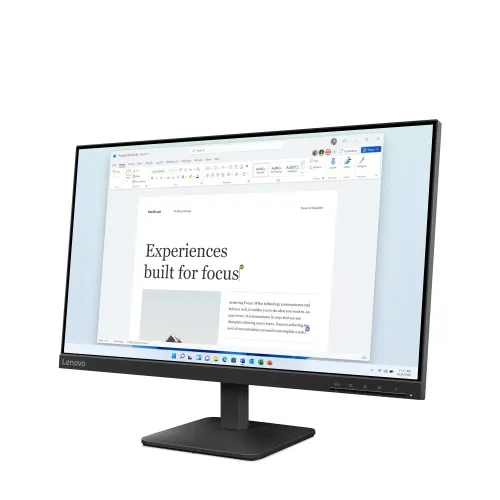
A compact Full HD monitor for everyday desks
The Lenovo L24-4e is a 23.8-inch desktop monitor built around an IPS panel and a 1920 × 1080 Full HD image. It is intended for the common mix of office applications, browser tabs, online classes, home administration and video playback. Its 16:9 shape fits standard widescreen content, while the diagonal keeps the monitor at a manageable size for a home desk, shared workstation or small office. The 100Hz maximum refresh mode adds headroom beyond the traditional 60Hz desktop display when the connected computer can supply a compatible signal.
What the 23.8-inch Full HD format means
At 1920 × 1080 pixels, the monitor provides the familiar Full HD workspace used by many Windows PCs, laptops, streaming services and console outputs. The active area measures 527 × 296.5 mm and the pixel pitch is 0.2745 mm, which Lenovo rates at 92 pixels per inch. Text, menus and common web pages are legible at ordinary desk distance without requiring the higher graphics load of a QHD or 4K panel. A user who keeps many dense windows open at once may prefer a higher-resolution display, while this model keeps the desktop layout simple and broadly compatible.
IPS viewing and anti-glare surface
Lenovo specifies In-Plane Switching technology with 178-degree horizontal and vertical viewing angles. That rating describes the panel’s viewing range; it does not mean brightness and color remain perfectly unchanged at every angle. It can help when a colleague looks at a spreadsheet from beside the desk or when the monitor is used in a shared room. The flat anti-glare surface reduces the mirror-like reflections associated with glossy displays under indoor lighting, although a bright window or direct lamp can still create distracting reflections.
Refresh rate and connection requirements
The L24-4e supports a 48Hz to 100Hz refresh range, and Lenovo documents 1920 × 1080 at 100Hz over its HDMI 1.4 input. The 100Hz setting can make mouse movement, scrolling and supported animation look more fluid than 60Hz. It does not increase the resolution or automatically make every game run at 100 frames per second: the computer must render those frames, and the selected output mode must be supported by the graphics device, cable and operating system. Lenovo lists VGA as a legacy connection with a lower refresh ceiling, so HDMI is the appropriate input when seeking the highest refresh mode.
Response modes and realistic expectations
Lenovo lists a 4ms Gray-to-Gray response in Extreme mode and 6ms in Typical mode. These figures refer to different monitor response settings, so the faster number should not be presented without its mode. Extreme overdrive can trade response speed against visible overshoot on some transitions; users can select the mode that looks most comfortable for their content. The display is a general-purpose 100Hz IPS monitor rather than a high-refresh gaming model with specialized motion features. It can still serve casual gaming and everyday motion, subject to the performance of the attached system.
Brightness, contrast and color
Typical brightness is rated at 250 cd/m² and typical static contrast at 1300:1. Those figures describe a conventional indoor monitor rather than a high-brightness HDR screen. Lenovo lists 16.7 million colors, an 8-bit signal path implemented as 6-bit plus frame-rate control, and 99% sRGB color coverage. This makes the display appropriate for ordinary web imagery, documents and general creative work where the sRGB color space is relevant. Lenovo’s coverage figure is not a factory calibration certificate; color-critical work should use a calibrated display and an appropriate measurement workflow.
Inputs and desk setup
The rear panel has one HDMI 1.4 input and one VGA input. HDMI is suitable for current desktop computers, many laptops with an HDMI output and compatible video sources. VGA can help connect older computers or equipment that still provides analog video. There is no listed DisplayPort, USB-C, USB hub or audio output. A laptop with only USB-C video output therefore needs a compatible USB-C video adapter or dock, and users should verify that the adapter supports Full HD at 100Hz if that refresh rate matters.
Stand, positioning and VESA mounting
The supplied stand supports tilt from −5 degrees to +22 degrees. Lenovo does not list height adjustment, swivel or pivot on this stand, so screen height may need to be adjusted by changing the desk or adding a riser. The monitor also supports a 100 × 100 mm VESA mount, allowing installation on a compatible wall bracket or monitor arm. Before mounting, check that the arm supports the monitor’s weight and VESA pattern, install the correct screws and follow the mount manufacturer’s instructions. Lenovo also lists cable management to help route the power and video leads along the stand.
Size, weight and packaging details
With its stand, the L24-4e measures 539.8 × 180 × 402.9 mm and weighs about 3.0 kg. The monitor head without the stand is 539.8 × 44 × 325.7 mm and approximately 2.7 kg. These are product dimensions and net weights. The larger 610 × 112 × 420 mm figure and 4.7 kg value describe the shipping package, including protective material and accessories; they should not be used as the assembled monitor’s dimensions or weight. Leave room behind the display for the stand, cable bends and ventilation, and keep the original packaging if the local seller requires it for service.
Power and energy use
Lenovo specifies an integrated power supply, with an AC input range of 100–240 volts at 50–60Hz. Typical consumption is 16W and maximum consumption is 19W; sleep and off states are rated below 0.5W, with switched-off consumption below 0.3W in the PSREF. Actual energy use varies with brightness, refresh setting, connected device and operating conditions. Because the power supply is internal, the monitor connects to mains power with its supplied power cable rather than a separate external brick. Use the supplied or correctly rated cable and a safe grounded outlet.
Design and compatibility
The monitor is finished in Raven Black and uses a three-sided NearEdgeless front design. Lenovo lists approximately 2mm side bezels and a 2mm top bezel, with a deeper lower border. A narrow frame can make two matching screens appear visually closer together, but the lower bezel remains present and the panel edges are not literally borderless. Lenovo documents Windows 10 and Windows 11 support. Other computers with compatible HDMI or VGA output can also display a supported signal, but system-specific features and refresh options depend on their graphics hardware and drivers.
What is in the box
Lenovo lists the monitor with its stand, a 1.8-metre HDMI cable, a 1.8-metre power cable, a quick setup guide and a warranty booklet. Retail packaging can vary by region or production batch, so check the carton and seller listing for the actual contents of the unit being supplied. The product has no listed speakers, webcam or microphone. A headset, desk speakers or a separate camera can be connected to the computer if required.
Warranty and regional model identification
The Lenovo product family page notes that some specifications and configurations vary by region. PSREF lists a three-year limited warranty for certain L24-4e machine type 68C2 configurations, and Bangladesh retail listings advertise three years. Those statements do not by themselves identify the service provider or prove the terms of an individual imported unit. Confirm the full machine type or sales suffix printed on the carton, the warranty booklet, the local provider, panel coverage, service location and invoice requirements before purchase. This catalog entry therefore uses the stable family model L24-4e rather than asserting an unverified regional suffix.
Who may find it a good fit
The L24-4e may suit a student who needs a reliable screen for classes and assignments, an office worker handling documents and web-based tools, or a home user who wants a reasonably compact Full HD display. Its IPS panel, 100Hz HDMI mode, anti-glare surface and VESA support cover several common preferences without adding a USB hub or multimedia hardware that every buyer may not need. People who rely on a USB-C one-cable desk setup, built-in sound, HDR, adjustable height or a large high-resolution workspace should compare models that specifically provide those features.
Setup checklist
For a straightforward first setup, attach the stand on a stable surface, connect the power cable and choose HDMI when using a compatible computer. Open the operating system’s display settings and select 1920 × 1080 at up to 100Hz if the source supports it. If the option is missing, check the graphics output, cable, adapter, driver and active input before assuming the monitor is faulty. Adjust tilt to reduce glare, set brightness for the room and use the monitor’s own on-screen controls to select a response mode. Keep ventilation openings clear, avoid pressure on the LCD surface and retain packaging and warranty papers.
Buying notes for Bangladesh
Local product listings commonly describe this monitor as a 23.8-inch Full HD IPS 100Hz model and show a three-year warranty claim. Retailer prices and stock can change, and warranty descriptions are set by sellers or distributors; neither should be treated as a fixed product specification. This product description does not invent a current BiponiBD price, delivery promise, stock level, customer review or review score. Confirm those details on the live offer before ordering. Ask the seller whether the supplied unit is new and sealed, which regional machine type is included, and which service channel handles a warranty claim.
Technical specifications
Key features
- 23.8-inch (60.5 cm) IPS display with a 1920 × 1080 Full HD resolution and 16:9 aspect ratio.
- Variable refresh range of 48–100Hz; Lenovo specifies 1920 × 1080 at 100Hz through HDMI 1.4.
- 250 cd/m² brightness and 1300:1 typical static contrast for everyday indoor work and entertainment.
- 99% sRGB coverage, 16.7 million colors and an 8-bit signal path (6-bit + FRC).
- 4ms Gray-to-Gray in Extreme mode or 6ms in Typical mode; response mode affects the quoted result.
- IPS viewing angles rated at 178° horizontally and vertically; anti-glare, flat screen surface.
- One HDMI 1.4 input and one VGA input; no DisplayPort, USB-C or USB hub is listed.
- Three-sided NearEdgeless design, cable management and Raven Black housing.
- Tilt adjustment from −5° to +22° and a 100 × 100 mm VESA mount interface.
- Integrated AC power supply; 16W typical and 19W maximum consumption in Lenovo PSREF.
Advantages
- The 100Hz Full HD mode can make pointer movement, scrolling and supported video feel smoother than a standard 60Hz monitor.
- IPS viewing angles and 99% sRGB coverage suit shared viewing, study, office documents and general media use.
- HDMI and VGA allow connection to newer computers and some legacy desktop equipment.
- VESA 100 × 100 mm support allows use with a compatible monitor arm or wall mount; the supplied stand also tilts.
- A 23.8-inch Full HD format gives a practical desktop footprint without requiring a large desk or high-resolution scaling.
Things to consider
- The stand offers tilt only; it does not provide listed height adjustment, swivel or pivot, so an arm may be needed for ergonomic positioning.
- There is no DisplayPort or USB-C input, so a laptop with only USB-C may require a compatible video adapter or dock.
- The display is Full HD rather than QHD or 4K, which leaves less workspace for dense timelines and side-by-side large documents.
- Lenovo does not list built-in speakers, a camera, a microphone, HDR or touchscreen capability for this model.
- The 4ms figure applies to Extreme response mode; Typical mode is 6ms, and local warranty coverage depends on the exact regional unit.
Frequently asked questions
What is the exact model?
The monitor is the Lenovo L24-4e. Lenovo PSREF identifies the product family as machine type 68C2. The catalog uses L24-4e as the model and manufacturer part number; the regional sales suffix on the Bangladesh unit should be confirmed from its carton or rear label.
Is the screen 24 inches?
It is marketed as a 23.8-inch display, approximately 60.5 cm diagonally. Its active image area is 527 × 296.5 mm, with 1920 × 1080 pixels in a 16:9 layout.
Does it support 100Hz?
Yes. Lenovo specifies a 48–100Hz refresh range and Full HD at 100Hz through HDMI 1.4. The computer graphics output, cable, operating-system display settings and selected resolution must also support the mode.
Can VGA run at 100Hz?
Lenovo specifies 1920 × 1080 at 100Hz for HDMI 1.4. VGA supports a lower refresh limit in the product documentation; choose HDMI when 100Hz operation is required.
What does 4ms response time mean?
Lenovo lists 4ms Gray-to-Gray in Extreme mode and 6ms Gray-to-Gray in Typical mode. Extreme is an overdrive setting; the mode and measurement should accompany the number rather than presenting 4ms as universal behavior.
What panel, brightness and contrast does it have?
Lenovo specifies an IPS panel, 250 cd/m² typical brightness and 1300:1 typical static contrast. The anti-glare surface and 178° horizontal/vertical viewing angles are intended for normal desktop viewing.
Is the color coverage suitable for design?
Lenovo lists 99% sRGB coverage, which is useful for general web and office content. The specification alone does not certify factory calibration or suitability for color-critical print, cinema mastering or professional HDR grading.
Which connections are available?
The rear inputs are one HDMI 1.4 port and one VGA port. Lenovo does not list DisplayPort, USB-C or a USB hub. A USB-C-only laptop may need a separate compatible video adapter.
Does it have speakers or a webcam?
Lenovo PSREF lists no speakers, camera or microphone for the L24-4e. Plan to use audio and conferencing devices connected to the computer.
Can it be mounted on a monitor arm?
Yes. The monitor supports a 100 × 100 mm VESA mount. Use a mount rated for the monitor and check screw compatibility and safe installation. The included stand adjusts by tilt from −5° to +22°.
What are the monitor dimensions and weight?
With the stand it measures 539.8 × 180 × 402.9 mm and weighs about 3.0 kg. The head alone measures 539.8 × 44 × 325.7 mm and weighs about 2.7 kg. The 610 × 112 × 420 mm size and 4.7 kg value refer to packaging, not the assembled monitor.
What is included and what warranty applies in Bangladesh?
Lenovo lists the monitor with stand, 1.8 m HDMI cable, 1.8 m power cable, quick setup guide and warranty booklet in the box. Lenovo PSREF shows a three-year limited warranty for listed configurations, and Bangladeshi retailers advertise three years; verify the local service provider, terms, carton suffix and original invoice before purchase.
Specifications are based primarily on Lenovo PSREF for the L24-4e family. Regional configuration, supplied accessories and local warranty terms should be checked on the individual unit.