Lenovo L24D-4C 23.8-inch FHD 144Hz USB-C Monitor: Complete Buyer Guide
A 24-inch work monitor with gaming refresh
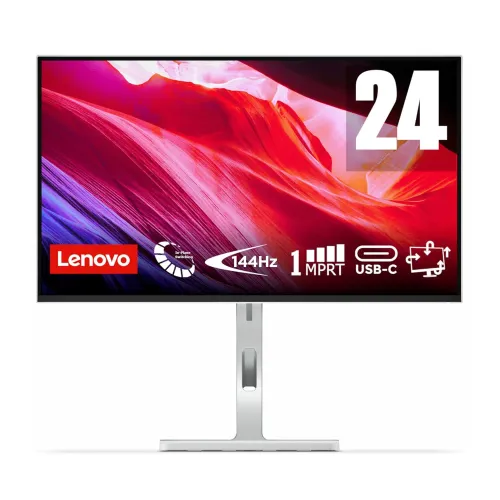
The Lenovo L24D-4C is a 23.8-inch Full HD monitor for a desk shared by office work, study, laptop docking, video calls and casual or competitive gaming. Lenovo pairs a 144Hz IPS panel with an adjustable ergonomic stand, integrated 3W × 2 speakers and a USB-C docking connection that can carry video, USB data and up to 75W laptop power delivery. This mix makes it different from a basic 24-inch monitor: the USB hub and one-cable laptop setup are major parts of its purpose. The screen is flat and uses a WLED backlight. Lenovo's official Product Specifications Reference (PSREF) gives the model as L24D-4C; the matching Lenovo Malaysia product SKU is 67DCUAC6MY, which is also listed by Bangladesh retailers for this product. The catalog display name and URL are preserved while model fields are normalized to that identifier.
Screen size, resolution and pixel density
Lenovo specifies a 23.8-inch diagonal screen, 16:9 aspect ratio and native 1920 × 1080 Full HD resolution. The active area is 527.0 × 296.5mm, with a listed 0.2745 × 0.2745mm pixel pitch and 93 pixels per inch. Shops often round the screen to 24 inches, which is reasonable for category browsing, but the precise panel diagonal is 23.8 inches. Full HD at this size gives clear text and a familiar Windows desktop scale without the graphics load of a higher-resolution panel. The anti-glare surface helps with reflections from room lights, though bright windows can still be distracting. It is a flat IPS screen with four-sided ultra-thin styling; image quality and viewing comfort also depend on how the user sets brightness, distance and room lighting.
IPS picture, brightness and color
The panel is an In-Plane Switching (IPS) LCD with a WLED backlight. Lenovo specifies 250 cd/m² brightness, typical 1500:1 static contrast, 178-degree horizontal and vertical viewing angles, and 16.7 million colors. Color gamut is listed as 99% sRGB coverage using CIE 1931; the separate 106% sRGB color-area ratio is not the same as coverage and should not be presented as “106% sRGB coverage.” The panel is listed as 8-bit (6-bit plus frame-rate control), so no native 10-bit claim is made. Lenovo supplies a general gamut figure but no per-unit calibration certificate or Delta E tolerance in the reviewed PSREF. The display can suit everyday photos and web graphics, but buyers doing paid color-critical work should use a verified calibrated workflow rather than relying on gamut alone.
144Hz refresh and response-time modes
A 144Hz refresh rate updates the picture up to 144 times per second when the connected computer sends a compatible signal. Motion and scrolling can look smoother than on 60Hz displays, especially when the game renders a high frame rate. The PSREF differentiates a 1ms Moving Picture Response Time (MPRT) mode from grey-to-grey (GtG) pixel transition settings: 4ms in Extreme mode and 6ms in Normal mode. These figures use different measurement methods, so “1ms response” should not be interpreted as the typical GtG time in every mode. Extreme response settings can affect image quality; users should choose a comfortable overdrive level. A high refresh capability cannot create frames that the graphics card or software has not rendered, and HDMI, USB-C, host device and cable must negotiate a supported mode.
Adaptive refresh, FreeSync and everyday gaming
Lenovo lists AMD FreeSync and VESA MediaSync. Its PSREF notes that AMD FreeSync works with compatible AMD Radeon graphics; feature behavior depends on the graphics hardware, driver, cable, refresh rate and application. FreeSync can align display timing with supported frame output to reduce visible tearing. The official product documentation does not list NVIDIA G-SYNC certification, so this listing names AMD FreeSync and VESA MediaSync rather than promising certification from another vendor. The 144Hz panel can serve a gaming PC and smooth compatible console or laptop output, but the highest mode must be selected by the connected device and depends on the input path. The HDMI 1.4 input is explicitly specified for Full HD at 144Hz; USB-C video requires a compatible DisplayPort Alt Mode source.
USB-C docking and 75W laptop power
The upstream USB-C port combines USB 5Gbps (USB 3.2 Gen 1), DisplayPort 1.2 Alt Mode HBR2 and USB Power Delivery 3.0 up to 75W. A compatible laptop can send video, use the monitor's downstream USB hub and receive power over one cable. One connector alone does not guarantee this: the laptop's USB-C port must support DisplayPort Alt Mode and USB PD input, and its power requirement should fit within the monitor's available output. The listed maximum is 75W; it may be reduced by connected USB devices or a higher monitor brightness setting. Lenovo includes a 1.8m USB-C-to-USB-C Gen 1 cable. A cable with a USB-C plug that lacks the necessary video/data capability will not provide the same docked setup, so keep the included cable or verify replacements.
USB hub, HDMI and audio connections
In addition to the USB-C upstream connection, the monitor has four downstream USB-A ports rated for USB 5Gbps, including one BC1.2 charging-capable port. These can keep a keyboard, mouse, headset receiver or storage device connected to the display while a laptop uses one upstream cable. The video inputs are one USB-C DisplayPort 1.2 Alt Mode port and one HDMI 1.4 input. Lenovo states that HDMI 1.4 supports 1920 × 1080 at 144Hz. There is one 3.5mm audio output for headphones or external speakers. No separate VGA or DisplayPort connector is listed in the PSREF; third-party specifications that claim them are likely mixing models. The integrated pair of 3W speakers can handle basic meeting audio and casual video, while a headset or external speakers may suit music and fuller sound.
Built-in speakers, camera and microphone
The official PSREF lists integrated 3W × 2 speakers. The same documentation says no webcam is bundled and no microphone is present; the catalog should not imply this monitor is an all-in-one video-call device. For meetings, the speakers can play remote callers, but users still need a separate microphone or headset microphone. The 3.5mm connector is audio-out, not a microphone input. When the monitor is connected over USB-C or HDMI, select the desired monitor or computer audio device in the operating system. A USB camera may connect to a downstream USB-A port only when the upstream USB-C data link is also connected to the laptop. Audio and USB routing can vary by host OS, dock configuration and application permissions.
Stand ergonomics, VESA and security
The height-adjustable stand supports up to 150mm of lift, tilt from −5 to +22 degrees, left and right 360-degree swivel, and −90 to +90-degree pivot for portrait positioning. This gives a wider range of desk adjustments than a fixed tilt base. The rear also supports a 100 × 100mm VESA mount pattern if a monitor arm is preferred. The product photos show the silver stand, cable-routing slot and rear panel; the official specifications identify a Kensington Nano Security Slot. The stock stand dimensions are listed at the lowest and highest positions, so desk depth and height can be planned. Use care when changing pivot orientation, and set portrait rotation in the computer's display settings. VESA mounting hardware and wall installation depend on the chosen compatible arm or bracket.
Dimensions, weight and box contents
At the lowest position, the listed dimensions are 539.4 × 196.2 × 380.6mm (width × depth × height); at full lift they are 539.4 × 196.2 × 530.6mm. The monitor head alone is 539.4 × 41.0 × 315.2mm. Lenovo's approximate lab weights are 5.1kg with stand and 3.4kg for the head; package weight is 7.2kg. The stated packaging measures 592 × 141 × 420mm. Lenovo cautions that weight varies by component and manufacturing batch, and system dimensions can vary by configuration, so these are manufacturer reference values rather than measurements of the exact retail carton. The published in-box list includes the monitor and stand, 1.8m USB-C cable, 1.8m power cable, quick setup guide and warranty booklet. Confirm any local bundle-specific differences with the seller.
Power, certifications and device support
The monitor has an internal power supply and accepts AC 100–240V at 50–60Hz, so no external monitor power brick is needed. Lenovo lists typical power consumption of 16W, maximum 145W, sleep/off below 0.5W, and switch-off below 0.3W. The 145W maximum is a system maximum and can reflect the display's USB-C laptop power output as well as its own operation; it should not be described as the monitor drawing 145W continuously. The PSREF lists ENERGY STAR, EPEAT Gold, EU energy label class D, RoHS and volatile organic compound certification, along with TÜV Rheinland Flicker Free and Low Blue Light hardware-solution certificates. Lenovo lists Windows 10 and 11 support and Lenovo Artery/Accessories and Display Manager software for supported Windows and Mac systems, with feature availability varying by operating system.
Bangladesh warranty and price comparison
The saved BiponiBD variant price is ৳26,500 and remains unchanged. At the time of review, Potaka IT showed ৳20,999 with ৳22,999 as the crossed-out price and marked the item in stock; Star Tech showed ৳26,500 and lists its product as in stock in the page snapshot. Tech Land also showed ৳26,500 and in-stock status. PCPartsBD's tracker showed ৳19,999–৳26,500 across seven listings, including multiple retailers at lower prices, but it aggregates rather than selling the product itself. The direct retailer observations support a reference range of ৳20,999–৳26,500, not a live offer attached to BiponiBD. Bangladesh retailers advertise a three-year warranty, while Lenovo PSREF notes that base warranty can be one or three years depending on market. Confirm the distributor/importer route, box and serial requirements, current stock and final checkout price with the chosen seller.
One-cable laptop workflow
A practical laptop arrangement is to connect the included USB-C cable between the monitor's USB-C upstream port and a laptop port that supports DisplayPort video, USB data and USB Power Delivery. Select the monitor as the display and audio device, connect keyboard, mouse and other peripherals to the monitor's USB-A ports, and confirm that the laptop is charging. If the battery still drains during heavy work, the laptop may need more than 75W or the available USB-C output may be reduced by connected devices or brightness. A desktop PC can connect through HDMI for video while a separate USB upstream connection carries the hub data, but the exact configuration depends on the PC ports and cable. The external 3.5mm audio output can serve headphones. Before purchase, check that a laptop USB-C port supports video rather than assuming every USB-C socket has the necessary functions.
Who benefits from the L24D-4C
The L24D-4C suits someone who wants one neat desk display for both work and gaming, especially a laptop owner who can use the 75W USB-C dock and integrated hub. The adjustable stand is useful for long workdays, portrait coding or documents, and a shared workspace where screen height changes. Built-in speakers simplify calls and casual viewing, while 144Hz and AMD FreeSync add smoother motion for compatible gaming setups. It may be less compelling for a buyer who only needs a basic monitor and will not use its dock, speakers or full stand adjustments; a lower-cost display may be enough. People who need a webcam, microphone, dedicated DisplayPort input, native 10-bit color or high-HDR brightness should compare those requirements with the verified specification before ordering.
Before you order
Confirm the box identifies Lenovo L24D-4C and the regional part number shown by your seller, then check the written three-year Bangladesh warranty terms and serial/box requirements. Verify laptop USB-C video and power support if the one-cable dock matters, and confirm that 75W is sufficient for that computer. Check that 23.8 inches, Full HD and 144Hz suit your viewing distance and graphics capability. The adjustable stand and USB-C cable are listed in the manufacturer bundle, but seller bundles can vary. Verify the current cash/card price, availability, delivery charge and return policy. Approximate Lenovo package measurements and weight help with planning but are not a measurement of the specific unit shipped. Retain the invoice and warranty booklet. If you plan to mount the panel, confirm the arm supports VESA 100 × 100mm and the monitor head's load.