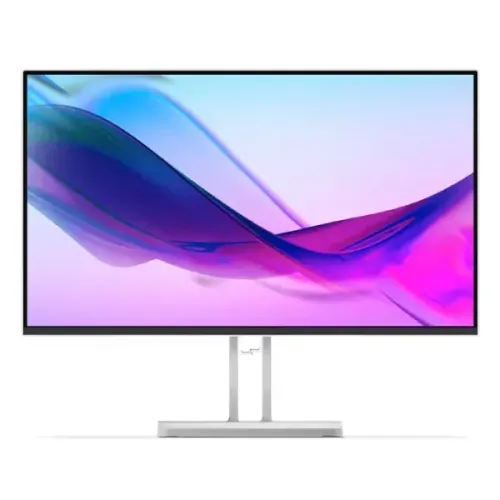
A practical 23.8-inch desktop display
Lenovo L24i-4A is a Full HD monitor for everyday computer use at home, school or work. Its 23.8-inch panel uses In-Plane Switching (IPS) technology and a 16:9 aspect ratio, which suits familiar desktop applications such as documents, browser windows, video calls, online lessons and Full HD media. Native resolution is 1920 × 1080. At this screen size, that resolution provides a standard desktop workspace; it does not offer the finer detail or extra canvas area of a QHD or 4K display. A 0.2745mm pixel pitch and 93 pixels per inch describe the spacing and density of the image. Before choosing, consider how many windows you keep open, the type size used by your applications, and how far you usually sit from the screen. A shopper who needs more visible content at once may prefer a higher-resolution panel, while this model keeps a common size and resolution combination for general tasks. The product’s Cloud Grey finish and slim-bezel appearance can coordinate with a neutral desk setup. Choose the display based on the computer, workspace and tasks you actually use, rather than expecting a monitor specification by itself to guarantee a particular gaming, design or productivity outcome. The Full HD format is also a practical match for streaming and common office software, but the amount of visible content depends on application layout and display scaling. Compare it with your preferred font size and viewing distance before choosing. The computer, desk and applications all determine how a monitor fits the daily workflow.
Picture characteristics and color
Lenovo lists 250 cd/m² brightness, 1500:1 typical static contrast and a separate 3,000,000:1 typical dynamic contrast figure. Static and dynamic contrast describe different measurements, so compare like with like when reviewing another monitor. The matte anti-glare surface can reduce mirror-like reflections from some light sources, although it cannot remove glare in a strongly lit room. Lenovo rates horizontal and vertical viewing angles at 178 degrees at the stated contrast threshold. This can help when sharing the screen with someone beside the main viewer. Color is specified as 16.7 million shades, using an 8-bit signal path described as 6-bit plus frame-rate control. Lenovo publishes 99% sRGB coverage and a 106% sRGB color-area ratio; coverage and area ratio are not the same claim. These values describe the model specification, not a calibration report for the individual unit. For color-critical photography, print or video work, check the application workflow and consider independent calibration. For routine documents, browsing and video, the panel’s resolution, surface and viewing geometry are the more practical comparison points. Brightness and contrast are manufacturer ratings, not a promise that the screen looks identical in every room. Window placement, direct sunlight, picture mode and source signal affect the perceived result. For color-critical work, check the whole software workflow instead of treating gamut coverage as calibration evidence.
Refresh rate, inputs and motion modes
The L24i-4A supports a vertical refresh range of 48–100Hz. Lenovo specifies 1920 × 1080 at up to 100Hz over HDMI 1.4, while its VGA timing is Full HD at 60Hz. That difference makes the chosen input important: a compatible source and HDMI connection are required to use the 100Hz timing. Graphics hardware, drivers, cable capability, monitor input selection and operating-system settings must all support the selected mode. Lenovo lists 1ms MPRT at 100Hz as well as 4ms Extreme, 6ms Normal and 14ms Off response modes. These values have distinct labels and should not be collapsed into one response-time claim. MPRT is a motion-picture response measurement, not input lag; the other figures refer to the monitor’s selectable response modes. If a refresh option does not appear, check the source output and display configuration first. The monitor does not create additional frames from a slower computer. Users should compare the actual refresh timing, response mode and connection needed for their system instead of relying on an unlabeled “fast response” headline. Refresh selection is configured on the connected computer. A game may run below the display ceiling depending on graphics hardware and settings, and changing input connectors can change available timing. Keep the graphics driver current and consult its instructions when choosing a mode or diagnosing a missing refresh option.
Audio, ports and computer compatibility
The rear connections include one HDMI 1.4 input, one VGA input, a 3.5mm audio-out jack and the power connector. The Kensington Security Slot is also listed. HDMI is the connection for Full HD at up to 100Hz; VGA is listed for Full HD at 60Hz. The monitor includes stereo speakers rated at 3W per channel (3W × 2), which can handle basic system audio without a separate speaker set. The 3.5mm output allows compatible headphones or external audio equipment to be connected. HDMI can carry sound from a compatible computer to the monitor. Lenovo does not list USB data ports, a USB hub, USB-C video, Ethernet or laptop charging. A user who wants to connect a laptop with one cable for display, power and accessories should compare a docking monitor with those functions. For an older desktop that only has VGA, confirm the required cable and accept the specified 60Hz timing. Check the computer’s actual outputs before ordering so that no unlisted adapter or dock is assumed to be included. When using headphones or separate speakers, check whether the computer routes audio to the monitor and whether the cable carries sound. The 3.5mm jack is audio output, not another video input. Users connecting several computers should plan how to switch signal because no built-in KVM or USB hub is specified.
Viewing comfort and Lenovo software
The manufacturer identifies Natural Low Blue Light and support for Lenovo Artery, formerly called Lenovo Accessories and Display Manager / Display Control Center. The available application features vary across operating systems, including Windows, macOS and Windows on Arm. Lenovo also lists Eyesafe Certified 2.0 and TÜV Rheinland eye-comfort and low-blue-light certification items for the model. Those names are reproduced as product documentation; they are not a promise of a medical benefit or a guarantee that every viewer will feel the same. Room lighting, brightness, screen position, viewing distance and personal preference still matter. The anti-glare treatment and the tilt adjustment can help tailor the setup to a room, while display controls can be adjusted for a preferred picture. If software control is important, check Lenovo’s current download/support information for the exact system before relying on a particular feature. The screen can be used without installing optional management software; the available settings and operating mode depend on the connected computer. Display-management software is optional; the monitor can show the computer image without installing it. Before downloading a utility, check operating-system and model support on Lenovo support. Keep display and computer settings aligned so software controls do not conflict with a preferred color mode or refresh configuration.
Stand, mounting and workspace fit
The included stand tilts from −5° to +22°. Lenovo does not list stand height adjustment, swivel or pivot, so users who need those movements can consider a compatible arm. The monitor supports a 100 × 100mm VESA mounting pattern; check a mount’s fasteners, load rating and installation directions. A Kensington slot is provided for compatible cable security, and Lenovo lists cable-management support. The Cloud Grey casing uses a four-sided ultra-thin-bezel design; the PSREF lists 2mm side and top bezels and a 10.4mm lower bezel. With its stand, the monitor measures approximately 539.4 × 182.9 × 433.8mm. The panel head alone is approximately 539.4 × 41.0 × 315.2mm. Measure the desk, wall clearance and cable route before installing the display, especially if another screen will sit beside it. A VESA arm can change the stand range but is not part of the included monitor unless the seller offer says so. Product photos show the stand and rear casing but do not establish the accessories in a particular delivered package. A separate arm can free desk space, but its reach, clamp style and movement should suit the desk. Leave room for rear connectors and the power cable. Secure the display according to both monitor and mount instructions before moving or tilting it. For a side-by-side setup, measure the space occupied by both bases and allow the screens to tilt independently. The panel bezels are narrow, but the visible gap also depends on case edges, alignment and the angle of each display. Matching brightness and color temperature by eye can make adjacent screens feel more consistent, though it does not guarantee calibrated color. Plan the connection and power route for each display before securing any arm or cable tray.
Power, energy and listed package contents
The power supply is integrated in the monitor and accepts AC 100–240V at 50–60Hz. Lenovo lists 14W typical and 28W maximum consumption, below 0.5W in sleep/off mode, and below 0.3W in switch-off mode. Separate ENERGY STAR values include 14.2W power-on consumption and a 44.5kWh typical energy consumption figure. Actual use depends on brightness, active features, input and operating conditions. The manufacturer’s box list includes the monitor with stand, a 1.8m HDMI cable, a 1.8m power cable, one screw, a quick setup guide and a warranty booklet. Lenovo lists approximate assembled weight as 3.84kg and head-only weight as 3.01kg. The carton is approximately 609 × 125 × 398mm and 5.82kg. Manufacturer measurements are approximate and can vary by configuration or manufacturing. Regional packaging may differ, so confirm any specific cable or paperwork with the seller if it is essential to your setup. These published package dimensions are planning references rather than a courier price or billing-weight quote. Energy figures use defined test modes and do not predict a household bill. Brightness and operating duration influence consumption. For an office purchase, compare published certifications and efficiency details with procurement requirements and current regional documentation.
Choosing the right setup and local offer
This monitor can suit a user who wants a 23.8-inch Full HD IPS screen, HDMI and VGA choices, basic built-in stereo audio and a conventional tilt stand. The 100Hz mode is specific to a compatible HDMI connection; VGA is listed at 60Hz. Before purchase, decide whether Full HD gives enough desktop area, whether the tilt-only stand meets the user’s ergonomic needs, and whether a VESA arm is preferred. Confirm the computer’s available video ports and the selected refresh mode. Lenovo’s PSREF lists one-year or three-year limited warranty terms depending on configuration and region; that manufacturer range does not establish coverage for a specific Bangladesh sale. Confirm the provider, duration, serial eligibility, exclusions and claim process for the BiponiBD offer. The current catalog value is BDT 16,950; it is not an official Lenovo Bangladesh MSRP or a guaranteed checkout price. Check the live selling price, stock, delivery and seller warranty before ordering. Regional product specifications and package contents can change, so consult the exact model documentation when a particular requirement is essential. For shared or business purchases, verify quantity, delivery address, invoice details and service documentation with the seller. Keep order confirmation and serial information after delivery so warranty questions can be checked against the exact unit. A retailer listing or earlier catalog price does not guarantee current availability.
Planning a shared or office setup
For a shared workstation, decide who will use the screen, which computer inputs are needed and where power and signal cables will run. HDMI and VGA support different maximum refresh timings, so label or document the selected connection if the same monitor is moved between systems. If several employees use the display, keep a short setup note with the selected input, preferred resolution and any optional Lenovo software used on managed computers. The tilt stand may suit some desks, while other users may need a VESA arm to position the screen at a different height; confirm mounting hardware and approval before installation. In a multi-monitor room, compare the casing finish, bezel layout and desk footprint so displays can be positioned consistently. For bulk delivery, verify carton handling, quantity and the receiving contact with the seller. After delivery, check the model code on the unit, retain purchase documentation and record serial information according to the organization’s asset process. Confirm warranty provider and eligibility against each unit rather than assuming all regional configurations share the same coverage. These steps help an office team distinguish model specifications from the details of the particular order and make future support requests easier to resolve. undefined