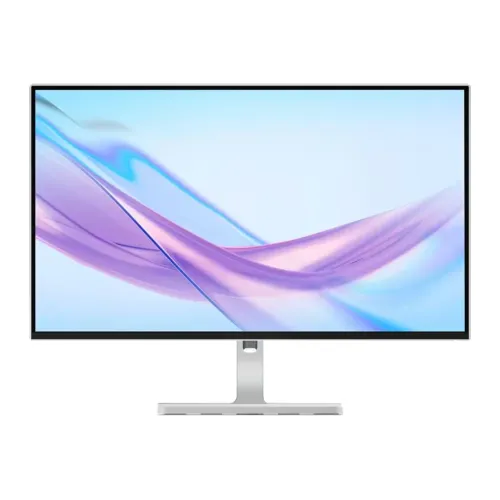
A sharper 27-inch workspace for everyday work
The Lenovo L27q-4A is a flat 27-inch monitor with a native 2K QHD resolution of 2560 × 1440 pixels. It is designed for users who want more desktop room and finer text than a Full HD screen of the same size, while retaining a familiar 16:9 layout for office software, web browsing, video and general home use. The Cloud Grey finish and four-sided NearEdgeless bezel give the display a restrained, modern appearance that fits a home office or shared workspace. This guide covers the L27q-4A model using Lenovo's PSREF specification sheet and Bangladesh retailer listings for local warranty and price context. Regional part-number suffixes vary, so the catalog uses the verified model name and leaves the exact manufacturer part number blank rather than guessing.
QHD resolution, pixel density and screen space
The 2560 × 1440 panel contains 3,686,400 pixels, about 78 percent more than a 1920 × 1080 Full HD display. At a 27-inch diagonal, Lenovo specifies an active viewing area of 596.7 × 335.7 mm, a pixel pitch of 0.2331 mm and density of approximately 109 pixels per inch. These figures support crisp interface elements and readable fine text at a typical desk distance. The additional pixels also make it easier to keep a document, browser and reference window visible at once. Windows or macOS scaling remains a personal preference; QHD commonly works well at 100 percent on a 27-inch panel, while users who prefer larger text can choose a higher scale. The display is flat with a 16:9 aspect ratio and matte anti-glare surface.
IPS panel, brightness and colour
Lenovo lists an IPS panel with 178-degree horizontal and vertical viewing angles, 350 cd/m² typical brightness and a 1500:1 typical contrast ratio. The wide viewing angles help keep the image usable when the viewer is not directly centered, although perceived brightness and colour can still vary with angle and room lighting. The anti-glare surface helps diffuse reflections from ordinary indoor light; it cannot eliminate glare from a bright window or lamp. Colour coverage is listed as 99 percent sRGB and 90 percent DCI-P3, with 16.7 million colours and true 8-bit colour depth. This makes the monitor appropriate for web graphics, general photo work and media creation where these colour spaces matter. It is not a substitute for a calibrated reference display when strict print matching or colour-critical mastering is required.
100Hz motion and response-time modes
The L27q-4A supports refresh rates from 48Hz to 100Hz. Compared with a traditional 60Hz office display, 100Hz can make scrolling, cursor movement and window animations appear more fluid when the computer supplies a compatible frame rate. Lenovo lists several response-time measurements: 1ms MPRT at 100Hz, 4ms in Extreme mode, 6ms in Normal mode and 14ms with the response-time setting off. MPRT and grey-to-grey response time describe different aspects of motion, so they should not be treated as interchangeable guarantees. Extreme overdrive may cause visible inverse ghosting depending on content; Normal is a reasonable starting point for everyday use. The panel is suitable for casual gaming, but its 100Hz ceiling is below the refresh rate of dedicated competitive esports displays.
HDR10 and adaptive refresh support
Lenovo identifies HDR10 compliance and VESA MediaSync support, with a variable refresh range of 48Hz to 100Hz. MediaSync can help compatible systems synchronize refresh for smoother video playback and supported gaming scenarios. Results depend on the graphics hardware, drivers, application and connection. HDR10 compliance means the display accepts compatible HDR signals; it does not by itself establish a particular VESA DisplayHDR tier or promise dramatic HDR highlights. The published 350 cd/m² typical brightness and IPS backlight design should set practical expectations. For standard desktop work, the monitor can be used in SDR and adjusted through the on-screen controls or supported Lenovo utility. Check the source device settings if an HDR option is unavailable or if the image appears washed out.
Connectivity for a PC, laptop or console
The rear connection area provides two HDMI 2.1 TMDS inputs, one DisplayPort 1.4 input using HBR2, and a 3.5mm audio output. Lenovo lists QHD operation up to 100Hz; confirm the selected resolution and refresh rate in the computer's display settings after connecting. HDMI 2.1 TMDS is the monitor's stated interface mode and should not be confused with the higher-bandwidth HDMI 2.1 FRL features found on some devices. A desktop PC and laptop can remain connected to separate inputs, with the active source selected using the monitor controls. The display does not provide USB-C video input, USB Power Delivery, a USB hub or downstream USB ports. Its audio jack can pass compatible source audio to headphones or powered speakers; the monitor also includes its own stereo speakers.
Built-in speakers and software controls
Two integrated 3W speakers, tuned with Waves MaxxAudio, provide a convenient audio option for video calls, system sounds, lessons and casual viewing without a separate speaker set. Their presence reduces desk clutter, though listeners seeking deeper bass or room-filling sound may prefer dedicated speakers or headphones connected to the 3.5mm output. Lenovo Artery, also referred to as Lenovo Accessories and Display Manager, is the companion utility listed for display controls. Availability of individual software functions can depend on the computer operating system and connection. The on-screen display remains available for settings such as input selection, brightness, contrast and picture modes. The rear port placement and control layout should be checked in the gallery images when planning cable access behind a wall or desk.
Ergonomic stand and mount options
The included stand provides four useful adjustments: up to 150 mm of height travel, tilt from −5 to +22 degrees, swivel through 360 degrees and pivot through 90 degrees in either direction for portrait orientation. These adjustments can help position the top of the screen near eye level, reduce neck movement and orient long documents or code vertically. Stand range and desk clearance matter: allow room for the base to rotate and for cables to move without being strained. The display head supports a 100 × 100 mm VESA mount pattern for a compatible arm or wall bracket. Check the mount's load rating and installation instructions before removing the supplied stand. The monitor weighs 5.65 kg with the stand and 3.91 kg as a head-only display.
Dimensions, power and physical setup
With the stand at its lowest position, the monitor measures 613.2 × 196.2 × 421.6 mm; at full height its dimensions are 613.2 × 196.2 × 571.6 mm. The head-only dimensions are 613.2 × 41.0 × 356.7 mm. Lenovo lists package dimensions separately as 692 × 150 × 479 mm and gross package weight as 8.56 kg. These carton measurements describe shipping packaging, not the installed screen, correcting the earlier catalog label that called them monitor dimensions. The monitor uses an internal power supply accepting AC 100–240V at 50–60Hz. Typical consumption is 21.6W, maximum is 65W, and sleep/off consumption is below 0.5W; actual use varies with brightness and settings. Leave ventilation space and use a stable surface or correctly rated mount.
Eye comfort features and daily use
The monitor includes Natural Low Blue Light hardware technology and is listed with Eyesafe Display 2.0, TÜV Rheinland Eye Comfort and TÜV Low Blue Light certifications. Lenovo's hardware approach is intended to reduce blue-light emissions while maintaining a more natural image than a simple yellow software overlay, though comfort is individual. Use a comfortable brightness matched to the room, position the screen to limit reflections, and take regular breaks during long sessions. The matte panel, height adjustment and portrait pivot can all help adapt the workspace to a user's posture and task. For meetings, the speakers offer convenient playback, but the product specification does not list an integrated webcam or microphone. Confirm any required accessories separately before purchase.
Who this monitor suits
The L27q-4A is a good fit for office professionals, students, developers and general users who value a sharp QHD desktop, a 100Hz refresh rate and an adjustable stand. The 99 percent sRGB and 90 percent DCI-P3 coverage also make it a capable option for many web and creative tasks, while the built-in speakers handle everyday audio. Casual gamers can benefit from smoother motion than 60Hz, but users focused on high-frame-rate competitive play may prefer a faster gaming monitor. A USB-C one-cable laptop desk, built-in USB hub or advanced HDR experience would call for a different feature set. Compare the monitor with the device outputs, desk dimensions, text scaling preferences and the software you actually use rather than relying on a single headline specification.
Bangladesh price and warranty context
Bangladesh retailer listings reviewed for this model showed prices around ৳27,300–৳27,500, with some listing regular prices near ৳28,500. Stock, discount and seller prices can change; these are market references and do not replace the active BiponiBD variant price. The catalog's existing MSRP of ৳27,500 is preserved. Local listings advertise a three-year warranty, and the catalog wording is normalized to “3 Years Official Warranty” based on those retailer claims. Warranty terms can vary by distributor and seller, so confirm the warranty provider, coverage, service process and invoice requirements at checkout. The product's included accessories listed by Lenovo include the monitor and stand, 1.8m HDMI cable, 1.8m power cable, quick setup guide and warranty booklet; exact regional box contents should still be confirmed with the seller.
Model identity and specification accuracy
The product model is Lenovo L27q-4A. Retailers list regional configuration codes, including 67BFGAC6MY, while Lenovo PSREF describes a broader 67BF family and regional suffix variations. Since the exact configuration label printed on this catalog unit has not been independently verified, the product and variant manufacturer-part-number fields are left blank rather than populated with a potentially incorrect code. The product name, URL slug, catalog ID, variant SKU, price, status, product images and their ordering are retained. Specification rows now distinguish panel size from package dimensions, include omitted response time and HDR/MediaSync details, and replace the vague power “Type” value with a clear internal supply description. Six gallery images receive descriptive alternate text based on the inspected views.