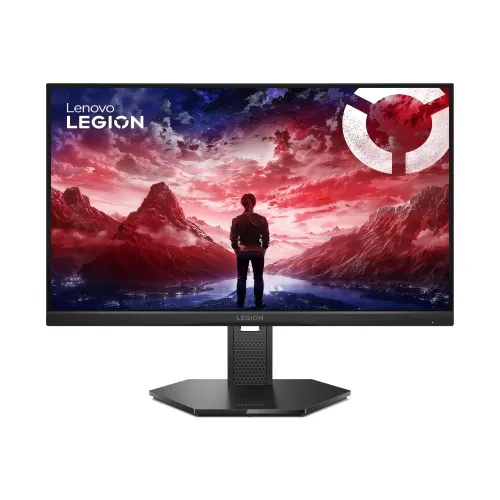
Lenovo Legion 25-10 24.5-inch 320Hz FHD IPS Gaming Monitor: Bangladesh Buyer's Guide
Model identity and intended use
The Lenovo Legion 25-10 is a 24.5-inch Full HD gaming monitor from Lenovo's 67D4 family. Lenovo PSREF identifies the base machine part family as 67D4GAC3; Bangladesh listings commonly show regional codes 67D4GAC3MY or 67D4GAC3WW. The exact suffix can depend on the import batch and power-cord region, so this listing uses the base MPN and does not guess a serial-specific region. It is designed for PC players who value a fast 1080p image, particularly in competitive games, and it can also serve as a regular screen for browsing, study, streaming and office applications. The catalog identity, title, slug, category, brand, variant, SKU and price remain the existing BiponiBD record.
24.5-inch FHD panel, pixel density and viewing distance
The flat IPS panel measures 24.5 inches diagonally and displays 1920 × 1080 pixels in a 16:9 aspect ratio. Lenovo lists an active image area of 543.7 × 302.6 mm, a pixel pitch of 0.2832 × 0.2802 mm and approximately 90 pixels per inch. That density is a practical match for fast Full HD gaming: a graphics card has fewer pixels to render than at QHD or 4K, which can make very high frame rates easier to reach. The trade-off is that small text and fine-edged graphics are less dense than on a higher-resolution screen. The three-side NearEdgeless treatment narrows the top and side bezels, while the anti-glare surface helps diffuse ordinary room reflections.
320Hz refresh rate and connection-specific limits
The monitor advertises a 320Hz maximum refresh rate, but the input determines the available ceiling. Lenovo's PSREF specifies Full HD at up to 320Hz through DisplayPort 1.4 (HBR3), and up to 240Hz through either of the two HDMI 2.1 TMDS ports. Use DisplayPort and a compatible PC graphics output to reach 320Hz; Lenovo lists a 1.8-metre DP 1.4 cable in the package. HDMI remains useful for a second computer or console, but should not be described as a 320Hz connection. The computer, graphics driver, selected resolution, cable and display settings must all support the chosen refresh rate. The user guide's input timing table also separates DP and HDMI limits.
Response time, overdrive and motion clarity
Lenovo lists 0.5ms MPRT and selectable overdrive response figures: 1ms at Level 4, 2ms at Level 3, 3ms at Level 2, 4ms at Level 1 and 6ms with overdrive off. These are different measurement or processing modes, not a guarantee that every pixel transition has the same latency in every scene. MPRT refers to perceived moving-image clarity and may use backlight strobing; overdrive adjusts pixel transitions and can create visible overshoot if set too aggressively. Start with a moderate setting and keep the option that looks cleanest at the frame rate you actually use. A high refresh rate can make motion updates more frequent, but it cannot create extra frames that the computer does not render.
Color, brightness, contrast and HDR expectations
The panel is specified at 300 cd/m² brightness, a 1000:1 typical static contrast ratio and a typical 3,000,000:1 dynamic contrast figure. Lenovo lists 99% sRGB coverage under CIE 1931, 16.7 million colors and True 8-bit color depth, with 178-degree horizontal and vertical viewing angles. These specifications suit general gaming and everyday color use, but they do not replace individual calibration for color-critical production. The product supports HDR10 signal compliance. With the published brightness and contrast figures, buyers should treat that as HDR signal compatibility rather than assume the pronounced highlights or deep local-dimming contrast of a high-end HDR display.
Variable refresh rate and graphics-card compatibility
For variable-refresh gaming, Lenovo lists NVIDIA G-SYNC Compatible, AMD FreeSync Premium and VESA Adaptive Sync support. These technologies can coordinate supported graphics output with panel refresh to reduce tearing and uneven motion when frame rates vary. AMD notes in the PSREF that its FreeSync technology works with AMD Radeon graphics. Compatibility and available ranges can depend on the source device, port, driver and settings; enable the relevant option in the graphics software and monitor menu. This screen is still a 1920 × 1080 display, so choose it for responsive Full HD play and not as a substitute for the extra desktop workspace or detail of a QHD panel.
Ports, audio routing and connected devices
The rear panel has one DisplayPort 1.4 (HBR3), two HDMI 2.1 TMDS inputs and one 3.5mm audio-out jack. Lenovo's published port notes set Full HD input timing at 320Hz over DP and 240Hz over HDMI. The monitor has no built-in speakers listed in PSREF, so plan to use a headset or speakers connected to the PC/console or the monitor's audio-out connection when audio is carried over the video link. There is no USB hub listed. The gallery shows the separate HDMI 1, HDMI 2, DP and headphone icons on the rear. A Kensington security slot is also provided. Check the ports on a laptop before purchase, especially if its available connection cannot output the refresh rate you want.
Ergonomics, stand adjustments and VESA mounting
The included LTPS stand supports height adjustment up to 135mm, tilt from -5 to +22 degrees, swivel 30 degrees to either side and pivot from -90 to +90 degrees for portrait orientation. That range makes it easier to set the screen height and angle for different desks or switch temporarily to a tall document view. Lenovo also specifies 100 × 100mm VESA mounting. The monitor head weighs about 3.1kg, and the complete monitor with stand is approximately 5.2kg; check the arm or wall bracket's load rating and mounting instructions before installing it. The stand has cable management, while the product images show a geometric base and an Eclipse Black finish.
Eye-comfort features and software controls
Lenovo lists Natural Low Blue Light and Eyesafe Display 2.0 and TÜV Rheinland hardware Low Blue Light certification. The monitor also supports Lenovo Artery (Lenovo Accessories and Display Manager), brightness calibration and Legion Space. These settings let owners adjust the picture and manage supported display controls; software features can vary by operating system, computer and version. Low-blue-light or flicker-related features do not guarantee that long sessions will be comfortable for every viewer. Adjust brightness for the room, take breaks and position the display to reduce glare. Use the rear on-screen display control to access the monitor's settings when software control is unavailable.
Power use, dimensions, weight and box contents
The monitor uses an internal power supply and accepts AC 100–240V at 50–60Hz. Lenovo rates typical consumption at 24.5W and maximum at 43W, with less than 0.5W in sleep/off mode and less than 0.3W in switch-off mode. With the stand, dimensions are 557.0 × 214.0 × 379.3mm at the lowest height and 557.0 × 214.0 × 514.3mm at the highest. The head alone measures 557.0 × 47.2 × 332.1mm. Package size is 615 × 145 × 420mm and packed weight is about 6.3kg. Lenovo lists the monitor with stand, a 1.8m DP 1.4 cable, a 1.8m power cable, four screws, quick setup guide and warranty booklet.
Bangladesh price, warranty and purchase checklist
Bangladesh retailers reviewed for this audit list the Legion 25-10 around ৳23,000–৳24,500, with Ryans showing ৳23,500 and Star Tech listing ৳23,000 at the time checked. The existing catalog variant price of ৳23,700 is preserved; competitor prices and stock can change. Lenovo PSREF states a three-year limited base warranty, and local sellers advertise a three-year warranty, but the local warranty provider and eligibility depend on the invoice, serial number and import batch. Before purchase, confirm the exact MPN suffix, sealed-box accessories, invoice warranty terms, refresh-rate support from your device and whether your setup uses DP for 320Hz or HDMI for up to 240Hz.