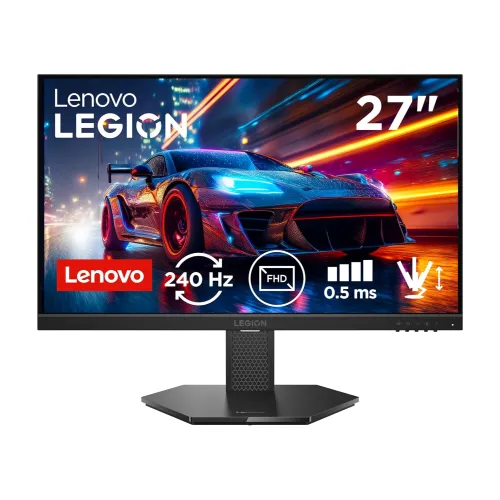
Lenovo Legion 27-10 27-inch 240Hz FHD gaming monitor
The Lenovo Legion 27-10, machine type 68C5 and model family 68C5GAC4, is a flat 27-inch Full HD gaming monitor for players who value a high refresh rate and an adjustable stand. Lenovo PSREF lists a 1920 x 1080 IPS panel, native 240Hz refresh, 300 cd/m² typical brightness, 1000:1 static contrast, 99% sRGB coverage and 0.5ms MPRT. Lenovo specifies HDR10 signal compliance, but this is an edge-lit WLED display without local dimming; treat HDR as signal compatibility rather than a promise of high-impact HDR brightness. The three video inputs are one DisplayPort 1.4 HBR3 and two HDMI 2.1 TMDS. They support Full HD at 240Hz. The full-function LTPS stand provides lift, tilt, pivot and swivel.
Native 240Hz at Full HD
The 240Hz refresh rate is native; no overclock setting is needed. A 240Hz screen can refresh up to 240 times per second when the computer supplies suitable frames. Its 4.17ms refresh interval is shorter than 60Hz or 144Hz, which can make motion and cursor movement look more fluid. The monitor remains 1920 x 1080, so it does not display the extra detail of a QHD 2560 x 1440 panel. Full HD also asks less of the graphics card than a higher resolution, which can help a gaming PC reach high frame rates. The right result depends on the game, GPU, settings, cable and selected Windows or console output. Set 1920 x 1080 and 240Hz in your display controls after connecting.
Response time modes: MPRT and overdrive
Lenovo lists 0.5ms MPRT and several gray-to-gray overdrive settings: 4ms at Level 1, 3ms at Level 2, 2ms at Level 3 and 1ms at Level 4. MPRT describes motion-picture persistence and is different from a gray-to-gray pixel transition time. The short response figures are mode-specific specification values, not a guarantee that every pixel transition reaches that figure under every condition. More aggressive overdrive can create bright inverse-ghost trails on some content. Try Level 2 or Level 3 first, then compare with your own games. MPRT uses backlight strobing and may not operate alongside variable refresh; use the monitor menu to see which combinations are available on the unit.
IPS image, color and viewing angles
The flat IPS panel has a 16:9 aspect ratio, anti-glare surface and 178-degree horizontal and vertical viewing angles. Lenovo lists 300 cd/m² typical brightness and 1000:1 typical static contrast. Its published gamut is 99% sRGB coverage (CIE 1931) with 100% sRGB color-area ratio; these are different gamut measures, not an individual unit calibration report. The listed color support is 16.7 million using 8-bit processing with 6-bit plus FRC. A 27-inch 1920 x 1080 screen has about 82 pixels per inch. That can make fine text look less dense than 24-inch FHD or 27-inch QHD at close range, so consider desk distance and text sharpness before purchase. An anti-glare finish reduces reflections but does not eliminate bright-room glare.
HDR10: understand the limits
Lenovo lists HDR10 compliance for accepting HDR signals. Its typical brightness is 300 cd/m², and PSREF does not list a local-dimming system or a high-brightness HDR certification for this model. HDR10 compatibility therefore does not mean the monitor can reproduce the strong highlights, deep blacks or contrast range of a high-end HDR display. Use SDR for consistent desktop work if HDR output looks dim or washed out, and enable HDR only when your PC or console content and settings suit it. Some Bangladesh retailer descriptions repeat the HDR10 claim without explaining its limits. The product data should retain Lenovo's HDR10 signal-compliance wording while making clear that this is an entry-level HDR implementation.
Adaptive sync for supported graphics
Lenovo lists AMD FreeSync Premium, NVIDIA G-SYNC Compatible and VESA Adaptive Sync support. Variable refresh rate synchronizes the display refresh with compatible GPU output within the supported operating range, reducing tearing when frame delivery fluctuates. The exact range can vary with connection, graphics hardware, driver and OSD settings; do not invent a minimum or maximum range where the manufacturer sheet does not publish one. DisplayPort is the best first connection to try for G-SYNC Compatible operation on a PC. Enable Adaptive Sync in the monitor menu and then in the graphics driver. For console use, the HDMI inputs can connect current systems, but console refresh is limited by the console's output modes and supported games.
Ports and HDMI 2.1 TMDS bandwidth
The rear input panel provides one DisplayPort 1.4 HBR3, two HDMI 2.1 TMDS inputs and one 3.5mm audio output. Lenovo specifies 1920 x 1080 at up to 240Hz over all three video inputs. TMDS is the signaling method specified for these HDMI ports; they are not HDMI FRL ports offering 48Gbps bandwidth. This distinction matters when comparing them with monitors meant for 4K high-refresh output. On this Full HD display, the manufacturer lists the required 240Hz mode. The audio jack passes audio from HDMI or DisplayPort to wired headphones or powered speakers. There are no built-in speakers or downstream USB hub ports, so plan separate audio and USB connections if needed.
Eye comfort and software controls
The monitor uses Lenovo's hardware Natural Low Blue Light solution and carries Eyesafe Display 2.0 and TÜV Rheinland Low Blue Light and Flicker Free certifications in the Lenovo materials. These are product features and certifications, not a medical promise. Lenovo lists Artery or Lenovo Accessories and Display Manager and Legion Space software support for display controls. Software availability can depend on operating system and Lenovo support downloads. On-screen controls remain useful for input selection, picture settings and response modes. Choose a brightness suited to the room, and use breaks during long sessions. The matte surface, IPS viewing angles, sRGB coverage and eye-comfort options make the screen usable for everyday desktop tasks as well as gaming, although its 82 PPI density is a consideration for very small text.
The LTPS stand and VESA mounting
The included LTPS stand supports up to 135mm of height adjustment, tilt from -5 to +22 degrees, swivel 30 degrees in either direction and pivot from -90 to +90 degrees. Lenovo lists 613.1 x 214.0 x 401.5mm at the lowest stand position and 613.1 x 214.0 x 536.5mm at maximum height, expressed as width, depth and height. Portrait rotation is useful for documents or code, and height adjustment helps align the screen with a seated viewing position. The head can be removed from the stand for a 100 x 100mm VESA mount. Lenovo lists 3.9kg for the head and 6.0kg with the stand; check the mounting arm's load limit and fasteners before installation.
Dimensions, power and package
Lenovo lists the unpacked monitor head at 613.1 x 42.3 x 366.4mm (width, depth, height). Standard packaging dimensions are 706 x 170 x 462mm. Net weight is 6.0kg with the stand and 3.9kg for the head; standard packaged weight is 7.7kg, with an 8.5kg green-package figure in the regional PSREF documentation. The integrated power supply accepts AC 100–240V at 50–60Hz. Power use is listed at 20W typical and 36W maximum, below 0.5W in sleep and below 0.3W powered off. Standard package contents include monitor and stand, a 1.8m HDMI 2.0 cable, 1.8m power cable, four screws, quick setup guide and warranty booklet. Regional cable bundles can differ, so confirm the actual box.
Bangladesh price and warranty
The BiponiBD variant price remains ৳21,800. At the time of the source review, local seller promotions were around ৳18,800–৳21,800, with regular/MRP references up to ৳26,800. Prices and stock change, so treat those as a market snapshot rather than a future quote. Star Tech, Ryans and TechLand list a three-year warranty for this model family. Confirm whether the specific unit's warranty is Lenovo brand service, who handles the claim, the dead-pixel policy and the service location on the invoice. The product's regional machine code can have a suffix such as MY or WW; match the package label and invoice to the supplied unit. The saved price, SKU and variant identity are preserved.
Model codes and choosing the right resolution
The marketing model name is Legion 27-10. Machine type is 68C5, and the model family is 68C5GAC4; regional part numbers include suffixes such as MY and WW. The Malaysian retailer stock code 68C5GAC4MY is cross-listed in Bangladesh, but an individual shipment's label should be checked. Do not confuse this monitor with Legion 27Q-10, which is a different QHD model, or curved R27fc-30 gaming displays. The Legion 27-10 is a flat Full HD IPS model. Its larger 27-inch screen is well suited to a deeper desk and a player who prioritizes high frame rates. If fine text at short distance or more desktop detail matters more than frame rate, compare a 27-inch QHD display or smaller Full HD screen.
Setup checklist
Attach the stand securely or install a compatible 100 x 100mm VESA arm. Connect a gaming PC through DisplayPort 1.4 or HDMI, select 1920 x 1080 and 240Hz in the operating system and graphics controls, and enable Adaptive Sync in the monitor and GPU settings if desired. Use the included HDMI cable if supplied; regional packages may vary. Set the response mode to a moderate level first, then compare clarity and overshoot in your own games. The 0.5ms MPRT mode is a distinct backlight-strobing option, not the same as 0.5ms GtG. Connect headphones or speakers to the 3.5mm output because the panel has no built-in speakers. Set height, tilt, swivel or portrait pivot to suit your seat and desk.
Specification transparency
The recommendations are based on Lenovo PSREF for Legion 27-10 Machine Type 68C5 and are cross-checked against Bangladesh seller listings. Lenovo documentation and retail pages differ slightly in pixel-pitch rounding: 0.3108mm is commonly shown by local stores, while one PSREF view lists 0.3114mm; both correspond to roughly 82 PPI. HDMI is specified as HDMI 2.1 TMDS, not FRL. Retailers describe HDR10, while the practical limits remain 300 cd/m² typical brightness without local dimming. In-box video cable can differ by region. Exact barcode/GTIN varies by shipment and stays unset without a unit label. The public attribute list removes the raw internal Evidence JSON; verified provenance is recorded in the structured product metadata. Existing name, slug, category, status, SKU and price remain unchanged.