Overview
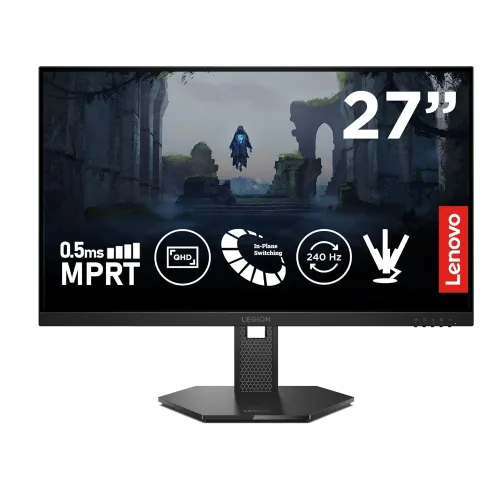
The Lenovo Legion 27Q-10 is a 27-inch QHD gaming monitor built around a Fast IPS panel. Its native resolution is 2560 × 1440, and Lenovo specifies a maximum refresh rate of 240Hz when the monitor receives a compatible signal through DisplayPort 1.4 with HBR3. The panel uses WLED backlighting, has a typical brightness of 300 cd/m² and a static contrast ratio of 1000:1. Lenovo lists support for HDR10 and Dolby Vision signals, while the display does not have local dimming. That distinction matters: signal compatibility lets the screen accept those formats, but it does not provide the bright highlights and deep local contrast of a premium HDR television. The advertised 0.5ms figure is MPRT under a backlight strobing mode; it is not the usual gray-to-gray response measurement. This guide explains the connection limits, motion settings, color claims, ergonomics, and checks buyers should make before ordering in Bangladesh.
QHD detail on a 27-inch screen
The 16:9 panel shows 2560 × 1440 pixels across a 27-inch diagonal. Lenovo lists a pixel pitch of approximately 0.2331mm and density of about 109 pixels per inch. QHD provides more workspace detail than Full HD at this size and can make small interface elements, game environments, product imagery and text look more defined. The amount of usable workspace also depends on operating-system scaling and application settings. Users who prefer larger text can increase scaling while retaining the panel’s native resolution. To get the intended clarity, select 2560 × 1440 in the graphics settings and use a cable and output that support that mode. The active image area is approximately 596.7 by 335.7mm. This is a flat display; it has no curved panel. Viewing angles are specified at 178 degrees horizontally and vertically, a standard IPS characteristic that helps when the screen is viewed off center.
240Hz and the DisplayPort path
Lenovo specifies up to 240Hz at QHD over DisplayPort 1.4 using HBR3. The source computer, graphics card, driver, cable and selected timing all need to support the required bandwidth. If the operating system shows a lower refresh rate, check the connection path, display settings and graphics control panel before assuming the panel is defective. The two HDMI inputs are HDMI 2.1 TMDS implementations. They are not HDMI 2.1 FRL ports with the full 48Gbps bandwidth sometimes associated with that label. Lenovo’s published mode information limits HDMI to QHD at up to 144Hz in 8-bit color, with common console modes such as 120Hz depending on the connected device and timing. Therefore, use DisplayPort for the monitor’s 240Hz PC mode. Do not assume every HDMI 2.1 device, cable, resolution and color-depth combination reaches 240Hz.
Understanding 0.5ms MPRT and GtG
The 0.5ms number refers to Moving Picture Response Time with a motion-blur-reduction backlight strobing mode. It does not mean that every pixel transition takes half a millisecond. Lenovo also provides gray-to-gray response options: approximately 1ms at level 4, 2ms at level 3, 3ms at level 2, 4ms at level 1, and 5ms with the feature off. Aggressive overdrive can create bright or dark inverse-ghosting trails, so the fastest numeric mode may not look best in every game. Begin with level 2 or 3 and compare moving objects against a dark background. MPRT strobing can reduce perceived blur, but it lowers brightness and is not available alongside Adaptive-Sync or HDR operation. It also requires a sufficiently high refresh rate. For everyday use, choose the setting that looks stable and comfortable rather than selecting a mode only by its smallest printed millisecond value.
Adaptive sync and variable frame rates
The monitor supports VESA Adaptive-Sync and is listed for AMD FreeSync Premium, including Low Framerate Compensation. Lenovo also lists NVIDIA G-SYNC Compatible operation. Variable refresh can match screen updates to compatible graphics output within the supported operating range, helping reduce tearing and uneven pacing. It does not make a game render faster, and its result depends on the graphics card, connection, frame rate and software configuration. Use DisplayPort for the widest PC refresh range. Enable the relevant setting in the monitor menu and graphics driver, then confirm that the operating system or driver reports the display as variable-refresh capable. A game running below the monitor’s supported range may behave differently from one within it. MPRT strobing and Adaptive-Sync cannot be used together, so users should decide whether they prefer strobe-based blur reduction or variable refresh for a particular game.
Color, brightness and HDR formats
Lenovo lists 300 cd/m² typical brightness, a 1000:1 static contrast ratio, 16.7 million colors and 99 percent sRGB coverage. The published gamut material also gives 90 percent DCI-P3 using the CIE 1976 measurement convention. Gamut percentages use different standards and methods, so figures should not be compared without checking their color-space basis. A factory calibration report is included according to the manufacturer’s specification, but that does not guarantee that every individual screen matches a user’s calibrated workflow. The monitor accepts HDR10 and Dolby Vision signals. With no local-dimming backlight and a typical 300-nit rating, it cannot reproduce the strong highlight range of high-end HDR displays. Treat HDR compatibility as a supported input format, not as a promise of reference-grade HDR performance. For color-sensitive work, use a calibrated profile and confirm the exact requirements of the application and workflow.
Eye-comfort features and software
Lenovo lists TÜV hardware low-blue-light certification, Natural Low Blue Light, Eyesafe 2.0 and eye-comfort features. These options can change the screen’s color balance or reduce selected blue-light output; they do not eliminate the need to take breaks, set readable text size or adjust ambient lighting. Lenovo Artery software can provide supported monitor controls from a computer, subject to operating-system and connection support. Available controls may vary by model firmware and software version. Keep the screen at a comfortable distance and position it to limit reflections. If colors look unusually warm after enabling an eye-care mode, compare the picture with the mode disabled and choose according to the task. The monitor is not advertised with built-in speakers or a microphone. Its 3.5mm audio output is for connecting headphones or external audio equipment; sound still needs to come from the computer or a compatible source.
Ports and connected devices
The rear panel provides one DisplayPort 1.4 HBR3 input, two HDMI 2.1 TMDS inputs and one 3.5mm audio-out connection. The monitor does not provide USB data ports, USB-C video input, Ethernet or a built-in USB hub. Connect a desktop gaming PC to DisplayPort when targeting QHD at 240Hz. HDMI can be useful for a console, laptop or second source, but the maximum refresh depends on the HDMI TMDS mode and source capabilities. The 3.5mm jack does not add speakers to the monitor; connect headphones or powered speakers and set the audio output on the source device. There are no integrated speakers to use when no external audio equipment is connected. Check the back-panel labels and the included regional documentation when setting up a unit, since cable inclusion may vary by country or retailer bundle.
Stand adjustment and mounting
The supplied stand supports height adjustment through 135mm, tilt from approximately -5 to +22 degrees, swivel about 30 degrees in each direction and pivot through 90 degrees. Pivot is useful for a portrait layout when the software and desk arrangement support it. The monitor also supports a 100 × 100mm VESA mounting pattern. The stand’s range allows the screen to be raised, tilted and rotated without requiring a separate arm, while a compatible VESA arm can provide a different desk arrangement. Confirm that a third-party mount supports the monitor’s weight and uses the correct screws before installation. With the stand attached, published dimensions are approximately 613.1mm wide, 214mm deep and 401.5 to 536.5mm high. The panel head is about 613.1mm wide, 42.3mm deep and 366.4mm high. Allow extra room for cables, tilt and the monitor base.
Power, weight and box contents
The monitor uses an integrated power supply and accepts 100–240V AC at 50/60Hz. Lenovo lists approximately 25W typical consumption and a 50W maximum, with low standby and off-state figures under its specified conditions. Power use changes with brightness, refresh rate and operating state. Published weight is about 6kg with the stand and 3.9kg for the display head, each subject to the manufacturer’s stated tolerance; packed weight is approximately 7.7kg. The box is specified to include a DisplayPort cable, power cord, four screws, a calibration report and a quick-start guide. Retailer bundles and regional packages can differ, so inspect the actual carton contents. Model suffixes identify regional configurations. The base MPN is 68C6GAC4, while complete regional codes append a market suffix; barcode and exact suffix should be checked against the delivered box rather than inferred from the base model.
Bangladesh buying checks
Bangladesh retailer listings identify the Legion 27Q-10 and commonly advertise a three-year warranty. Retail prices and stock change over time, and online listings may not reflect the final checkout price. The catalog’s existing ৳29,000 variant price and earlier indicative range are retained; confirm today’s price and stock with the seller before purchase. Ask the seller to state the complete regional model code, whether the warranty is provided by Lenovo’s authorized local channel or the retailer, and how dead pixels or transit damage are handled. Check that the monitor, stand, power cord, DisplayPort cable and box labels match the promised item. Keep the invoice and warranty card. The monitor is the IPS LCD Legion 27Q-10; do not confuse it with the separately named OLED Legion 27Q-10 OLED or the related 27QD-10. Product aggregators sometimes mix details among these models, so use the full model name and regional code when comparing listings.
Setup checklist
Before gaming, connect through DisplayPort, select 2560 × 1440, choose up to 240Hz in the operating system, and enable Adaptive-Sync in both the monitor menu and graphics driver if desired. Confirm that the chosen mode remains available after sleep or driver updates. If using HDMI, consult the source device’s output list and expect the TMDS refresh limit rather than assuming 240Hz. Test response-time levels with actual game motion and watch for inverse ghosting. When using MPRT strobing, expect lower brightness and disablement of Adaptive-Sync and HDR. For a console, verify its supported QHD timing and refresh before ordering. Mounting should follow the manual, VESA pattern and screw guidance. For HDR content, compare the image with expectations set by the panel’s brightness and lack of local dimming. These checks help distinguish a configuration limit from a hardware fault and make the monitor’s capabilities easier to assess.