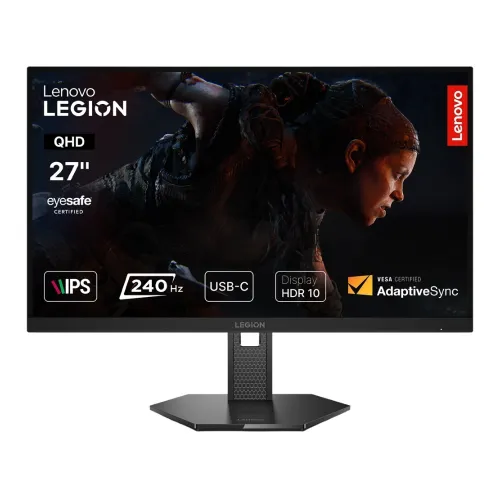
Lenovo Legion 27QD-10 27-Inch 240Hz QHD IPS Gaming Monitor: Complete Technical & Buyer Guide
The Lenovo Legion 27QD-10 (Lenovo Machine Type 67D2, Regulatory Model A25270QG0) is a purpose-built 27-inch QHD (2560 × 1440) In-Plane Switching (IPS) gaming monitor engineered for competitive esports players, fast-paced action gamers, and hybrid desk setups. Combining an ultra-responsive 240Hz native refresh rate with a 1 ms (Level 4 GtG) / 0.5 ms (MPRT) pixel response architecture, factory-calibrated wide-gamut color reproduction (99% sRGB and 90% DCI-P3), hardware-level Eyesafe Certified 2.0 low blue light protection, and a full-range ergonomic stand, the Legion 27QD-10 hits the modern sweet spot between 1080p high-refresh panels and bandwidth-heavy 4K displays.
1. Model Identification: Distinguishing the Legion 27QD-10 from Sibling Lenovo Monitors
Before purchasing or comparing specifications across retailers in Bangladesh, buyers should understand how Lenovo structures its 27-inch QHD Legion lineup. Several similarly named models share the same Raven Black exterior chassis but differ significantly in refresh rate, color depth, and rear connectivity:
- Lenovo Legion 27QD-10 (Machine Type 67D2 — This Model): Features a 27-inch 2560 × 1440 IPS panel running at up to 240Hz, 10-bit (8-bit + FRC) color depth (1.07 billion colors), 23W typical / 70W maximum power consumption, and in Lenovo's official 67D2 PSREF specification includes a built-in USB hub featuring 1× USB-C upstream port (5Gbps, DisplayPort 1.4 Alt Mode, up to 15W PD 3.1) and 2× USB-A 5Gbps downstream ports alongside 1× DisplayPort 1.4, 2× HDMI 2.1 TMDS, and 1× 3.5mm audio-out.
- Lenovo Legion 27Q-10 (Machine Type 68C6): Shares the 27-inch QHD 240Hz IPS panel and 300 cd/m² brightness, but uses a True 8-bit (16.7 million colors) pipeline, consumes 25W typical / 50W maximum power, and omits the USB-C and USB-A ports entirely (providing only 2× HDMI 2.1 TMDS, 1× DP 1.4, and 1× 3.5mm audio-out). Important Local Market Note: Several Bangladeshi retailers list the Legion 27QD-10 with its 23W/70W power rating, 1.07 billion color spec, and USB-C hero badge, but copy the non-USB port list and rear studio photos from the Legion 27Q-10 (68C6). If USB-C single-cable display input or downstream USB-A ports are essential to your workflow, verify the exact 10-character Lenovo part number ( vs. ) on the sealed carton before checkout.
- Lenovo Legion R27q-30 / R27qe (Machine Types 67B4 / 67C5): Lower-tier 165Hz–180Hz QHD IPS monitors rather than native 240Hz panels.
- Lenovo Legion Y27qf-30 (Machine Type 67A7): An earlier 240Hz (250Hz overclocked) QHD IPS model that uses a USB-B upstream hub and includes dual 3W speakers, whereas the Legion 27QD-10 has no built-in speakers.
2. QHD (2560 × 1440) Resolution & Panel Clarity
On a 27-inch diagonal screen (active viewing area 596.7 × 335.7 mm), the native 2560 × 1440 (QHD / WQHD) resolution delivers a pixel pitch of 0.2331 × 0.2331 mm and a pixel density of 109 PPI (listed as 109 dpi in Lenovo PSREF). Compared to a 27-inch Full HD (1920 × 1080) monitor (~81.6 PPI), the Legion 27QD-10 packs 77.7% more pixels, eliminating visible pixel grid ("screen-door" effect) at normal desk viewing distances of 55 to 75 cm. Text in code editors, spreadsheets, and productivity apps appears crisp without requiring aggressive operating-system fractional scaling, while in-game distant targets in tactical shooters and battle royale titles resolve with noticeably sharper edge definition.
The flat In-Plane Switching (IPS) panel is framed by a 3-side NearEdgeless bezel (just 1.1 mm top and side border thickness) and treated with a low-haze anti-glare matte coating that diffuses ambient room reflections without introducing grainy crystalline artifacts across solid white backgrounds.
3. 240Hz Refresh Rate, Port Bandwidth & Console Compatibility
At its native 240Hz refresh rate, the monitor refreshes the screen every 4.17 milliseconds—more than 66% faster than a standard 144Hz panel (6.94 ms) and nearly four times faster than a 60Hz display (16.67 ms). However, achieving the full 2560 × 1440 @ 240Hz output depends directly on which video input port you use:
- DisplayPort 1.4 (HBR3 — 32.4 Gbps Max Bandwidth): Supports the full native 2560 × 1440 resolution at 240Hz with 10-bit color (8-bit + FRC) and Adaptive Sync enabled. Desktop gaming PCs with NVIDIA GeForce or AMD Radeon GPUs should always connect via the DisplayPort 1.4 input using the bundled 1.8m DisplayPort cable.
- USB-C Upstream (DP 1.4 Alt Mode HBR3 — 67D2 PSREF Specification): On official units, the USB-C port routes four high-speed HBR3 lanes via DisplayPort 1.4 Alternate Mode, supporting 2560 × 1440 at up to 240Hz for compatible gaming laptops and handhelds (such as the Lenovo Legion Go), while simultaneously delivering up to 15W (PD 3.1) trickle power and enabling the two USB-A 5Gbps ports. (Note that 15W PD can charge smartphones, tablets, or accessories, and sustain handhelds under light loads, but cannot power a gaming laptop without its dedicated AC adapter.)
- 2× HDMI 2.1 TMDS Ports (Bandwidth Caveat): Lenovo labels the two HDMI inputs as HDMI 2.1 TMDS (Transition-Minimized Differential Signaling). Under the official HDMI 2.1 specification, "HDMI 2.1 TMDS" carries the exact same 18 Gbps bandwidth ceiling as legacy HDMI 2.0b rather than the 40–48 Gbps Fixed Rate Link (FRL) bandwidth used by full-bandwidth HDMI 2.1 ports. Consequently, per Lenovo's official PSREF and user manual, the HDMI ports on the Legion 27QD-10 support a maximum refresh rate of 2560 × 1440 at up to 144Hz (vertical frequency range 48Hz–144Hz). They are ideal for connecting a PlayStation 5, Xbox Series X/S (at 1440p 120Hz), or a secondary laptop, while reserving DisplayPort 1.4 for 240Hz PC gaming.
4. Understanding the 0.5ms MPRT Claim vs. GtG Overdrive Levels
Lenovo rates the Legion 27QD-10 at 0.5 ms (MPRT) and provides four selectable grey-to-grey (GtG) pixel overdrive levels in the On-Screen Display (OSD) and Lenovo Artery software:
- Level 1 Overdrive: 4 ms GtG (gentlest voltage boost; zero inverse ghosting, best for 60Hz–100Hz cinematic gaming).
- Level 2 Overdrive: 3 ms GtG (well-balanced daily setting for variable refresh rates across 90Hz–240Hz).
- Level 3 Overdrive: 2 ms GtG (fast competitive setting optimized for high frame rates above 160 fps).
- Level 4 Overdrive: 1 ms GtG (maximum voltage overdrive; achieves the lowest measured transition time for marketing benchmarks, but introduces visible inverse ghosting/corona artifacts around fast-moving dark edges).
- 0.5 ms MPRT (Moving Picture Response Time): Achieved via backlight strobing rather than faster liquid-crystal rotation. Enabling MPRT pulses the WLED backlight in sync with frame refreshes to reduce eye-tracking motion blur. However, enabling MPRT automatically disables Adaptive Sync (G-SYNC / FreeSync), locks screen brightness, and introduces high-frequency flicker that can cause eye fatigue during long sessions. For most players, running Adaptive Sync with Overdrive Level 2 or Level 3 delivers the cleanest motion experience.
5. Color Accuracy, Brightness, Contrast & HDR10
With 99% sRGB (CIE 1931) and 90% DCI-P3 (CIE 1976) coverage (95% DCI-P3 color area ratio) and 10-bit color support (8-bit native + Frame Rate Control dithering) for 1.07 billion colors, the Legion 27QD-10 renders smooth gradients without skybox banding and vibrant saturation in modern games, photo editing, and video timelines. Peak typical luminance is rated at 300 cd/m² (nits) with a 1000:1 static contrast ratio (3,000,000:1 dynamic). While the monitor accepts and decodes HDR10 signals from PCs and consoles, it uses an edge-lit WLED backlight without local dimming zones and peaks at 300 nits; therefore, HDR10 serves as compatibility decoding rather than true high-dynamic-range contrast. In dimly lit rooms, dark scenes exhibit typical IPS contrast and mild corner IPS glow.
6. Adaptive Sync, Eye Care & Software Ecosystem
The monitor supports a full suite of Variable Refresh Rate (VRR) standards: NVIDIA G-SYNC Compatible, AMD FreeSync Premium (including Low Framerate Compensation below 48 fps), and VESA Adaptive Sync certification. For prolonged work and gaming marathons, the panel incorporates a TÜV Rheinland Hardware Low Blue Light solution and Eyesafe Display 2.0 certification, filtering high-energy blue wavelengths (415–455 nm) directly at the LED backlight phosphor level so whites stay natural without a yellow software tint. Users can configure crosshair overlays, frame-rate counters, timers, input switching, and color profiles directly from the desktop using Lenovo Artery (Lenovo Accessories and Display Manager) and Legion Space on Windows 10, Windows 11, Windows on ARM, and macOS.
7. Ergonomics, Build Dimensions & Desk Planning
Unlike budget monitors restricted to basic tilt, the Legion 27QD-10 ships with Lenovo's full LTPS (Lift, Tilt, Pivot, Swivel) stand in Raven Black:
- Height Adjustment (Lift): Up to 135 mm vertical travel (overall height ranges from 394.2 mm at lowest position to 529.2 mm at highest position).
- Tilt: -5° forward to +22° backward.
- Swivel: -30° to +30° left and right rotation.
- Pivot: -90° to +90° bidirectional portrait rotation—ideal for secondary vertical coding, chat, or document reading.
- VESA Mounting & Weight: Standard 100 × 100 mm VESA pattern with a lightweight 3.5 kg unpacked head weight (5.6 kg with stand; 7.8 kg packed per Lenovo 67D2 PSREF) and a compact 613.7 × 214.0 mm desk footprint.
- Audio Note: The monitor does not contain built-in speakers; digital audio received over DisplayPort, HDMI, or USB-C is passed through to the rear 3.5mm audio-out jack for headphones or external desktop speakers.