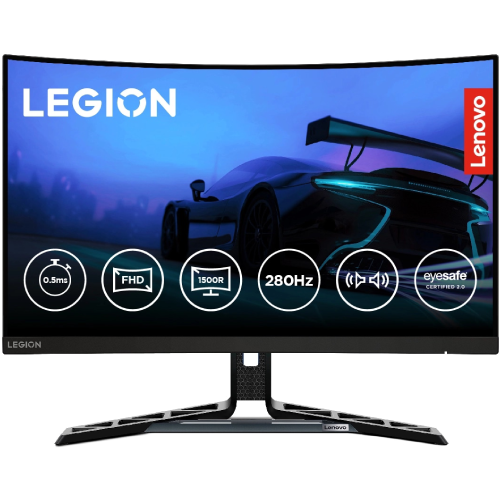
Lenovo Legion R27fc-30: 27-inch 1500R curved gaming monitor
The Lenovo Legion R27fc-30 is a 27-inch Full HD curved gaming monitor using a VA panel and WLED backlight. Lenovo's official machine type is 67B6 and the part number for this configuration is 67B6GAC1WW. Its 1500R curve, 1920 × 1080 resolution and 240Hz native refresh target players who want a large, fast display without moving to a higher-resolution graphics workload. Lenovo also documents an optional DisplayPort overclock mode up to 280Hz for limited sessions; 240Hz is the native refresh. The monitor has an integrated two-speaker system, an adjustable LTPS stand, Eyesafe 2.0 certification and an internal power supply. The existing BiponiBD price of ৳25,500 remains unchanged. Confirm current stock, price and local warranty details with the seller.
Full HD resolution and 1500R curved VA panel
The display uses a 27-inch diagonal active area of 597.89 × 336.31mm, with Full HD resolution of 1920 × 1080 and a 16:9 aspect ratio. Lenovo lists a pixel pitch of 0.3114 × 0.3114mm, approximately 82 pixels per inch. The VA panel and 1500R curve create a wraparound desktop view; the 1500R figure describes the curve radius, not the monitor width. Lenovo lists 178-degree horizontal and vertical viewing angles and an anti-glare finish. Full HD can be easier to drive at very high frame rates than QHD, while 27-inch QHD monitors show more fine detail. Consider your normal viewing distance, text scaling, desk space and game frame-rate goals before choosing between those formats.
240Hz native refresh and 280Hz DisplayPort overclock
Lenovo specifies 240Hz as the native maximum refresh over DisplayPort 1.4 and HDMI 2.1 TMDS. The monitor also offers an overclock setting up to 280Hz through DisplayPort 1.4. Lenovo notes that the 280Hz overclock mode is intended for sessions up to 30 minutes before it returns to the 240Hz native rate. It is therefore useful to describe both values with their conditions: 240Hz native, up to 280Hz overclocked via DisplayPort for a limited period. Your graphics card, cable, game and selected mode must support the desired refresh. If the computer only shows a lower frequency, check the input, graphics output, cable, driver and the operating system's advanced display settings. A refresh-rate rating does not guarantee that a game will render that many frames.
Response modes, motion clarity and adaptive sync
The official response-time options are 0.5ms MPRT, 1ms at Level 4 or Extreme, 2ms at Level 3, 4ms at Level 2 and 6ms at Level 1 or Normal mode. MPRT is a motion-picture response measurement and is not the same as gray-to-gray response. Lenovo lists VESA Certified ClearMR 7000, AMD FreeSync, VESA Adaptive Sync and NVIDIA G-SYNC Compatible support. These features can help coordinate refresh with compatible graphics hardware and settings. A faster response mode may introduce visual artifacts on some content, so compare the available OSD levels and choose the one that looks best to you. The manufacturer's ratings describe modes and certification, not a promise of identical motion performance in every game or configuration.
Brightness, contrast, color and HDR10
Lenovo rates typical brightness at 350 cd/m² and static contrast at 3,000:1, with a 3,000,000:1 dynamic contrast figure. The color specifications are 99% sRGB and 90% DCI-P3, with 125% sRGB color area ratio and true 8-bit processing for 16.7 million colors. Coverage and area ratio are different measurements, so they should not be treated as interchangeable. HDR10 compliance is listed. These manufacturer figures are not an independent calibration report and do not establish a separate VESA DisplayHDR tier. For creative work, verify the individual monitor and use a calibrated color workflow. For games and video, select a picture mode that suits the room and content, then set brightness to a comfortable level. The anti-glare finish can reduce reflections but cannot remove strong direct light.
HDMI, DisplayPort and built-in speakers
The video inputs are two HDMI 2.1 TMDS ports and one DisplayPort 1.4 input. Lenovo specifies 1920 × 1080 at up to 240Hz on both connection types; DisplayPort is also required for the 280Hz overclock mode. This HDMI designation is specifically TMDS signaling, so the catalog states HDMI 2.1 TMDS rather than implying HDMI 2.1 FRL bandwidth. For sound, the monitor includes two integrated 3W speakers and one 3.5mm audio output. The rear and underside product images show the downward-facing I/O area. Connect the source with a cable suitable for the desired mode, select the correct input and configure the resolution and refresh rate. The official box contents list a 1.8m DisplayPort cable and 1.8m power cable, along with four screws and setup materials; verify the regional package with the seller.
Full ergonomic LTPS stand and VESA mounting
The included stand supports lift up to 135mm, tilt from -5 to +22 degrees, swivel from -30 to +30 degrees and pivot from -90 to +90 degrees. This range allows height and portrait-orientation adjustment without immediately needing a separate arm. The monitor also supports a 100 × 100mm VESA mount. With the stand, the width and depth are 610.3 × 258.8mm and the height ranges from 385.8mm to 520.8mm. The monitor head alone measures 610.3 × 82.7 × 367.3mm (W × D × H). The included V-wing base has a phone-holder slot and a blue cable-routing clip visible in the product images. Check the desk depth, available height and cable clearance before placing it. If using an arm, verify the arm's load rating and VESA hardware.
Weight, packaging and everyday setup
The assembled monitor weighs 6.2kg net with the stand. The panel head alone weighs 4.3kg, and Lenovo lists gross packaged weight at 10.3kg. The retail carton dimensions are 820 × 187 × 500mm (W × D × H). These figures matter when planning a monitor arm, carrying the display or arranging delivery. The product page records the with-stand dimensions separately from the head-only values so the two configurations are not confused. For first setup, attach the stand according to Lenovo's instructions, route the cable through the stand clip, connect the power cable and video source, then use the OSD to select the input and picture mode. Keep ventilation clear. The images show the screen, stand, cable clip and integrated phone slot; they do not establish whether every promotional accessory appears in every regional box.
Eye care, certification and Lenovo software
Lenovo lists Natural Low Blue Light, Eyesafe Certified 2.0, TÜV Rheinland Eye Comfort and TÜV Low Blue Light for the hardware solution. The Eyesafe badge is also visible in the supplied front image. These are product specifications and certifications, not medical claims. The monitor is compatible with Lenovo Artery, Lenovo's Accessories and Display Manager software. The on-screen display and software help users manage available monitor settings; supported options can depend on the connected computer and software version. The product images show a blue OSD joystick and physical controls on the rear lower edge. Adjust the display to your workspace, keep ambient lighting appropriate and take breaks as needed. The feature wording in this description is limited to the manufacturer's stated technologies and certifications.
Power, internal supply and included contents
Unlike models that use a separate power brick, the R27fc-30 has an integrated internal power supply. Lenovo specifies AC 100–240V at 50–60Hz. Listed consumption is 24W typical, 47W maximum, 23.4W under Energy Star, less than 0.5W in sleep and less than 0.3W when off. Actual draw depends on brightness, refresh mode and use. The official package contents include the monitor with stand, a 1.8m DisplayPort cable, a 1.8m power cable, four screws, a warranty booklet and a Quick Setup Guide. Package contents can vary by local bundle, so confirm them at checkout. Use the supplied power cable and a grounded outlet appropriate for the local electrical system. The internal supply keeps the external cable arrangement simpler, while the stand clip supports cable routing behind the display.
Bangladesh pricing and warranty checks
The catalog's existing price of ৳25,500 matches the reviewed Bangladesh seller listings. The research snapshot found Star Tech and Ryans near ৳25,500, TechLand around ৳26,500 with a higher regular-price reference, and other reviewed sellers between about ৳25,000 and ৳26,500. Seller offers and stock can change, so treat those figures as a snapshot rather than a price promise. The checked local listings advertised three years of warranty. Confirm the warranty issuer, service coverage, start date, exclusions and dead-pixel policy on the invoice. Lenovo's public PSREF confirms the product specifications, not the local invoice terms for this exact unit. Verify that the box and invoice list the Legion R27fc-30 and part number 67B6GAC1WW. The catalog keeps the existing product name, slug, SKU and ৳25,500 price. Country of origin and regional barcode/GTIN are unverified and remain blank.
Who should consider the Legion R27fc-30?
This monitor is designed for buyers who want a 27-inch curved Full HD display, a very high native refresh rate, VA contrast, variable refresh support, built-in speakers and a fully adjustable stand. Its 1500R curve and wide LTPS adjustment range may suit a desk where users frequently change posture or screen orientation. Full HD's 82 PPI density is lower than QHD at 27 inches, so users focused on fine text and detailed desktop work may prefer a higher resolution. The 280Hz overclock mode is a time-limited DisplayPort feature, while 240Hz is the normal native setting. Before buying, confirm graphics output, desk depth, stand clearance and seller warranty terms. During setup, choose native 1920 × 1080, select 240Hz for normal use, and enable the 280Hz overclock only when the system and intended session support Lenovo's conditions.