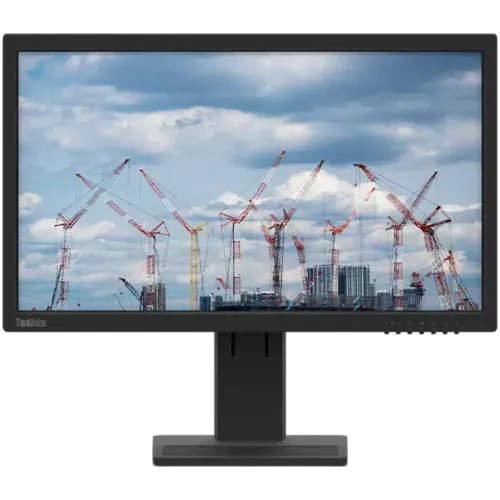
Lenovo ThinkVision E22-28 for a productive desk
The ThinkVision E22-28 is a 21.5-inch business monitor with a Full HD 1920 × 1080 IPS display, a 16:9 aspect ratio and a WLED backlight. It is designed for everyday office tasks, study, reception counters and home workstations where clear text, a compact footprint and flexible positioning matter. Full HD gives more usable desktop space than an HD 1366 × 768 screen at this size, while the 60Hz refresh rate keeps the model focused on normal productivity rather than high-refresh gaming.
The IPS panel offers broad viewing angles and consistent color across the screen when several people look at a presentation. Lenovo specifies 178° horizontal and vertical viewing angles, but that does not mean the image is identical from every position. For the clearest text and color, place the monitor in front of the main user and adjust the stand to suit the desk.
Full HD image, brightness and motion
The native resolution is 1920 × 1080 pixels, with a 0.248mm pixel pitch and about 102 pixels per inch. This works well for documents, browser pages, spreadsheets and standard office applications. It provides more room for two windows than an HD monitor, although a larger or higher-resolution screen may be better if you routinely work with very dense spreadsheets, high-detail design files or several full-size windows at once.
Lenovo lists 250 cd/m² typical brightness, a 1000:1 typical static contrast ratio and a 3,000,000:1 dynamic contrast ratio. The display supports 16.7 million colors and a typical 72% NTSC gamut. These are manufacturer specifications for a general-purpose IPS monitor; they are not a promise of factory calibration or wide-gamut color work. The anti-glare surface helps limit reflections, but it cannot remove glare from a bright window or direct light.
The panel refreshes at 60Hz. Lenovo specifies 6ms in Normal mode and 4ms in Extreme mode. Extreme mode is a response-time setting, not a higher refresh rate; buyers should expect a 60Hz work monitor rather than a 100Hz or 144Hz gaming display. Use the normal response setting for ordinary desktop work and select a faster mode only if its appearance suits your content.
Three video inputs for mixed computer setups
The E22-28 provides one HDMI 1.4 input, one DisplayPort 1.2 input and one VGA input. HDMI and DisplayPort carry digital video; VGA supports compatible older computers and equipment. Check the exact output on your laptop or desktop before ordering. The monitor has no USB-C video input listed, so a USB-C-only computer may need a compatible video adapter or dock.
Lenovo's box list includes a 1.8m HDMI cable and a 1.8m power cable, along with the monitor and stand and a quick setup guide. Regional box contents can vary, so confirm included accessories with the seller, especially if you plan to connect over DisplayPort or VGA. Set the computer to the monitor's native 1920 × 1080 mode for the clearest image; older VGA connections may need positioning or clock adjustment through the monitor controls.
Adjustable stand, VESA fit and desk space
The supplied stand supports a 155mm lift range, tilt from approximately −5° to +22°, swivel through up to 360° in either direction and portrait pivot through ±90°. This range helps align the screen with different desk heights and viewing positions. Adjust the height before long work sessions, and check that nearby objects leave enough room for the base and the full pivot movement.
A 100 × 100mm VESA interface allows compatible wall brackets and monitor arms. Confirm that the mount supports the monitor's weight and the correct VESA pattern before installation. Lenovo lists about 508mm width and 178.6mm depth with the stand at its lowest position; the height is about 301.6mm at the lowest setting and 443.4mm at the highest. The monitor head alone is about 43.4mm deep, 307.9mm high and 508mm wide. Keep the stand and head measurements separate when planning a mount or desk layout.
The monitor weighs about 3.90kg with its stand, while the head alone is 2.20kg. Lenovo lists a packaged weight of 5.40kg. Allow extra room for cables and the stand footprint, and use the packaged weight when arranging delivery or lifting the carton.
Built-in sound and eye-comfort features
Two integrated 1.5W speakers provide basic sound for video calls, online classes, system alerts and casual media playback. They can reduce the need for separate desktop speakers in a simple work area, but their small size is not intended to replace a dedicated headset or room audio system where stronger sound or microphone privacy is important.
The E22-28 carries TÜV Rheinland Eye Comfort and Flicker Free certifications, and Lenovo specifies an anti-glare surface. These features can support comfortable everyday viewing, but personal comfort depends on room lighting, brightness, screen position and viewing habits. Set brightness to match the room, position the display at a comfortable distance and take regular breaks during extended sessions.
Power use and product certifications
The monitor uses an internal power supply and accepts AC 100–240V at 50–60Hz. Lenovo lists typical consumption of 13W, maximum consumption of 17W and less than 0.5W in sleep/off or switch-off modes. Actual consumption depends on brightness, image content and the selected operating state. Use the supplied power cable and a properly grounded outlet that meets local electrical requirements.
Lenovo's reference sheet lists ENERGY STAR certification, EPEAT Silver registration, TCO 8.0, TCO Edge 2.0 and RoHS compliance. Certification and registration availability can differ by region and program listing. The display also has a Kensington lock slot for a separately purchased compatible security cable; the slot itself does not include a lock.
Who should consider the ThinkVision E22-28?
This model can suit office teams, students, home-office users and reception desks that need a compact Full HD IPS screen, older VGA compatibility, integrated speakers and an ergonomic stand. The combination of HDMI, DisplayPort and VGA can simplify mixed-generation equipment, while the height, tilt, swivel and pivot adjustments make it easier to arrange a shared workstation.
Compare alternatives if you need refresh rates above 60Hz, USB-C one-cable docking, HDR, a wider color gamut, a larger screen or a different audio setup. Check how the 21.5-inch size fits your viewing distance and whether your software benefits more from a larger display. No claim of gaming performance, USB hub capability or USB-C connectivity should be inferred from the model name.
Warranty and Bangladesh buying checklist
Lenovo's product reference lists a three-year limited warranty. Bangladesh sellers also advertise three-year brand warranty, but the local service provider, invoice, serial-number eligibility and warranty start date determine what support applies to a particular unit. Ask the seller to confirm the local warranty and claim process in writing, and keep the purchase invoice and serial information.
Before checkout, confirm that the label identifies ThinkVision E22-28 and machine type/model 62B9MAR4WW, the finish is Raven Black, the unit is new and the screen has no damage or defects. Check that the 1.8m HDMI and power cables, stand and quick setup guide are included, and ask about delivery, return terms and the seller's available stock. BiponiBD's approximate market range is an informational comparison only; it is not a current BiponiBD store offer, stock guarantee or seller warranty.