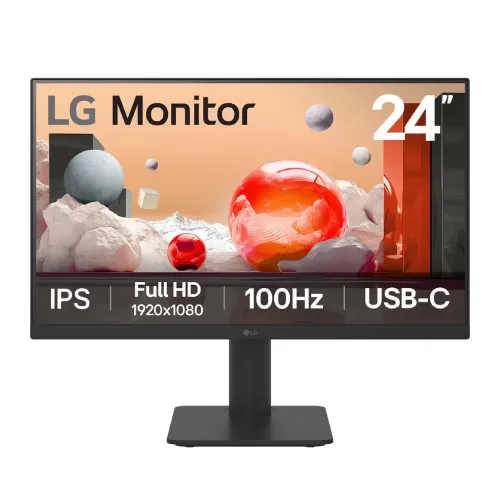
A practical 23.8-inch Full HD monitor
The LG 24MS570B-B is a 23.8-inch monitor built for a home office, study desk or compact workstation. Its IPS panel combines 1920 × 1080 Full HD resolution with a 100Hz refresh rate, while USB-C carries video, data and up to 65W of USB Power Delivery for a compatible laptop. LG also includes two HDMI inputs, two USB downstream ports and stereo speakers, giving the display several everyday connection options. This feature mix can reduce desk clutter for someone who connects a laptop and a second source, but the exact cable and device capabilities still matter. LG's regional product pages confirm the model and specifications used in this guide. Bangladesh sellers list the same 24MS570B-B model; their prices and warranty terms are market offers that may change.
Screen size, resolution and workspace
The panel measures 23.8 inches diagonally, with an active image area of approximately 527 × 296 millimetres. Its 16:9 aspect ratio and 1920 × 1080 resolution suit common office documents, web pages, video calls and Full HD video. At this size, the pixel pitch is 0.2745 × 0.2745mm. Text and interface elements are generally comfortable at normal desktop viewing distance, while users who keep many detailed windows visible at once may prefer a larger or higher-resolution display. The screen surface is anti-glare, which helps reduce reflections from indoor lighting; it does not make direct sunlight disappear. The panel is flat rather than curved, and the three-side virtually borderless styling can make adjacent screens look more continuous, though a visible lower bezel remains.
IPS picture, brightness and color
LG specifies an IPS panel, 250 cd/m² typical brightness and a 1300:1 typical contrast ratio. The listed viewing angles are 178 degrees horizontally and vertically, and LG rates the color gamut at NTSC 72% (CIE 1931). The monitor supports approximately 16.7 million colors. Those are panel specifications, not a promise that every unit is factory calibrated for color-critical work. For photo editing, print proofing or paid design, use a calibrated workflow and check whether the intended color space and accuracy are sufficient. Brightness is intended for ordinary indoor use; users working beside strong sunlight may want a brighter model. Black level and perceived contrast also depend on room lighting and viewing conditions.
100Hz refresh and response setting
The monitor supports a refresh range up to 100Hz over both HDMI and USB-C according to LG's official product specification. A 100Hz mode can make pointer movement and scrolling feel smoother than a 60Hz mode when the connected computer supplies a matching signal. The maximum refresh rate is a capability, not a guarantee that a game will render 100 frames each second. LG specifies a 5ms grey-to-grey response time when the Faster response setting is selected. That figure should be understood as a mode-specific pixel transition specification rather than a universal measure of total display latency. LG's official specification lists no HDR support and no AMD FreeSync certification for this model. Dynamic Action Sync is a gaming feature name; it should not be confused with NVIDIA G-SYNC or variable refresh rate support.
USB-C laptop connection and 65W power
The USB-C port supports display input, data transfer and USB Power Delivery up to 65W. A compatible laptop can therefore connect to the display and receive power through one USB-C cable, while peripherals connected to the monitor's USB downstream ports can be available through the same upstream link. This requires a host USB-C port with DisplayPort Alternate Mode and power input support, plus a suitable full-function cable. LG lists USB-C refresh support up to 100Hz at Full HD. Actual charging rate can depend on the laptop's requirements and the monitor's operating state. The product package includes a USB-C cable according to LG Japan's listing, but the box contents of a particular Bangladesh-distributed unit should be checked with the seller.
HDMI, USB hub and audio
Two HDMI inputs let users leave more than one source connected, such as a desktop computer and a laptop dock or console. LG's specification lists HDMI vertical frequency from 48 to 100Hz. A USB-C input adds the one-cable laptop setup described above. Two USB downstream ports are specified as USB 2.0; they are useful for basic keyboard, mouse or other low-bandwidth accessories, but are not a high-speed USB 3 hub. The 3.5mm stereo headphone output can send monitor audio to wired headphones or external speakers. LG lists two built-in speakers rated at 2W each, suitable for basic system sounds, calls and casual video. Users seeking fuller sound or louder room audio may prefer separate speakers or headphones.
Ergonomic stand and VESA mounting
The included stand supports up to 80mm of height adjustment and tilt from approximately −5 to +15 degrees. Adjusting height can help position the screen for a seated user, while tilt helps aim it toward the viewing position. The stand does not offer the full swivel and pivot range found on more advanced monitor arms. LG specifies a 75 × 75mm VESA mounting pattern for a compatible arm or wall mount; confirm the mount's supported size and load before installation. The rear images show the stand column and connection area, but do not prove every accessory included in the sales box. Desk clearance should account for the stand base, cables and the monitor's depth.
Eye-comfort and display controls
LG lists Flicker Safe and a blue-light reduction mode. These are display settings intended to offer viewing options; comfort varies by person and does not replace reasonable breaks, suitable brightness or an appropriate viewing distance. The monitor also supports LG Switch software, which provides additional desktop display-management controls on supported systems. LG lists features including Reader Mode, Black Stabilizer, Color Weakness mode, Crosshair, Dynamic Action Sync, Super Resolution+ and Smart Energy Saving. Some gaming-oriented controls affect the image or on-screen settings, but they do not change the panel's native resolution or certify the monitor for a particular gaming ecosystem. Check the official support page for software and manual availability for the relevant region and operating system.
Power, size and package information
LG specifies 100–240V, 50/60Hz AC input and a 19V external AC/DC adapter. The product page lists 17W on-mode consumption and 0.3W standby/off figures. Its DC output rating is 110W (19V/5.79A); that adapter rating is not the same as typical display consumption. LG lists dimensions with the stand of approximately 540 × 368–448 × 219mm, and head-only dimensions of 540 × 321 × 56mm. Listed weight is about 3.2kg with the stand and 2.3kg without it. The package dimensions are 607 × 175 × 404mm and package weight is 4.5kg on the Japan page; regional packaging can differ, so treat these as manufacturer reference values when estimating shipping.
What comes in the box and warranty
The LG Japan specification lists an AC/DC adapter, 1.5m power cable, 1.5m USB-C cable, 1.5m HDMI cable, quick setup guide, warranty documentation and mounting screws. Included accessories can vary by region or seller bundle, so confirm the contents before ordering in Bangladesh. LG Japan states a three-year limited repair warranty for that market, including panel and backlight coverage under its terms. Bangladesh retailers also advertise a three-year warranty, but the local distributor, claim process and covered components can differ. Ask the seller to identify the warranty provider and keep the invoice and serial details. The catalog price remains the current variant price; it is not a promise that every retailer has the same offer.
Who this display suits
This model can fit a laptop-first desk where 65W USB-C charging, a built-in hub and a 100Hz Full HD screen are useful together. It also suits users who want an IPS panel, integrated speakers and two HDMI inputs without moving to a larger display. The 23.8-inch size is practical for a compact desk or a secondary screen. It may be less suitable for buyers who need 144Hz or faster gaming, HDR playback, high-speed USB downstream connections, a full range of stand movement or a larger screen for dense multitasking. Check your laptop's USB-C display support, power needs and cable before choosing it as a single-cable dock. For color-critical work, compare the published NTSC gamut and obtain independent calibration information rather than assuming professional accuracy.
Price and buying checks in Bangladesh
The reviewed Bangladesh seller references list the LG 24MS570B-B around ৳27,500–৳29,500, with Star Tech, Tech Land and Creatus listing current offers in that range when checked. Price, stock, cash discount and EMI terms can change without notice. The catalog variant's ৳28,500 price is preserved. Compare the exact 24MS570B-B model string, warranty source, sealed-box status, accessory contents and return policy; a similar LG model can have different ports, USB-C power or stand features. Before checkout, verify whether the retailer price is cash-only or applies to card/EMI, whether delivery is included, and whether the warranty is local distributor-backed. These checks help avoid assuming that a regional LG support page defines the local seller's commercial terms.
Setup and connection checklist
For the highest refresh mode, select 1920 × 1080 at up to 100Hz in the operating system or graphics control panel and use a supported HDMI or USB-C input path. USB-C video and laptop charging both require compatible host hardware; a charging-only cable will not provide display output. Connect the monitor's upstream USB-C to the computer before expecting the downstream USB ports to behave as a hub. Use either HDMI input for a second source, and route audio to the monitor speakers or the headphone output as preferred. Adjust height and tilt before settling on a chair position, then set brightness to match the room. If the screen appears limited to a lower refresh rate, check the connected source, cable capability, graphics settings and driver rather than assuming the panel is defective.