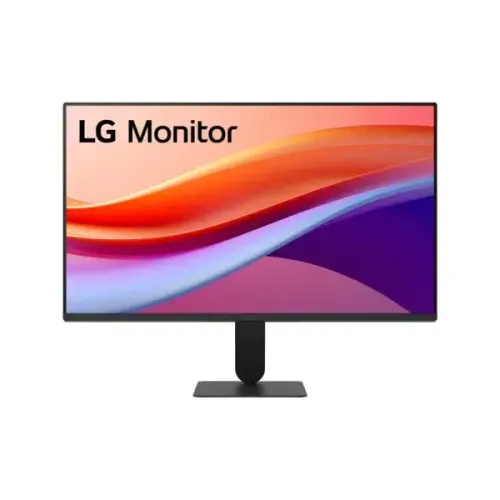
LG 24U411A-B at a glance
The LG 24U411A-B is a 23.8-inch flat IPS monitor built around a Full HD 1920 × 1080 panel. LG specifies a maximum 120Hz refresh rate, a standard 16:9 shape and a slim four-side narrow bezel design. The 120Hz mode is suited to everyday desktop work, study, video playback and games where a compatible computer can produce higher frame rates than a conventional 60Hz screen. Its specification should be read by exact model: 24U411A-B is different from the 24U411B-B 144Hz model and from 27-inch variants in the family. The 24U411A-B is not a 144Hz unit. Check the label and regional suffix when ordering because features, warranty coverage and supplied accessories can vary by market.
Panel size, resolution and desktop clarity
The active display measures 23.8 inches diagonally, approximately 60cm. Its native 1920 × 1080 resolution places 2.07 million pixels across a 16:9 panel, a common fit for office software, web pages, video and console or PC output. LG lists a pixel pitch of 0.2745 × 0.2745mm and 178-degree horizontal and vertical viewing angles. IPS technology is useful when a person views the display away from the exact centre, such as when sharing a screen or working at a normal desk angle. Full HD at this size gives a familiar balance between readable interface scaling and image detail. Users who regularly work with very large spreadsheets, multiple detailed panels or high-resolution creative assets may prefer a QHD display with more workspace.
120Hz refresh and connection-dependent limits
LG lists 120Hz as the maximum vertical refresh rate. The family manual identifies 1920 × 1080 at up to 120Hz over HDMI and Full HD up to 75Hz through the D-Sub analog input. The graphics card, output mode, cable, operating-system settings and application frame rate must all support a chosen mode. A high refresh rate can make pointer movement, scrolling and camera motion look smoother when the source supplies compatible frames. The port revision is not stated consistently for this exact regional suffix on the LG specification page, so this description names the inputs without guessing a version. Use HDMI for the documented 120Hz Full HD mode; do not expect the same maximum refresh from VGA/D-Sub.
Understanding 5ms GtG and 1ms MBR
LG provides two response-related claims that measure different things. The panel response rating is 5ms gray-to-gray in the Faster OSD mode. LG also advertises 1ms Motion Blur Reduction, a mode that strobes or pulses the backlight to reduce perceived persistence blur. The 1ms MBR figure is not a 1ms GtG transition. LG warns that MBR lowers luminance, flicker may occur and Adaptive Sync as well as Dynamic Action Sync cannot be used while MBR is active. Buyers should choose the behavior they need: variable-refresh support and brightness, or the optional blur-reduction mode. The marketing number should not be repeated without the mode name and its trade-offs.
Brightness, contrast, gamut and HDR
LG rates typical brightness at 250cd/m² and minimum brightness at 220cd/m². Its exact product specification gives 1500:1 typical contrast and 1050:1 minimum. LG lists 16.7 million colors and sRGB coverage of 99% typical (95% minimum) measured under CIE 1931. HDR10 and HDR Effect are included as supported processing features. A local retailer currently lists a 3000:1 contrast figure, but that conflicts with LG’s official exact-model data; this product content follows the manufacturer. HDR10 compatibility does not by itself establish a high peak HDR brightness or professional HDR performance. Actual appearance also depends on the input signal, room lighting, selected picture mode and source material.
Gaming and variable-refresh features
The 24U411A-B includes Variable Refresh Rate (VRR), Dynamic Action Sync, Black Stabiliser and Crosshair features in LG’s specification. VRR can coordinate refresh with a compatible source over supported modes. Dynamic Action Sync is LG’s gaming feature for reducing processing delay; it is not the same technology as NVIDIA G-SYNC certification. LG does not list an NVIDIA G-SYNC badge for this exact model. Black Stabiliser adjusts dark-scene visibility, while Crosshair adds a display overlay. These functions may help some game types, but they do not change the monitor into a high-refresh esports product beyond its 120Hz maximum. MBR mode is a separate option and LG says Adaptive Sync and DAS are unavailable while it is enabled.
Eye-comfort and image-processing options
LG lists Flicker Safe, Reader Mode and Color Weakness features. Reader Mode adjusts the displayed image for reading-oriented use, and Flicker Safe is LG’s reduced-flicker feature. Color Weakness mode is an accessibility-oriented color adjustment. The monitor also offers Super Resolution+, Smart Energy Saving and HDR Effect. These settings let owners tune the display for different content, but they are optional picture-processing tools rather than promises of medical benefit or calibrated color accuracy. For color-critical work, use suitable calibration tools and an appropriate reference display. The LG Switch software can organize screen layouts and provide quick access to some workflows, subject to supported operating systems and current software availability.
Ports, sound and microphone clarification
LG lists one HDMI input, one D-Sub (VGA) input and a 3-pole headphone output for sound only. The product page does not identify a microphone input or a built-in microphone. Some retailer copy combines the headphone output with a microphone claim, but the manufacturer’s port table only documents sound output. The supplied computer or a separate USB audio adapter can provide microphone support if needed. The one HDMI input suits a PC or console; D-Sub can help connect legacy equipment, with a lower maximum refresh than HDMI. Check the physical regional carton and port labels if a specific signal standard or cable is essential. HDMI cable inclusion is listed in LG’s UK accessory information, though in-box contents can vary by region.
Stand, tilt, VESA and physical fit
The supplied stand offers tilt adjustment only. LG’s product page describes a range of approximately −5° to +20°. Height adjustment, swivel and portrait pivot are not listed, so desks requiring those movements may need a separate monitor arm. The rear mounting interface is VESA 100 × 100mm. The monitor measures 539.2 × 417.6 × 220mm with the stand and 539.2 × 317.1 × 37.5mm without it. Shipping dimensions are 605 × 385 × 145mm. LG lists 3.2kg with stand, 2.3kg without stand and 4.4kg shipping weight. The slim base uses little desk depth compared with many wide gaming stands; verify desk clearance and VESA screw compatibility before mounting.
Power, adapter and energy figures
LG specifies an external power adapter and AC input of 100–240V at 50/60Hz. The model-family manual identifies adapter output at 19V DC, 1.3A, with regional adapter models varying by country. LG lists sleep-mode consumption below 0.5W and DC-off below 0.3W. The exact in-use wattage is not listed in the specification block consulted, so it is not invented here. Use the supplied compatible adapter and avoid substituting an adapter solely because its connector appears to fit. Keep ventilation clear and follow the manual’s placement and electrical guidance. The LG page lists HDMI in its accessories section; other in-box contents and regional power leads should be confirmed with the seller for the exact unit.
Warranty and Bangladesh market context
Bangladesh retailer pages list a three-year warranty for the LG 24U411A-B. LG regional support pages show that warranty duration and terms can vary by market; the New Zealand support page, for example, lists 36 months for parts and labour, while the United States page lists different coverage. The local service issuer, invoice requirement and region of import must therefore be confirmed with the selling retailer. At the time of this audit, Star Tech lists ৳15,000, Tech Land lists ৳15,000 with an out-of-stock note in its page copy, and Ryans lists ৳15,000. These are external market observations, not BiponiBD price or stock. Offers can change, and a retailer’s availability state should be rechecked before purchase.
Who this monitor suits
The LG 24U411A-B can fit an office, study or home desk where a 23.8-inch IPS Full HD screen, HDMI refresh up to 120Hz, a VGA option, simple tilt adjustment and VESA mounting are useful. Its 99% typical sRGB claim and IPS viewing angles suit general web and media use, while HDR10, VRR and LG gaming overlays add flexibility. Consider a higher-resolution panel for more desktop space, a taller ergonomic stand for adjustment, or a monitor with multiple HDMI inputs for several devices. Buyers seeking a built-in microphone, speakers, NVIDIA G-SYNC certification, HDMI 2.0 specifically, or a 144Hz mode should compare the exact requirements before choosing. Confirm the regional suffix, local warranty and supplied cables with the seller.
Features
- 23.8-inch (60cm) flat IPS panel with Full HD 1920 × 1080 resolution and 16:9 ratio.
- 120Hz maximum refresh rate over HDMI; the LG manual lists 1080p up to 75Hz on D-Sub.
- LG separates 5ms GtG response in Faster mode from 1ms Motion Blur Reduction (MBR).
- Typical 250cd/m² brightness (220cd/m² minimum), 1500:1 typical contrast and 178° viewing angles.
- sRGB 99% typical gamut (CIE 1931), with HDR10 and LG HDR Effect.
- One HDMI input, one D-Sub/VGA input and a 3-pole headphone output carrying sound only.
- Variable refresh rate, Dynamic Action Sync, Black Stabiliser and Crosshair gaming features.
- Flicker Safe, Reader Mode and Color Weakness modes; Smart Energy Saving and Super Resolution+.
- Tilt-only stand; −5° to +20° tilt; VESA 100 × 100mm mount.
- External adapter, universal 100–240V AC input; LG lists sleep below 0.5W and DC-off below 0.3W.
Pros
- IPS Full HD image with 120Hz HDMI mode and wide 178° viewing angles.
- HDMI and analog D-Sub inputs provide connection choice for modern and legacy computers.
- LG lists HDR10, sRGB 99% typical, Flicker Safe and Reader Mode.
- VESA 100×100mm and tilt adjustment suit desk placement or a compatible monitor arm.
- LG publishes separate 1ms MBR and 5ms GtG figures and discloses MBR trade-offs.
Considerations
- Full HD offers less workspace detail than QHD at a similar screen size.
- The stand is tilt-only; height, swivel and pivot adjustment are not listed.
- The 1ms claim requires MBR mode, lowers luminance and disables Adaptive Sync/DAS.
- Only one HDMI input is provided; D-Sub is limited to 75Hz at Full HD per manual.
- No built-in speaker or microphone is listed; use external audio equipment.
Frequently asked questions
What is the exact monitor model?
This catalog item is LG 24U411A-B. LG publishes an exact product page for the 24U411A-B and a family manual covering the B/BG/BN regional variants. Check the printed model on the carton and rear label.
What screen size and resolution does it have?
LG specifies a 23.8-inch (60cm) IPS display with 1920 × 1080 Full HD resolution, 16:9 aspect ratio and 0.2745mm pixel pitch.
Does it support 120Hz?
Yes. The official specification lists 120Hz maximum. LG’s family manual lists 1920 × 1080 at up to 120Hz over HDMI. D-Sub Full HD timing reaches 75Hz.
Is the response time 1ms or 5ms?
Both numbers describe separate modes. LG lists 5ms GtG in Faster response mode and 1ms Motion Blur Reduction (MBR). MBR lowers luminance, may cause flicker and disables Adaptive Sync and Dynamic Action Sync.
Is 3000:1 contrast correct?
LG’s exact product page lists 1500:1 typical and 1050:1 minimum. Some local seller pages show 3000:1, which conflicts with LG’s manufacturer specification; this listing follows LG.
Which ports are provided?
LG lists one HDMI input, one D-Sub (VGA) input and a 3-pole headphone output for sound only. The official page does not list a microphone input or built-in microphone.
Does it support NVIDIA G-SYNC?
LG lists Variable Refresh Rate and Dynamic Action Sync, but does not list NVIDIA G-SYNC certification for this model. Dynamic Action Sync is LG’s input-lag feature and should not be presented as G-SYNC.
What does the 1ms MBR mode change?
Motion Blur Reduction strobes the backlight to reduce persistence blur. LG notes that brightness becomes lower, flicker may occur and Adaptive Sync/Dynamic Action Sync cannot run at the same time.
Does this monitor support HDR?
LG lists HDR10 and HDR Effect. Its typical brightness is 250cd/m²; HDR10 support alone does not imply high peak HDR brightness or a premium HDR tier.
Can I mount it on a monitor arm?
Yes. LG lists a 100 × 100mm VESA mounting pattern. The stand supports tilt adjustment from approximately −5° to +20°; height adjustment, swivel and pivot are not listed.
Are speakers or a microphone built in?
LG’s exact connectivity specification lists a sound-only headphone output, and it does not list built-in speakers or a microphone. Plan on external speakers/headphones and a separate microphone if required.
What warranty applies in Bangladesh?
Bangladesh retailer listings show a three-year warranty. LG’s regional support pages can describe different coverage, so confirm the local service provider, invoice requirements and exact unit terms with the seller before purchase.