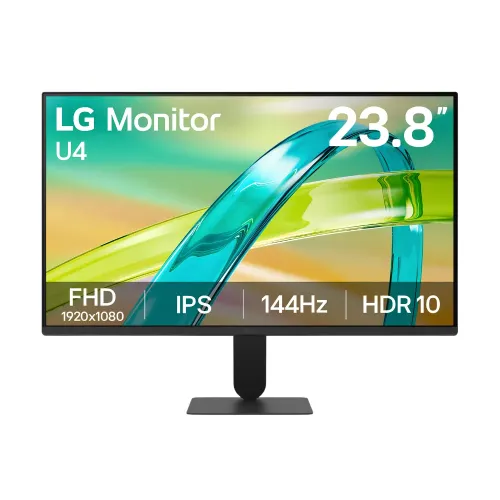
The LG 24U411B-B is a 23.8-inch Full HD IPS monitor with a 144Hz maximum refresh rate, HDR10 compatibility, AMD FreeSync Premium, HDMI 2.0 and VGA. LG lists 1ms Motion Blur Reduction and 5ms GtG as separate response specifications. Explore its gaming and everyday features, connection limits, mounting details, seller warranty terms and current Bangladesh price range before choosing a listing.
Model overview
The LG 24U411B-B is a 23.8-inch Full HD IPS monitor with a maximum 144Hz refresh rate. LG presents it for a mix of gaming, office work and video use, combining an IPS panel with AMD FreeSync Premium, HDR10 compatibility, and gaming controls such as Dynamic Action Sync and Black Stabilizer. This page identifies the exact 24U411B-B model so it is easier to compare the correct monitor against other LG 24-inch products.
The advertised 1ms and 5ms figures describe different response modes. LG lists 1ms Motion Blur Reduction (MBR) and 5ms gray-to-gray at the Faster response setting. MBR uses a backlight strobing technique to reduce perceived motion blur; it is not the same measurement as GtG response time. LG also states MBR lowers screen luminance, may cause flicker, and cannot run at the same time as adaptive sync or Dynamic Action Sync. Choose the mode that fits the task rather than treating the two numbers as interchangeable.
Display size, resolution and viewing
The panel measures 23.8 inches diagonally and displays 1920 × 1080 pixels in a 16:9 widescreen layout. That Full HD format is common for desktop work, streaming and games, and it is generally easier for a computer to render at high frame rates than a higher-resolution QHD or 4K panel. The 24-inch wording used in retailer titles is a rounded size class; LG’s product page gives 23.8 inches.
LG identifies the panel as IPS and states 178-degree horizontal and vertical viewing angles. Its key specifications list 250 cd/m² typical brightness and sRGB 99% typical color gamut. Bangladesh retailer specification tables also show a 1500:1 contrast ratio; LG’s page consulted for this review does not surface that ratio in its key specification panel, so treat the contrast figure as a retailer-listed specification. Color and contrast perception can vary with viewing position, room light, content and settings.
The monitor supports HDR10 input. HDR compatibility allows supported HDR signals and content to be recognized; it does not by itself promise a particular peak brightness, local dimming, or the impact of a dedicated high-brightness HDR screen. LG also lists HDR Effect as a picture feature. For SDR office work, use the normal picture mode and adjust brightness to the room rather than assuming HDR should always be enabled.
Refresh rate, response modes and gaming
LG lists a maximum refresh rate of 144Hz. A high refresh rate can make pointer movement, scrolling and supported game motion appear smoother when the computer can supply enough frames and the input mode supports the selected setting. Refresh rate and frame rate are related but different: a 144Hz monitor does not make a game render at 144 frames per second. The graphics hardware, game, settings, cable and connection all affect the result.
The manufacturer lists 5ms GtG response time at the Faster setting and a separate 1ms MBR feature. Gray-to-gray describes pixel transitions under the specified test mode. MBR uses a different motion-blur-reduction approach and LG notes that it lowers luminance and may produce flicker. It also disables adaptive sync and Dynamic Action Sync while active. Use MBR only if its motion effect is useful and the brightness and flicker trade-offs are acceptable.
AMD FreeSync Premium can synchronize supported display refresh with compatible graphics output to reduce tearing and stutter within the supported operating range. Dynamic Action Sync is an LG processing feature intended to reduce input delay. Black Stabilizer raises visibility in darker game scenes, and Crosshair overlays an aiming mark. These functions do not guarantee a competitive advantage; their value depends on the game, source and user preferences.
For the 144Hz mode, connect over the listed HDMI 2.0 input, use a suitable cable, install current graphics drivers and select 1920 × 1080 at 144Hz in the operating system. If the high refresh option is missing, confirm that the input and cable are correct, check the source’s output capability, and review the graphics control panel. The VGA input is not identified as the preferred high-refresh path; confirm supported analog modes with the source and the manual.
Color, HDR and everyday picture modes
LG specifies sRGB 99% typical (CIE1931). This is a color-gamut coverage rating, not a factory calibration report or a guarantee of color accuracy for every unit. People doing color-critical work should calibrate the display and use an appropriate color-managed workflow. For everyday browsing, documents, photos and video, the stated gamut provides a broad standard color range for this class of monitor.
The monitor includes Reader Mode, Flicker Safe, Smart Energy Saving and Super Resolution+. Reader Mode adjusts color temperature and brightness for document viewing. Flicker Safe is designed to minimize invisible screen flicker. Individual comfort differs, and these features are not medical treatments. Reduce reflections, position the screen comfortably, and set the brightness to suit ambient light.
LG Switch software can divide the screen into up to six areas, change themes and use mapped shortcuts; LG also describes picture-by-picture and picture-in-picture support in the app section. Software availability and features can change, and the connected devices still need suitable inputs. Auto Input Switch can help when multiple sources are connected. Verify compatibility and the latest application support with LG before relying on a specific workflow.
Ports, audio and device compatibility
The retailer tables identify one HDMI 2.0 input and one D-Sub (VGA) input. HDMI is the primary digital connection for modern computers and is the connection to use when aiming for the full 144Hz mode. VGA is an analog input for compatible legacy systems. A converter may be required for a computer that has only DisplayPort or USB-C; adapters can limit resolution, refresh rate or audio, so check their specifications before purchase.
The specifications list an audio/headphone output and a built-in microphone. They do not list integrated speakers. The audio jack can be used with compatible external audio equipment, while the microphone capability depends on the device connection and operating-system support. A monitor appearing as an audio device in a computer menu does not mean it includes speakers. If sound is important, plan for dedicated speakers or headphones and confirm how the microphone connects on the specific regional model.
Design, stand and mounting
LG describes a slim stand and three-side virtually borderless design. The narrow top and side borders can make a two-screen desk setup look more continuous, though the physical frame and gaps remain visible. Measure the desk and account for the full stand footprint before arranging multiple screens.
LG lists tilt as the stand adjustment. Height, swivel and pivot are not listed in the reviewed specification. For more ergonomic movement, a compatible monitor arm may help. Bangladesh retailer listings specify 100 × 100mm VESA mounting. Check that the bracket supports this pattern and the monitor’s weight, use the correct hardware, and follow the installation instructions.
Retailer dimensions list approximately 539.4 × 412 × 220mm with the stand and 539.4 × 317.1 × 38.7mm without it. Listed weights are 3.2kg with the stand and 2.3kg without. These are useful desk and mount planning references; check the included product manual for final clearances and handling guidance. The black finish gives it a neutral appearance across home, study and office setups.
Power, setup and care
Retailer specification tables list an external power adapter and 100–240V, 50/60Hz input. They also list power consumption below 0.5W in sleep mode and below 0.3W when DC off. Use the supplied adapter and check the rating label before reconnecting after a move. Do not substitute an adapter with a different voltage or connector. Keep the power unit ventilated and route its cable so it does not strain the monitor connection.
For first setup, attach the stand securely or use a rated 100 × 100mm VESA arm. Connect the power adapter and the appropriate video cable, choose the matching input, and set the computer to 1920 × 1080. Then choose 144Hz if the source and cable support it. Adjust tilt, brightness and picture mode to the room. If the display is blank, check power, input selection, cable seating and the computer’s output mode before concluding that the monitor has a fault.
Keep the panel clean with the display switched off and a soft dry cloth, following the supplied manual. Avoid pressing on the LCD surface or spraying liquid directly onto it. Store the box and invoice, record the model and serial number, and keep the adapter with the product. These steps make routine setup and a later warranty enquiry easier.
Warranty, current seller prices and buying checks
At the time of this check, PQS displayed the exact model as in stock at ৳14,200. Star Tech and Tech Land displayed ৳14,499 and marked the product In Stock. These retailer listings support an approximate Bangladesh market range of ৳14,200–৳14,499. Prices, discounts and stock can change. This estimate is informational only; it is not a live BiponiBD store offer or an LG-set MSRP. Confirm delivery fees, payment method, stock and final checkout amount with the chosen seller.
Star Tech, Tech Land and PQS each displayed a three-year warranty for the listing reviewed. Warranty service and exclusions are set by the seller or authorized local channel and may depend on the invoice, serial number, registration and region. The LG manufacturer product page confirms a warranty-support section but does not establish the local seller terms shown on these listings. Ask the selected seller to confirm the service provider, coverage period, dead-pixel policy and exclusions in writing before payment.
Before buying, match 24U411B-B on the carton and invoice; confirm the included stand, power adapter and cables with the seller; verify your computer has a suitable HDMI output for the desired refresh; and decide whether you need built-in audio. This model is not listed with integrated speakers, height adjustment, USB-C or DisplayPort. Buyers needing those features should compare an alternative model.
Key features
- 23.8-inch IPS display with Full HD 1920 × 1080 resolution
- 144Hz maximum refresh rate for compatible HDMI 2.0 sources
- 5ms GtG at Faster response mode; separate 1ms Motion Blur Reduction (MBR) mode
- HDR10 compatibility and typical sRGB 99% color gamut
- AMD FreeSync Premium support for compatible graphics hardware
- Three-side virtually borderless screen and slim stand base
- Dynamic Action Sync, Black Stabilizer and Crosshair gaming features
- HDMI 2.0 and D-Sub (VGA) video inputs
- 3-pole headphone audio output; built-in microphone listed by retailers
- Reader Mode, Flicker Safe, Smart Energy Saving and LG Switch app
- Tilt adjustment and 100 × 100mm VESA mounting pattern
- External power adapter; 100–240V, 50/60Hz input
Advantages
- 144Hz refresh is higher than a standard 60Hz display and can make supported motion look smoother.
- IPS panel, 178° stated viewing angles and sRGB 99% typical gamut suit general viewing and color-rich everyday content.
- HDMI 2.0 and VGA cover both common digital and legacy analog computer outputs.
- FreeSync Premium, Dynamic Action Sync and Black Stabilizer offer useful gaming settings when the source supports them.
- 100 × 100mm VESA mounting, tilt adjustment and a slim three-side border give flexible desk or arm placement.
Points to consider
- The native resolution remains Full HD; buyers needing a higher-resolution workspace should compare QHD or 4K displays.
- The 1ms figure refers to MBR mode, while LG separately lists 5ms GtG at Faster; MBR can reduce luminance and disables adaptive sync/DAS while active.
- Brightness is 250 cd/m² typical, so strong direct light or reflections may affect visibility.
- The built-in microphone and headphone output do not mean the monitor has built-in speakers; separate audio may be needed.
- The stand lists tilt adjustment only; height, swivel and pivot adjustment are not specified.
Frequently asked questions
What is the screen size and resolution?
LG identifies the panel as 23.8 inches with a 1920 × 1080 Full HD resolution and 16:9 aspect ratio. Retailers sometimes round the class size to 24 inches.
Does the LG 24U411B-B support 144Hz?
Yes. LG lists a maximum 144Hz refresh rate. Select a compatible source, HDMI connection and display mode in the computer settings.
Is the response time 1ms or 5ms?
They refer to different modes: LG lists 1ms Motion Blur Reduction (MBR) and 5ms GtG at Faster. MBR is a blur-reduction feature, not the same measurement as GtG response time.
What happens when 1ms MBR is enabled?
LG notes that MBR lowers luminance, can cause flicker, and cannot be used simultaneously with adaptive sync or Dynamic Action Sync.
Does it support HDR?
The model supports HDR10 input. HDR compatibility alone does not establish a particular peak brightness or guarantee the impact of a higher-end HDR display.
Does it support AMD FreeSync?
Yes. LG lists AMD FreeSync Premium. The feature depends on a compatible graphics source and supported connection/settings.
Which video ports are available?
The Bangladesh retailer specification lists one HDMI 2.0 input and one D-Sub (VGA) input. Check the exact unit and cable requirements before ordering.
Does the monitor have speakers?
The reviewed model specifications list a headphone/audio output and a built-in microphone, but do not list built-in speakers. Plan separate speakers or headphones if needed.
Can it be wall-mounted?
Retailer specifications list a 100 × 100mm VESA pattern. Use a compatible mount rated for the monitor and follow its installation instructions.
Can the stand be adjusted?
LG lists tilt adjustment. Height adjustment, swivel and pivot are not listed for this model.
What is the warranty?
Star Tech and Tech Land list three years, and PQS also lists three years. Warranty service is seller/channel-specific; confirm the exact terms and service provider on the invoice.
What is the current Bangladesh price?
The checked seller listings showed ৳14,200 at PQS and ৳14,499 at Star Tech and Tech Land. These are retailer prices, not a live BiponiBD offer, and may change.
Confirm stock, included accessories, warranty and the final price with the selected seller.