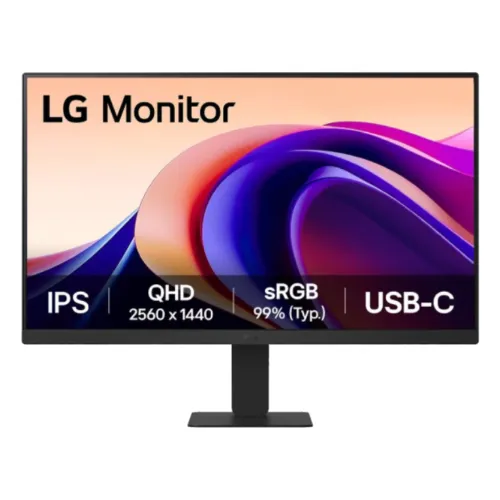
LG 24U631A-B overview
The LG 24U631A-B is a 23.8-inch QHD monitor built around a flat IPS panel with a native resolution of 2560 × 1440 and a maximum refresh rate of 100Hz. Its 16:9 screen combines a compact footprint with more pixels than a Full HD display of the same size. LG lists 250 cd/m² typical brightness, 1000:1 typical contrast, 99% typical sRGB coverage, HDR10 support and a 5ms gray-to-gray response time under the Faster response setting. Connectivity includes one HDMI input, one USB Type-C port with DisplayPort Alternate Mode and up to 15W power delivery, plus a three-pole headphone output. The USB-C connection can carry a compatible laptop’s video signal and provide modest charging, but 15W is not a replacement for a typical laptop charger. This is an everyday work and home monitor with a useful high-resolution picture, not a high-brightness HDR display or a full-power docking station. This buyer guide explains the model’s verified specifications, practical limits, setup needs, and what buyers in Bangladesh should check before ordering.
QHD resolution and pixel density
The 24U631A-B displays 2560 × 1440 pixels in a 16:9 format. At 23.8 inches, this works out to roughly 123 pixels per inch, with an approximate pixel pitch of 0.206 mm. Compared with a 23.8-inch Full HD monitor, QHD places more pixels into a similarly sized area. Small text, detailed spreadsheets, code, maps and high-resolution photographs can appear more defined, while the physical display remains compact enough for a typical study or office desk. The additional desktop space can also help when arranging two application windows side by side. Operating-system scaling affects how much content fits and how comfortably it reads; users with visual preferences can choose a larger scale without losing the panel’s native detail. To use the full 2560 × 1440 resolution at 100Hz, the computer, graphics driver, cable and selected input mode all need to support that output.
IPS panel, viewing angles and surface
LG specifies an In-Plane Switching panel with horizontal and vertical viewing angles of 178 degrees at a contrast threshold of 10:1. IPS technology is useful when the display is viewed slightly off-center or shared during a presentation, though image appearance still changes with angle and room lighting. The panel is flat and uses an anti-glare surface treatment. This can diffuse reflections from common indoor lighting, but it does not make the monitor reflection-proof in strong sunlight or under a bright lamp placed directly behind the viewer. A typical contrast ratio of 1000:1 is listed, with 700:1 minimum. These are static contrast specifications; they should not be confused with dynamic processing values used by some marketing material. For comfortable daily use, position the screen so that the top portion is near eye level and adjust tilt to reduce glare.
Brightness, color and HDR10
The product specification gives a typical brightness of 250 cd/m² and a minimum of 200 cd/m². That is a common level for indoor office, study and home use. In a bright room, placing the screen away from direct sunlight and adjusting room lighting will matter. LG lists sRGB coverage of 99% typical and 95% minimum, supporting a broad range of everyday web, document and media colors. The monitor supports 16.7 million colors in 8-bit output. A gamut percentage describes the range of colors, not a factory-calibration certificate or guaranteed color error. People doing print-critical or paid color work should use a calibrated, color-managed setup and confirm that the specific unit meets their requirements. HDR10 and HDR Effect are listed, which means compatible HDR content can be accepted and processed. The 250-nit brightness and typical IPS contrast are modest compared with high-end HDR displays that use stronger peak brightness and local dimming. Treat HDR10 as format support, not a promise of reference-grade highlight intensity.
100Hz motion and 5ms response setting
LG specifies a maximum refresh rate of 100Hz for the native QHD mode and a 5ms GtG response time under the Faster response setting. A 100Hz refresh can make pointer movement, window animations, scrolling and compatible games feel smoother than 60Hz, provided the computer can deliver the selected mode. The 5ms response figure is tied to a specific overdrive setting and testing method; it does not mean every pixel transition takes exactly five milliseconds in every situation. More aggressive response settings can introduce visible artifacts on some displays, so users should choose the option that looks cleanest to them. This monitor is not advertised as a high-refresh esports screen. It offers a balanced refresh rate for general productivity and casual gaming while preserving QHD detail. Verify the active refresh rate in the operating system after connecting, especially when using a dock or adapter.
USB-C video and 15W power delivery
One USB Type-C port supports DisplayPort Alternate Mode video and up to 15W of Power Delivery charging. With a compatible laptop that outputs display over USB-C, one cable may carry the video signal and provide a small amount of power. However, 15W is low for most laptops under active use. It may maintain or slowly charge some low-power devices, but many notebooks require a 45W, 65W or higher charger. The port should not be described as a full-power docking solution or as a USB hub unless a verified specification lists additional USB data ports. Check the laptop’s USB-C capabilities: a connector that physically fits does not guarantee DisplayPort video output. If the computer cannot send video over USB-C, use HDMI instead. The catalog’s corrected summary describes the 15W limit clearly so buyers do not assume the monitor replaces their laptop power supply.
HDMI, headphone output and audio
The monitor has one HDMI input, specified as HDMI 2.0 in the catalog source data, and one USB-C video input. LG lists a three-pole headphone-out jack for sound only. This is an audio output; it is not a microphone input. The monitor has no built-in speakers and no built-in microphone. Connect headphones or external speakers to the monitor’s audio output when the video source sends audio through HDMI or USB-C, or connect them directly to the computer. The product does not include VGA/D-Sub. This matters when connecting older desktop computers or office equipment: they may require a suitable active adapter, and an adapter can affect supported resolution and refresh. Confirm which cable is supplied in the exact Bangladesh retail package because accessories can vary by regional SKU and seller.
Ergonomics, VESA mounting and placement
The standard stand supports tilt from -5 to +20 degrees. The current product information does not establish stock stand height adjustment, swivel or portrait rotation, so buyers should not expect those movements. The monitor supports a 100 × 100 mm VESA mounting pattern, making compatible arms or wall brackets an option. Check the stand-removal method and screw requirements in LG’s manual before mounting. Its 23.8-inch diagonal makes it easier to place on a narrow desk than a larger display, while the VESA option can free desk space. Measure the available width, depth and height, including room for cables and the stand base. Exact unit weight and dimensions were not verifiable from the supplied product record during this review, so those shipping fields remain blank rather than being estimated from another regional variant.
Flicker reduction and comfort features
The catalog and manufacturer material list Flicker Safe and Reader Mode features. These are display functions intended to support comfortable viewing under particular brightness and color settings. They do not guarantee that every person will avoid eye strain, and they do not replace normal breaks, readable text sizes, suitable room lighting or correct posture. Reader Mode typically changes the image presentation to suit reading, so users doing color-sensitive work should review how it affects the picture. The anti-glare panel treatment may help in ordinary rooms, although placement remains important. If you are sensitive to display characteristics, evaluate the monitor at a comfortable distance and use settings that feel natural for your work.
Bangladesh price, regional part and warranty
The catalog’s existing variant price is ৳28,700, and its saved local-market snapshot ranged from ৳28,700 to ৳29,300. That price record was captured earlier and should be treated as an indicative reference, not a live quote. Retail stock, current promotional prices, warranty providers and regional SKUs may change. LG identifies the base model as 24U631A-B; suffixes such as 24U631A-B.ATRQ or 24U631A-B.AEUQ identify regional distribution variants. The exact suffix and physical box barcode for the unit being shipped are not shown in the catalog snapshot, so the product-level GTIN is left blank rather than assigning a barcode that may not match the local batch. Confirm the complete model code, invoice, seller’s official warranty terms, stock and final checkout price before purchase. The current catalog warranty label says three years; its local terms should be confirmed with the seller for the exact unit.
Who should choose this monitor
The LG 24U631A-B is a good candidate for someone who wants a compact 23.8-inch workspace with QHD detail, IPS viewing angles, 100Hz motion and a USB-C video connection that also offers limited 15W charging. It can suit study, office documents, browsing, coding, light content work and everyday entertainment. It is especially practical for a compatible laptop user who wants a single USB-C video cable while keeping the original laptop charger available. Consider another model if you need built-in speakers, a microphone, VGA, multiple HDMI inputs, stronger laptop charging, a USB hub, a highly adjustable stand or brighter HDR performance. Buyers should match the input to their computer, understand the 15W USB-C limit, and verify the regional suffix and warranty before paying.
Buying checklist and setup
Before checkout, confirm that the product label reads LG 24U631A-B and ask which regional suffix is being supplied. Verify that the quoted price matches the seller’s current stock and note the warranty provider and coverage on the invoice. If using USB-C, check that the computer supports DisplayPort Alternate Mode and understand that the monitor provides up to 15W rather than full laptop charging. If using HDMI, ensure the graphics output and cable support QHD at the desired 100Hz mode. Choose headphones or external speakers if audio is needed, because the monitor has no internal speakers. For an arm, check compatibility with the 100 × 100 mm VESA pattern and the monitor’s manual. After installation, select 2560 × 1440 and 100Hz in the operating system, set text scaling for comfort, and adjust brightness for the room. Save the packaging and serial-matched invoice for any warranty claim.