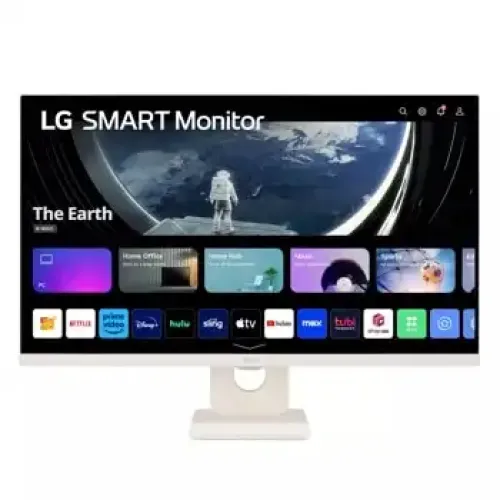
LG 27SR50F-W Smart Monitor overview
The LG 27SR50F-W is a 27-inch Full HD IPS smart monitor that combines a conventional display with LG webOS 23 streaming and connected-home features. Its 1920 × 1080 panel, 60Hz refresh and 14ms typical response are aimed at office work, browsing, online meetings, streaming and casual gaming. LG's exact-model page lists HDR10, stereo speakers, two HDMI inputs, two USB ports, AirPlay 2, Screen Share, Bluetooth, ThinQ Home Dashboard and support for a Magic Remote. The catalog name and model code match the product. The five catalog pictures show its white monitor body and webOS home screen, while the manufacturer page describes the platform features. This monitor can work independently for supported streaming apps after network setup, or connect to a computer or console over HDMI.
Full HD picture and IPS viewing
The native resolution is Full HD 1920 × 1080 in a 16:9 aspect ratio. On a 27-inch screen, this gives a large viewing area for documents, browser pages, presentations, online classes, video calls and entertainment. The IPS panel is specified with a 178-degree horizontal and vertical viewing angle; this is a nominal viewing characteristic and does not mean brightness and color remain identical from every position. LG and local listings identify anti-glare surface treatment and typical brightness of 250 cd/m², with a typical contrast ratio of 1000:1. Adjust brightness for the room and avoid strong light reflecting directly from the panel. Full HD content maps naturally to the native resolution; higher-resolution source video is scaled for the monitor rather than shown pixel-for-pixel at 4K.
Smart webOS 23 functions
webOS 23 supplies the monitor's smart-TV style home interface and supported streaming apps. The home screen can organize media services and connected inputs, while internet access and individual app subscriptions may be required for streaming. LG lists ThinQ Home Dashboard for compatible smart-home devices and support for a Magic Remote. Check the exact regional package to see whether a remote is included and which buttons or functions are supported in Bangladesh. App catalogs and service availability can vary by country and can change over time; the monitor does not guarantee every service is available in every region. These smart features let the display work without leaving a computer connected for every task, but a PC can still be used as a source for software or services that are not available on webOS.
Wireless sharing and connected devices
LG lists Apple AirPlay 2, Screen Share, and Bluetooth for compatible devices. AirPlay 2 can let supported Apple devices share or stream content to the monitor over a compatible network. Screen Share provides wireless mirroring for supported devices. Bluetooth can pair compatible peripherals or audio devices according to the available feature and regional software. Wi-Fi and internet access support the smart platform, but wireless casting depends on compatible operating systems, network setup, app support, and firmware. A wireless feature is not the same as a wired video input and may introduce latency or quality changes. For presentations, meetings, and casual media, wireless sharing can reduce cable changes; for timing-sensitive gameplay, use a direct HDMI connection. LG ThinQ device integration requires compatible products and account or network setup where applicable.
HDR10 and everyday image modes
The monitor supports HDR10 according to LG. HDR10 is a content and signal format; this label alone does not promise a particular peak-brightness certification. LG lists 250 cd/m² typical brightness and a 1000:1 typical contrast ratio, so buyers should consider those figures when setting expectations for HDR highlights and dark scenes. Compatible HDR content and a source configured for HDR are necessary. LG also lists Reader Mode, Flicker Safe and picture-control features. Reader Mode changes the image for text-heavy use, while picture modes let users select a look suited to a task. Results depend on the source, settings, room lighting, and content mastering. If colors look too warm or too cool, compare the available picture modes rather than assuming the source file is wrong.
60Hz refresh and response time
The exact model is listed at 60Hz maximum refresh with a 14ms typical response time by LG and Bangladesh sellers. It is suited to office work, streaming and casual games, but it is not a high-refresh esports monitor. A compatible computer or console can output up to the monitor's supported refresh rate over its digital input. Smoothness in a game still depends on the source frame rate, game settings, and system performance. Response-time figures can use different measurement methods, and the 14ms typical figure should not be compared directly with gray-to-gray figures from other models unless the test method is the same. Buyers prioritizing fast competitive play should compare a monitor with a higher refresh rate and response characteristics that match their games.
Ports, speakers and wired setup
LG's official exact-model listing specifies two HDMI inputs and two USB ports, along with integrated stereo speakers rated at 5W per channel and a headphone connection depending on regional I/O configuration. HDMI can connect a computer, console, set-top box or other supported source. The USB ports support compatible USB functions; confirm any accessory or service requirements in the manual. The built-in speakers provide convenient sound for streaming, calls and basic listening, while headphones or external speakers may suit music and fuller audio. A local Bangladesh retailer page differs from LG by listing one HDMI, one USB-A and no speaker, so verify the physical port layout and package of the exact imported unit with the seller before purchase. The rear catalog image shows a vertical group of connectors, consistent with the richer manufacturer configuration, but does not replace checking the unit label.
Eye comfort and daily use
LG lists Flicker Safe and Reader Mode, and Bangladesh listings also describe low-blue-light or anti-glare features. These tools can change the display for reading or extended screen use, but comfort depends on the individual and the environment. Set brightness to a level that fits the room, keep a comfortable viewing distance, reduce reflections and take regular breaks. An anti-glare surface can diffuse reflections but cannot eliminate direct sunlight or a lamp pointed at the panel. Reader Mode may change the color temperature and appearance of white backgrounds; switch back to a normal picture mode when color work or media viewing matters. Eye-care features are useful settings to explore, not a guarantee that every user will avoid fatigue.
Stand, tilt and mounting
The supplied stand supports tilt adjustment. LG product pages and local listings show no height adjustment, so users who need a higher screen position can consider a compatible riser or monitor arm. The VESA mounting pattern is 100 × 100mm. Check arm load rating, screw depth, installation instructions and cable clearance before attaching the monitor. The white housing and stand shown in the catalog images distinguish this -W finish from black alternatives. LG lists physical dimensions of 611.8 × 450.9 × 209.9mm with the stand and 611.8 × 370.9 × 45.1mm without it, with net weight about 5.6kg including the stand and 4.4kg without. The seller carton may list gross weight and package size separately; do not confuse them with the operating monitor.
Power, included items and warranty
LG specifications list approximately 25W power consumption and an external power adapter, with 100–240V, 50/60Hz mains input. Package contents vary by market. LG's US page lists a remote-control capability, and local retailers describe HDMI cable or remote accessories differently; confirm the sealed box contents with the Bangladesh seller. The existing catalog states a three-year warranty, and several local retailer pages also list three years. Warranty coverage can differ by importer, seller, panel policy, service location and excluded accessories. Ask for written warranty details and keep the invoice and serial number. Before accepting delivery, verify the model label says 27SR50F-W, check the display and ports, confirm the included power adapter, and test the chosen HDMI input and smart setup while the seller's return period is active.
Price and seller checks in Bangladesh
Listings checked on 5 November 2026 showed advertised prices including ৳41,500 at BME, ৳44,900 at Tech Link, ৳45,500 at TechLand, and roughly ৳45,900 at PCB Store, which showed the model out of stock. Star Tech's page showed a ৳45,500 headline while an older embedded text block mentioned a different price; for that reason the comparison range uses other clearly stated seller prices and remains only a market snapshot. Offers, stock, delivery, VAT, payment method and bundle contents may change. The existing catalog variant MSRP of ৳45,500 remains unchanged. Confirm the final price, stock, exact region version, ports, remote, cables and warranty directly with the retailer before ordering.
Who should choose the 27SR50F-W
The 27SR50F-W can suit people who want a single display for office tasks and streaming, prefer smart apps without a permanently connected computer, or need wireless screen sharing for compatible phones and laptops. Its IPS viewing angle, Full HD resolution, 60Hz refresh, built-in stereo speakers and webOS platform address everyday use. It may not suit buyers who require 4K detail, USB-C docking, ergonomic height adjustment, high-refresh competitive gaming or HDR performance above the stated brightness. The smart app experience also depends on region and internet access. Compare the exact connection count, included remote, and local warranty because seller specifications do not fully agree with LG's own exact-model page. These checks help make sure the product matches the desk, source devices and services the buyer plans to use.
Summary
LG 27SR50F-W is a 27-inch Full HD IPS smart monitor with webOS 23, 60Hz refresh, HDR10, wireless sharing features and integrated speakers. LG's exact-model page lists two HDMI inputs and two USB ports, while one Bangladesh listing differs on ports and speaker availability; buyers should confirm their unit's regional configuration before checkout. The monitor also offers Reader Mode, Flicker Safe, VESA 100 × 100mm mounting and a tilt-adjustable stand. It is designed for streaming, office work and casual media use rather than high-refresh gaming. A current local seller price snapshot, warranty and included accessories should be verified with the chosen retailer. Catalog model, MPN, descriptions, structured features and image alt text have been normalized against the official model details and the images present in the product listing.