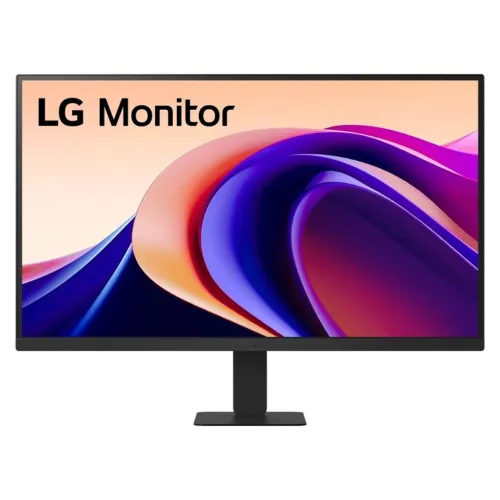
LG 27U631A-B 27-Inch QHD 100Hz IPS USB-C Monitor: Complete Buying Guide
Who this monitor is for
The LG 27U631A-B is a 27-inch QHD display for buyers who want more desktop space and sharper text than a Full HD office screen, while keeping the cost and graphics demands below a 4K monitor. Its 100Hz IPS panel, USB-C input, and 99% sRGB typical coverage fit mixed office, study, browsing, coding, and general creative workloads. The flat matte panel and three-side virtually borderless design also work well in a two-monitor workspace. It is not a specialist HDR monitor or an all-in-one laptop dock: brightness is 250 cd/m² typical, there are no speakers, and USB-C delivers up to 15W. Buyers should compare these practical limits alongside the resolution and refresh rate.
QHD resolution and workspace
The panel displays 2560 × 1440 pixels in a 16:9 format. That is 3,686,400 pixels, roughly 1.78 times the pixel count of 1920 × 1080 Full HD. At 27 inches, the stated pixel pitch is approximately 0.2331mm and density about 108.8 pixels per inch. The result is more room for two windows, a code editor beside a preview, spreadsheets with additional columns, or a 1440p video timeline. QHD can render fine text more cleanly than 27-inch Full HD, while avoiding the scaling and graphics load that some users encounter with 4K. Set the computer to the native resolution for the clearest interface.
IPS image, colour and brightness
LG specifies an IPS LED-backlit LCD with 178-degree horizontal and vertical viewing angles, a 1000:1 typical contrast ratio (700:1 minimum), and 99% sRGB coverage typical under CIE1931. These characteristics make the display useful for shared viewing, web graphics, UI work, and everyday photo review. The typical brightness is 250 cd/m², with a 200 cd/m² minimum; it is intended for indoor environments rather than bright direct sunlight. The anti-glare coating helps reduce reflections but does not eliminate them. Colour-gamut coverage alone does not guarantee colour accuracy, so print production or colour-critical work should include calibration and verification against the specific workflow.
100Hz refresh and response settings
A 100Hz refresh rate can display up to 100 updates per second when the computer provides a compatible signal. This makes routine pointer movement, scrolling, window transitions and timeline navigation feel smoother than 60Hz. LG lists a 5ms grey-to-grey response time with the Faster setting; actual perceived motion clarity also depends on content, refresh rate, response-time tuning and the graphics source. The monitor is suitable for casual play and general entertainment, but its key strengths remain QHD productivity and smooth everyday operation. If a game console or PC is connected over HDMI or USB-C, check that the device output and operating-system display settings select the resolution and refresh rate you expect.
HDR10 and realistic expectations
HDR10 support allows the monitor to accept a compatible HDR signal. It can be useful when viewing HDR-labelled video or games, but HDR support by itself does not establish high dynamic range image performance. The 27U631A-B is rated at 250 cd/m² typical brightness and does not list local dimming, so highlights and contrast cannot match high-brightness displays with dedicated HDR backlights. Treat HDR10 here as signal compatibility and tone mapping, not as a promise of cinematic peak brightness. For standard desktop work, SDR mode may provide the most predictable appearance. Choose a higher-tier HDR monitor if sustained high brightness, local contrast control or HDR grading is a core requirement.
USB-C, HDMI and audio routing
The rear connection panel has one HDMI 2.0 input, one USB Type-C port with DisplayPort Alternate Mode and up to 15W Power Delivery, a 3.5mm headphone/audio output, and DC input. A compatible laptop can send video over USB-C and receive up to 15W, which can reduce cable clutter and help power phones or tablets. Fifteen watts is not a full laptop charging solution for most notebooks, particularly during demanding work; keep the computer’s own charger attached. HDMI is the straightforward option for desktops, consoles and media devices. There is no VGA, separate DisplayPort, built-in speaker, microphone or downstream USB-A hub. Use external audio equipment through the computer or 3.5mm output.
Gaming functions and connection accuracy
LG includes Dynamic Action Sync to reduce processing delay and Black Stabilizer to reveal detail in darker scenes. These functions can help with casual games, while the 100Hz panel and 5ms GtG setting support responsive motion. Dynamic Action Sync is an LG feature and should not be described as NVIDIA G-SYNC. The reviewed manufacturer specifications do not certify this model for G-SYNC, so buyers who need a named adaptive-sync technology should verify that requirement with LG before choosing. Avoid relying on generic retailer checkbox tables for ports or gaming functions: some may show a VGA connector or microphone that the official model-specific rear I/O diagram does not show.
Eye comfort for long sessions
The monitor uses an anti-glare surface and includes LG Flicker Safe and Reader Mode settings. Reader Mode adjusts the screen presentation for reading, while Flicker Safe is intended to reduce visible and imperceptible flicker associated with backlight control. The practical comfort of any display depends on room lighting, brightness, viewing distance, text size and breaks. Start with brightness matched to the room, position the screen to avoid reflections, and use the stand tilt to keep the viewing angle comfortable. These features are display settings rather than medical treatment and do not guarantee prevention of eye strain. Color Weakness mode is also listed by LG for users who want adjusted colour differentiation.
Stand, VESA mounting and physical fit
The supplied crescent-base stand supports tilt from -5° to +20°. It does not provide height, swivel or portrait adjustment, so users needing those movements should budget for a separate arm. The monitor supports the standard 100 × 100mm VESA pattern. LG lists dimensions of 613.2 × 454.8 × 215.0mm with stand and 613.2 × 362.5 × 43.7mm without stand; weights are 4.4kg and 3.8kg respectively. Check desk depth, clamp clearance, cable routing and arm load rating before mounting. The retail carton is 690 × 450 × 140mm with a listed gross shipping weight of 5.7kg, useful for delivery planning.
Power, software and daily operation
The 27U631A-B uses an external adapter and supports 100–240V AC at 50/60Hz, suitable for the common voltage range. LG lists power consumption figures that vary by operating condition; confirm the regional manual and energy label for the exact mode-specific values. LG Switch software provides supported layout and device-control functions on compatible systems. Its usefulness depends on the computer, operating system, permissions and software version, so treat it as an optional convenience rather than a requirement for using the monitor. Basic display operation uses the monitor controls and standard HDMI or USB-C video; the core QHD and 100Hz functions do not depend on a proprietary desktop app.
Buying checklist and Bangladesh warranty
The catalog price for the variant is ৳31,700. Reviewed local retailers listed prices around ৳31,500–৳32,300 and a three-year warranty, but stock, promotional prices, service terms and included accessories can change. Before ordering, confirm the exact 27U631A-B model code on the invoice, that the package is new and sealed, the warranty provider and coverage period, dead-pixel or replacement terms, and whether the required HDMI or USB-C cable is included. Keep the invoice and warranty documentation. No barcode, GTIN or country-of-origin evidence was available in this product batch, so those identifiers remain blank rather than being guessed. Compare the model code carefully with the smaller 24U631A-B and other LG 27-inch monitors.
Final fit summary
Choose the LG 27U631A-B if you want a QHD 27-inch IPS workspace, 100Hz refresh, useful sRGB coverage, USB-C display input and VESA mounting in one monitor. It is especially balanced for office work, study, programming, browsing, general design and casual entertainment. Plan for its tilt-only stand, modest 15W USB-C power, 250-nit typical brightness, and the need for external speakers or headphones. It has no VGA or separate DisplayPort input. Buyers looking for full laptop docking, high-impact HDR, factory-certified colour workflows, built-in audio, height-adjustable ergonomics or a specific adaptive-sync certification should compare alternatives before purchase. Verify final price and three-year local warranty conditions with the seller.
Technical specifications at a glance
- 27-inch IPS LED LCD, QHD 2560 × 1440, 16:9, 100Hz
- 5ms GtG (Faster), 99% sRGB typical, 250cd/m² typical brightness
- HDR10 signal support, anti-glare surface, 178° viewing angles
- 1 × HDMI 2.0, 1 × USB-C DP Alt Mode with 15W PD, 1 × 3.5mm audio out
- Tilt -5° to +20°; 100 × 100mm VESA mount; external power adapter
- 613.2 × 454.8 × 215mm with stand; 4.4kg; carton 690 × 450 × 140mm, 5.7kg gross