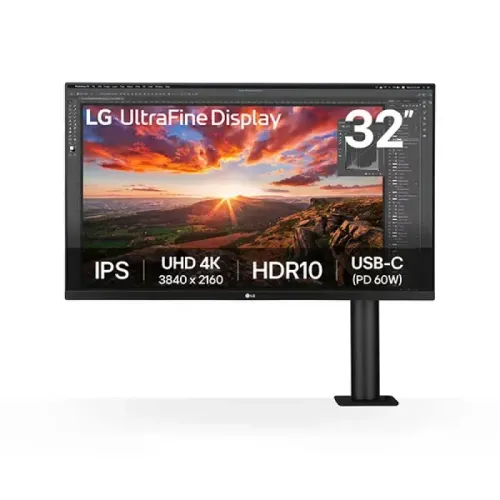
A large 4K IPS workspace
The LG UltraFine Ergo 32UN880K-B is a 31.5-inch viewable monitor marketed in the 32-inch class. It displays 3840 × 2160 pixels in a 16:9 format and refreshes at up to 60Hz. The IPS panel has a pixel pitch of approximately 0.18159mm and density near 140 pixels per inch. This combination suits document work, spreadsheets, photo review and a broad desktop workspace, while interface scaling can be adjusted for comfortable text size.
LG specifies a 5ms gray-to-gray response time at its Faster response setting. This rating is tied to a monitor setting and does not describe every pixel transition under every condition. The display is designed primarily for productivity and creative work rather than high-refresh competitive gaming. Its anti-glare surface helps reduce common room reflections, though direct sunlight and bright windows can still reflect from the screen.
The 31.5-inch panel measures approximately 714.3mm across and can show detailed 4K content when the connected computer supports the required output. Use a compatible HDMI 2.0, DisplayPort 1.4 or USB-C DisplayPort Alt Mode connection. Cable quality, graphics hardware, operating system and display settings all influence whether 3840 × 2160 at 60Hz is available.
Factory color and DCI-P3 coverage
LG lists DCI-P3 coverage of 95% typical and 90% minimum using the CIE 1976 measurement. The panel supports approximately 1.07 billion colors through 10-bit output implemented as 8-bit plus frame-rate control. LG states that each display is factory color calibrated and includes a calibration report. This helps establish the initial color state, but production results still depend on picture mode, software color management, ambient conditions and the individual workflow.
The model is hardware calibration ready and can be used with LG True Color Pro software and a compatible measurement device. A calibration workflow can be useful when consistent output matters, but it requires suitable equipment and supported software. For web work, check sRGB behavior and content management; for video or print, use the color space and profile requested by the client or delivery platform.
The monitor includes HDR10 support and an HDR Effect picture feature. Brightness is listed at 350cd/m² typical and 280cd/m² minimum, with typical contrast of 1000:1 and minimum contrast of 700:1. HDR10 compatibility does not imply local dimming or a high-tier HDR certification. Brightness and contrast ratings vary with mode and test conditions, and HDR picture appearance depends on source mastering, player, operating system and room lighting.
LG Ergo articulated desk arm
The included LG Ergo arm is the model’s defining physical feature. It attaches with a C-clamp to a compatible desk edge or through a supported grommet opening. The articulated stand supports 0–180mm extension and retraction, up to 280 degrees of swivel in either direction, 0–130mm height adjustment, 90-degree counter-clockwise pivot and tilt from −25 to +25 degrees. The arm lets users position the screen over the desk and move it back when more work surface is needed.
The clamp requires a desk that can safely bear the monitor and arm. Check desk thickness, edge shape, underside clearance, grommet dimensions and any crossbars before installation. Follow LG’s instructions for the included T-bolt and clamp hardware, and route cables through the arm as designed. Do not assume that the articulated arm will attach to every desk or that it includes a conventional flat monitor base.
The panel also has a standard 100 × 100mm VESA mounting pattern for a compatible separate mount. Use a bracket with an appropriate weight rating and the correct screws. The stand is part of the 32UN880K-B product identity; the earlier 32UN880-B is a related but distinct catalog sibling, so use the full suffix for manuals, parts and warranty support.
USB-C single-cable connection and hub
The USB-C input supports DisplayPort Alt Mode video, USB 3.0 upstream data and up to 60W Power Delivery. A compatible laptop can connect the monitor image and USB hub while receiving power through one cable. The host computer must support DisplayPort video and USB-C charging. Sixty watts may be insufficient for some workstation or gaming laptops under heavy load, so check the laptop’s original power requirements before relying on the monitor as its only charger.
Two USB 3.0 Type-A downstream ports provide a convenient place for keyboard, mouse and other accessories. The hub connection uses the USB-C cable to the host. Transfer speeds and device behavior depend on the connected computer and peripherals. The monitor’s supported port set includes two HDMI 2.0 inputs, one DisplayPort 1.4 input, USB-C and a 3.5mm headphone output. HDMI and DisplayPort support 4K UHD up to 60Hz with HDCP 2.2.
The monitor includes a 3-pole 3.5mm headphone jack for audio output. The Type-C video and audio path depends on the host and its settings. If the USB hub is not detected, confirm that the USB-C connection is seated and that the host supports data over that port; a cable used only for charging may not carry data or video.
MaxxAudio speakers and desktop features
Two built-in speakers rated at 5W each use Waves MaxxAudio processing for stereo sound. They can handle meetings, videos and everyday listening without occupying desk space with separate speakers. For critical music work or higher volume and bass, external speakers or headphones may be more suitable. The 3.5mm output can feed compatible headphones. Select the LG monitor as the audio output device in the computer when sound is routed over HDMI, DisplayPort or USB-C.
LG’s on-screen controls include Reader Mode and Flicker Safe functions for adjusting the display to different tasks. Color Weakness Mode can help distinguish selected colors for some users, while Black Stabilizer, Dynamic Action Sync and Super Resolution+ offer additional picture controls. AMD FreeSync support is specified from 40 to 60Hz over HDMI or DisplayPort. These settings complement normal ergonomic and lighting choices and are not a medical claim.
OnScreen Control and LG Switch can provide desktop OSD control, screen layouts and supported workflow functions. Dual Controller can allow compatible computers to share keyboard and mouse input across systems. Availability depends on operating system, installed software, network or USB setup and supported devices. Hardware calibration ready is separate from these utility features and requires compatible calibration hardware and True Color Pro software.
Dimensions, weight and power
With the Ergo arm attached, approximate dimensions are 714.3 × 641.1 × 406.8mm (width × height × depth). The monitor head without the stand measures approximately 714.3 × 420.1 × 45.7mm. The shipping carton is listed at about 821 × 507 × 247mm. Account for the arm’s movement envelope and the desk-edge clamp when planning placement; the screen may extend, retract, pivot and swing across a much larger area than a fixed stand.
The monitor weighs approximately 10.3kg with the Ergo stand and 6.5kg without it. Shipping weight is around 14.6kg. Verify that the desk and clamp area can support the assembled unit, and use care when lifting the large panel. Keep the monitor head protected while attaching or removing the arm. The matte-black bezel, textured rear enclosure and anodized black arm form the listed finish.
Power is supplied by an external 19.5V, 10.8A adapter rated at 210W. Input voltage is 100–240V AC at 50/60Hz. LG lists typical consumption around 55W, maximum consumption around 160W when USB-C Power Delivery and the USB hub are in use, sleep consumption below 0.5W and DC-off consumption below 0.3W. The adapter and DC cable need a safe location with airflow and enough slack for arm movement.
Included accessories and package
The manufacturer package information lists the monitor head and Ergo C-clamp/grommet arm stand, external power adapter and AC cord, a DC extension cable, HDMI cable, 1.8m USB-C cable, individual factory calibration report and quick setup guide. Regional box contents can vary, so inspect the shipped carton and compare the contents with the seller invoice. Keep the calibration report, serial number and purchase documentation for setup and any warranty claim.
Install the arm following the LG manual for the 32UN880K-B. Tighten the clamp and grommet hardware as instructed, route the cables through the arm channel and leave enough slack for the full extension and rotation range. Do not force the joints beyond their stops. If the desk material is fragile or thin, confirm suitability with the desk manufacturer before attaching a heavy articulated monitor arm.
Bangladesh price and warranty
Bangladesh retailer pages reviewed showed offer prices around ৳90,000–৳91,500. Star Tech displayed a special cash price near ৳90,000 against a regular price around ৳97,490; Ryans listed about ৳91,500 against a regular price around ৳99,600; TechLand showed offers around ৳90,000–৳91,000. Seller pages commonly stated three years of warranty. The existing variant MSRP of ৳91,500 is retained while the market range is represented as approximately ৳90,000–৳92,500 based on the checked listings.
Price, stock, payment offers and delivery may change. Confirm the exact 32UN880K-B model suffix on the carton and invoice, whether the item is locally distributed, the warranty provider, service location and claim terms. The earlier 32UN880-B is a separate revision even though its core panel, stand and connectivity are similar; verify the K-B SKU when buying and requesting service.
Who should consider the 32UN880K-B
This monitor may suit a designer, analyst or home-office user who wants a large 4K IPS screen, an adjustable arm that frees desk surface, a one-cable USB-C connection and integrated speakers. Its factory calibration, DCI-P3 coverage, hardware calibration readiness and 10-bit color support can serve color-aware work when used with an appropriate profile and workflow. The Ergo arm is especially useful when the screen needs to move between sitting and standing positions or to clear the desk between tasks.
Before choosing it, check the desk’s edge or grommet compatibility, the laptop’s USB-C video and charging support, whether 60W charging is enough, and whether 60Hz and 350-nit typical brightness meet the intended work. Buyers needing faster gaming refresh, higher HDR brightness, local dimming or a conventional tabletop stand should compare other models. Review current seller stock and written warranty coverage before purchase.