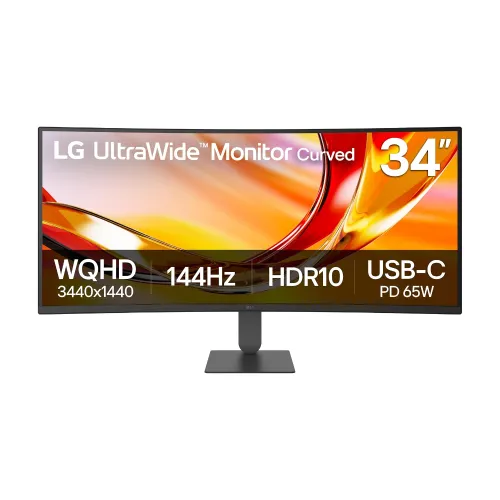
LG 34U640B-B is a 34-inch 21:9 curved UltraWide monitor with 3440 × 1440 WQHD, VA contrast, 144Hz, AMD FreeSync Premium, HDR10 and 99% typical sRGB. Its 1800R screen includes USB-C video and data with up to 65W Power Delivery, two HDMI 2.0 inputs, DisplayPort 1.4, a USB hub, PIP/PBP and Dual Controller support. Compare LG 34U640B-B price in Bangladesh and confirm current seller stock and warranty.
Overview
The LG 34U640B-B is a 34-inch curved UltraWide monitor designed to provide a broad workspace for productivity, media and gaming. Its 21:9 screen uses a native 3440 × 1440 WQHD resolution, which places more horizontal content on screen than a conventional 16:9 monitor. LG pairs a VA panel and 1800R curvature with a maximum 144Hz refresh rate, AMD FreeSync Premium and multiple gaming and eye-comfort features. Its USB-C connection carries DisplayPort video and data while supplying up to 65W to a compatible notebook. The monitor also includes two HDMI inputs, DisplayPort 1.4, a USB hub, PIP/PBP and LG Dual Controller software support. LG's official specification lists typical 99% sRGB gamut, factory calibration and a three-side virtually borderless design. Confirm exact local stock, price and warranty terms before purchase because retailer offers can change.
34-inch UltraWide workspace
The 3440 × 1440 resolution is arranged in a 21:9 aspect ratio. That wider canvas can keep a browser, document, timeline, chat or reference pane visible alongside another application, reducing window switching during compatible workloads. It may suit spreadsheet work, editing timelines, coding, research and broad desktop layouts. Most games and video can run in 21:9 only when the title or player supports ultrawide output; some may show side bars, crop the picture or use a different field of view. The 34-inch diagonal and 1800R curve are best assessed at the intended desk distance. QHD UltraWide has fewer total pixels than 4K UHD, and its width means the graphics card still needs to drive a substantial number of pixels at high refresh.
VA panel, curvature and image
LG lists a VA panel with 1800R curvature, a typical 4000:1 contrast ratio and 178-degree horizontal and vertical viewing angles. The official data lists 300 cd/m² typical brightness and 240 cd/m² minimum brightness. The curved surface can make the far left and right edges feel less distant on a wide desktop, while the high specified contrast supports visible separation between light and dark content. As with any panel, performance can vary with viewing position, room lighting and individual unit characteristics. The official specification does not give a local-dimming system, so contrast claims should not be interpreted as a promise of OLED-like blacks or premium HDR behavior.
Color and calibration
LG lists 99% typical sRGB coverage under CIE1931, 95% minimum and factory color calibration. It supports 1.07 billion colors and features including HDR Effect, Super Resolution+ and Color Weakness mode. These specifications make it suitable for general content creation and web-oriented work, but they do not replace a colorimeter or guarantee accurate output for every individual unit. For production that must match print or other displays, use color-managed software, select a suitable picture mode and verify the monitor with a calibration device. Content made for sRGB should be previewed with the right color profile rather than relying on gamut percentage alone.
144Hz motion and gaming
The maximum refresh rate is 144Hz, with a 5ms GTG response time at the Faster setting. AMD FreeSync Premium and VRR are listed to coordinate compatible graphics output and reduce tearing. Dynamic Action Sync, Black Stabiliser, Crosshair and Auto Input Switch add gaming-oriented controls. Smoothness depends on the PC or console, frame rate, video connection and settings. The 21:9 aspect ratio is not supported by every game or console mode; check the exact title and platform. A competitive player should also consider the stated response-time method, overdrive behavior and personal preference. This monitor's wide format and 144Hz ceiling make it appropriate for a mix of work and supported gaming, rather than a replacement for every specialized esports display.
USB-C and device connections
One USB-C upstream port supports DisplayPort video, data and up to 65W Power Delivery. With a compatible laptop and cable, the display can reduce desk cabling by carrying screen signal and charging through one connection. The official table lists two HDMI 2.0 inputs, one DisplayPort 1.4 input and two USB 3.2 Gen 1 downstream ports. A headphone output is available, but the official specifications do not list integrated speakers. For computers needing more than 65W, keep the original charger connected. If the USB hub or LG Dual Controller is part of the planned workflow, follow LG's connection guide so the USB-C upstream and connected computers are wired correctly.
PIP, PBP and Dual Controller
LG lists Picture-in-Picture and Picture-by-Picture, including a two-source PBP mode. These can be useful when viewing two connected computers at once, though available input combinations and resolutions depend on the model's signal handling. LG Dual Controller software supports controlling compatible computers with a shared monitor, keyboard and mouse and can support file movement between connected systems under its software conditions. LG Switch is also highlighted for screen layouts and picture settings. These capabilities can make the monitor useful for a work laptop and personal desktop, but software, network and USB connections must be configured. Check current manuals and app support for the computer operating systems in use.
Eye comfort and stand
The official page lists Reader Mode, Flicker Safe, Color Weakness and Smart Energy Saving. Reader Mode adjusts picture settings for document use; these features can be useful preferences but do not guarantee protection from eye fatigue. Users should still set comfortable brightness, viewing distance and breaks. LG lists a stand with tilt and height adjustment; its feature page gives -5° to +15° tilt and 80mm height travel. It does not list swivel or pivot. A 100 × 100mm VESA pattern supports compatible arms or wall mounts. The product has a slim stand and virtually borderless design; make sure desk width and depth accommodate the 809.1mm-wide screen and stand footprint.
Power, dimensions and packaging
LG specifies an external power adapter, 100–240V at 50/60Hz, less than 0.5W sleep consumption and less than 0.3W when off. The dimensions with stand are 809.1 × 464.4 × 220mm; without stand 809.1 × 359 × 91.5mm. Listed net weight is 7.7kg with stand and 5.6kg without, with shipping weight 10.4kg. The official page lists HDMI, USB-C and DisplayPort cables among accessories, though accessories may vary by region. Check the box contents and country-specific adapter or warranty details with the local seller before setup.
Bangladesh price snapshot and warranty
On 6 November 2026, Star Tech and Tech Land direct pages both showed the LG 34U640B-B at ৳70,500 and In Stock. Their listed regular prices differed, at ৳75,410 and ৳72,000 respectively. A Google result for Global Brand showed ৳71,000, but its direct page was not inspected in this review. Treat these as a dated comparison, not a guaranteed final sale price. Star Tech and Tech Land list three-year warranty; the manufacturer UK page does not define local Bangladesh coverage. Ask the chosen seller to state the warranty provider, dead-pixel policy, service process, delivery and invoice terms before payment.
Who should consider it
This model may work well for users who benefit from wide horizontal workspace, such as video editors, analysts, office multitaskers, streamers and players whose games support 21:9. USB-C charging, PIP/PBP, Dual Controller, two HDMI inputs and a USB hub help combine several devices. The VA contrast, 1800R curve and high refresh rate suit mixed productivity and entertainment. Consider a 4K model if pixel density is the priority, an IPS monitor if the workflow demands different viewing behavior, higher USB-C power for a demanding laptop, or separate speakers for audio. Also check whether the desk, graphics hardware and game library suit a 34-inch 21:9 panel.
Connection and setup checklist
Before ordering, confirm model 34U640B-B, current price, stock, delivery and the exact three-year local warranty. Measure desk width and viewing distance. Connect through USB-C when the laptop supports video and 65W charging, or use HDMI/DisplayPort for another host. In the operating system, select 3440 × 1440 and enable up to 144Hz if the port and cable support it. Turn on FreeSync/VRR on both compatible graphics hardware and the display as needed. Configure PIP/PBP or LG Dual Controller only after connecting all required sources and USB links. Adjust tilt and height, or use a compatible 100 × 100mm mount. Keep the seller invoice and warranty paperwork.
Key features
- 34-inch 21:9 UltraWide VA display with 3440 × 1440 WQHD resolution.
- 1800R curvature wraps the wide screen around the user's viewing area.
- Maximum 144Hz refresh rate with a 5ms GTG response time at Faster mode.
- LG lists typical 99% sRGB color gamut and factory color calibration.
- 300 cd/m² typical brightness and 240 cd/m² minimum brightness.
- HDR10 and HDR Effect support for compatible content and picture modes.
- AMD FreeSync Premium, VRR, Dynamic Action Sync and Black Stabiliser gaming tools.
- USB-C supports video, data and up to 65W Power Delivery for a compatible notebook.
- Two HDMI 2.0 inputs and one DisplayPort 1.4 input.
- Two USB 3.2 Gen 1 downstream ports, PIP/PBP and LG Dual Controller.
- Reader Mode, Flicker Safe, Color Weakness and Super Resolution+ features.
- Ergonomic stand supports tilt and up to 80mm height adjustment; VESA 100 × 100mm.
Pros
- 34-inch 21:9 QHD format gives broad horizontal workspace for two or more windows.
- 144Hz and FreeSync Premium support smooth compatible gaming and desktop motion.
- USB-C 65W can combine laptop video and charging through one suitable cable.
- Strong VA contrast is specified at 4000:1 typical, with 1800R curvature.
- Two HDMI, DisplayPort, USB hub, PIP/PBP and Dual Controller allow flexible device workflows.
- Star Tech and Tech Land both show the exact model in stock at ৳70,500 in this dated snapshot.
Considerations
- 3440 × 1440 remains below 4K resolution and the 21:9 aspect ratio may be unsupported by some games or video content.
- 65W USB-C may not fully power some performance laptops during heavy workloads.
- The stand offers tilt and 80mm height movement but no swivel or pivot listed by LG.
- No built-in speakers are specified; plan for headphones or external audio.
- HDR10 compatibility is not a premium HDR brightness or local-dimming guarantee.
- Bangladesh prices and availability can change, so confirm the checkout amount and warranty before purchase.
Frequently asked questions
What is the LG 34U640B-B price in Bangladesh?
On 6 November 2026, Star Tech and Tech Land direct product pages each showed ৳70,500 and In Stock. Their regular prices differed: Star Tech ৳75,410 and Tech Land ৳72,000. Global Brand appeared at ৳71,000 in Google results, but that direct page was not checked. Confirm price, stock and delivery before ordering.
What resolution and aspect ratio does it have?
LG specifies a 34-inch screen with 3440 × 1440 WQHD resolution and a 21:9 aspect ratio. This provides a wider desktop than a standard 16:9 display, useful for side-by-side windows and editing timelines.
Is the monitor curved?
Yes. LG specifies an 1800R curvature. A curved wide panel can keep the edges oriented toward the user, but preferred viewing distance and comfort vary by desk and person.
What is the refresh rate?
The maximum refresh rate is 144Hz, and the response-time specification is 5ms GTG at Faster mode. The actual available mode depends on the source, resolution, port, cable and monitor settings.
Does it support USB-C laptop charging?
Yes. LG lists USB-C with DisplayPort Alt Mode, data transfer and up to 65W Power Delivery. The notebook and cable must support USB-C video and charging. A high-power laptop may need its original adapter.
What are the video ports?
LG lists two HDMI 2.0 inputs, one DisplayPort 1.4 input and one USB-C upstream connection. Local seller pages show the same model's HDMI, DP and USB-C configuration.
Does it have built-in speakers?
LG's specification does not list built-in speakers. It lists a headphone output; use headphones or external speakers for audio.
What color gamut and brightness are specified?
LG lists typical sRGB coverage of 99% (minimum 95%), typical brightness of 300 cd/m² (minimum 240 cd/m²), 1.07 billion colors and typical contrast of 4000:1. These are model specifications, not a measurement of an individual unit.
Does it support HDR?
Yes. LG lists HDR10 and HDR Effect. HDR impact depends on the source and content; the 300 cd/m² typical brightness and lack of a local-dimming claim mean HDR10 compatibility should not be treated as premium HDR performance.
Can I use PIP or PBP?
LG lists PIP and PBP, including 2PBP. These modes can show multiple sources, with limits depending on input pairing and resolution; consult the current manual for supported layouts.
What stand adjustments and mount pattern are included?
LG lists tilt and height adjustment, with 80mm height travel and a tilt range of -5° to +15°. It supports 100 × 100mm VESA mounting. Swivel and pivot are not listed in the official specification.
What warranty is available?
The official UK page does not establish Bangladesh warranty terms. Star Tech and Tech Land list a three-year warranty. Confirm the local warranty provider, coverage, dead-pixel conditions, invoice requirements and claim process with the Bangladesh seller.