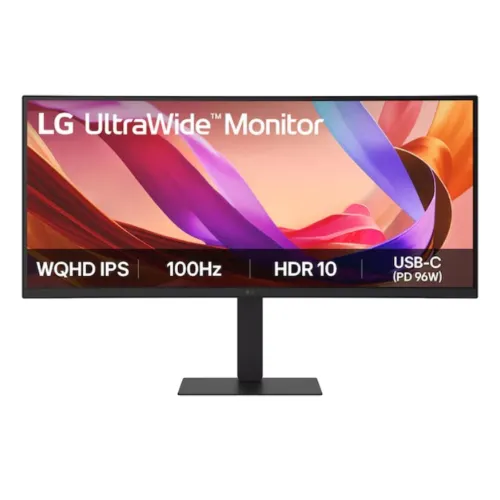
LG 34U650A-B 34-inch UltraWide curved IPS monitor
The LG UltraWide 34U650A-B is a 34-inch curved desktop monitor with a 21:9 aspect ratio and 3440 × 1440 UltraWide QHD resolution. Its 86.72cm diagonal gives a broad horizontal workspace for documents, spreadsheets, editing timelines and side-by-side windows. The panel uses IPS technology and an anti-glare surface. A gentle 3800R curve follows the wide screen, making the edges easier to view from a typical central seating position without turning the display into an aggressively curved gaming screen.
The pixel pitch is 0.2325 × 0.2325mm, and the active display area is approximately 799.8 × 334.8mm. The 21:9 canvas can reduce the need to arrange two separate monitors for users who want a single continuous workspace. Window management still depends on the operating system and applications; LG Switch software offers smart split layouts for compatible systems. Screen proportions and application support should be considered before purchase because some video and older games may show black bars or use a narrower image.
The 100Hz maximum refresh rate is higher than a conventional 60Hz office display and can make pointer movement, scrolling and supported content look smoother when the source is configured correctly. A 100Hz panel does not create frames that the connected computer fails to render. The stated response time is 5ms gray-to-gray using the Faster setting. That is a panel response specification, not overall computer latency or a guarantee that every transition will measure the same in every mode.
Panel brightness, contrast and color
LG lists brightness of 300 cd/m² typical and 240 cd/m² minimum, with a 1000:1 typical and 700:1 minimum contrast ratio. These numbers are corrected from a local seller table that swapped the typical and minimum labels. A typical value is a stated representative specification and the minimum is a lower bound under the manufacturer’s conditions. They should not be read as independent measurements of every retail unit or as a promise of identical screen uniformity across the full panel.
Color support is 1.07 billion colors, described as 10-bit using 8-bit plus frame-rate control, and LG lists 99% sRGB coverage measured under CIE 1931. The product also lists factory color calibration and Super Resolution+. Color-space coverage describes a gamut capability rather than a guarantee of exact color accuracy for every unit, mode or application. Buyers doing color-critical work should use a suitable color-managed workflow and independent calibration if their requirements call for it.
The viewing angle is specified as 178 degrees left/right and 178 degrees up/down at a contrast ratio of at least 10. IPS viewing angles support flexible seating and collaboration, though color and brightness can still vary with angle and room light. The anti-glare treatment helps reduce reflections but cannot remove every reflection from a bright window or lamp. Position the screen to control glare and adjust brightness to match the room rather than assuming that the coating alone solves reflections.
HDR, visual features and eye care
LG lists HDR10 and HDR Effect. This model should not be described as having a VESA DisplayHDR certification unless a matching certificate is separately confirmed. HDR10 is a content signal format; the display’s brightness, contrast, color gamut and local dimming capability determine the actual visual result. The product specifications list 300 cd/m² typical SDR brightness and do not advertise a VESA HDR tier. HDR Effect can process compatible SDR content for an altered appearance, but it does not turn that source into native HDR mastering.
Flicker Safe and Reader Mode are the main eye-care settings named by LG. Reader Mode reduces blue-light output through a warmer picture mode; Flicker Safe is designed to reduce screen flicker. LG also cites TÜV Rheinland Eye Comfort certification, Color Weakness Mode and Smart Energy Saving. These tools can help some users adjust the image but do not guarantee freedom from eye fatigue. Viewing distance, breaks, room lighting, text size, brightness and individual sensitivity still influence comfort.
Dynamic Action Sync and Black Stabilizer are listed as visual and gaming aids. Dynamic Action Sync reduces processing delay in supported use, while Black Stabilizer adjusts dark-scene visibility. The official regional specification does not list AMD FreeSync for this exact model, although Star Tech and TechLand Bangladesh tables claim FreeSync support. This listing describes the discrepancy instead of presenting the retailer claim as manufacturer-certified compatibility. The 100Hz specification and Dynamic Action Sync are confirmed LG features.
USB-C, KVM and device connections
The central connection feature is an upstream USB-C port with DisplayPort Alternate Mode, USB data and up to 96W USB Power Delivery for a compatible host. A laptop connected through a suitable USB-C cable can send display and USB data while receiving power, which may reduce the number of cables on a desk. The laptop must support DisplayPort Alt Mode and accept the offered power profile. Charging speed and behavior depend on the computer and cable; 96W is the monitor’s maximum stated delivery, not a universal guarantee for every laptop.
A separate USB-C downstream port provides USB 3.2 Gen 1 data and up to 15W charging, and three USB-A downstream ports use USB 3.2 Gen 1 at up to 5Gbps. The upstream USB-C connection is a distinct host-facing port; the downstream ports connect accessories such as a keyboard, mouse or storage device. LG’s built-in KVM can share connected peripherals across two computers when the video and USB paths are connected as described. LG Switch software supports dual-PC control and hotkey switching on compatible systems.
Video inputs are one HDMI 2.0 and one DisplayPort 1.4, both specified to support the native 3440 × 1440 mode up to 100Hz with a compatible source. USB-C also carries a DisplayPort Alt Mode video signal. The monitor does not include a D-Sub/VGA port; a Star Tech specification table incorrectly says that it does. It also has no RJ45 Ethernet port in the LG 34U650A-B specification. Select the matching input and cable, and check the source device’s output limits when a preferred refresh rate is unavailable.
Audio, built-in KVM and software
Built-in stereo speakers are rated at 7W per channel and marketed with Rich Bass. They provide a convenient audio option for meetings and general playback without requiring desktop speakers. The official product page does not promise a particular room-filling volume or substitute for dedicated speakers. A 3.5mm four-pole combo headphone output supports stereo headphones and a compatible headset microphone through the same connector. The monitor itself has no internal microphone on the bezel; microphone input is available through a correctly wired headset connected to the combo jack.
The integrated KVM switch is designed for a desk shared by two computers. A keyboard, mouse and supported USB peripherals connected to the monitor can follow the selected host, provided each computer is connected to the monitor’s video and USB data paths. Picture-by-Picture can display two source images together, and Auto Input Switch can help move between detected inputs. These features depend on the OSD configuration, cable layout and computer compatibility; they do not provide wireless switching or networking.
LG Switch software adds screen partition layouts, dual-PC control and hotkey switching. LG describes smart split layouts for up to six regions. Software availability and functions can vary by operating system and version, so download compatible software from LG and check the support page for the computer in use. The physical display remains usable without optional software; the app improves window and multi-device management rather than changing the panel’s native resolution or port capabilities.
Curvature, stand and desk setup
The 3800R curve has a nominal radius of 3.8 metres and is relatively gentle for a 34-inch 21:9 screen. Curvature is useful for keeping the far edges within a similar viewing distance when seated centrally. It does not increase resolution or change the active image dimensions. A curved monitor may be less suitable for users who need a perfectly straight reference line for specialized drafting, or who often view the display from far off-centre; consider the actual task and seating position.
The one-click stand provides tilt from −5° to +21°, swivel from −30° to +30° and 150mm height adjustment. Portrait pivot is not supported, which is expected for a curved 21:9 panel. These adjustment ranges help align the screen with different chair heights and desk arrangements. The stand’s base projects forward and behind the panel, so check desk depth and allow room for the full swivel and tilt movement before placing it near a wall or other equipment.
A 100 × 100mm VESA mounting pattern supports compatible arms or brackets. The stand can be removed according to the manual, and the display should be supported by its frame during installation. The monitor weighs about 10.1kg with the stand and 7.3kg without it, so verify the arm’s load rating and mounting hardware. Avoid pressing or twisting the curved panel while attaching a mount. Keep cables slack enough for height and swivel adjustment without pulling on ports.
Dimensions, power and box contents
With the stand raised, the monitor measures about 816.7 × 535.2 × 230.0mm (width × height × depth); in the lower stand position, height is approximately 385.2mm with width and depth unchanged. The panel without the stand measures about 816.7 × 364.4 × 83.6mm. The shipping carton is approximately 986 × 522 × 187mm and shipping weight is about 13.4kg. Measure the desk and delivery route before ordering, and include cable bend clearance behind the display.
This model uses an internal power supply, so it connects to AC through a standard power cord and does not require an external power brick. Input is 100–240V AC at 50/60Hz. LG lists typical power consumption at 43W, 0.5W in sleep mode and 0.3W with DC off. Actual power use depends on brightness, USB charging, speaker volume and enabled settings. Keep the ventilation openings clear and use the appropriate supplied cord.
LG’s manual lists a power cord, HDMI cable, USB Type-C cable and quick setup guide or calibration report. DisplayPort cable inclusion can vary by region. Confirm the package and warranty card with the local seller. Use the HDMI or DisplayPort cable for video when required, and connect the USB-C host cable to use the full display, USB hub and 96W power-delivery path. The optional USB-A accessories need the monitor’s host USB data connection to reach the computer.
Strengths and practical limitations
The expansive 3440 × 1440 canvas is useful when a workflow benefits from multiple windows across one screen. The IPS panel, 99% sRGB specification and factory calibration support general content work, while 100Hz can provide smoother desktop movement than 60Hz. USB-C with up to 96W power delivery, a four-port USB hub, integrated KVM, Picture-by-Picture and LG Switch make it possible to organize a multi-device workstation around one monitor. Built-in 7W × 2 speakers add convenient everyday audio.
A wide curved monitor occupies substantial desk width and should be positioned at a comfortable distance. Native 21:9 resolution needs a computer capable of driving 3440 × 1440; older systems may require a cable or adapter that limits refresh rate. The model has no VGA port or Ethernet jack. Its USB-C can supply up to 96W to a compatible host, while its separate downstream USB-C supplies up to 15W to a peripheral. These ports have different roles and should not be confused.
The manufacturer does not list FreeSync on the official regional specification, though some local retailer tables claim it. The product is specified at 100Hz with Dynamic Action Sync and Black Stabilizer. HDR support is HDR10 and HDR Effect, with no VESA DisplayHDR tier listed. The 3800R curve is gentle and the stand does not rotate to portrait. These qualifications matter for buyers choosing a display for a particular game, color workflow or mounting plan.
Bangladesh price, warranty and purchase checks
During this review, Star Tech listed the LG 34U650A-B at about ৳81,000 and showed it in stock with a three-year warranty. TechLand listed it at about ৳82,000 and also stated a three-year warranty. PQS carried a product listing but the reviewed source did not provide a stable price observation. Local asking prices, promotions, delivery and inventory change; these figures are a dated comparison and are not a BiponiBD price promise.
The current catalog variant MSRP is ৳82,000 and remains unchanged. Confirm the checkout total, delivery charge, payment condition and whether the exact 34U650A-B is physically available before ordering. LG suffixes such as 34U650A-B.AEU, .AHK and .AUS identify regional product codes; verify the unit label and local service eligibility with the seller. A general model name alone does not guarantee that every regional bundle includes the same cable.
Bangladesh sellers commonly state three years of warranty. Ask which local distributor or service center handles the product, what proof is required, and which panel, backlight or physical-damage conditions are excluded. Keep the purchase invoice, serial number and warranty card. The published product specifications describe hardware but do not replace local written warranty terms. If the seller’s specification page conflicts with LG, use the manufacturer’s model-specific documentation for port and power details and request clarification before purchase.
Who may benefit and setup guidance
This monitor may suit professionals who regularly arrange several windows, work with wide timelines, review spreadsheets or connect more than one computer. The wide QHD resolution offers more horizontal workspace than a 16:9 QHD screen, while 100Hz and the adjustable stand support general daily use. The built-in KVM and USB-C docking connection can reduce desk clutter for compatible laptops. Buyers who need pivot orientation, VGA, Ethernet, or a specific verified FreeSync certification should compare the listed limitations against their requirements.
For first setup, assemble the stand on a clean soft surface according to the manual, connect the power cord and choose the input. Select 3440 × 1440 in the computer display settings and choose up to 100Hz if the graphics output, cable and input support it. For a USB-C laptop setup, confirm DP Alt Mode and power requirements, connect the host cable, then connect the USB peripherals to the downstream hub. Use the OSD to select KVM, PBP or Auto Input Switch when needed.
If a 100Hz mode is unavailable, check graphics drivers, cable specification, input selection and operating-system display settings. If peripherals attached to the monitor do not appear on the computer, confirm the upstream USB-C host connection and selected KVM source. If audio is silent, select the monitor’s audio output and check the built-in speaker volume or headset connection. For HDR10 playback, enable HDR in the source and content application; HDR Effect is a separate image-processing option. Consult LG support before changing advanced settings.
Cleaning, care and everyday use
Use the cleaning method described in the LG manual and a soft clean cloth. Do not press on the curved panel, apply cleaner directly to the screen or allow liquid to enter the enclosure. Handle the monitor by the frame, especially when attaching or removing the stand. The curved display is wide and relatively heavy, so use two people when moving or installing it if needed. Retain the packaging for transport where practical.
Reader Mode, Flicker Safe and screen brightness controls can be adjusted to suit a room, but comfortable viewing depends on more than a single preset. Avoid strong reflected light, set text scaling for the viewing distance and take breaks during extended work. Smart Energy Saving can change power behavior; users may disable or adjust it if it interferes with their preferred brightness. For color-sensitive work, use a consistent profile and validate the screen under the actual ambient lighting conditions.
The display’s 21:9 aspect ratio works well with applications that support resizable windows and wide timelines. Streaming video and games may use a narrower aspect ratio and show unused screen area depending on the source. Picture-by-Picture can display two inputs at once, but the computer’s resolution and application layout affect how usable each portion is. These are normal compatibility considerations for a wide monitor and do not indicate a panel fault.