LG UltraGear 24GS65F-B 23.8-inch FHD 180Hz IPS Gaming Monitor: Bangladesh Buyer Guide
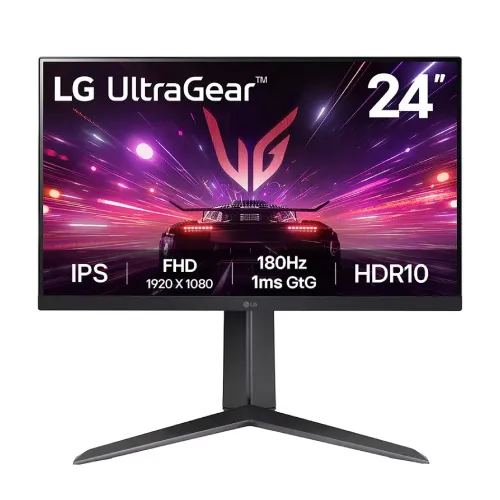
The LG UltraGear 24GS65F-B is a 24-inch-class gaming monitor with a 23.8-inch viewable IPS display, native Full HD resolution and a maximum 180Hz refresh rate. Its combination of high refresh, 1ms GtG at the Faster response-time setting, HDR10 signal support, AMD FreeSync and NVIDIA G-SYNC compatibility is aimed at PC players who want responsive 1080p gaming from a compact desk display. The supplied stand is a key part of this model: LG lists height adjustment, tilt and clockwise pivot, which lets the screen move between landscape and portrait positions. It is not the same stand as the tilt-only 24GS60F-B. The core product model is 24GS65F-B. LG Bangladesh has a support page for the regional product code 24GS65F-B.AHK, but the exact suffix on the unit held by the local seller has not been confirmed; this guide therefore uses the core model code and does not guess a regional part number.
Picture size, resolution and panel
The monitor uses a flat IPS panel with W-LED backlighting and a native 1920 × 1080 pixel grid in a 16:9 layout. LG markets it as a 24-inch screen; its viewable diagonal is about 23.8 inches (60.47cm). Pixel pitch is 0.2745 × 0.2745mm, approximately 92.6 pixels per inch. This density is a practical fit for games, streaming video, browsing, schoolwork and office applications at normal desk distance. The IPS panel supports 178-degree horizontal and vertical viewing angles at CR≥10, helping the image remain legible when a person is seated off-center. LG lists typical contrast at 1000:1 and minimum contrast at 700:1. The surface is anti-glare, and the chassis has a three-side virtually borderless design. A Full HD 23.8-inch panel is easier to drive at high frame rates than a higher-resolution screen, though users who need more workspace or finer text can prefer QHD at a similar size.
180Hz refresh and the meaning of 1ms GtG
LG specifies a native maximum refresh rate of 180Hz. A monitor refreshing 180 times per second can display more frequent motion updates than a 60Hz panel, which can make fast camera movement and tracking feel smoother when the connected PC produces enough frames. The refresh-rate claim does not mean every game will render at 180 frames per second; graphics hardware, game settings and the selected display mode determine the actual frame rate. LG rates response time at 1ms GtG with the Faster response-time setting. GtG measures a pixel transition under a specified overdrive mode; it should not be read as a guarantee that every transition is always exactly one millisecond or that all motion blur disappears. Users can select among response-time modes in the on-screen display and choose the setting that balances clarity against visible overshoot for their system and content.
Variable refresh, HDR10 and gaming controls
LG lists NVIDIA G-SYNC Compatible and AMD FreeSync support. Variable refresh can coordinate the display refresh with a compatible graphics card's output to reduce tearing and stutter when frame rate varies. Compatibility and the available refresh range depend on the GPU, driver, input and settings; LG's product page notes that G-SYNC Compatible VRR support is tied to supported GeForce GPUs and connections. The monitor accepts HDR10 content and includes an HDR Effect option, but the typical brightness is 300cd/m² and the product documentation does not identify local dimming or a high-brightness HDR certification. Treat HDR10 as supported signal processing, not as a promise of premium HDR contrast. LG also lists Dynamic Action Sync (DAS), Black Stabilizer, Crosshair, FPS Counter, Auto Input Switch and an on-screen control utility. These tools add selectable display and game overlays; they do not improve a PC's raw frame rate.
Color, brightness and eye-comfort features
The panel is rated at 300cd/m² typical and 240cd/m² minimum brightness, with sRGB 99% typical gamut coverage under the stated CIE1931 method and 16.7 million colors. Those figures describe the panel specification; they do not independently certify calibration accuracy for professional print or color-critical work. LG lists Flicker Safe and Reader Mode, and a Color Weakness mode is also shown in the local specification listing. These settings allow users to choose a more comfortable display profile for their content, but comfort remains personal and the modes are not medical treatment. A 300-nit typical rating is suited to ordinary indoor use; placement opposite a bright window can make any matte display harder to see. Use the monitor's brightness and color controls to suit the room, and use a calibrated workflow if accurate color matching is a job requirement.
Ports and the seller specification conflict
The official product specification and the rear image supplied with this catalog record support one DisplayPort 1.4 input, one HDMI 2.0 input, one 3.5mm headphone-out connection and a DC power input. The rear photo clearly shows just two video inputs in total. A local retailer table copied into the current catalog says “Yes (2ea)” for HDMI and describes two HDMI ports elsewhere; another retailer specification page repeats that count. These entries conflict with the one-HDMI specification and the visible I/O bay, so this update corrects the HDMI quantity to one and records the discrepancy in the review evidence. Buyers who require more than two video sources should plan to switch cables or use an external switch, and should check the physical rear panel on delivery. The reviewed sources do not list USB-C video or a built-in USB hub. A 3.5mm headphone-out jack carries audio from a connected source; LG does not specify built-in speakers, so plan on headphones or separate speakers for sound.
Stand adjustments, VESA and desk space
The supplied ergonomic stand supports 110mm of height travel, tilt from -5° to +15° and clockwise 90° pivot into portrait orientation. LG's adjustment list does not include left-right swivel, so this model should be recorded as swivel: No. The product photos show the portrait orientation and height/tilt range. A 100 × 100mm VESA pattern allows compatible monitor arms or wall brackets after detaching the supplied stand; LG's India and UK product pages list 5.4kg with stand and 3.3kg without stand, so check that the mount supports the regional unit's weight and follow its manual. With the stand raised, the monitor measures 540.8mm wide, 551.1mm high and 291.2mm deep; LG India lists 441.1mm at the lower position. Without the stand, LG India and UK list 540.8 × 323.8 × 42.8mm. The stand depth is about 29.12cm, so allow desk space for the V-shaped base and cable routing. LG lists 7.8kg shipping weight for its India/UK variants; the delivered carton can vary by region.
Power, accessories and local warranty
The 24GS65F-B uses an external power adapter and LG lists 100–240V AC, 50/60Hz input. Power consumption varies by regional page and test method: LG India lists 18W On-Mode ErP, LG France lists 17W typical and 19W maximum, and LG India/UK list below 0.5W sleep and below 0.3W DC-off. The adapter's DC output can also vary by regional package, so read the supplied adapter label instead of assuming one rating. The reviewed seller pages differ on which video cable is bundled: some list DisplayPort, while a Ryans answer says its package includes HDMI, adapter and power cable. Accessories can vary by regional sub-SKU, so confirm the actual box contents rather than assuming every package includes both HDMI and DisplayPort cables. Bangladesh retailers advertise a three-year warranty. LG Bangladesh's official support page identifies the 24GS65F-B.AHK product code but directs owners to the warranty policy inside the packaging and says serial number and proof of purchase are needed for service. Therefore, the three-year period in this catalog is a seller-listed offer, not independently confirmed for every regional serial. Ask the seller to state the warranty provider, coverage period and claim conditions on the invoice.
Who should consider this monitor
This model suits a player who values Full HD at high refresh and wants an IPS panel, adaptive-sync support and a stand that can raise, tilt and rotate the screen vertically. A 23.8-inch 1080p layout is a sensible match for esports titles and mixed desktop use, while 99% sRGB typical gamut and wide viewing angles help with everyday media and content. The included stand saves the cost and setup work of an arm for users who need height or portrait adjustment. Its limitations are also clear: it remains a Full HD screen rather than QHD, has no documented built-in speakers, does not include stand swivel, and offers only one HDMI input alongside one DisplayPort. Its HDR10 signal support should not be confused with high-end local-dimming HDR. Before purchase, confirm the GPU connection needed for 180Hz and adaptive sync, the local warranty provider for the serial, and the current stock and price.
Model identification and regional code
Use LG UltraGear 24GS65F-B as the catalog model and 24GS65F-B as the core manufacturer part number. LG Bangladesh's support portal has the regional code 24GS65F-B.AHK, while LG's United States product page uses 24GS65F-B and other markets may publish additional product-code endings. The regional suffix can identify market, packaging or power-cord configuration; it should not be added to the variant MPN unless the physical item label or supplier invoice confirms it. The related LG 24GS60F-B shares the general panel and gaming class but has a tilt-only stand; it should not be used as a source for this product's height or pivot capabilities. The exact model code and the visible product photos support 24GS65F-B's height and portrait stand. This entry retains its existing catalog name and URL while cleaning only the model and MPN fields.
Before ordering checklist
Confirm that the carton and rear label show 24GS65F-B and ask for the regional suffix. Check the rear I/O for one HDMI 2.0 port, one DisplayPort 1.4 and the headphone-out jack; the seller tables that say two HDMI ports are inconsistent with LG's spec and the reviewed product image. For 180Hz, use a suitable cable and graphics output, install current GPU drivers, then select 1920 × 1080 at 180Hz in the operating system display settings. Enable FreeSync or G-SYNC compatibility where supported by the graphics card and connection. If planning a desk arm, verify 100 × 100mm VESA compatibility and adequate load capacity. Confirm whether the package includes HDMI or DisplayPort cable, whether the external adapter and power cord are present, and what the seller's three-year warranty actually covers. Keep the invoice, box and serial details for a claim. The current catalog price of ৳24,699 is retained; live prices and stock can change.