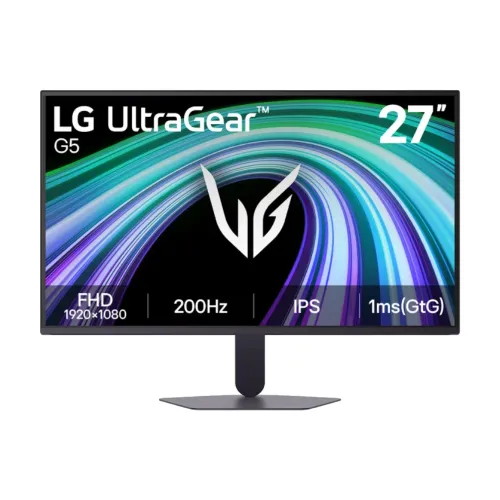
LG UltraGear 27G523B-B: 27-inch Full HD gaming monitor
The LG UltraGear 27G523B-B is a flat 27-inch IPS gaming monitor with a 1920 x 1080 Full HD panel and native refresh up to 200Hz. LG identifies it as part of the UltraGear G5 family. Its fast refresh rate is aimed at responsive PC gaming, while the IPS panel, wide viewing angles and near-borderless three-side design also suit everyday browsing, study and streaming. The screen remains Full HD, so buyers comparing 27-inch displays should weigh motion smoothness against the finer detail available from a 27-inch QHD monitor.
Native 200Hz refresh and source requirements
LG lists 200Hz as the maximum refresh rate and confirms 1920 x 1080 at up to 200Hz over HDMI 2.0 and DisplayPort 1.4. This is a native supported mode; an overclock setting is not listed. A 200Hz panel can refresh more than three times as often as a 60Hz display, which can make fast motion and cursor movement appear smoother when the source delivers enough frames. Select 1920 x 1080 and 200Hz in the computer display settings. The final mode depends on the GPU, cable, operating system, game and port configuration. Consoles use their own supported output modes and will not necessarily use 200Hz.
Pixel density and Full HD at 27 inches
The 27-inch 16:9 screen uses 1920 x 1080 pixels and has a pixel pitch of about 0.3108mm, or roughly 82 pixels per inch. One current catalog attribute incorrectly lists 0.0944 x 0.2802mm; that figure does not match a 27-inch Full HD panel and is replaced. At normal gaming distance the larger image can be comfortable to view, but small text and fine edges are less dense than on a 24-inch Full HD screen or a 27-inch QHD display. Consider desk depth, viewing distance and the kind of work you do before choosing this resolution.
IPS image, brightness and color
LG specifies an IPS panel with 178-degree horizontal and vertical viewing angles, 300 cd/m² typical brightness and 240 cd/m² minimum brightness. The listed static contrast is 1000:1 typical and 700:1 minimum. LG's marketing material describes 99% sRGB coverage, while detailed specification tables on regional LG pages show 95% as the typical or minimum figure and 99% on another regional page. Because the regional tables are not consistent, this description records that difference instead of treating one gamut figure as universal. The panel supports 16.7 million colors with 8-bit processing (6-bit plus FRC in the detailed specification).
Response time and overdrive
LG lists 1ms gray-to-gray response at the OSD's Faster response-time setting. This is a mode-specific manufacturer figure, not a guarantee that every pixel transition completes in one millisecond under every condition. More aggressive overdrive can cause bright inverse-ghost trails on some transitions. If you notice overshoot, compare the Fast and Faster options using your own games and desktop content. Response time, refresh rate and frame rate describe different behaviors: a 200Hz display refreshes up to 200 times per second, while response time describes how quickly pixels transition between shades.
Adaptive sync and supported graphics
LG lists AMD FreeSync Premium and NVIDIA G-SYNC Compatible. Its UK specification page identifies G-SYNC Compatible operation over DisplayPort only; use the DisplayPort connection first when enabling G-SYNC on a compatible PC. FreeSync Premium synchronizes refresh with a compatible AMD graphics source to reduce tearing and stutter when frame delivery varies. Enable the feature in the monitor menu and graphics driver where required. The usable range can depend on the source, connection, driver and settings, so no unverified minimum or maximum VRR range is promised here.
HDR10, brightness and realistic expectations
The monitor accepts HDR10 signals and LG lists HDR10 support, HDR Effect and Smart Energy Saving features. It is not listed as VESA DisplayHDR certified and no local dimming system is specified. With 300 cd/m² typical brightness and a 700:1 minimum / 1000:1 typical contrast specification, HDR should be understood as signal compatibility and tone mapping on this panel, not as a promise of the strong highlights and deep blacks of a high-brightness HDR display. If desktop HDR looks dull, use SDR for routine work and enable HDR only for compatible content and source settings.
Ports, bandwidth and audio
The rear panel has two HDMI 2.0 inputs, one DisplayPort 1.4 input with DSC support and a 3-pole headphone output. LG lists Full HD at up to 200Hz on HDMI 2.0 and DisplayPort 1.4. DSC is Display Stream Compression support on the DisplayPort connection; it is not an extra video input. The 3-pole jack carries audio to wired headphones or powered speakers. There are no built-in speakers, USB-C video input, USB hub or USB downstream ports. Connect external audio separately if you want sound, and choose the input cable appropriate to the computer or console.
Gaming controls and software
The official LG feature list includes Dynamic Action Sync, Black Stabilizer, Crosshair, FPS Counter, Reader Mode, Color Weakness, Flicker Safe, HDR Effect, Auto Input Switch and LG Switch. These options are controlled through the monitor's on-screen menu or LG software where supported. Dynamic Action Sync is intended to reduce input delay, while Black Stabilizer adjusts dark-scene visibility; neither replaces good game settings or guarantees a competitive advantage. LG Switch requires software and a manual download from LG. Availability can vary by operating system and region, so use the official LG support page for downloads.
Stand, tilt and VESA mounting
The included compact stand offers tilt adjustment only. LG product documentation lists a -5 to +15 degree tilt range; it does not provide height adjustment, swivel or pivot. The head can be mounted on a compatible 100 x 100mm VESA arm or wall bracket. Check the fasteners and arm load limit before installation. The supplied stand has a slim L-shaped upright and low-profile base designed to use less desk space. If you need the screen at eye level, pair it with a riser or an adjustable arm rather than expecting lift from the stock stand.
Dimensions, weight and placement
LG lists the monitor at 614.1 x 461.8 x 220mm with the stand and 614.1 x 358.8 x 49.1mm without it, expressed as width x height x depth. Shipping carton dimensions are 700 x 141 x 430mm. Net weight is 4.2kg with the stand and 3.1kg without it; shipping weight is 5.5kg. Leave room behind the display for its external power adapter and cable routing, and check the packaged dimensions if transporting it. The 100 x 100mm mounting pattern and 3.1kg head weight are useful when choosing a VESA arm.
Power and package contents
LG specifies an external power adapter with 100–240V, 50/60Hz AC input and 19V, 1.7A DC output (32W). Listed standby consumption is below 0.5W and DC-off consumption is below 0.3W. The Philippines regional accessories list includes the adapter and a 1.5m power cord; it also lists a DisplayPort cable, but bundled video cables can differ by market and shipment. Check the actual box contents with the Bangladesh seller before purchase. The monitor has no built-in speaker, so include headphones or external speakers if you need audio.
Bangladesh price and warranty snapshot
The BiponiBD variant's stored price remains ৳26,900. During this review, TechLand BD listed ৳26,900 with a three-year warranty, PQS listed ৳26,000, and Star Tech's catalog page showed ৳26,500. These are retailer snapshots and can change with stock and promotion. Local sellers advertise three-year coverage, while LG's US support page for the .AUS unit lists a one-year parts and labor warranty; regional warranty terms are not interchangeable. Confirm the warranty provider, exact regional unit, dead-pixel policy, service location and coverage period on the Bangladesh invoice.
Model identity and regional differences
The base model is 27G523B, and the black-finish sales code is 27G523B-B. Regional suffixes such as .AUS, .ATR or .AEU may identify local support and bundle variations; do not treat those suffixes as a separate panel specification without checking the unit label. The LG page, port labels and retailer listings should be matched to the product on the invoice. Do not confuse this 200Hz 27G523B-B with the older 27GS60F-B 180Hz model or the related 25G523B-B 25-inch model. The product MPN is normalized to 27G523B-B; barcode, GTIN and country of manufacture remain blank because no exact unit label verifies them.
Who should choose this monitor?
This model suits a buyer who wants a 27-inch IPS screen, Full HD resolution and a high 200Hz refresh rate for PC games, with adaptive sync and basic tilt adjustment. It can also handle everyday study, office tasks and streaming. A smaller Full HD display may look sharper for small text at a short desk distance. A QHD screen provides more workspace and finer detail, while a higher-tier HDR screen may deliver better highlight and contrast performance. The 27G523B-B has no built-in speakers, no height-adjustable stand and no USB-C dock, so account for those needs when comparing total setup cost.
Setup checklist
Attach the stand on a stable desk or mount the display using a compatible 100 x 100mm VESA fitting. Connect a PC through DisplayPort 1.4 or HDMI 2.0, select 1920 x 1080 and 200Hz in the operating system, then enable FreeSync or G-SYNC Compatible in the monitor and graphics settings if supported. Use DisplayPort for G-SYNC Compatible operation as LG specifies on its UK product page. Try the Fast response mode first and compare Faster if you want to judge overdrive artifacts. Connect headphones or external speakers to the 3-pole audio jack, and adjust tilt or use a riser for a comfortable viewing height.
Specification and source transparency
The technical data is based on LG's official 27G523B-B regional product specifications and support material, cross-checked against Bangladesh retailer listings. LG's regional pages differ on the exact sRGB gamut figure: one marketing page states 99%, while detailed specification tables show 95% alongside 99% elsewhere. This page preserves that caveat. The official pages agree on 27-inch FHD IPS, 200Hz, 1ms GtG at Faster, HDMI 2.0 x2, DisplayPort 1.4, 3-pole headphone out, HDR10, FreeSync Premium, G-SYNC Compatible, tilt-only stand, 100 x 100mm VESA, dimensions and weights. No barcode, GTIN or country of origin is added without unit evidence.