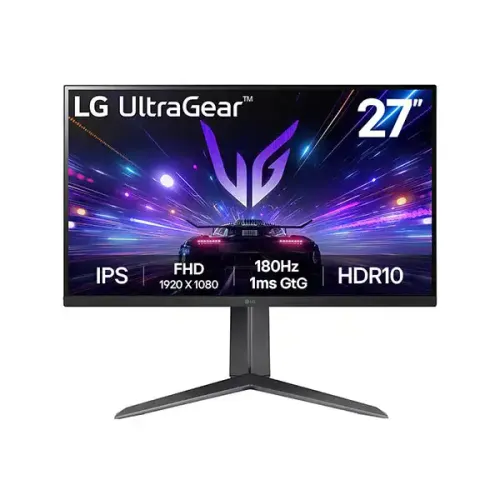
LG UltraGear 27GS65F-B 27-inch Full HD 180Hz IPS Gaming Monitor: Complete Guide
Model identity and lineup
The LG UltraGear 27GS65F-B is a 27-inch Full HD gaming monitor with an IPS panel and an ergonomic stand. Its model code is 27GS65F-B; the suffix -B identifies the black finish. LG’s Bangladesh support site references a regional 27GS65F-B.AHK support entry, while model-family product pages can use other regional codes. This guide follows the base 27GS65F-B specification and notes where a regional port count should be checked on the actual unit. Do not confuse it with the 27GS60F-B, which is commonly sold with a simpler stand, or the 27GS75Q-B, which is a separate QHD model. The existing product name, slug, category, Active status, LG brand, variant identity, SKU and ৳34,000 catalog price are retained. Model and manufacturer part number are normalized to 27GS65F-B.
Full HD IPS image and pixel pitch correction
The monitor has a 27-inch IPS display with native 1920 × 1080 resolution and a 16:9 aspect ratio. LG specifies a 0.3108mm pixel pitch, which is approximately 81.6 pixels per inch. The catalog previously showed 0.2331mm, a value associated with 27-inch QHD panels; replacing it is important because the 27GS65F-B is Full HD. At normal desktop distances, Full HD provides clear gaming and general-use imagery, though a QHD model will show finer text and detail at the same size. LG lists 300 cd/m² typical brightness, 240 cd/m² minimum, 1000:1 typical contrast, 700:1 minimum and 178-degree viewing angles. Use the native resolution for the intended sharpness and adjust the operating-system scaling to suit the viewing distance.
180Hz gaming and response settings
LG specifies a maximum 180Hz refresh rate. A high refresh rate can make motion look smoother when the graphics card renders enough frames and the source is connected using a supported cable. The monitor’s 1ms GtG response is available in the Faster response-time mode. That is an overdrive setting and should not be treated as a guaranteed value for every pixel transition. If the image shows bright inverse trails, choose a less aggressive response setting. LG also provides Dynamic Action Sync, Black Stabilizer, Crosshair and FPS Counter options. These tools can help tune the display to a game, but they do not improve the computer’s frame rate. Select 1920 × 1080 at 180Hz in the graphics settings and check the on-screen status when setting up a new PC.
Adaptive-Sync, G-SYNC and FreeSync
LG lists both NVIDIA G-SYNC Compatible and AMD FreeSync for the 27GS65F-B. Adaptive-Sync can coordinate monitor refresh with compatible GPU output to reduce tearing and judder when frame rates vary. The result depends on the graphics card, driver, cable and selected refresh range. Enable the monitor’s sync setting if required, then turn on the matching variable-refresh option in the graphics control panel. NVIDIA G-SYNC Compatible is not a hardware G-SYNC module; it is an Adaptive-Sync compatibility feature. A logo on a store page should not replace the model-specific specification. If your gaming device is a console, confirm which VRR modes and refresh rates it can output at 1080p. For a PC, DisplayPort is typically the straightforward connection for high-refresh operation.
Color gamut and HDR expectations
LG rates the panel at sRGB 99% typical and 95% minimum under CIE1931, with 16.7 million colors. These gamut values describe color coverage, not calibration accuracy. LG also lists HDR10 support and HDR Effect mode. The technical specifications do not list local dimming or a VESA DisplayHDR certification. Treat HDR as compatible input and image-processing support rather than the high contrast of an OLED or local-dimming screen. Typical brightness is 300 cd/m², with a 240 cd/m² minimum rating. Use the display in a comfortable room-lighting environment and avoid direct reflections. If content creation is important, calibrate the monitor and view the work in a color-managed application rather than relying only on the UltraGear gaming label or gamut percentage.
Ports, audio and regional configuration
LG’s documented configuration includes one HDMI 2.0 input, one DisplayPort 1.4 input and one 3-pole 3.5mm headphone output. Some retailer pages describe two HDMI inputs, but LG regional product tables can differ; inspect the exact Bangladesh unit or carton before checkout if multiple HDMI connections are necessary. The monitor has no built-in speakers listed in the LG specification. HDMI or DisplayPort can carry source audio, which can then be routed through the headphone output to headphones or external speakers. The rear I/O recess also includes the power connection for the external adapter. Connect a PC and select the matching input from the on-screen menu. Keep enough clearance behind the panel for the cable bends, especially when using the stand’s pivot and height adjustments.
Ergonomic stand, pivot and VESA mounting
The 27GS65F-B’s stand supports 110mm of height adjustment, clockwise portrait pivot, ±15-degree swivel and -5 to +15-degree tilt. This range lets users align the screen for sitting or standing and rotate long documents into portrait orientation. Before pivoting, check application layout and leave slack in the power and video cables. The stand has a V-shaped base that takes desk depth; measure the available space before positioning it. LG specifies a standard 100 × 100mm VESA pattern for arm mounting. Use a mount rated for the monitor’s weight and follow the manual when detaching the stand. The rear mouse holder accessory is region/package dependent and should be confirmed with the seller rather than promised unless present in the box.
Power, weight, package and warranty
LG lists an external power adapter with 19V, 2.1A DC output, universal 100–240V AC input at 50/60Hz, typical power consumption around 23W, maximum about 25W, sleep below 0.5W and off below 0.3W in the published regional specification. LG’s UK product sheet gives 7.2kg weight with stand, 5.1kg without stand and 9.3kg packaged; carton dimensions are 727 × 205 × 487mm. Other regional figures can differ, so use the local carton label if available. Bangladesh sellers advertise a three-year warranty. LG’s Bangladesh support page directs users to the warranty policy supplied with the actual unit, so check the serial-specific warranty card and purchase invoice for exact coverage. Barcode, GTIN and country of origin were not verified from the physical product evidence and remain blank.
First setup and picture adjustment
After connecting the power adapter and video cable, set the computer to 1920 × 1080 and select 180Hz if the graphics output and cable support it. Use the on-screen menu to choose a response-time mode, then test a moving scene for overshoot before settling on Faster. For variable refresh, turn on the monitor’s Adaptive-Sync option if available and enable compatible sync in the GPU driver. HDR10 can be enabled for supported content, but ordinary desktop use may look more consistent with HDR disabled. Adjust brightness for the room rather than leaving it at maximum. Use the Reader Mode or Flicker Safe settings according to preference, and check that the color profile matches your work. Save the monitor’s serial and warranty details before discarding the carton.
Who should choose the 27GS65F-B
This model suits gamers who want a high-refresh Full HD IPS panel with adjustable height and portrait pivot. It can also work for everyday office tasks, streaming and general media. The stand is a meaningful upgrade over tilt-only entry-level gaming monitors, and Adaptive-Sync helps when a supported computer’s frame rate varies. Consider a 27-inch QHD screen if pixel density is the priority, or a model with built-in speakers if desk audio without accessories matters. Verify the actual HDMI count because regional descriptions conflict, and use DisplayPort if the setup depends on LG’s documented DP 1.4 path. Before ordering, confirm the exact suffix, warranty card, package accessories, desk dimensions and retailer’s current price. Keep the invoice and serial number for local service.