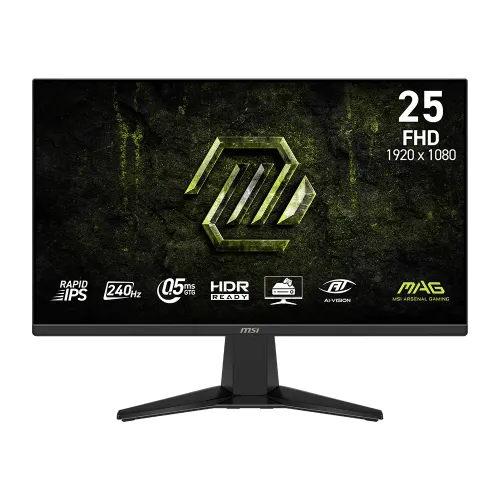
MSI MAG 255F X24 24.5-inch 240Hz Rapid IPS Gaming Monitor
The MSI MAG 255F X24 is a 24.5-inch flat gaming monitor built around a Full HD 1920 × 1080 Rapid IPS panel. MSI lists the 255F X24 as a 240Hz model; the X24 in the model name identifies this refresh tier. The exact model matters when comparing marketplace listings, because similarly named MAG 255F products have different refresh rates, stands and other specifications. This listing describes the MAG 255F X24 only, not the MAG 255F E20, MAG 255XF, MAG 255PXF or older G255F models.
A 240Hz maximum refresh rate can display up to 240 frames per second when the connected computer or console produces a compatible 1920 × 1080 signal. Motion can look smoother and fast-moving targets remain easier to follow than on a standard 60Hz office screen, especially in competitive shooters, racing games and sports titles. The display does not make a game run at 240 frames per second by itself: the graphics card, game settings, cable, input port and selected operating-system refresh setting all affect the result.
MSI’s official datasheet specifies Full HD at up to 240Hz over both HDMI 2.0b ports and the DisplayPort 1.2a input. This is useful for a PC with DisplayPort and for a console or second computer connected over HDMI. HDMI support includes 1080p at up to 240Hz, and the datasheet also identifies console mode support. The actual mode available from a console depends on its output capabilities; a monitor rated for 240Hz does not make a console output 240Hz if that console is limited to a lower frame rate.
The Rapid IPS panel combines fast motion capability with wide 178-degree horizontal and vertical viewing angles. Native contrast is rated at 1000:1, and typical SDR brightness is 300 cd/m². The anti-glare surface helps reduce reflections from room lighting. These are manufacturer specifications, not independent measurements. The panel is flat, uses a 16:9 aspect ratio and has a pixel pitch of 0.2832 mm horizontally by 0.2802 mm vertically. At 24.5 inches and 1920 × 1080, it offers a familiar Full HD workspace for gaming, everyday browsing and video.
MSI specifies a minimum 0.5ms gray-to-gray response time. The “minimum” qualifier is important: it is the manufacturer’s fastest stated GtG mode and should not be rewritten as a universal measured response under every overdrive setting. Do not substitute a 1ms MPRT claim copied from a different MAG or G-series monitor. The X24’s official datasheet calls out 0.5ms GtG (Min.), 240Hz and Adaptive-Sync as separate specifications.
Adaptive-Sync coordinates the monitor refresh with compatible graphics output to help reduce tearing and stutter within the supported range. MSI also lists HDR Ready, AI Vision, Smart Crosshair, Anti-Flicker and Less Blue Light features. HDR Ready means the monitor accepts supported HDR content or signal processing; the official model materials do not list a VESA DisplayHDR certification tier. It should therefore not be advertised as DisplayHDR 400 certified. AI Vision is an on-screen feature intended to lift detail in darker scenes, while Smart Crosshair adds an on-screen aiming aid. Use the OSD controls to select and configure these features.
The manufacturer lists 1.07 billion display colors using 10-bit processing (8-bit + FRC). Its color-gamut figures are 117% sRGB, 90% DCI-P3 and 87% Adobe RGB under the CIE 1976 standard. These are manufacturer gamut figures, not proof of factory calibration or a particular Delta E accuracy. For color-critical design or print work, use a calibrated reference display and a colorimeter rather than treating a gaming monitor’s gamut volume as a calibration report.
The rear connection panel has one DisplayPort 1.2a input, two HDMI 2.0b inputs, one headphone-out jack and an AC power input. MSI lists HDCP 2.3 and HDMI CEC support in its model datasheet. There are no USB data ports or built-in speakers listed. Connect headphones, powered speakers or a headset to the headphone output when audio is required; video-source audio still needs to be enabled on the computer or console. A DisplayPort cable is not listed in MSI’s standard accessories, so confirm the retailer bundle or use a suitable cable.
A built-in power board accepts 100–240V AC at 50/60Hz, so this model uses a power cord rather than an external power brick. MSI lists one HDMI 2.0 cable, one C13 power cord and a quick guide in the box. The supplied HDMI cable supports the monitor’s Full HD 240Hz timing according to the datasheet. The manufacturer lists power consumption at approximately 18 kWh per 1,000 hours in its European energy label context; power draw varies with image settings and operating mode.
The stand supports tilt from -5° to 20°. It does not provide height adjustment, swivel or pivot according to MSI’s specification table. A 100 × 100 mm VESA mounting pattern is available for a compatible arm or wall bracket; select the correct screws and follow the monitor’s mounting instructions. MSI lists a Kensington lock slot. The monitor measures 557.29 × 220.1 × 418.55 mm with its stand and 557.29 × 65.52 × 326.85 mm without it. Net weight is 3.24 kg with stand and 2.82 kg without stand; boxed gross weight is 5.10 kg.
For a desktop PC, connect DisplayPort or HDMI, choose 1920 × 1080 in display settings and select 240Hz if the graphics card, port and cable support it. For a PlayStation, Xbox or Switch, connect over HDMI and select a supported resolution, refresh rate and variable refresh mode in the console settings. HDMI CEC can allow compatible devices to control power or wake behavior. If a high refresh option does not appear, check the cable, GPU driver, input selection and display settings before assuming the monitor is defective.
This is not a 1440p or 4K panel. Its native resolution is 1920 × 1080, which can be a practical match for competitive gaming where high frame rates matter more than extra desktop pixels. Buyers who need a sharper text workspace, detailed 4K editing or more vertical space may prefer a higher-resolution monitor. The fixed stand is tilt-only, so users seeking a built-in height-adjustable ergonomic stand should budget for a compatible monitor arm or choose a model with those adjustments.
Check the exact label MAG 255F X24 when comparing prices. MSI’s related MAG 255F E20 is a 200Hz model; MAG 255XF and MAG 255PXF models are different 300Hz products, with the latter also associated with ergonomic stand features. Older G255F and G255PF E2 pages may reuse similar wording or photos. Their response-time claims, refresh rates, brightness, ports and included accessories should not be copied into this product record unless the MAG 255F X24’s own official specification confirms them.
Bangladesh retailers list this model around ৳18,400 to ৳18,500 in recent price checks, while other pages show higher regular or stale prices. Stock and promotional prices change, so confirm the amount at checkout. Several local sellers state a three-year warranty, but the exact service provider and coverage are seller-specific. Keep the invoice, serial number and warranty card, and confirm whether the warranty is handled by the authorized local distributor or the individual retailer. The existing BiponiBD variant price and stock status remain unchanged by this content update.
The MAG 255F X24 is a focused choice for players who want a 24.5-inch Full HD screen, a 240Hz refresh ceiling, Rapid IPS viewing angles, Adaptive-Sync and standard connections for a PC and console. Its key trade-offs are Full HD resolution, 300-nit SDR brightness, no built-in speakers and a tilt-only stand. Listing those limits alongside its speed, OSD gaming aids and port capabilities helps buyers decide whether it fits their desk, GPU, games and preferred setup.