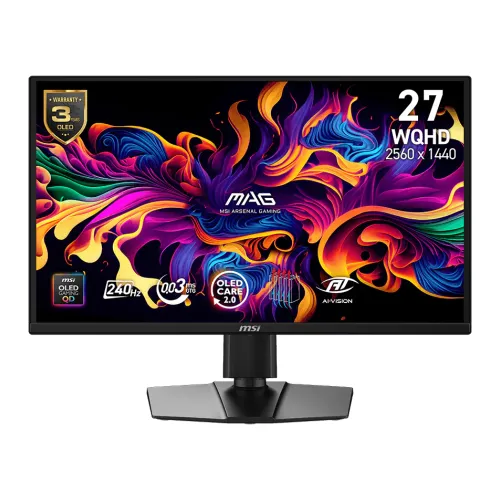
MSI MAG 272QP QD-OLED X24 gaming monitor
The MSI MAG 272QP QD-OLED X24 is a 26.5-inch WQHD gaming monitor using a third-generation Quantum Dot OLED panel. Its native resolution is 2560 × 1440 pixels in a 16:9 aspect ratio, and its maximum refresh rate is 240Hz. The exact model suffix “X24” matters: MSI also sells monitors with similar MAG 272QP or 273QP naming, so check the carton and product label when comparing models or ordering accessories.
The panel has approximately 0.2292mm pixel pitch and about 110.8 pixels per inch. MSI lists an anti-reflection surface, 178-degree horizontal and vertical viewing angles, and a typical 1,500,000:1 contrast ratio. Unlike an LED-backlit LCD, QD-OLED pixels are self-emissive. Black pixels can switch off, and the panel uses quantum-dot color conversion to produce a wide color range.
A 240Hz refresh rate means the monitor can refresh up to 240 times per second when the graphics source, signal, cable and settings support the mode. Actual game frame rate depends on the computer and title. WQHD resolution balances detail and graphics load differently from 4K; it does not guarantee that every system will produce 240 frames per second. Configure the graphics output and operating-system display setting after connecting the monitor.
QD-OLED image, color and brightness
MSI describes the MAG 272QP QD-OLED X24 as a third-generation QD-OLED gaming display. Its typical contrast specification is 1,500,000:1, and its typical viewing angle is 178 degrees horizontally and vertically. The panel is flat and uses an anti-reflection surface. These properties describe the product family; perceived image quality also depends on room lighting, picture mode, input signal, firmware and the particular unit.
The reviewed MSI specification lists 200 cd/m² typical SDR brightness at 100% average picture level and 400 cd/m² typical HDR brightness. The product is marked HDR Ready. A typical rating is not a guarantee of identical brightness in every picture mode or screen area. OLED brightness can depend on picture content and selected settings, so the figures should be understood in the context of MSI’s test conditions.
MSI specifies true 10-bit color with 1.07 billion colors, a factory calibration claim of Delta E no greater than 2, and gamut figures of 98% Adobe RGB, 99% DCI-P3 and 138% sRGB using the CIE 1976 standard. Gamut size and coverage are not interchangeable measurements. These manufacturer values indicate wide-gamut capability but do not replace calibration or color management for critical design, photo or video production.
Refresh, motion clarity and adaptive sync
The monitor supports a maximum 240Hz refresh rate and a dynamic refresh range of 48 to 240Hz. MSI lists a 0.03ms gray-to-gray response time and VESA ClearMR 13000 certification. Response-time and motion-clarity labels describe measured panel behavior under specified conditions; they are not the same thing as total input latency from a game controller to an on-screen result.
AMD FreeSync Premium, NVIDIA G-SYNC Compatible and Adaptive-Sync are listed for variable refresh use. VRR can coordinate display refresh with compatible graphics output within the supported operating range and may reduce tearing. Enable compatible features in the display menu and graphics software as needed. The selected input, video mode, graphics driver and game settings can affect which refresh and sync options are available.
Use DisplayPort or HDMI 2.1 for a high-refresh WQHD signal. DisplayPort 1.4a uses HBR3 and Display Stream Compression for WQHD at up to 240Hz. HDMI 2.1 supports WQHD at up to 240Hz with the compatible source. For a laptop or console, verify the exact output version and supported refresh modes; cable shape alone does not confirm bandwidth.
OLED protection, heat and everyday care
MSI OLED Care 2.0 includes functions such as Pixel Shift, Panel Protect, Static Screen Detection, Multi-Logo Detection, Taskbar Detection and Boundary Detection. These features help manage static image exposure and panel maintenance. MSI also describes a passive graphene heatsink designed to dissipate heat without a cooling fan. Use the on-screen prompts and the current MSI manual for panel-protection timing and maintenance behavior.
OLED care functions help reduce the risk of image retention but cannot guarantee that burn-in will never occur. Avoid leaving bright, static interface elements on screen for long periods at maximum brightness. Use screen savers, hide persistent taskbars where practical, vary content and allow any panel-protection cycle to finish. Do not disconnect power while a maintenance cycle is active unless MSI instructs otherwise.
Local Bangladesh retailer listings reviewed state a three-year warranty and describe burn-in coverage for this model. Warranty eligibility may depend on region, seller, invoice, panel-care behavior and terms in effect when the unit is sold. Confirm the actual written MSI or distributor coverage and any conditions before purchase; this content does not replace the warranty document supplied with the monitor.
Gaming tools and console mode
The monitor includes gaming-oriented tools such as AI Vision, Smart Crosshair, Optix Scope and Night Vision. These on-screen functions adjust visibility or add aiming aids according to the mode. Their effect is preference-dependent, and use in online games remains subject to each game’s rules. MSI also lists Picture-in-Picture and Picture-by-Picture options for viewing multiple sources when the selected signals and settings are compatible.
MSI Console Mode supports WQHD output at 120Hz with VRR according to the reviewed product information. The feature also lists HDMI CEC and 4K-to-2K downscaling for supported PlayStation 5 and Xbox Series X|S configurations. Console capabilities vary by game and device settings, and not all console titles output the same refresh rate. Confirm the console’s video mode and HDMI cable support.
A five-way OSD navigation joystick provides access to picture and gaming settings. Start with the display’s recommended picture mode, then adjust brightness, color and sync options to match the source. A mode optimized for games may not be ideal for color-critical work, while HDR behavior depends on both the display setting and the content or operating-system output.
Video inputs, USB-C and audio
The input panel includes two HDMI 2.1 ports rated FRL 10G, one DisplayPort 1.4a HBR3 input, one USB-C port and one 3.5mm headphone output. HDMI supports WQHD up to 240Hz along with VRR, Auto Low Latency Mode and HDMI CEC functions. DisplayPort supports WQHD up to 240Hz with DSC. Exact signal options depend on source capability, cable quality and selected color format.
USB-C carries DisplayPort Alt Mode video and supports up to 15W Power Delivery. This is a low-power charging capability compared with laptop-class docking displays, so it may not fully charge a laptop during use. Confirm that the computer’s USB-C port supports DisplayPort Alt Mode. The model has no USB-A downstream hub ports and no KVM switch, so it should not be selected as a one-cable docking station with peripheral sharing.
The monitor has no built-in speakers. A 3.5mm headphone output is available for a compatible headset or external audio equipment. If sound is required, plan to use the computer’s audio output, headphones or separate speakers. This avoids assuming that an audio jack or HDMI input means internal speakers are present.
Ergonomics, VESA mounting and security
The supplied stand offers four types of adjustment: tilt from −5 to +20 degrees, swivel from −30 to +30 degrees, pivot from −90 to +90 degrees and up to 110mm of height adjustment. Adjust the screen so the top edge sits near eye level and the panel faces the user directly. Keep cables loose enough to accommodate pivot and swivel movement.
The VESA mounting pattern is 100 × 100mm, and the reviewed MSI accessory list includes four VESA standoff screws. Check that a monitor arm or wall bracket supports both the mounting pattern and the display’s weight. Follow the mount manufacturer’s installation instructions and use the supplied screws or correctly sized replacements; screws that are too long can damage the monitor.
A Kensington lock slot is listed for physical security. The monitor’s black finish and adjustable stand are suitable for a range of desk setups, but check the desk footprint and viewing distance before installation. The panel-only and stand dimensions differ substantially, so account for stand depth when placing the display on a compact desk.
Dimensions, weight and power
MSI lists dimensions with the stand at 611.6 × 533.0 × 241.9mm (width × height × depth). Without the stand, the panel measures 611.6 × 357.7 × 55.76mm. The carton is approximately 820 × 169 × 513mm. Net weight with the stand is about 5.7kg, while gross packed weight is about 9.4kg. These measurements help with desk planning, shipping and handling.
The monitor has an internal power board and built-in AC power supply, so it uses a standard IEC C13 power cord rather than an external power brick. The rated input is 100–240V at 50/60Hz. Route the AC cord safely and keep the ventilation area unobstructed. The exact cord type and included accessories can depend on the region and package version.
The official accessory list includes one DisplayPort 1.4a cable, one power cord, four VESA wall-mount standoff screws, one microfiber cleaning cloth and a quick-start guide. Inspect the delivered box and invoice to confirm the contents. The reviewed list does not include an HDMI cable, so buyers who need HDMI may need to supply a suitable cable.
Bangladesh price and warranty snapshot
Bangladesh retailer pages reviewed showed prices from about ৳83,500 to ৳88,000 across several sellers. Star Tech displayed ৳87,999 with a regular price of ৳89,000; TechLand displayed ৳85,800; Ryans displayed ৳88,000. The existing catalog variant MSRP of ৳87,999 is preserved. These values are retailer observations and can change with stock, promotion, seller and delivery location.
The retailers reviewed commonly listed a three-year warranty. Star Tech described OLED burn-in coverage subject to OLED Care 2.0 functions remaining enabled. Since warranty coverage can vary by region or distribution channel, ask the seller to confirm the burn-in terms in writing and keep the invoice and warranty documents. Confirm the current warranty policy before relying on any burn-in statement.
Check the seller, current offer price, stock, delivery conditions, return window and service process before ordering. A price shown on a retailer page is not necessarily the price of a BiponiBD offer. Product specifications remain useful for comparison, while current availability and warranty are transaction-time details.
Who should consider this QD-OLED display
The MAG 272QP QD-OLED X24 may suit a PC gamer seeking a 26.5-inch WQHD panel with 240Hz refresh, a very fast manufacturer response rating, high contrast, wide color gamut and variable refresh. It also offers HDMI 2.1 console functions, USB-C video input and a height-adjustable stand. The 16:9 WQHD format is suitable for gaming and general desktop use without the graphics load of 4K.
Consider the display’s OLED care requirements and the room environment. OLED is self-emissive and can provide deep black levels, but static content and prolonged use at high brightness require sensible care. The anti-reflection surface helps with room lighting, but direct reflections can still be visible. The monitor has no speakers, no USB-A hub, no KVM, and USB-C power delivery is limited to 15W.
A computer must output the desired WQHD refresh rate through a supported port. For 240Hz, check GPU and port capability, cable, driver and game settings. If laptop charging or peripheral docking is a priority, a dedicated dock or another display may be needed. Console players should confirm their intended 120Hz mode and the game’s supported output.
Model identification and listing status
The exact manufacturer model is MSI MAG 272QP QD-OLED X24. The current product had been assigned to “Others,” while the MSI brand exists in the catalog. Its old modelName and manufacturerPartNumber omitted the X24 suffix. The revised listing uses the MSI brand and full model identifier while retaining the existing product slug, product ID and variant relationship.
The catalog already contains nearby MSI QD-OLED models, including MAG 273QP QD-OLED X24 and MAG 271QPX QD-OLED E2. They are different models, so compare exact product labels, panel size, ports and specifications. No exact duplicate of MAG 272QP QD-OLED X24 was found in the reviewed inventory.
This product is Active and its public product API and page currently return HTTP 200. The content update retains that lifecycle status and the current URL. Existing variant SKU, MSRP and media records are preserved while the product copy, model identifiers, specifications, SEO text and image descriptions are improved.
Cleaning, setup and use limits
Use the supplied microfiber cloth or the cleaning method recommended in the MSI manual. Do not press on the OLED panel, spray liquid directly on the display or use abrasive cleaners. Place the screen on a stable surface or correctly rated mount, and keep ventilation openings clear. Disconnect power before moving cables or mounting hardware.
During setup, select the native WQHD resolution and the desired refresh rate in the operating system or graphics driver. Enable VRR in the monitor and driver if needed. If 240Hz does not appear, check the port, cable, source output configuration, color format, driver and firmware. HDMI, DisplayPort and USB-C support different feature sets, so choose the connection based on the computer or console.
Product details and price are based on MSI’s official model information and direct Bangladesh seller pages checked for this audit. Brightness, color, refresh, HDR and warranty information reflect manufacturer or seller statements and may vary by mode, region or purchase date. Check current product documentation and the invoice for the final specifications and coverage applicable to the unit being sold.