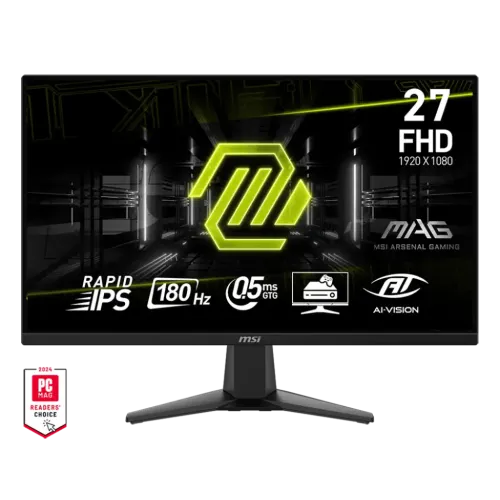
MSI MAG 275F at a glance
The MSI MAG 275F is a flat 27-inch gaming monitor with a Rapid IPS panel, Full HD resolution and a refresh rate of up to 180Hz. Its focus is quick motion, broad viewing angles and a familiar 16:9 picture in a desk-friendly gaming setup. The 1920 × 1080 resolution is less demanding on a graphics card than QHD or 4K, which can help a compatible PC reach higher frame rates in competitive titles. The 180Hz refresh rate and MSI's stated 0.5ms minimum grey-to-grey response time are the principal performance specifications; they depend on the source, connection, settings and measurement conditions. This guide uses MSI's official product and specification pages and operating manual for technical facts. Bangladesh retailer listings are used only as time-sensitive price and warranty references.
Resolution, size and viewing experience
The display measures 27 inches diagonally and uses native 1920 × 1080 Full HD resolution with a 16:9 aspect ratio. MSI lists an active display area of 597.888 × 336.312mm and a pixel pitch of 0.3114mm horizontally and vertically, yielding approximately 82 pixels per inch. At a normal desk distance, the image provides a large viewing area for games, video and general use. Because the pixel density is lower than a 27-inch QHD screen, small text and fine interface details may look less crisp up close; choose viewing distance and operating-system scaling to suit your eyesight. Full HD can be a practical match for mid-range graphics cards when high frame rates matter. Use the monitor's native resolution for a one-to-one pixel image, and confirm the PC exposes 180Hz in its display settings.
Rapid IPS panel, brightness and colour
MSI specifies a Rapid IPS panel with typical SDR brightness of 250 nits, a 1000:1 contrast ratio and 178-degree horizontal and vertical viewing angles. IPS technology generally supports more consistent colour and brightness across wide viewing positions than many narrow-angle panels, which can be useful for shared viewing or when posture shifts during play. The anti-glare surface helps soften reflections from indoor lighting, but direct sunlight can still affect visibility. MSI reports 1.07 billion display colours using 8-bit plus FRC and lists Adobe RGB, DCI-P3 and sRGB gamut figures of 75%, 80% and 115%, respectively, under CIE 1976 measurement. These gamut area figures should not be read as a factory-calibration guarantee. The monitor can suit gaming, streaming and everyday content work; creators who need colour-critical print or mastering accuracy should use a calibrated reference workflow.
180Hz refresh and response-time claims
At its maximum 180Hz setting, the monitor can refresh the image up to three times as often as a 60Hz display. When the graphics card produces enough frames and the connection is configured correctly, this can make aiming, camera motion and fast scrolling feel more immediate. MSI rates the panel at 0.5ms GtG minimum and 1ms MPRT in its manual; these are different measurement methods, and the minimum GtG figure is not a promise that every pixel transition occurs in that time. The manual also notes that MPRT is available only above 85Hz and disables Adaptive-Sync while active. Users can choose between motion clarity and variable-refresh operation based on the game and personal preference. Extreme response settings can produce overshoot on some content, so compare the available OSD modes rather than assuming the lowest headline number is always best.
Adaptive-Sync, FreeSync and HDR Ready
MSI lists AMD FreeSync as the dynamic refresh technology and describes Adaptive-Sync support to reduce tearing and stutter with compatible graphics hardware. Compatibility depends on the GPU, driver, display mode, cable and game settings; enabling Adaptive-Sync may constrain other options such as MPRT. MSI also lists HDR support and describes the monitor as HDR Ready. This should be understood as HDR signal compatibility, not a VESA DisplayHDR certification or proof of high-end HDR brightness, local dimming or contrast. The published typical brightness is 250 nits and the panel has a 1000:1 native contrast ratio, so HDR effects have practical limits. If the operating system offers HDR, test it with relevant content and turn it off if standard desktop material appears less natural. The display also provides Low Blue Light, anti-flicker and image-adjustment controls.
Ports, console use and audio
The MSI specification lists two HDMI 2.0b inputs, one DisplayPort 1.4 input and one headphone output. Both HDMI and DisplayPort support 1920 × 1080 up to 180Hz according to MSI's specification page. The multiple inputs let a user connect a gaming PC and a console or second computer, then switch the active source in the monitor menu. The MAG 275F does not include built-in speakers; audio can be routed through the 3.5mm headphone output when supported by the source connection, or sent directly from the computer or console to a separate audio device. MSI's console mode supports VRR at optimized 1080p settings, and HDMI CEC can help compatible consoles control power and mode behavior. Check the console model and its output settings, since supported refresh and VRR modes vary by device.
Gaming tools and monitor controls
The MAG 275F includes MSI gaming features such as AI Vision, Night Vision, screen assistance, refresh-rate display, alarm clock and several picture modes, as described in its product page and manual. AI Vision can adjust visibility in dark scenes; it changes the image and may not suit every game or colour workflow. Night Vision and other processing options can be toggled in the on-screen display. The monitor has a physical Navi Key for navigating its menus, where users can set input source, brightness, contrast, response time, Adaptive-Sync and display position. Some options are mutually exclusive: for example, activating MPRT disables Adaptive-Sync, and some image controls become unavailable in selected modes. These are mode dependencies rather than defects. Configure one feature at a time and verify that the desired refresh mode remains enabled in the operating system.
Stand, VESA fit and desk dimensions
The supplied stand supports tilt from −5 to +20 degrees; MSI does not list height adjustment, swivel or pivot for this model. Set the screen near eye level using the desk or a compatible stand, and plan cable routing before positioning it close to a wall. The monitor supports a 100 × 100mm VESA mount with M4 × 10mm screws, providing an option to use a compatible arm. Verify the arm's weight capacity and mounting requirements first. MSI lists assembled dimensions of 611.3 × 220.1 × 454.3mm in width, depth and height order, and head-only dimensions of 611.3 × 56.6 × 362.6mm. The product itself weighs 4.0kg; gross package weight is 6.2kg. MSI lists carton measurements of 684 × 129 × 463mm for the worldwide carton and 704 × 149 × 498mm for the outer carton. These packaging measurements are distinct from the assembled display.
Power, eye comfort and care
The monitor uses a power cable and supports 100–240V AC at 50–60Hz. MSI lists operating consumption below 21W, standby below 0.5W and off-state below 0.3W. Actual draw varies with brightness, selected mode and connected devices. A typical grounded outlet or suitably rated UPS can power the display; check local plug compatibility and the UPS load before relying on battery runtime. MSI's product page describes Anti-Flicker and TÜV Rheinland certified Low Blue Light technologies. The manual explains that enabling Low Blue Light shifts colour temperature toward a warmer, more yellow appearance, so turn it off when colour work matters. Place the display to avoid strong reflections, clean it with a soft cloth and do not press on the LCD surface. No built-in webcam or speaker system is listed.
Who should consider this Full HD gaming monitor
The MAG 275F is aimed at players who prioritize a high refresh rate and responsive IPS image at Full HD, especially when their PC can render a high frame rate at 1080p. It can also serve for general browsing, study and video. The 27-inch screen gives games a large image, but users who sit close and spend long sessions reading small text may prefer a 27-inch QHD model. The tilt-only stand is simple, so users who require built-in height adjustment, pivot or swivel may need a monitor arm. Since there are no internal speakers, plan for headphones or external audio. Buyers who want USB-C docking, laptop charging, a USB hub or stronger HDR hardware should compare other models. The right choice depends on the desk, game type, graphics hardware and preferred balance between image sharpness and frame rate.
Price and warranty in Bangladesh
At review time, the current BiponiBD variant price is ৳26,500 and is retained as the catalog price. The Star Tech listing shows a discounted cash price of ৳26,500 and a three-year warranty; Tech Land BD lists around ৳28,200 with three years, while other listings range higher. The observed retailer prices are a market snapshot, not a live offer or a promise of stock. Retailer prices can change with promotions and payment method. Local warranty claims should be confirmed with the seller, including the service provider, panel policy, proof-of-purchase requirements and whether the unit is an authorized local distribution model. Compare the exact MAG 275F model name on the box and invoice. Regional product bundles and carton details may differ, so confirm included power cable and return conditions before placing an order.
Product identity and specification corrections
The exact manufacturer and model are MSI and MAG 275F. The source identifies the general product model but the regional SKU suffix is not independently visible on this unit, so no more specific manufacturer part number is asserted. The product already has the correct visual subject, but its brand field was incorrectly mapped to “Others”; an existing MSI brand entry has been verified and is used for the correction. The catalog's one-HDMI summary is corrected to two HDMI 2.0b inputs and one DisplayPort 1.4 input. The 180Hz rate, 0.5ms minimum GtG, HDR Ready support and 3-year retailer warranty were retained with clearer context. The feature set, exact-model advantages, limitations, FAQs, SEO description, social metadata and four descriptive gallery alt texts below make the product page more useful while preserving the product ID, number, name, slug, category, status, variant identity, price, primary image and media ordering.