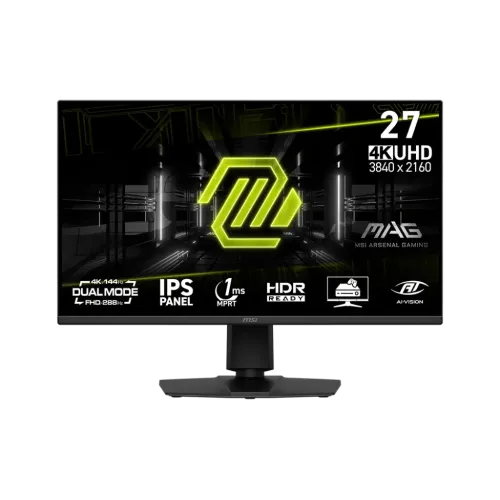
The MSI MAG 275UPD E14 is a 27-inch gaming monitor designed around two display choices: native 4K UHD at up to 144Hz, or Full HD at up to 288Hz using Dual Mode. It is important to understand that the 288Hz figure applies to 1920 × 1080 Full HD, not 3840 × 2160 4K. The IPS panel, adaptive refresh support, multiple video inputs and adjustable stand make it suitable for a range of PC and console desks. The product’s best mode depends on the games, graphics hardware and visual priorities of the owner.
Product overview
The MSI MAG 275UPD E14 combines a 27-inch IPS display with two deliberately different operating modes. Its native panel resolution is 3840 × 2160, commonly called 4K UHD. MSI specifies refresh rates up to 144Hz at this resolution. Dual Mode changes the signal to 1920 × 1080 Full HD and raises the supported refresh rate to as much as 288Hz. This gives the owner a choice between sharper detail and a higher refresh ceiling. It does not provide 4K at 288Hz. That distinction matters when comparing monitor titles and planning a computer build. The selected mode, connected source and game settings all affect the final image and performance.
Choosing between 4K and 288Hz
UHD mode is useful for detailed single-player games, general desktop work, high-resolution video and compatible console output. Its 144Hz ceiling is already above traditional 60Hz displays, while retaining the native pixel count. Full HD Dual Mode uses fewer pixels, which can make it easier for a gaming PC to deliver very high frame rates in esports titles. At 288Hz, the source must send the correct 1920 × 1080 signal and the game must render enough frames to make use of it. A monitor refresh rate is not a promise that every game will run at that frame rate. Competitive players may value the higher refresh option; users who prioritize fine text and image detail may prefer UHD.
Panel and image characteristics
MSI identifies an IPS panel with 178-degree horizontal and vertical viewing angles. The listed typical SDR brightness is 250 cd/m² and typical contrast is 1500:1. The screen has an anti-glare surface and a flat 16:9 format. Color-gamut figures are 90% DCI-P3, 84% Adobe RGB and 130% sRGB using the manufacturer’s CIE1976 method. Gamut coverage and volume are not interchangeable measurements, so these values should be read in the stated measurement context. They describe color range, not factory calibration accuracy. Anyone producing color-critical work should check calibration information and use a suitable measurement workflow.
Motion, response and variable refresh
The product specification lists 1ms MPRT response time. MPRT is a motion-picture response-time metric and should not be read as a guarantee that every pixel transition is free from blur or overshoot. MSI also lists Adaptive-Sync and AMD FreeSync Premium. Variable refresh can synchronize the display with compatible graphics output over a supported range, reducing tearing in suitable conditions. Results depend on source hardware, drivers, chosen port, frame rate and on-screen settings. For console VRR, confirm compatibility for the console generation and game. Players should compare motion modes and response settings in their own titles, since the most aggressive setting is not always the clearest.
HDR expectations
MSI describes the monitor as HDR Ready. This wording indicates HDR signal capability, but it does not by itself establish a premium HDR experience. The listed 250 cd/m² typical SDR brightness and the absence of a manufacturer claim here for local dimming mean buyers should keep expectations measured. HDR results vary with source, content, tone mapping and selected display mode. For bright-room use, room lighting and screen placement remain relevant. If high-impact HDR is a deciding requirement, compare independently measured peak brightness, contrast behavior and dimming implementation rather than relying on a readiness label alone.
Connections and device setup
The listed inputs are two HDMI 2.1 ports and one DisplayPort 1.4a HBR3 port, with a headphone output. MSI specifies 4K at 144Hz on the HDMI 2.1 inputs. The exact supported mode over each connection depends on the monitor manual, device output, cable quality and configuration. Use a suitable certified cable and verify the source’s output menu after connecting. A gaming PC can be connected by DisplayPort or HDMI, while two HDMI ports may be convenient for a console and another device. The package contents should be checked with the local seller; do not assume an unlisted cable or adapter is included.
Console use
MSI describes HDMI console features including variable refresh rate, Auto Low Latency Mode and HDMI CEC. These can help a compatible console communicate display and latency preferences, but support is shared between the screen, console, firmware and game. The 4K144 input capability does not mean every console outputs 144 frames per second; console frame-rate modes are determined by the console and title. Before purchase, compare the console’s supported resolution and refresh combinations with the monitor’s input table. Users connecting multiple devices should label cables and input selections so switching between a PC and console is straightforward.
Stand and mounting
The supplied stand supports height adjustment from 0 to 130mm, tilt from -5 to 20 degrees, swivel from -30 to +30 degrees and pivot from -90 to +90 degrees according to MSI’s specification. Ergonomic adjustment can help align the screen with seating position and desk height. The monitor also lists a 100 × 100mm VESA mount and Kensington lock. A third-party arm must safely support the complete display weight and use compatible screws. Check desk clearance, cable slack and the arm manufacturer’s load rating before installation. Pivoting the display physically does not guarantee that all games or software will rotate automatically.
Audio and feature differences
There is a source discrepancy concerning internal speakers. MSI’s specification and Star Tech list two 2W speakers, while Skyland’s table reports speaker details as unavailable. Verify the exact local unit and audio behavior with the seller before relying on the speakers. A headphone output is listed. MSI lists Picture-in-Picture and Picture-by-Picture support, which arrange more than one video input on screen. These functions do not perform USB peripheral switching. The manufacturer specification does not list a KVM feature, so buyers who need one keyboard and mouse to switch between computers should plan for a separate KVM or USB switch.
Gaming computer requirements
The display can accept high-refresh signals, but the computer must render them. A modern GPU may reach high frame rates more readily in Full HD than in UHD, depending on the title and quality settings. Esports games often place different demands on CPU and GPU than graphically intensive releases. Check the graphics card’s HDMI and DisplayPort capabilities, game benchmarks, cable support and operating-system display settings. The monitor’s 4K mode can also be used at lower refresh rates if a system cannot sustain 144 frames per second. Buyers should choose based on the games they play and their preferred balance of resolution, image quality and responsiveness.
Bangladesh price and warranty
Three Bangladesh seller pages for the exact model were checked on 6 November 2026. Tech Land BD showed ৳55,799, Skyland showed ৳55,799 and Star Tech showed ৳55,900, each with in-stock status at the time observed. The displayed cash-price range is therefore ৳55,799 to ৳55,900. Retailer regular-price figures differ and are not used to represent a single standard market price. All three pages advertised three-year warranty terms, but the responsible service provider, exclusions and claim process should be verified in writing. Retail price, stock and promotional terms may change after the observation date.
Who should consider it
This monitor can suit buyers seeking one display for both detailed 4K play and a high-refresh Full HD competitive mode. It may also fit mixed PC and console setups that benefit from multiple HDMI inputs and a flexible stand. Consider another category if the main priority is premium HDR, extremely bright-room performance, guaranteed high frame rates in demanding games or a confirmed integrated KVM. The best choice depends on the system’s output, available desk space, preferred game genres and expected audio setup. Review the exact product number on the invoice and packaging to avoid confusion with similar MAG models.
Before checkout
Ask the retailer to confirm the exact model MAG 275UPD E14, current cash price, availability and written warranty. If built-in sound matters, ask the shop to confirm the speaker specification for its stock because published pages conflict. Check the included accessories and return policy, and confirm whether dead pixels or internal dust are covered. Match the intended 4K144 or Full HD 288Hz mode to your computer or console output. For a monitor arm, verify VESA fit, weight rating and screw length. Save the invoice and warranty details. These checks help ensure the screen, source and local service expectations align before payment.
Practical setup note 1
After installation, open the computer or console display settings and verify the active resolution and refresh rate rather than assuming the connection selected the preferred mode. Select UHD 3840 × 2160 for the detailed mode or the supported Full HD 1920 × 1080 Dual Mode for the higher refresh target. Check the on-screen information menu, use a suitable cable and update the graphics driver when needed. If a mode is unavailable, review the source output capability, port selection, cable specification and monitor manual. Keep expectations aligned with the mode actually active. This simple check helps avoid mistaking a 60Hz or 120Hz fallback signal for the maximum supported display configuration, and makes troubleshooting more precise.
Practical setup note 2
After installation, open the computer or console display settings and verify the active resolution and refresh rate rather than assuming the connection selected the preferred mode. Select UHD 3840 × 2160 for the detailed mode or the supported Full HD 1920 × 1080 Dual Mode for the higher refresh target. Check the on-screen information menu, use a suitable cable and update the graphics driver when needed. If a mode is unavailable, review the source output capability, port selection, cable specification and monitor manual. Keep expectations aligned with the mode actually active. This simple check helps avoid mistaking a 60Hz or 120Hz fallback signal for the maximum supported display configuration, and makes troubleshooting more precise.
Specification summary
- 27-inch Rapid IPS panel with native 3840 × 2160 UHD resolution for detailed desktop and game imagery.
- UHD mode supports refresh rates up to 144Hz; use a compatible GPU and connection to reach the supported mode.
- Dual Mode switches to 1920 × 1080 Full HD at up to 288Hz for fast competitive play.
- The two modes target different priorities: fine 4K detail or a higher refresh rate at Full HD.
- MSI lists 1ms MPRT response time; motion clarity varies with settings, content and panel behavior.
- The display is HDR Ready; this designation does not mean it has the brightness or local dimming of a high-end HDR monitor.
- MSI quotes 90% DCI-P3, 84% Adobe RGB and 130% sRGB coverage using CIE1976 measurements.
- Adaptive-Sync and AMD FreeSync Premium support variable refresh rate with compatible systems.
- Two HDMI 2.1 inputs support 4K at 144Hz; DisplayPort 1.4a HBR3 is also provided.
- Console features include VRR, ALLM and HDMI CEC support as described by MSI.
- The supplied stand offers height, tilt, swivel and pivot adjustments; 100 × 100 mm VESA mounting is supported.
- PIP and PBP can show multiple input sources; this model does not list a KVM switch.
Frequently asked questions
What is the MSI MAG 275UPD E14 price in Bangladesh?
On 6 November 2026, Tech Land BD and Skyland displayed ৳55,799, while Star Tech displayed ৳55,900 for the exact model and showed it in stock. Prices and availability can change; confirm the checkout total and stock before ordering.
Does this monitor run 4K at 288Hz?
No. MSI specifies UHD 3840 × 2160 at up to 144Hz. The 288Hz Dual Mode uses Full HD 1920 × 1080. The title’s 288Hz wording refers to this second mode, not 4K output.
What is Dual Mode?
Dual Mode lets you choose UHD at up to 144Hz for detailed imagery or Full HD at up to 288Hz for fast competitive gaming. A mode switch changes resolution and refresh-rate target; check game and GPU support.
Can I play at 4K on this display?
Yes. The native UHD resolution is 3840 × 2160 and MSI specifies up to 144Hz in this mode. To use it, the source device, selected port, cable and configuration must support the chosen signal.
What graphics card is needed for 288Hz?
A compatible PC must output 1920 × 1080 at up to 288Hz through a supported input and maintain high frame rates in the chosen game. The monitor alone cannot create additional game frames; check GPU output specifications and game performance.
Does it support FreeSync or variable refresh rate?
MSI lists AMD FreeSync Premium and Adaptive-Sync. Compatibility depends on the connected device, graphics hardware, driver, input and display settings. Console VRR support also depends on the console and game.
Which ports are included?
MSI lists two HDMI 2.1 inputs supporting 4K at 144Hz, one DisplayPort 1.4a HBR3 input and a headphone output. Check the official connection table and included cable before purchasing for a specific device.
Is HDR performance high-end?
MSI labels the display HDR Ready. That confirms HDR signal compatibility but does not by itself promise high peak brightness, local dimming or premium HDR contrast. MSI lists 250 cd/m² typical SDR brightness.
Can I mount it on a monitor arm?
The specification lists a 100 × 100 mm VESA pattern. Confirm the arm supports the monitor’s weight, the correct screw length and the required clearance before installation.
Does it include KVM, PIP or PBP?
MSI lists PIP and PBP multi-source viewing, but does not list KVM for this model. These features are different: PIP/PBP arrange video sources, while a KVM switches USB peripherals.
What warranty is available in Bangladesh?
The three checked retailers advertise three years. Confirm whether the warranty is provided by MSI’s local distributor or the shop, what parts are covered, dead-pixel policy, exclusions and service location on the invoice.
What should I check before ordering?
Confirm the exact MAG 275UPD E14 model, 4K144 versus FHD288 mode behavior, final price, stock, warranty in writing, speaker configuration, included cables and return terms. Verify that your GPU or console supports the desired resolution and refresh rate.