Overview: an immersive WQHD gaming display
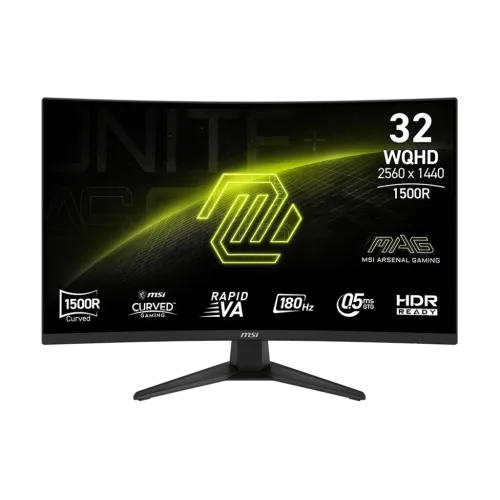
The MSI MAG 321CQF E18 is a 31.5-inch curved gaming monitor built around a WQHD 2560 x 1440 Rapid VA panel. Retailers often round the size to 32 inches, but MSI lists the exact panel size as 31.5 inches. Its 1500R curve, 16:9 aspect ratio, and 180Hz maximum refresh rate make it a large-format screen for PC games, everyday desktop work, streaming, and console play. The native resolution places 3,686,400 pixels on screen, providing more image detail than Full HD while remaining less demanding than 4K at comparable frame rates. The high refresh ceiling is available through DisplayPort; the two HDMI 2.0b inputs are specified for WQHD up to 144Hz. That connection distinction matters when choosing a graphics card, laptop dock, or console cable. The product is an entertainment and gaming display, not a color-reference monitor or a certified HDR400 screen. MSI describes HDR support as HDR Ready, which is the wording used throughout this listing.
WQHD resolution and desktop space
The 2560 x 1440 native canvas offers a useful balance between sharpness and graphics performance. Compared with a 1920 x 1080 Full HD screen of similar size, WQHD gives games and applications more addressable detail and more room for panels, timelines, maps, documents, and browser windows. It is especially useful for role-playing games, racing titles, strategy games, and action games where the broader desktop can make interface elements easier to arrange. At 31.5 inches, the larger image can feel more spacious than a typical 24- or 27-inch monitor, although viewers should plan desk depth and a comfortable viewing distance. The 16:9 shape is compatible with mainstream PC video, streaming, and console formats. The display uses a 0.2724 mm pixel pitch according to MSI. Sharpness still depends on source resolution, scaling settings, game rendering, and the viewing distance; an external monitor cannot add detail that is absent from a low-resolution source.
Rapid VA panel, contrast, and 1500R curve
MSI specifies a Rapid VA panel with a typical static contrast ratio of 3000:1 and SDR brightness of 300 cd/m². VA technology is commonly selected for its stronger native contrast than many IPS panels, which can help dark scenes look more dimensional in a room with controlled lighting. The screen's 1500R curvature follows a tighter arc than a mild curve and is intended to bring the edges of a wide display toward the viewer. Whether that curve feels natural depends on seating position, desk depth, and personal preference; users who need a completely flat view for straight-line drawing or multi-screen alignment may prefer to compare in person first. MSI lists 178-degree horizontal and vertical viewing angles, but this is a viewing-angle specification, not a promise of identical color and contrast from every position. The anti-glare surface helps manage reflections from room lighting, while direct light can still affect perceived black levels and contrast.
Fast motion: 180Hz and response-time modes
A 180Hz refresh rate can present up to 180 refreshes per second when the computer supplies compatible frames and the connection is configured correctly. MSI's specification allows WQHD up to 180Hz over DisplayPort 1.4a and up to 144Hz over either HDMI 2.0b input. This makes DisplayPort the connection to choose when targeting the monitor's full PC refresh rate. A higher refresh rate can make camera pans, mouse movement, and supported game animation appear smoother than a 60Hz display, but the actual result depends on GPU output, game settings, and frame rate. MSI lists 0.5ms GtG as a minimum response-time figure. Its manual also describes a 1ms MPRT mode; GtG and MPRT are different measurement methods and should not be presented as the same simultaneous response specification. Motion clarity can vary with selected mode, brightness, frame rate, and individual sensitivity.
Adaptive sync and variable refresh
The MAG 321CQF E18 supports AMD FreeSync according to MSI. Variable refresh can coordinate supported graphics output with the display's refresh timing within its supported operating range, helping reduce visible tearing when frame delivery fluctuates. Compatibility and available ranges depend on the source device, connection, driver, and configuration, so buyers should check their PC or console settings after setup. MSI also states that VRR is supported for PS5 and Xbox consoles in its console-mode notes. This can help maintain a more consistent presentation in compatible games, but it does not raise the console's rendering resolution or guarantee a particular frame rate. A monitor setting cannot compensate for a game that is limited to a lower frame rate. For PC use, connect through the selected input, enable adaptive sync in the display menu if required, then configure the graphics driver. Use the manufacturer's documentation for exact OSD controls and avoid assuming every variable-refresh feature works identically across HDMI and DisplayPort.
HDR Ready: realistic expectations
MSI labels the display HDR Ready. The listed 300 cd/m² brightness and 3000:1 typical contrast ratio provide context for that support, but the product page does not list VESA DisplayHDR 400 certification. One local retailer page makes a stronger HDR400 certification claim; that statement conflicts with MSI's own specification, so this product content does not repeat it. HDR playback also requires compatible content, software, operating-system settings, and a suitable signal chain. HDR Ready means the monitor can accept supported HDR content according to MSI's product description; it should not be confused with a promise of high peak brightness, local dimming, or reference-grade HDR mastering. For everyday SDR games, videos, office applications, and web browsing, users can leave HDR disabled unless they have a reason to enable it. When comparing monitors for HDR work, review certification, measured brightness, backlight control, and independent test results rather than relying on the label alone.
Color range and 10-bit signal description
MSI specifies 1.07 billion colors using 10-bit color support via an 8-bit plus Frame Rate Control implementation. Its global specification lists 89% Adobe RGB, 92% DCI-P3, and 124% sRGB under the CIE 1976 measurement standard. These figures describe color-space coverage or area as stated by MSI; they do not mean that each unit is factory calibrated for professional color-critical work. The wide gamut can make compatible game and video content appear vivid, and the 10-bit signal path can represent smoother tonal transitions when the computer, application, settings, and content also support it. A standard 8-bit source will not become native 10-bit artwork simply because it is viewed on this screen. Designers should use a calibration workflow and a suitable color-managed application when accuracy matters. For competitive gaming and general media, the listed color support gives useful context without implying an unverified Delta-E rating or a bundled calibration report.
Inputs, bandwidth, and headphones
The monitor has two HDMI 2.0b video inputs, one DisplayPort 1.4a HBR2 input, and one headphone-out jack. MSI specifies WQHD up to 144Hz through HDMI and WQHD up to 180Hz through DisplayPort. That means users can connect a PC and a console or a second computer at the same time, then select the active source from the on-screen display. It does not have a listed USB hub or USB-C video input, so a laptop that relies on USB-C will need an appropriate video adapter or dock, and USB peripherals must connect to the computer separately. The headphone jack provides an audio output path for compatible headphones or powered audio equipment; MSI lists no built-in speakers. Audio output behavior depends on the connected device and operating-system sound selection. Check the cable and graphics output specifications before expecting maximum resolution and refresh simultaneously, particularly when using adapters, docks, or long cables.
Console compatibility
MSI lists console modes for 1080p and 1440p at 60Hz and 120Hz, HDMI CEC support, and VRR support for PS5 and Xbox. A supported console can therefore use the monitor for WQHD gameplay at compatible frame rates, subject to the game, console model, selected input, and settings. The HDMI inputs are rated up to WQHD 144Hz, which is sufficient for the modes MSI lists for console use. HDMI CEC may allow compatible devices to coordinate some power or control functions, although behavior varies by device and setup. Console VRR support is similarly conditional on the console, game, firmware, and display configuration. The monitor does not convert every game to 120 frames per second; a title must offer that mode and the console must be set to use it. For a PC targeting 180Hz, use DisplayPort and confirm the output mode in the operating system or graphics driver.
Stand, ergonomics, and mounting
The included stand supports tilt adjustment from -5 to +20 degrees according to MSI. The published specification does not list height, swivel, or pivot adjustment, so users seeking those movements should consider a compatible monitor arm or a riser. A 100 x 100 mm VESA mounting pattern is provided for compatible arms and brackets; check the mount's weight rating and screw requirements before installation. The curved 31.5-inch panel occupies more desk area than a compact office monitor, so measure desk width, depth, wall clearance, and arm reach before purchase. Set the display so the center is near eye level and keep a comfortable viewing distance; ergonomics depend on the user and desk rather than the panel alone. MSI specifies dimensions with the stand of 711.6 x 269.5 x 503.1 mm and without it of 711.6 x 91 x 424.1 mm. Plan cable routing for the power cord, video cable, and any attached headphone lead.
Power, controls, and setup
MSI lists an internal power board and an AC input range of 100–240V at 50/60Hz. The product package list includes one DisplayPort 1.4a cable, one C13 power cord, and a quick guide; actual regional package contents may vary, so confirm the local seller's box contents at purchase. After placing the monitor on a stable surface or mounting it securely, connect the power cord and selected video cable, choose the correct input, and set the intended resolution and refresh rate in the computer or console menu. Use the on-screen display to adjust image presets, brightness, and supported gaming features. MSI lists a 5-way navigator in its connection diagram. Menu labels and defaults can vary with firmware or region. Avoid blocking ventilation openings and use a grounded, correctly rated power outlet. For cleaning, follow the user manual and use a soft, non-abrasive cloth; do not spray liquid directly onto the panel.
PIP/PBP and multitasking note
MSI's current product-page note says HDMI CEC and PIP/PBP are supported and KVM is not supported. The main specification table does not provide a detailed PIP/PBP mode matrix, so treat those as manufacturer-listed capabilities and consult the manual or OSD before relying on a particular picture arrangement. PIP and PBP, where enabled for a compatible combination of inputs, can be useful for viewing two sources, but they do not replace a second monitor for every workflow. There is no KVM function listed, and there is no USB hub to switch attached peripherals. For a workstation that needs keyboard and mouse sharing, use a separate KVM switch or a computer dock that supports the required devices. Verify which source combinations and resolutions are available before planning a production workflow around multi-source viewing.
Who should consider this monitor
This model is a strong fit to consider for PC players who want a large curved WQHD screen, a high refresh ceiling over DisplayPort, and adaptive sync from a compatible setup. It may also suit console players who want a 31.5-inch display with the 1440p/120Hz modes MSI lists, as well as users who watch media or work with several windows on a spacious 16:9 canvas. People who prioritize a compact desk footprint, a flat panel, USB-C docking, built-in speakers, extensive stand adjustment, or certified HDR should compare alternatives before choosing. The VA contrast and curved shape are preference-sensitive, and color-critical creative work should be evaluated with independent measurement and calibration rather than relying on gamut percentages alone. For Bangladesh buyers, compare current retailer price, stock, warranty provider, exchange policy, and delivery conditions. This listing's seller snapshot is evidence for comparison, not a guaranteed future offer or a substitute for confirmation at checkout.
Bangladesh buying and warranty checks
Local retailer listings reviewed on 5 November 2026 showed cash or promotional prices from ৳42,500 to ৳44,500, with stock and payment conditions differing by seller. The product variant's existing MSRP is ৳43,000 and has been preserved; the market snapshot is stored separately with its date and source links. Retailer pages list a three-year warranty, while the catalog also records 03 years. Confirm the exact local warranty provider, what damage or panel conditions are covered, required documents, and service location directly with the seller before purchase. A listed stock status can change quickly, and cash, card, EMI, online, and showroom prices may differ. Check the sealed box, included DP cable and power cord, serial-number documentation, and return policy. Avoid assuming a specific country of origin or an unverified calibration or HDR certification; those fields remain unset unless supported by reliable exact-model documentation.
Summary of trade-offs
The key strengths are the 31.5-inch WQHD canvas, 1500R curve, Rapid VA panel, 180Hz DisplayPort mode, FreeSync support, and useful combination of HDMI and DisplayPort inputs. MSI's published 3000:1 typical contrast and 300-nit SDR brightness help buyers understand the panel's intended role. The practical trade-offs are equally important: HDMI is specified up to 144Hz at WQHD, 180Hz requires DisplayPort, the stand is tilt-only, there is no listed USB hub or built-in speaker, and HDR is described as Ready rather than certified DisplayHDR 400. The large curved format also needs adequate desk space and may not suit users who require a flat screen or high-density 4K workspace. Weigh these limits against the games, devices, room lighting, desk dimensions, and price you actually have. If those priorities line up, the MAG 321CQF E18 offers a clearly specified path to large-format WQHD gaming without requiring buyers to infer performance from ambiguous retailer copy.