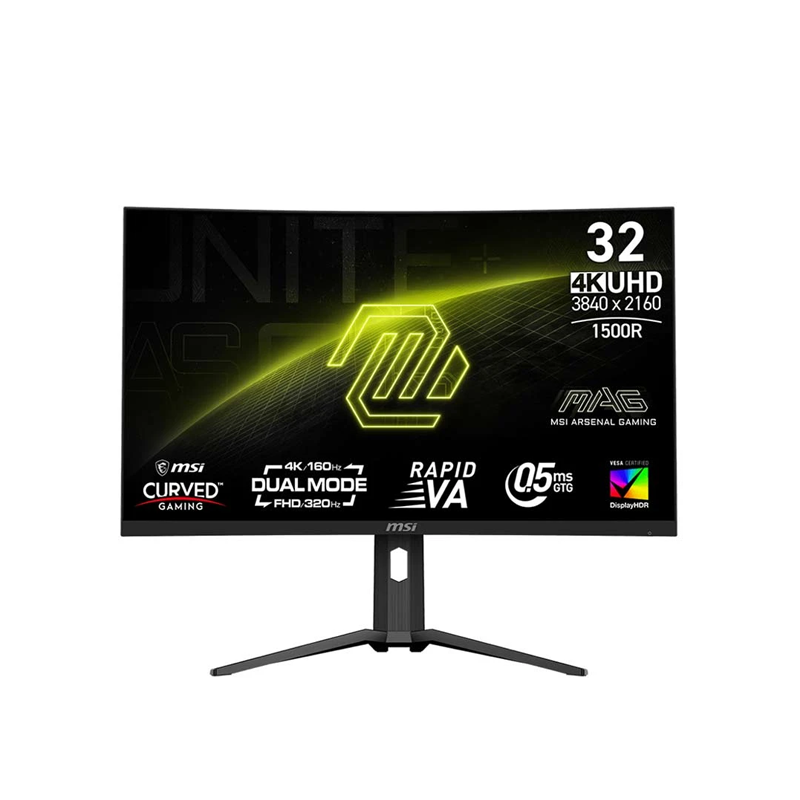
MSI MAG 321CUPDF dual-mode curved monitor
The MSI MAG 321CUPDF is a 31.5-inch curved gaming display with a Rapid VA panel, 1500R curvature and Dual Mode. Its native 4K UHD mode runs at up to 160Hz, while a separate FHD mode runs at up to 320Hz. This lets players choose higher image detail or a faster refresh mode for titles and computers that can sustain high frame rates. It does not display 4K at 320Hz; the two refresh targets correspond to different resolutions.
The panel uses a 16:9 aspect ratio, 3840 × 2160 native resolution, and 1920 × 1080 alternate mode. Pixel pitch is approximately 0.18159mm and the viewing angle is specified at 178 degrees horizontally and vertically. A 31.5-inch curved screen needs sufficient desk depth and viewing distance so the whole image remains comfortable to scan.
MSI AI Dual Mode is designed to detect supported resolution changes and switch to the suitable refresh behavior. MSI also lists screen-size simulation for 24.5-inch and 27-inch competitive gaming areas. These settings adjust the active view for supported workflows; they do not change the physical panel size. Check the on-screen display and game output after changing modes.
Rapid VA, contrast and motion
MSI specifies Rapid VA liquid-crystal technology with LED backlighting. Typical static contrast is 3000:1, while the dynamic contrast figure is 100,000,000:1. The native contrast rating is the relevant fixed panel comparison; dynamic contrast can vary through backlight behavior and should not be read as the static contrast of every scene. The anti-glare surface helps manage ordinary room reflections, though it cannot eliminate direct glare.
Response time is rated at 0.5ms GtG minimum. Actual pixel transitions depend on overdrive setting, refresh, temperature and image content, so the minimum response claim does not describe every transition. Adaptive-Sync and AMD FreeSync Premium support are listed, with a 48–160Hz variable refresh range in UHD mode and 48–320Hz in FHD mode. Compatibility depends on the graphics source, driver and connection.
At the UHD setting, the monitor can deliver detailed 4K game images at up to 160 frames per second when the system can render them. In FHD mode, the refresh ceiling rises to 320Hz for supported PC games. A lower display resolution can look softer on a 31.5-inch screen, so choose the mode for the title, graphics hardware and viewing preference.
Color and DisplayHDR 400
The monitor displays approximately 1.07 billion colors using 10-bit output implemented as 8-bit plus frame-rate control. MSI lists a CIE 1976 gamut of 97% DCI-P3, 93% Adobe RGB and 136% sRGB. Wide-gamut content can look vivid, but unmanaged applications may show oversaturation. For color-sensitive work, select an appropriate color mode and profile, use suitable ambient light and verify the output with a calibrated workflow.
VESA DisplayHDR 400 certification and 350cd/m² typical brightness are specified. HDR can improve supported highlights compared with standard SDR content, but DisplayHDR 400 is an entry HDR class and the monitor does not use local-dimming Mini-LED zones. HDR appearance depends on source mastering, game settings, operating system, display mode and ambient light. HDR certification alone does not guarantee a particular visual result.
The 1500R curve is intended to wrap the broad panel more naturally around the viewer. Curvature is a physical characteristic and cannot be flattened through a display setting. It is useful for immersive desktop and game use, but the display is not suited to portrait rotation because the stand does not pivot and the panel is curved.
HDMI 2.1, DisplayPort and USB-C
Two HDMI 2.1 inputs support the high-refresh PC modes and compatible console signals. MSI specifies full 48Gbps bandwidth, with Console Mode features including 4K 120Hz, variable refresh rate, Auto Low Latency Mode and HDMI CEC for compatible PlayStation 5 and Xbox Series X|S systems. Console output depends on the console, game, cable and selected settings. The PC FHD 320Hz mode is not a console 4K mode.
One DisplayPort 1.4a input with HBR3 supports the monitor’s high-resolution and high-refresh signals. A USB-C connector provides DisplayPort Alt Mode video and up to 15W Power Delivery. That 15W is useful for low-power devices or accessories but is generally insufficient to charge a laptop under normal use. Confirm that the host USB-C port carries video and use a suitable cable.
A 3.5mm headphone output is available for listening. The MAG 321CUPDF has no built-in speakers and does not provide USB-A downstream hub ports or a USB-B upstream hub connection. Plan external audio and peripherals accordingly. These absences distinguish it from monitors whose USB-C connection also includes a powered hub or laptop charging.
Gaming controls and eye-care settings
MSI gaming controls include AI Vision for adjusting detail in darker areas, Smart Crosshair, Optix Scope and Night Vision. The display also supports Picture-in-Picture and Picture-by-Picture modes, plus a five-way on-screen display joystick. These features can help tune the view or place a second source on screen. Their behavior depends on the game, input and monitor firmware, and they should be evaluated in the actual setup.
Anti-Flicker and Less Blue Light features are listed, with TÜV Rheinland certification for the eye-care functions. These are screen controls rather than medical guarantees. Set brightness for the room, reduce reflections and use a comfortable viewing distance. Rest breaks and normal ergonomic adjustments remain useful during long sessions.
Stand, mounting and physical dimensions
The supplied stand supports tilt from −5 to +20 degrees and height adjustment from 0 to 130mm. It does not swivel and it does not rotate into portrait orientation. VESA mounting is 100 × 100mm, and the monitor includes a Kensington lock slot. A compatible arm or wall mount should have an appropriate load rating. Since the panel is curved, keep it in landscape orientation and follow the mounting instructions for this model.
With the stand, dimensions are approximately 710.5 × 266.6 × 643.7mm in width, depth and height. Without the stand, the monitor measures approximately 710.5 × 96.8 × 423.3mm. The carton measures about 947 × 162 × 520mm. The broad screen and large carton require enough desk, doorway and storage clearance. Leave space for cables and the external adapter.
The black chassis weighs 6.65kg net with the stand, while gross boxed weight is 9.62kg. The existing catalog had these values reversed and incorrectly labeled 6.65kg as panel-only weight. MSI’s specification identifies the two values as net weight and gross weight (NW/GW). Do not interpret 9.62kg as the bare monitor’s weight.
Power and package contents
The monitor uses an external 19V DC power adapter and accepts 100–240V AC at 50/60Hz. The adapter should be placed securely with airflow and cable slack. An external supply is a separate brick rather than a built-in AC power board. Keep it away from heat and ensure the power cord and DC connector remain accessible when adjusting the height of the monitor.
MSI lists a DisplayPort 1.4a cable, external power adapter, C5 AC cord, four VESA wall-mount standoff screws and quick guide in the package. Confirm included items against the actual regional carton and seller invoice because box contents can vary. Retain the serial number, model label and purchase receipt for support and warranty service.
Bangladesh price, warranty and model identity
Bangladesh retailer pages reviewed showed a Star Tech special cash price of approximately ৳87,300 against a regular price of ৳93,000 and an Apple Gadgets listing around ৳94,500. Other seller listings fall within approximately ৳87,000–৳94,500. The existing variant MSRP of ৳94,500 is preserved while the market range records the checked lower and upper offers. Prices, stock and payment-specific discounts can change after review.
Retailer pages commonly list three years of official warranty. Confirm the warranty provider, service center, proof-of-purchase conditions and any panel or pixel terms in writing on the invoice. Verify the MAG 321CUPDF model code and the part number 9S6-3DD89T-001 on the carton. The similar MAG 321UPX is a 240Hz QD-OLED model with a different panel and must not be confused with this Rapid VA dual-mode display.
The MAG 321CUPDF may suit a player who wants a large curved screen that can alternate between high-detail 4K and high-refresh FHD, with HDMI 2.1 console connectivity and wide gamut. Consider the limits before purchasing: USB-C supplies only 15W, no speakers or USB hub are included, the stand has no swivel or pivot, and HDR brightness is 350 nits typical with DisplayHDR 400 certification. Compare these trade-offs with the intended computer, console and desk.