Pros
- UWQHD ultrawide resolution and 180Hz DisplayPort mode.
- 1500R VA screen with high listed contrast in MSI regional data.
- FreeSync Premium support and gaming assistance features.
- Adjustable stand and PIP/PBP functionality listed.

All categories
 New condition
Monitors
MSI · MAG 342CQR E2
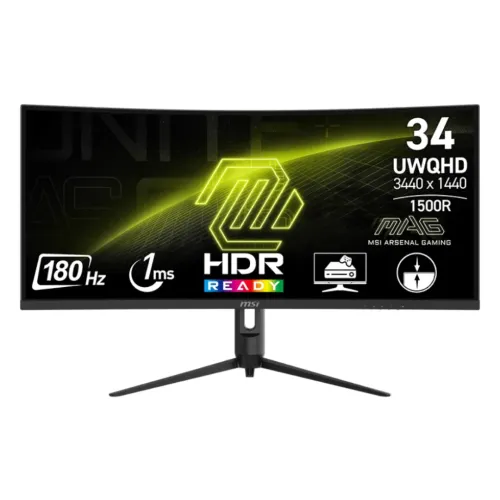
34-inch 1500R UWQHD VA gaming monitor with 180Hz, FreeSync Premium, HDR Ready and DisplayPort 1.4a.
Price unavailable
Price range updating
No verified price is available yet. Store offers will appear when merchants publish them.
Compare store prices
No live offers for this variant
Offers will appear when merchants publish them.
Loading history…
Product story
The MSI MAG 342CQR E2 is a 34-inch 21:9 curved gaming monitor with 3440 × 1440 UWQHD resolution and a VA panel. MSI lists 1500R curvature, 180Hz refresh, 1ms MPRT, AMD FreeSync Premium, HDR Ready, a DisplayPort 1.4a input and two HDMI 2.0b inputs. It is distinct from the MAG 342CQRF E20, which has a different refresh rate and specification set. Refer to MSI documentation for the exact regional part number and use the correct cable, input and OSD settings. Available modes depend on the complete source chain. Price, stock, return conditions, package and local warranty require confirmation from the Bangladesh seller.
Check the exact model label MAG 342CQR E2. MSI regional documentation uses different part numbers and some conflicting contrast or refresh-range values, so confirm the local unit part number. The current MSI product page describes 180Hz and 1ms MPRT; its UK datasheet lists 3000:1 typical contrast, while separate regional SKU documents can show different values. Verify the regional specification before relying on a variant-specific figure. Refer to MSI documentation for the exact regional part number and use the correct cable, input and OSD settings. Available modes depend on the complete source chain. Price, stock, return conditions, package and local warranty require confirmation from the Bangladesh seller.
The 34-inch screen has a 21:9 aspect ratio and native 3440 × 1440 UWQHD resolution. It provides a broad canvas for compatible games, editing timelines and multiple windows. Choose native resolution for clear text. Games that do not support ultrawide formats may show side bars, crop the image or stretch it; check important titles before purchase. Refer to MSI documentation for the exact regional part number and use the correct cable, input and OSD settings. Available modes depend on the complete source chain. Price, stock, return conditions, package and local warranty require confirmation from the Bangladesh seller.
MSI specifies a VA panel with a 1500R curve and 178-degree horizontal and vertical viewing angles. A regional datasheet lists 3000:1 typical contrast, anti-glare coating and 300 nits typical brightness. VA contrast can suit dark scenes, but color and contrast perception depends on the unit, viewing angle, settings and ambient lighting. Refer to MSI documentation for the exact regional part number and use the correct cable, input and OSD settings. Available modes depend on the complete source chain. Price, stock, return conditions, package and local warranty require confirmation from the Bangladesh seller.
The maximum refresh is 180Hz and MSI lists a 1ms MPRT response. MPRT describes motion-picture response and is not interchangeable with GTG response time. The monitor also has a signal range up to 180Hz in some published regional data. Use the specified DisplayPort connection for native UWQHD up to 180Hz and confirm the exact mode against the local SKU. Refer to MSI documentation for the exact regional part number and use the correct cable, input and OSD settings. Available modes depend on the complete source chain. Price, stock, return conditions, package and local warranty require confirmation from the Bangladesh seller.
MSI’s product page identifies AMD FreeSync Premium, while datasheets describe AMD FreeSync or Adaptive-Sync across regions. Variable refresh can reduce tearing on compatible systems within the supported range. Enable the feature on the monitor and GPU, and check driver compatibility. Avoid assuming every graphics card or connection will expose identical options. Refer to MSI documentation for the exact regional part number and use the correct cable, input and OSD settings. Available modes depend on the complete source chain. Price, stock, return conditions, package and local warranty require confirmation from the Bangladesh seller.
HDR Ready is the MSI label for this model; it is not a VESA DisplayHDR certification. A regional datasheet lists typical brightness of 300 nits. HDR quality depends on the content, system output and picture settings. Set realistic expectations for highlight brightness and local contrast, and compare HDR playback with SDR on your own content. Refer to MSI documentation for the exact regional part number and use the correct cable, input and OSD settings. Available modes depend on the complete source chain. Price, stock, return conditions, package and local warranty require confirmation from the Bangladesh seller.
MSI’s UK datasheet lists Adobe RGB 93%, DCI-P3 95%, and sRGB 119% using CIE1976 area percentage/overlap, and 1.07 billion colors at 8-bit plus FRC. Gamut percentages are not a per-unit calibration certificate. Calibrate the individual display for color-sensitive production and use color-managed applications. Refer to MSI documentation for the exact regional part number and use the correct cable, input and OSD settings. Available modes depend on the complete source chain. Price, stock, return conditions, package and local warranty require confirmation from the Bangladesh seller.
The listed inputs are one DisplayPort 1.4a and two HDMI 2.0b ports. MSI’s datasheet specifies 3440 × 1440 up to 180Hz over DisplayPort and up to 100Hz over HDMI 2.0b. Connection type therefore changes the maximum refresh at native resolution. Confirm the GPU output, cable, selected input and OSD mode when setting up. Refer to MSI documentation for the exact regional part number and use the correct cable, input and OSD settings. Available modes depend on the complete source chain. Price, stock, return conditions, package and local warranty require confirmation from the Bangladesh seller.
MSI describes console mode for compatible consoles, with HDMI CEC and VRR support in product materials. Exact supported console resolution and refresh depend on console, game, cable and region-specific monitor firmware. The monitor’s 180Hz PC maximum is not a console frame-rate guarantee. Check the console’s detected signal after connection. Refer to MSI documentation for the exact regional part number and use the correct cable, input and OSD settings. Available modes depend on the complete source chain. Price, stock, return conditions, package and local warranty require confirmation from the Bangladesh seller.
MSI highlights Anti-Flicker, Less Blue Light, AI Vision and gaming assistance features on its product page. AI Vision is intended to reveal dark-area detail and adjust brightness or color saturation. Picture processing changes appearance, and eye comfort depends on brightness, breaks and room lighting. Review the manual for settings and avoid treating comfort features as medical claims. Refer to MSI documentation for the exact regional part number and use the correct cable, input and OSD settings. Available modes depend on the complete source chain. Price, stock, return conditions, package and local warranty require confirmation from the Bangladesh seller.
A regional MSI datasheet lists PIP/PBP functionality, which can place or split signals from supported inputs. Use it for workflows where simultaneous sources are useful, but check layout and resolution behavior in the manual. There is no USB hub listed in the cited spec, so do not expect USB peripheral switching or KVM. Refer to MSI documentation for the exact regional part number and use the correct cable, input and OSD settings. Available modes depend on the complete source chain. Price, stock, return conditions, package and local warranty require confirmation from the Bangladesh seller.
The stand lists tilt from -5 to +20 degrees, swivel from -30 to +30 degrees and height adjustment up to 90mm; some datasheets list a small pivot range. The regional datasheet specifies a 75 × 75mm VESA mount and Kensington lock. Confirm screw size and monitor-arm load capacity, and allow room for the curved display to rotate. Refer to MSI documentation for the exact regional part number and use the correct cable, input and OSD settings. Available modes depend on the complete source chain. Price, stock, return conditions, package and local warranty require confirmation from the Bangladesh seller.
A UK datasheet lists dimensions around 808.6 × 269.97 × 513.97mm with stand and 808.6 × 119.67 × 363.95mm without stand, with net weight about 6.95kg and 5.4kg without stand. It uses an external 19V, 3.42A adapter and AC input 100–240V, 50/60Hz. Regional figures can differ; follow the supplied unit manual. Refer to MSI documentation for the exact regional part number and use the correct cable, input and OSD settings. Available modes depend on the complete source chain. Price, stock, return conditions, package and local warranty require confirmation from the Bangladesh seller.
For a PC, use DisplayPort 1.4a for the highest listed native UWQHD refresh, then choose 3440 × 1440 and 180Hz in display settings. HDMI 2.0b is listed up to 100Hz at native resolution. If a mode is missing, inspect the cable, source output, GPU driver, input selection and monitor OSD before diagnosing a hardware fault. Refer to MSI documentation for the exact regional part number and use the correct cable, input and OSD settings. Available modes depend on the complete source chain. Price, stock, return conditions, package and local warranty require confirmation from the Bangladesh seller.
The wide 21:9 format suits supported racing and simulation games, immersive titles and productivity timelines. Some competitive games restrict ultrawide field of view, and some video content will show side bars. A high frame rate at UWQHD requires a capable graphics card. Review compatibility for the software and games you actually use. Refer to MSI documentation for the exact regional part number and use the correct cable, input and OSD settings. Available modes depend on the complete source chain. Price, stock, return conditions, package and local warranty require confirmation from the Bangladesh seller.
Potential strengths include a 34-inch UWQHD canvas, 1500R curve, 180Hz DisplayPort mode, FreeSync Premium, color gamut coverage, adjustable stand and PIP/PBP. Trade-offs include HDMI refresh limited to 100Hz at native resolution, HDR Ready rather than a stated DisplayHDR tier, no listed USB hub or speakers, and regional specification variation. Refer to MSI documentation for the exact regional part number and use the correct cable, input and OSD settings. Available modes depend on the complete source chain. Price, stock, return conditions, package and local warranty require confirmation from the Bangladesh seller.
Inspect the curved panel for cracks, pressure marks and defects under the seller’s policy. Check the stand, adapter, cable bundle, serial label and invoice. Keep packaging during the return period. Clean with a soft microfiber cloth, avoid pressing on the panel and never spray liquid directly onto the screen. Refer to MSI documentation for the exact regional part number and use the correct cable, input and OSD settings. Available modes depend on the complete source chain. Price, stock, return conditions, package and local warranty require confirmation from the Bangladesh seller.
Before purchase in Bangladesh, confirm current price and stock, exact MAG 342CQR E2 regional part number, new or open-box status, cables and accessories, return/dead-pixel terms, delivery and serial-specific local MSI warranty provider and duration. The catalog’s “3 Years Warranty” entry does not itself establish local MSI coverage; ask for written confirmation on the invoice. Refer to MSI documentation for the exact regional part number and use the correct cable, input and OSD settings. Available modes depend on the complete source chain. Price, stock, return conditions, package and local warranty require confirmation from the Bangladesh seller.
MSI MAG 342CQR E2 is a 34-inch 3440 × 1440 1500R VA monitor with 180Hz refresh, 1ms MPRT, FreeSync Premium and HDR Ready. DisplayPort supports native UWQHD up to 180Hz; HDMI 2.0b up to 100Hz. Verify exact regional SKU and Bangladesh warranty before buying. Refer to MSI documentation for the exact regional part number and use the correct cable, input and OSD settings. Available modes depend on the complete source chain. Price, stock, return conditions, package and local warranty require confirmation from the Bangladesh seller.
Helpful answers
Product-specific answers maintained with the catalog information.
It is a 34-inch UWQHD monitor with 3440 × 1440 resolution.
MSI lists 180Hz, with DisplayPort supporting native UWQHD up to 180Hz.
MSI lists UWQHD up to 100Hz over HDMI 2.0b.
The MAG 342CQR E2 has a 1500R curve.
MSI lists AMD FreeSync Premium and Adaptive-Sync in its product materials.
It is listed as HDR Ready; the cited datasheet does not state VESA DisplayHDR certification.
The cited MSI datasheet lists no USB ports; do not assume USB hub or KVM.
The regional datasheet lists up to 90mm height adjustment.
Confirm serial-specific local MSI provider, term and service with the seller in writing.
Customer community
Become a merchant
Join BiponiBD, publish accurate offers and start free.