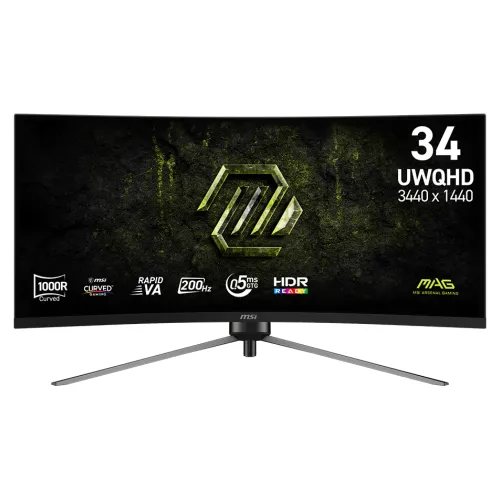
MSI MAG 345CQRF E20 overview
The MSI MAG 345CQRF E20 is a 34-inch curved gaming monitor with a 3440 × 1440 UWQHD panel and a 21:9 aspect ratio. MSI identifies the panel as Rapid VA, gives a 1000R curvature and lists a maximum refresh rate of 200Hz. It is designed for a broad desktop and gaming view, while game and application support determines how much of that ultrawide canvas is used. The monitor also lists AMD FreeSync Premium, HDR Ready input, a 3500:1 typical contrast ratio and a minimum 0.5ms GtG response-time figure.
The detailed product page and technical information are matched to MSI’s exact model. This catalog entry previously used the generic Others brand, had only a title-like short description, a very short long description, generic image alt text and empty provenance fields. The update identifies MSI correctly and expands the model-specific content. It retains the existing slug, active state, Monitors category, SKU, ৳61,000 catalog MSRP, three-year catalog warranty and media identity. Connection limits and adjustments follow the manufacturer’s specification rather than broader retailer copy.
34-inch UWQHD resolution and ultrawide format
The native resolution is 3440 × 1440 pixels. In 21:9 format, the panel can show more horizontal workspace than a conventional 16:9 screen at a similar vertical pixel count. That can be helpful when arranging multiple windows, timelines, wide spreadsheets, simulation dashboards or games that support ultrawide layouts. MSI lists the active display area as 797.22mm horizontally by 333.72mm vertically, with a pixel pitch of 0.23175mm in both directions.
UWQHD is not the same as 4K UHD. A computer must render the selected resolution and game settings, and older applications may show side borders or stretch their interface instead of using the full width. Check the software you use most often, especially competitive games that limit ultrawide views, video sources with fixed aspect ratios and workplace applications with fixed layouts. Set operating-system scaling to suit your viewing distance and text size.
1000R curve and desk setup
MSI specifies a 1000R curvature. The curved panel wraps the horizontal image toward the viewer, which can make a wide 34-inch screen feel more continuous from a centered seat. The shape is a physical design characteristic; it does not increase the source resolution or create extra game frame rate. The monitor is approximately 797.53mm wide with its stand, so measure the available desk width and leave room for the stand feet, keyboard, speakers and cable routing.
Curved displays can feel different depending on seating distance, viewing angle and personal preference. Keep the screen centered in front of the main seating position and avoid placing it where strong reflections cross the viewing area. MSI lists a weight of 7.75kg net and 11.3kg gross. Confirm that a desk, monitor arm or shelf can safely support the monitor and stand. The included stand’s height, tilt, swivel and pivot adjustments allow positioning without relying only on a separate arm.
200Hz refresh rate and connection limits
The manufacturer lists a 200Hz maximum refresh rate and a 48–200Hz vertical signal range. MSI’s note specifies the important connection boundary at full 3440 × 1440 resolution: DisplayPort can reach up to 200Hz, while HDMI 2.0b supports UWQHD up to 100Hz. For a high-refresh PC setup, connect through DisplayPort 1.4a (HBR3), use a compatible cable and select the supported resolution and refresh rate in the operating system or graphics settings.
The display cannot create frames that the graphics system does not render. Actual frame rate depends on the PC, GPU, game, resolution and quality settings. Some titles may run below 200 frames per second even on powerful hardware. For a console setup, MSI’s Console Mode information lists 1080p at 60Hz or 120Hz and 1440p at 60Hz or 120Hz, with VRR supported for PS5 and Xbox. Console capabilities and game-specific output options still apply.
Response time and motion behaviour
MSI specifies 0.5ms GtG (minimum). Grey-to-grey response time describes pixel transitions under a particular measurement method and setting. A minimum figure does not mean that every shade transition finishes in exactly that time, nor does it guarantee that all motion will appear free of blur, overshoot or trailing. Results can vary with overdrive, refresh rate, scene contrast and the individual transition being measured.
When comparing displays, keep the method and conditions in mind rather than treating a minimum rating as a universal result. Use the monitor’s on-screen settings to find a balance that looks clear without visible inverse ghosting. Fast action, dark scenes and camera movement can reveal different artifacts. The 200Hz refresh capability and FreeSync Premium may improve perceived motion consistency when a compatible PC supplies suitable frame rates, but the experience depends on the whole system.
Rapid VA panel, contrast and viewing
The monitor uses an MSI Rapid VA panel. MSI lists a typical 3500:1 contrast ratio, 300 cd/m² SDR brightness and horizontal and vertical viewing angles of 178 degrees. VA technology can provide stronger native contrast than many IPS panels, while viewing-angle specifications describe the measurement range rather than perfectly unchanged colour from every seat. The screen has an anti-glare surface intended to reduce reflections from ambient light.
Room lighting, brightness settings and the direction of light sources affect comfort and visible contrast. Avoid aiming bright windows or lamps directly at the panel, and adjust the display for the room rather than assuming the maximum setting is best. The 300 cd/m² value is an SDR specification. It should not be used to infer a specific HDR brightness tier or a guaranteed HDR image quality.
HDR Ready and colour information
MSI labels the monitor HDR Ready and lists 1.07 billion colours using 10-bit output through 8-bit plus frame-rate control. The manufacturer gives colour-gamut figures of 88% Adobe RGB, 90% DCI-P3 and 110% sRGB under the CIE 1976 standard. Gamut size and coverage are different comparisons: a gamut-size figure above 100% does not mean every colour in a colour space is accurately reproduced.
The specification does not list VESA DisplayHDR certification or a local-dimming system for this model. HDR content, operating-system configuration, source-device tone mapping, game support and room lighting all affect the result. The listed gamut figures can help compare broad colour range, but they do not establish factory calibration or a measured Delta E. For colour-critical work, use a calibration workflow and verify the colour-space coverage required by the project.
FreeSync Premium and variable refresh
AMD FreeSync Premium is the dynamic-refresh technology MSI lists for this monitor. The specification gives a 48–200Hz vertical range. Variable refresh can coordinate display timing with a compatible graphics system and help reduce tearing or uneven frame presentation within the supported operating range. The connected graphics card, driver, cable, game, refresh mode and monitor settings all need to support the configuration.
If you want to use FreeSync, enable the feature where needed in the monitor and graphics software, then check that the operating system or game exposes the expected option. Performance outside the operating range can behave differently depending on the graphics system. FreeSync does not increase the number of frames rendered by a game. It can help align refresh timing with the frames the system already produces.
Ports, PIP/PBP and devices
MSI lists one DisplayPort 1.4a (HBR3), two HDMI 2.0b inputs and one headphone-out connection. The HDMI inputs support UWQHD up to 100Hz, while DisplayPort supports UWQHD up to 200Hz. This distinction matters when selecting a cable or connecting multiple sources. The official specification also lists PIP/PBP, which can show multiple input sources in picture-in-picture or picture-by-picture arrangements when configured for supported modes.
The monitor does not list USB-C, a USB hub, KVM functionality, speakers or a webcam in its technical specification. HDMI CEC is listed as supported, and MSI’s Console Mode details compatibility information for supported console resolutions and VRR. Use the headphone output with compatible audio equipment. Check device output resolution, refresh rate and cable capability before buying accessories for a particular computer or console.
Stand adjustments, VESA and ergonomics
The included stand supports tilt from -5° to +20°, swivel from -30° to +30°, pivot from -1.5° to +1.5° and height adjustment from 0 to 100mm, according to MSI. The wide panel can be positioned for a centered primary viewing seat, and height travel can help align the screen with eye level. MSI also lists a 100 × 100mm VESA pattern for a compatible arm or wall mount.
The monitor is a wide, curved panel, so confirm the monitor arm’s supported screen size, VESA compatibility, weight capacity and reach before installation. Pivot range is limited and does not mean the 34-inch ultrawide is intended for full portrait rotation. Leave clearance for the stand and connectors. The rear images in the catalog show the curved enclosure, stand and lighting accents, but they do not establish a technical feature unless it is also listed in the specification.
Power, dimensions and package contents
MSI lists an external 19V 3.42A power adapter and AC input of 100–240V at 50/60Hz. The dimensions with the stand are 797.53 × 332.32 × 418.9mm; without the stand they are 797.53 × 158.18 × 363.02mm. The carton measures 985 × 228 × 510mm. Net weight is 7.75kg, and gross package weight is 11.3kg. These measurements help plan desk space, mounting and delivery access.
The official accessory list includes one DisplayPort 1.4a cable, one C13 power cord, one power adapter, one quick guide and four VESA screws. Package contents can vary by market or sales channel, so confirm the box with the local seller. Keep the adapter ventilated and use the supplied power equipment with a suitable outlet. The stated input range is a power compatibility specification and should not be read as a claim about energy consumption.
Bangladesh seller price and warranty context
On 6 November 2026, Tech Land BD showed the exact model in stock at ৳61,000 with a displayed regular price of ৳65,000. Distribution Hub showed ৳62,900. The observed reference range is therefore ৳61,000–৳62,900 for these checked seller pages. Prices and stock can change by seller, payment method and delivery location. This dated market estimate is informational and is not a live BiponiBD store offer.
The catalog already records a three-year warranty, and the Tech Land page also displays three years. The warranty field is retained without changing the commercial terms. Confirm the seller’s warranty provider, claim location, dead-pixel policy, delivery charge, return conditions and current stock before ordering. BiponiBD currently has no verified offer associated with this variant, so the seller reference should not be mistaken for an offer available through this marketplace.
Who may choose the MAG 345CQRF E20?
This monitor may suit PC players who want a wide 21:9 canvas, a 200Hz DisplayPort mode, a curved 34-inch panel and variable refresh support. It can also provide room for multiple windows in compatible productivity applications. The adjustable stand and VESA pattern give more placement options than a fixed-height stand. Its connections may also suit a setup with more than one source, provided the user understands the HDMI refresh limit and uses DisplayPort for the specified UWQHD 200Hz mode.
It may be a poor fit for a narrow desk, buyers who prefer a flat 16:9 screen, users requiring 4K resolution, or console/game combinations that do not support ultrawide formats. Buyers seeking certified HDR tiers, USB-C docking, a built-in USB hub, KVM or integrated speakers should compare those features directly. Check graphics capability, game support, mounting hardware, warranty terms and the current local price before deciding.
Model identity and listing summary
The MSI MAG 345CQRF E20 is a black 34-inch 1000R curved Rapid VA monitor with UWQHD 3440 × 1440 resolution, a 21:9 aspect ratio and a maximum 200Hz refresh rate. It supports AMD FreeSync Premium, HDR Ready input, 3500:1 typical contrast and 10-bit colour output using 8-bit plus FRC. MSI lists one DisplayPort 1.4a, two HDMI 2.0b ports and headphone out.
The exact model is used consistently in the product name, MSI brand, model and MPN, description, metadata, specifications, features, FAQs, tags and media alt text. The 200Hz mode is connected to DisplayPort, while the HDMI UWQHD limit is stated as 100Hz. Existing slug, active status, Monitors category, variant SKU, ৳61,000 MSRP, three-year warranty, logistics and all media IDs, URLs and order are retained. The two seller references are dated context, separate from BiponiBD offers.