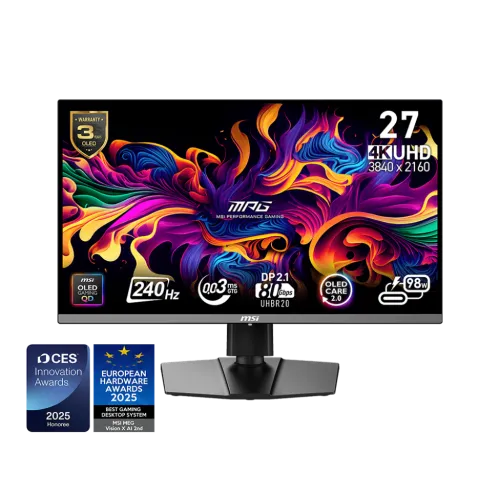
MSI MPG 272URX QD-OLED 4K 240Hz gaming monitor
The MSI MPG 272URX QD-OLED is a premium flat gaming monitor built around a high-resolution 4K UHD panel and a fast refresh specification. MSI describes the screen size as 26.5 inches, while product listings commonly use the 27-inch class. The panel uses quantum-dot OLED technology and displays 3840 x 2160 pixels in a 16:9 aspect ratio. This combination is designed for players who want fine image detail and smooth motion from a compatible desktop PC or other supported video source. The monitor can also serve as a large high-resolution display for creative applications, streaming and general computer use, with the final experience shaped by the connected device and chosen settings.
MSI lists a 0.153 x 0.153 mm pixel pitch and an active display area of 589.97 x 332.93 mm. The surface is flat rather than curved. A flat 16:9 layout suits conventional desk and game arrangements, and 4K UHD resolution gives applications a 3840-by-2160 native pixel grid. Scaling settings may be useful for making small text comfortable at a typical desk distance. The usable workspace depends on the operating system, application layout, viewing distance and personal preference. The panel size in the manufacturer specification is 26.5 inches, which explains why the same model may be advertised as either 26.5-inch or 27-inch by local shops.
QD-OLED picture, contrast and color
QD-OLED combines OLED pixel control with quantum-dot color conversion. MSI rates the typical contrast ratio at 1,500,000:1 and lists 178-degree horizontal and vertical viewing angles. The display supports 10-bit color, specified as 1.07 billion colors and described as 8-bit plus frame-rate control in the product specification. MSI lists color-space coverage of 98% Adobe RGB, 99% DCI-P3 and 138% sRGB under the CIE 1976 measurement standard. These are manufacturer specifications rather than an independent calibration report. Users doing color-sensitive work should select an appropriate mode, configure their operating system and workflow, and verify the individual display with a calibration device if their work requires measured accuracy.
The monitor has an anti-glare surface and a flat screen. Its OLED contrast characteristics can help dark scenes retain visibly deep blacks in a suitably controlled viewing environment. Room reflections, ambient light, content mastering, graphics output and display settings all affect perceived image quality. The broad gamut can render saturated colors in supported content, while color-managed apps are important when viewing material created for a defined color space. The listed 10-bit support describes input and display capability; it does not mean every app or video source will deliver a 10-bit signal automatically.
HDR brightness and certification
MSI lists DisplayHDR True Black 400 support and several brightness values with different measurement conditions. The SDR rating is 250 nits. The specification lists 450 nits typical HDR brightness with True Black 400 at 10% Average Picture Level, and a 1000-nit typical peak at 3% APL. APL represents the portion of the picture that is bright during the measurement. The 1000-nit value therefore describes a small bright area, not full-screen or sustained brightness for every scene. HDR output also depends on the game or video, operating system, source device, connection, picture mode and room lighting. These context details matter when comparing OLED and LCD monitor brightness numbers.
For HDR games and films, enable HDR in the source device and use content mastered for HDR. If an image looks washed out or too dim, check the operating system HDR calibration, game settings and monitor preset. A product specification states the supported mode; it cannot guarantee that all content will use HDR well. The 1.5-million-to-one typical contrast ratio, DisplayHDR True Black 400 label and separate brightness measurements describe different aspects of display performance and should be considered together rather than treated as one interchangeable rating.
240Hz motion and response-time rating
The maximum refresh rate is 240Hz, the activated variable refresh range is listed as 48 to 240Hz, and MSI specifies a 0.03ms gray-to-gray response time. A 240Hz refresh can present up to 240 updates per second when the video source supplies a matching signal. This can make fast movement appear smoother than on lower-refresh displays, especially when game frame rates remain high. The 0.03ms figure is the manufacturer response-time rating; perceived motion also depends on pixel transitions, overdrive or other settings, frame pacing, game content and the viewing environment.
MSI lists G-SYNC Compatible support. A compatible graphics card and properly configured connection are needed for variable refresh operation. The monitor cannot create extra frames that a computer or console does not render. Running a demanding game at native 3840 x 2160 and 240 frames per second may require a powerful graphics system and appropriate image-quality settings. When a game does not reach that frame rate, variable refresh and lower frame-rate output can still be useful, but the outcome depends on the source. Confirm that the computer's output port, cable and graphics settings support the resolution and refresh combination you intend to use.
Video, USB and audio connections
The rear connections include two HDMI 2.1 inputs, one DisplayPort 2.1a input with UHBR20 and one USB Type-C connection supporting DisplayPort Alternate Mode with up to 98W Power Delivery. MSI lists UHD at up to 240Hz for HDMI, DisplayPort and Type-C. Exact output depends on the graphics device, cable and configuration. USB-C can carry video and power to a compatible laptop through one cable, but the laptop must support DisplayPort Alternate Mode and its charging demand must be compatible with the available power. Up to 98W is the maximum listed delivery, not a promise that every attached device will receive that amount.
The monitor also provides two USB 5Gbps Type-A downstream ports and one USB 5Gbps Type-B upstream port. MSI includes a USB Type-B-to-Type-A cable in the listed accessories for connecting the USB hub to a computer. A headphone output is available for private listening or an external speaker setup. The exact-model specification does not list integrated speakers, so plan for headphones, desktop speakers or another audio device if sound is required. The product page also lists HDMI-CEC, KVM, Picture-in-Picture and Picture-by-Picture functions; use the manual to confirm input and USB wiring for your intended multi-device configuration.
Ergonomics, mounting and physical dimensions
The supplied stand offers tilt from -5 to +20 degrees, swivel from -30 to +30 degrees, pivot from -90 to +90 degrees and height adjustment from 0 to 110 mm. These movements help position the screen for a seated desk setup, while the included pivot range can rotate the monitor into portrait orientation when a workflow calls for it. The back also supports a 100 x 100 mm VESA mounting pattern and includes a Kensington lock provision. Check the monitor arm's VESA compatibility and load capacity before installing it, and use the correct fasteners and installation instructions.
With the stand attached, the manufacturer lists dimensions of 610 x 242 x 422 mm and net weight of 8.1 kg. Without the stand, dimensions are 610 x 69 x 356 mm. The carton measures 810 x 185 x 500 mm and gross package weight is 11.36 kg. These measurements describe different configurations: the assembled monitor, the panel without its stand, and the shipping package. Check desk width and depth, arm clearance, delivery access and mounting strength before purchase. The package measurements can also help with planning transport, but retailer packaging and included accessories should be confirmed when arranging delivery.
Power, included accessories and warranty
MSI specifies an internal power board and AC input from 100 to 240 volts at 50 or 60Hz. The power supply is therefore built into the monitor rather than described as a separate external power adapter. The listed box contents include an HDMI 2.1 cable, DisplayPort 2.1a cable, C13 power cord, quick guide, USB Type-B-to-Type-A cable and four VESA screws. In-box contents may differ between regions or retailers, so confirm the seller's package if a particular cable or accessory is essential to your installation.
MSI's global specification page lists three years of warranty coverage including panel burn-in. Manufacturer product specifications also note that availability and terms may vary by model region. Bangladesh retailers can describe warranty terms differently, so ask for the written local warranty, the service provider, what documentation is required and how panel burn-in claims are handled. Keep the purchase invoice and packaging if the seller requires them. This listing should not be read as a guarantee that every local distributor applies the global policy in exactly the same way.
Who should consider this monitor?
The MPG 272URX is intended for buyers seeking a compact high-end display with UHD detail, QD-OLED technology and a high maximum refresh rate. It may suit PC players who have a graphics card and games capable of using high refresh rates, as well as users who want HDMI, DisplayPort and USB-C inputs in one display. Its ergonomic stand and USB hub can support a tidy desk, and its wide color-space specifications may appeal to people working with colorful media. These capabilities are based on manufacturer-listed features; the best setup depends on the hardware, software, room and personal preferences.
Before choosing it, compare the desk footprint, panel size, graphics-card capability, USB-C charging requirement, audio needs and written warranty. Consider whether your content is primarily SDR or HDR and how much ambient light is present in your room. OLED displays have different image characteristics and care guidance from conventional LCDs, so read the supplied manual and follow MSI's maintenance recommendations. The 4K pixel grid and 240Hz maximum are most useful when the connected source can deliver the modes you plan to use. Retail pricing and stock change frequently; verify the final amount and availability with the seller.
Features
- 26.5-inch active QD-OLED panel marketed as 27-inch, flat 16:9 format, 3840 x 2160 UHD resolution and 0.153 mm pixel pitch.
- Up to 240Hz refresh rate and 0.03ms GtG response time, according to MSI.
- DisplayHDR True Black 400 support; MSI distinguishes 250-nit SDR, 450-nit typical HDR at 10% APL and 1000-nit typical peak at 3% APL.
- 1.5M:1 typical contrast, 10-bit 1.07-billion-color support and 98% Adobe RGB, 99% DCI-P3 and 138% sRGB coverage by CIE 1976 measurement.
- Two HDMI 2.1, one DisplayPort 2.1a UHBR20 and USB-C DisplayPort Alternate Mode with up to 98W Power Delivery.
- USB hub with two USB 5Gbps Type-A ports and one USB 5Gbps Type-B upstream port; one headphone output.
- G-SYNC Compatible support, 48–240Hz activated range, HDMI-CEC, KVM, Picture-in-Picture and Picture-by-Picture functions.
- Height-adjustable stand with tilt, swivel and pivot; 100 x 100 mm VESA mounting and Kensington lock.
- Internal power board with AC 100–240V, 50/60Hz input; no external power brick is listed.
- Three-year warranty including panel burn-in is stated by MSI, subject to regional availability and local warranty terms.
Pros
- Native UHD resolution pairs with a manufacturer-listed 240Hz refresh rate for high-detail, high-frame-rate gaming when the source system supports it.
- QD-OLED, 1.5M:1 typical contrast and wide listed color coverage provide a strong specification set for gaming and color-rich media.
- The port selection includes HDMI 2.1, DisplayPort 2.1a UHBR20, USB-C video with up to 98W PD and a USB hub.
- The included stand supports height, tilt, swivel and pivot adjustments, with a standard 100 x 100 mm VESA pattern as another mounting option.
- MSI states three-year panel burn-in inclusion on its global specification page; local service terms still need confirmation.
Cons and purchase considerations
- The 1000-nit peak figure is specified at 3% APL; buyers should not interpret it as sustained full-screen brightness.
- USB-C supports up to 98W, but charging performance depends on the laptop and cable and may not meet every device requirement.
- The display has no built-in speakers, so external audio equipment may be needed.
- A 4K 240Hz signal places substantial demands on the graphics card, console, cable and game; the monitor rating alone does not ensure a given frame rate.
- Retailers show differing sale, regular-price and warranty information; confirm final price, stock and local claim procedure before ordering.
Frequently asked questions
1. What are the screen size, resolution and panel type?
MSI specifies a 26.5-inch active QD-OLED panel with 3840 x 2160 UHD resolution, a 16:9 aspect ratio and 0.153 x 0.153 mm pixel pitch. Retailers commonly market it as a 27-inch monitor; both refer to this model.
2. Does it run 4K at 240Hz?
MSI lists a maximum refresh rate of 240Hz and states UHD up to 240Hz for its HDMI 2.1, DisplayPort 2.1a and USB-C video connections. Actual output depends on the source device, cable and settings.
3. What is the response time?
MSI rates gray-to-gray response at 0.03ms. This is a manufacturer rating and not a guarantee of identical motion results in every game or setup.
4. What are the brightness and HDR ratings?
MSI lists 250 nits for SDR, 450 nits typical HDR with True Black 400 at 10% APL, and 1000 nits typical peak at 3% APL. These measurements use different picture-area conditions; 1000 nits is not a full-screen sustained brightness figure.
5. Which video ports are available?
The exact-model specification lists two HDMI 2.1 ports, one DisplayPort 2.1a with UHBR20, and one USB-C port with DisplayPort Alternate Mode and up to 98W Power Delivery.
6. Can USB-C charge a laptop?
The USB-C port is rated for up to 98W Power Delivery. Check your laptop charging requirement and cable rating; maximum delivered power can depend on the connected device.
7. Does the monitor include a USB hub?
Yes. MSI lists two USB 5Gbps Type-A ports and one USB 5Gbps Type-B port. A USB Type-B to Type-A cable is included to connect the hub to a computer.
8. Are speakers built in?
No built-in speakers are specified. The monitor has a headphone output; use headphones or external speakers for audio.
9. What stand adjustments and mounting are supported?
The stand tilts from -5 to +20 degrees, swivels from -30 to +30 degrees, pivots from -90 to +90 degrees and adjusts in height from 0 to 110 mm. VESA mounting is 100 x 100 mm.
10. How large and heavy is the monitor?
With stand, dimensions are 610 x 242 x 422 mm and net weight is 8.1 kg. Without the stand, dimensions are 610 x 69 x 356 mm. MSI lists gross package weight as 11.36 kg and carton dimensions as 810 x 185 x 500 mm.
11. What is covered by the warranty?
MSI lists a three-year warranty including panel burn-in on its global specification page. Coverage and service can vary by country and distributor, so confirm the written Bangladesh warranty terms with the seller.
12. What is the current price in Bangladesh?
Retail listings checked on 6 November 2026 displayed differing values and price labels. These are dated retailer observations, not a BiponiBD offer; confirm current price, stock and warranty before purchase.
Specification source: MSI's exact-model product specification and product page, accessed 6 November 2026. Bangladesh price observations are retailer listings checked the same date and are not a BiponiBD offer.