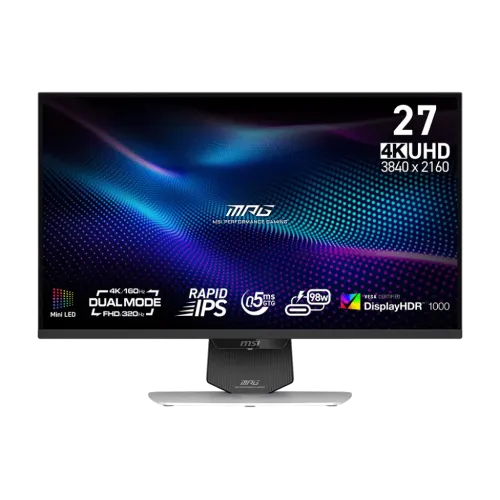
MSI MPG 274URDFW E16M 27-inch Dual-Mode Mini-LED Gaming Monitor
The MSI MPG 274URDFW E16M combines a 27-inch Rapid IPS panel with Quantum Dot color and a 1,152-zone Mini-LED backlight. Its headline feature is Dual Mode: select native 3840 × 2160 4K UHD at up to 160Hz for detailed play, or change to 1920 × 1080 FHD at up to 320Hz for compatible fast-paced games. The two modes trade image detail for refresh headroom; the display does not provide 4K at 320Hz. A physical mode toggle and AI Dual Mode software make switching between supported profiles easier.
Dual Mode resolution and refresh
In UHD mode, the monitor drives 3840 × 2160 pixels at up to 160Hz. This gives a 16:9 image with substantially more desktop and game detail than FHD, while retaining a high refresh rate for responsive play. At 27 inches, 4K can also provide crisp text and interface edges when the operating system uses a comfortable scaling level. The actual mode available depends on the graphics device, connection, cable, driver and game settings.
FHD mode uses 1920 × 1080 pixels at up to 320Hz. That higher refresh can suit competitive titles where a supported computer can deliver high frame rates and the player prefers motion smoothness over pixel detail. The lower resolution is an intentional second operating mode, not a second panel and not a claim that 4K signals refresh at 320Hz. Review each game’s resolution and frame-rate options before selecting the mode.
The monitor offers a dedicated physical toggle and AI Dual Mode behavior that can detect a resolution change and select the corresponding refresh profile. MSI describes display-size simulation options for 24.5-inch and 27-inch play areas. These functions complement, rather than replace, the game, GPU and operating-system settings. Use the on-screen display and MSI Gaming Intelligence application to review which mode is active.
Rapid IPS, Mini-LED and Quantum Dot
The flat 27-inch panel uses Rapid IPS liquid crystal technology and a Mini-LED full-array local-dimming backlight with 1,152 zones. Quantum Dot technology supports the monitor’s wide color gamut. Local dimming divides the backlight into areas that can change brightness according to the image. This can create brighter highlights and deeper-looking dark scenes than a typical monitor with a single continuously lit backlight, while behavior around small bright objects depends on zone size and scene content.
MSI lists a typical native contrast ratio of 1000:1 and dynamic contrast ratio of 100,000,000:1. The native figure describes the panel under a standard measurement, while dynamic contrast describes a changing backlight condition and should not be read as the static contrast of every scene. The anti-glare screen surface helps reduce ordinary reflections. Viewing angle is listed at 178 degrees horizontally and vertically; color and contrast can still vary as the screen is viewed off-axis.
Pixel pitch is 0.15525mm horizontally and vertically, with a 16:9 aspect ratio. The active display area is approximately 596.16 × 335.34mm. The monitor is flat rather than curved. Choose a viewing distance that lets the entire display remain comfortable to scan, and set interface scaling to suit eyesight, application and desk depth.
Brightness and certified HDR
MSI rates typical SDR brightness at 400cd/m² and HDR peak brightness at 1,000cd/m², and identifies the monitor as VESA DisplayHDR 1000 certified. The Mini-LED backlight, local dimming and high peak rating are designed to show HDR highlights while retaining shadow detail. Results depend on the chosen picture mode, HDR signal, content mastering, local-dimming behavior and surrounding room light. Certification is a capability indicator, not a promise that every game or video will look identical.
One Bangladesh retailer’s summary feature row says DisplayHDR 400, while that same listing’s detailed HDR attribute says DisplayHDR 1000. The manufacturer’s specification identifies VESA DisplayHDR 1000, which is the value used here. When comparing seller pages, prioritize the official model specification and check the exact model suffix rather than copying a short summary row without context.
Color gamut and factory calibration
The manufacturer lists 100% Adobe RGB, 98% DCI-P3 and 140% sRGB coverage using CIE 1976 measurement. MSI also states that the monitor is factory calibrated to Delta E 2 or less and includes a factory calibration report. The broad gamut can support vivid games and creative tasks, but the correct color mode depends on the target: web content commonly uses sRGB, while video and print workflows may use different standards. Wide-gamut output can appear oversaturated in unmanaged applications.
The supplied calibration report documents the factory measurement for the unit and does not remove the need for a controlled workflow when color accuracy is critical. Ambient lighting, brightness, color mode, GPU output and software color management affect what is seen. The 10-bit color specification is implemented as 8-bit plus frame-rate control (FRC), supporting approximately 1.07 billion displayed colors. Check the selected resolution, refresh rate, bit depth and color output in the graphics control panel.
Response, synchronization and gaming controls
MSI lists a minimum 0.5ms gray-to-gray response time. This is a manufacturer rating under specified conditions and should not be interpreted as the time every pixel transition takes at every setting. Adaptive-Sync, AMD FreeSync Premium and NVIDIA G-SYNC Compatible support are listed. The stated variable-refresh range is 48–160Hz in UHD mode and 48–320Hz in FHD mode. Enable compatible sync settings in the monitor menu and graphics driver when supported.
Gaming features include AI Vision for dark-detail visibility and image adjustment, AI Crosshair that changes crosshair color against its background, Smart Crosshair and Optix Scope. MSI Gaming Intelligence software can provide desktop OSD controls, hotkey assignment and supported firmware updates when connected to a computer using the USB upstream path. Feature behavior can vary by software version, game and system configuration; confirm compatibility before relying on an overlay in competitive play.
The rear lighting bar supports MSI Mystic Light RGB and Windows Dynamic Lighting compatibility. Its ambient lighting is a decorative feature, separate from the panel’s color accuracy and Mini-LED zones. Anti-Flicker and Less Blue Light features are included, with TÜV Rheinland certification stated for the eye-care functions. These options do not guarantee freedom from eye strain; room lighting, screen brightness, distance and breaks remain relevant to comfort.
HDMI 2.1, DisplayPort and USB-C
Two HDMI 2.1 inputs support the monitor’s high-refresh PC modes and compatible console signals. MSI lists HDMI 2.1 full bandwidth at 48Gbps, with compatible console features including 4K 120Hz, variable refresh rate, Auto Low Latency Mode and HDMI CEC. Console mode behavior depends on the connected PlayStation 5 or Xbox Series X|S, the game, cable and selected settings. A console cannot use the PC-only FHD 320Hz mode unless that source itself outputs a supported signal.
One DisplayPort 1.4a input supports HBR3 and Display Stream Compression (DSC) for high-bandwidth PC output. The USB-C port carries DisplayPort Alt Mode video, USB data and up to 98W Power Delivery. A compatible laptop can connect video and receive charging through one cable, subject to host support and power requirements. Some demanding laptops may need their own power supply during heavy workloads, and not every USB-C port on a computer supports video output.
The monitor also includes two USB 2.0 Type-A downstream ports and one USB 2.0 Type-B upstream connection. The built-in KVM can share a keyboard, mouse and connected USB peripherals between two devices through the supported upstream paths. USB 2.0 is adequate for many keyboards and mice but is slower than a modern high-speed storage hub. A 3.5mm headphone output is available. There are no built-in speakers, so plan for headphones or external speakers.
Stand, mounting and physical dimensions
The included white stand supports tilt from −5 to +20 degrees, swivel from −30 to +30 degrees, pivot from −90 to +90 degrees and height adjustment from 0 to 110mm. These adjustments help align the panel with the user and desk. The monitor supports 100 × 100mm VESA mounting and includes VESA screws according to MSI’s package information. Check the mount’s load rating and follow its instructions before hanging the screen.
With its stand, the monitor measures approximately 613.10 × 202.38 × 400.85mm in width, depth and height. Without the stand, it measures approximately 613.10 × 68.77 × 375.31mm. The inside carton dimensions are listed as 905 × 195 × 470mm and the outer carton as 920 × 208 × 494mm. Check desk width and depth, arm clearance and cable routing before delivery. A Kensington lock slot is provided for compatible security cables.
Net weight is approximately 8.2kg with the stand and 5.6kg without it; gross packaged weight is 12.4kg. The white bezel, rear housing and stand give the model its E16M white-finish identity. Use the exact suffix when seeking parts or support because MSI monitor model names can be similar while panel, color and refresh mode differ.
Power supply and box contents
The monitor uses an external 24V, 11A power adapter rated at 264W and accepts 100–240V AC, 50/60Hz input. The external power brick needs a ventilated, accessible place and an outlet suitable for the supplied cable. Keep the adapter clear of heat sources and avoid bending the DC cable sharply. The rated adapter capacity is not the monitor’s constant draw; actual consumption varies with brightness, HDR highlights, local dimming, USB-C charging and active USB devices.
MSI’s listed package includes a DisplayPort 1.4a cable, Ultra High Speed HDMI 2.1 cable, USB-C cable, USB Type-B-to-Type-A upstream cable, external adapter and AC cord, four VESA mounting screws, factory calibration report and Quick Start Guide. Regional packaging can vary, so compare the accessory list with the actual sealed box and seller invoice. Retain the serial label and proof of purchase for warranty service.
Bangladesh price and warranty
Bangladesh listings reviewed showed offer prices around ৳83,800 to ৳87,500 and regular prices up to approximately ৳94,900. Star Tech displayed prices around ৳83,799–৳87,500 against a regular ৳92,100, while TechLand showed an offer around ৳83,800 against ৳94,900. PQS also listed the model with a three-year warranty. The existing catalog variant price of ৳87,500 is preserved; market range fields are expanded to reflect the observed offer and regular prices.
Retailer pages commonly state three years of warranty, but the exact distributor, panel coverage, service process, dead-pixel terms and proof-of-purchase requirements should be confirmed in writing. Prices, stock, shipping and promotional discounts change by seller and location. Treat the figures as a checked market snapshot, not a guaranteed live offer. Verify the white E16M model name on the invoice and carton before paying.
Who should consider this display
The MPG 274URDFW E16M may suit PC players who want one 27-inch monitor for detailed 4K gaming and a separate high-refresh 1080p mode, plus local-dimming HDR, wide-gamut color, USB-C charging and a KVM. It can also support a laptop-and-desktop workspace with a shared keyboard and mouse. Its Rapid IPS panel avoids OLED-specific burn-in management while using Mini-LED zones for high-contrast HDR scenes.
Before choosing it, consider whether a white chassis matches the setup, whether the desk can accommodate the external adapter, and whether the game library can benefit from both modes. Buyers prioritizing native 4K at more than 160Hz, built-in speakers, USB 3.x hub speed or a smaller power supply should compare alternatives. Confirm the correct refresh and color configuration using official documentation and the connection limits of the actual graphics source.