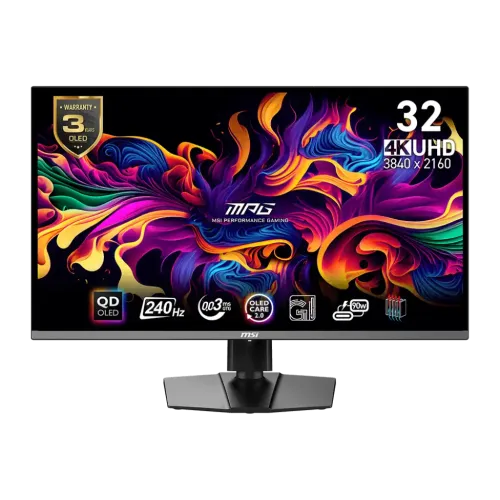
MSI MPG 321URX QD-OLED 31.5-inch 4K UHD 240Hz Gaming Monitor combines UHD resolution, QD-OLED contrast, high refresh, USB-C power delivery and a broad input set. Manufacturer specifications and regional warranty limits are stated below; Bangladesh price and stock can change.
A 31.5-inch UHD QD-OLED workspace
The MSI MPG 321URX QD-OLED is a flat 31.5-inch monitor built around a QD-OLED panel. MSI lists 3840 x 2160 pixels, a 16:9 aspect ratio and an active display area of 699.48 x 394.73mm. Some Bangladesh listings call it 32 inches; the manufacturer's exact panel-size figure is 31.5 inches. That distinction matters when comparing screen measurements, desk fit and pixel density. Its UHD resolution provides a dense workspace for high-resolution games, video timelines, photo libraries and multiple application windows. Scaling choices in the operating system affect how much interface content appears at once, while the screen size and viewing distance influence how comfortable that content is to read.
QD-OLED panel and contrast
QD-OLED combines self-emissive pixels with quantum-dot color conversion. Individual pixels can switch off for dark image regions, which is why OLED displays can show deep blacks and high perceived contrast in suitable scenes. MSI specifies a typical contrast ratio of 1,500,000:1 and a flat anti-reflection surface. The coating can reduce distracting reflections, although it cannot remove direct glare from a bright window or lamp. MSI lists 178-degree horizontal and vertical viewing angles. Picture appearance still depends on room lighting, selected picture mode, source material and the viewer's position. The display does not use a conventional LED-backlit LCD panel; the catalog's old generic LED display-type label was incorrect and has been replaced with QD-OLED.
Resolution and refresh behavior
The native resolution is 3840 x 2160, commonly called 4K UHD. MSI rates the monitor at 240Hz and states a 0.03ms gray-to-gray response time. A high refresh rate can show more motion samples when the computer renders frames quickly enough, while response time is a manufacturer measurement rather than a guarantee that every transition looks identical. Graphics hardware, game settings, frame pacing, selected refresh mode and connection all affect the result. For everyday desktop use, users can select a lower refresh rate if desired. For fast games, the 4K workload can be demanding; users should compare their graphics card's real performance with the titles and quality settings they use.
HDR brightness and certification
MSI lists DisplayHDR True Black 400 certification and peak HDR brightness up to 1000 nits in its specifications and guide. Typical SDR brightness is specified at 250 nits. The peak HDR figure applies to high-brightness highlights and should not be read as full-screen sustained brightness. HDR results vary with the scene, tone mapping, picture mode, application and operating-system configuration. A certified display can reproduce compatible HDR content, but certification alone does not ensure that every video or game is mastered well. For SDR productivity, users can set a comfortable brightness level and adjust room lighting. For HDR, compare supported output settings on the source device and keep the display firmware and application configuration current.
Color gamut and calibration
The official specification lists Adobe RGB at 97%, DCI-P3 at 99% and sRGB at 138% in its gamut summary. That summary mixes target-gamut coverage and gamut-size-style percentages; they are not interchangeable measures. MSI's product materials describe factory calibration and Delta E at or below 2, alongside 10-bit color and 1.07 billion supported colors. Those figures are manufacturer claims, not an independent measurement of the individual unit being sold. Buyers doing color-critical print, film or client work should use color-managed applications, choose an appropriate mode and check the workflow with a calibrated instrument where accuracy is required. Wider gamut can make compatible content look vivid, but an unmanaged workflow may oversaturate colors.
Motion, synchronization and console play
MSI lists both G-SYNC Compatible and AMD FreeSync Premium Pro support. Variable refresh can coordinate the display's refresh timing with a compatible graphics source and help reduce tearing. The source device, driver and selected connection must support the feature. The two HDMI 2.1 inputs are specified for 3840 x 2160 at up to 240Hz. MSI also describes 4K at 120Hz, variable refresh, Auto Low Latency Mode and HDMI-CEC for current consoles. Console capabilities differ from PC output modes, and a certified high-speed HDMI cable is recommended by the user guide. The monitor's feature list is not a promise that every console or graphics card supports every mode simultaneously.
HDMI and DisplayPort connections
The rear input set includes two HDMI 2.1 ports and one DisplayPort 1.4a port. MSI's exact-model specification states up to UHD 240Hz over these connections. Cable quality, graphics hardware, driver support, color format and other settings can affect which combinations are available. The monitor is flat rather than curved, so its 16:9 panel fits conventional multi-monitor or console setups without a curved-screen alignment requirement. The user guide describes HDMI CEC support and the relevant console timing. HDMI and DisplayPort do not deliver laptop charging power; for a combined video-and-power connection, use the USB-C input and a compatible host.
USB-C power and USB hub
A single USB-C cable can carry DisplayPort Alternate Mode video and up to 90W Power Delivery, according to MSI. The connected computer must support video over USB-C, and the cable must be rated for the intended video and charging capabilities. Power delivery does not guarantee that every laptop will charge at its maximum rate, particularly under heavy load. The monitor also has two USB 2.0 Type-A downstream ports and one Type-B upstream connector. Connect the upstream cable to the computer to make the hub available. These ports are suitable for basic peripherals, while users transferring large files may prefer a faster dedicated hub. The USB hub also supports monitor software functions described in MSI's documentation.
KVM and multi-source features
MSI describes a built-in KVM function that routes a keyboard and mouse between connected computers through the monitor. This can reduce the number of desk peripherals when switching between a desktop and a laptop. KVM behavior depends on connecting the required upstream USB paths and selecting the matching source. The monitor also offers Picture-in-Picture and Picture-by-Picture modes for viewing more than one source. MSI's guide documents limitations: some multi-window modes do not support HDR, and selectable resolutions depend on the input and display mode. Check the user guide before relying on a particular simultaneous-source layout. The product content does not claim that all modes preserve UHD 240Hz for every source at once.
OLED care and long-term use
MSI OLED Care 2.0 includes panel-protection functions such as pixel shifting, panel protection and static-image detection. MSI also describes boundary, taskbar and multi-logo detection. These tools aim to reduce the chance of image retention from static content, but no care feature can guarantee that burn-in will never occur. Users can enable the protection settings, vary content, avoid leaving bright static graphics on screen for extended periods and follow on-screen panel maintenance prompts. MSI describes a graphene film and custom heatsink intended to dissipate heat without an active cooling fan. This is a manufacturer design claim, not a measured promise of a particular service life. Warranty coverage is detailed separately below.
Gaming Intelligence and physical controls
The Gaming Intelligence application can expose monitor settings from a connected computer, while the monitor's five-way navigation control provides on-screen menu access. MSI lists features including Smart Crosshair, Optix Scope, AI Vision, refresh-rate display and customizable hotkeys. These are optional image or interface functions; their suitability depends on the game and personal preference. MSI also lists Mystic Light ambient illumination. Firmware updates are available through the supported update process. Before changing firmware, follow the current MSI instructions and do not interrupt power during the update. The monitor remains usable with its on-screen controls if the companion application is not installed. Availability of software features can depend on the connected operating system and configuration.
Stand, adjustment and mounting
The included stand supports 110mm of height adjustment, tilt from -5 to +15 degrees, swivel from -30 to +30 degrees and pivot from -10 to +10 degrees. The pivot range is limited; it is not a full 90-degree portrait rotation. For an arm or wall mount, MSI lists a 100 x 100mm VESA pattern and M4 x 10mm screws in the guide. Check the mount's load rating against the monitor's net weight and confirm clearance for the cable connections. The base and stand have a substantial footprint, so measure both the width and depth of the intended surface. MSI lists a Kensington lock for compatible physical security cables.
Dimensions, weight and package contents
With the stand attached, the listed dimensions are 718 x 242 x 483mm (width x depth x height). Without the stand, MSI lists 718 x 69 x 418mm. Net weight is 9.6kg and gross package weight is 12.3kg. The outer shipping carton measures 995 x 195 x 540mm; the inside carton is 975 x 185 x 515mm. The user guide lists the monitor, stand, base screws, wall-mount screws, power cord and quick-start guide. An Ultra High Speed HDMI cable is marked optional, and the manual warns that package contents may vary by country. Confirm the Bangladesh seller's exact box contents, especially whether an HDMI cable and USB upstream cable are included.
Power, heat and room setup
The official specification lists a power cable and 100–240V, 50/60Hz input. MSI's manual lists power-on consumption below 270W, standby below 0.5W and power-off below 0.3W. Actual consumption depends on brightness, HDR content, connected devices and operating mode. Route cables through the stand's cable-management area and leave room for ventilation. Avoid covering the enclosure openings and place the display on a stable, level surface that can support its weight. The power cord is intended for this monitor according to the manual. Use a properly grounded outlet and follow the manufacturer's safety instructions. Power consumption values are product specifications rather than an estimate of a buyer's electricity bill.
Warranty and Bangladesh purchase checks
MSI's exact-model global page lists a three-year warranty including panel burn-in. Bangladesh retailers also advertise three-year coverage; one retailer states that the box is required for an image-retention claim. Local warranty provider, parts coverage, burn-in eligibility and service process can differ by market and seller. Confirm the written local terms, serial-number handling, dead-pixel policy, proof-of-purchase requirements and who provides service before buying. The product database leaves country of origin, barcode and GTIN blank because they were not confirmed from the exact-model manufacturer record. Retailer descriptions may contain country-of-origin or assembly claims, but those are not substituted for a verified product provenance document.
Who should consider this monitor
The MPG 321URX suits buyers who want a flat 31.5-inch UHD panel with high refresh, QD-OLED contrast, broad color coverage and a combination of PC and console inputs. The USB-C 90W connection can suit compatible laptop desks, while KVM may help users switch between systems. It is less suitable for buyers who need built-in speakers, a fast USB hub, a full portrait stand pivot or a screen that can display fixed high-contrast interfaces for long uninterrupted periods without OLED-care considerations. Before purchase, verify that the PC can drive the desired 4K refresh rate, check the physical desk fit, confirm included cables and ask the local seller to state warranty and stock terms in writing.
Key features
- 31.5-inch flat third-generation QD-OLED panel with 3840 x 2160 UHD resolution and a 16:9 workspace.
- 240Hz rated refresh and manufacturer-rated 0.03ms gray-to-gray response time for fast motion.
- VESA DisplayHDR True Black 400 certification with per-pixel OLED contrast characteristics.
- Two HDMI 2.1 inputs and DisplayPort 1.4a support UHD at up to 240Hz with a compatible source.
- USB-C DisplayPort Alternate Mode input with up to 90W Power Delivery for a single-cable laptop setup.
- Two USB 2.0 Type-A ports and one Type-B upstream port provide a monitor USB hub.
- KVM and Picture-in-Picture/Picture-by-Picture functions support multi-device workflows; modes have feature limitations.
- AMD FreeSync Premium Pro and NVIDIA G-SYNC Compatible support are listed by MSI.
- OLED Care 2.0, graphene film and a custom heatsink are manufacturer-described panel-care and thermal features.
- Height, tilt, swivel and limited pivot adjustments, 100 x 100mm VESA mounting and Kensington lock support.
Advantages
- UHD detail, 240Hz motion and OLED pixel-level contrast combine gaming sharpness with deep dark-scene rendering.
- USB-C video and up to 90W Power Delivery can simplify compatible laptop desk connections.
- Two HDMI inputs, DisplayPort, USB hub, KVM and multi-input display functions provide flexible device routing.
- Factory calibration, 99% DCI-P3 coverage and 10-bit color are useful manufacturer-stated starting points for vivid content.
- The stand offers height, tilt and swivel adjustments; VESA mounting is available when the included stand is not suitable.
Trade-offs to consider
- The 31.5-inch flat panel needs a substantial desk footprint; measure the 718mm-wide display and stand depth before buying.
- A 4K 240Hz signal requires a capable graphics output, suitable cable and system; it is not guaranteed by the monitor alone.
- OLED static-image retention remains a consideration for long sessions with fixed interfaces despite panel-care features.
- The listed pivot adjustment is only -10 to +10 degrees, so the stand is not a full portrait-rotation solution.
- USB hub ports are USB 2.0 and the monitor has no built-in speakers; buyers needing faster hub data or audio must add equipment.
Frequently asked questions
1. What is the exact panel and resolution?
MSI specifies a 31.5-inch flat QD-OLED display with 3840 x 2160 UHD resolution and a 16:9 aspect ratio. The manufacturer calls it 31.5 inches; sellers may market it as a 32-inch class monitor.
2. What refresh rate and response time are specified?
The rated refresh rate is 240Hz and MSI specifies a 0.03ms gray-to-gray response time. Actual results depend on the source, selected mode, connection and system configuration.
3. What HDR certification does it have?
MSI lists VESA DisplayHDR True Black 400. Its materials also describe peak HDR brightness up to 1000 nits. Peak brightness and certification are different measurements; HDR appearance depends on content and settings.
4. Which video connections are available?
The official specification lists two HDMI 2.1 inputs, one DisplayPort 1.4a input and one USB-C port with DisplayPort Alternate Mode. MSI states 3840 x 2160 up to 240Hz on all three connection types, subject to a compatible source and cable.
5. Can USB-C charge a laptop?
The USB-C input supports up to 90W Power Delivery while carrying DisplayPort Alternate Mode video. The host must support USB-C video and suitable USB Power Delivery; charging performance depends on the laptop and cable.
6. Does the monitor include a USB hub?
Yes. MSI lists two USB 2.0 Type-A downstream ports and one USB 2.0 Type-B upstream port. Connect the upstream cable to the computer to enable the downstream USB hub and monitor software functions.
7. What adaptive sync and console features does it support?
MSI lists G-SYNC Compatible and AMD FreeSync Premium Pro. Its product page describes HDMI 2.1 console support with 4K at 120Hz, variable refresh rate, Auto Low Latency Mode and CEC. The console and cable must support the selected feature.
8. How does the stand adjust?
The stand supports 110mm of height adjustment, tilt from -5 to +15 degrees, swivel from -30 to +30 degrees and pivot from -10 to +10 degrees. It has a 100 x 100mm VESA mount. The limited pivot range is not a full portrait rotation.
9. What are its dimensions and weight?
With stand, MSI lists 718 x 242 x 483mm (W x D x H); without stand it lists 718 x 69 x 418mm. Net weight is 9.6kg and gross package weight is 12.3kg. The outer carton is 995 x 195 x 540mm (W x D x H).
10. What is included in the box?
The user guide lists the monitor, stand, stand base and screws, wall-mount bracket screws, power cord and quick-start guide. An Ultra High Speed HDMI cable is marked optional, and MSI notes package contents can vary by country; confirm the exact local bundle with the seller.
11. What warranty applies in Bangladesh?
MSI lists a three-year warranty including panel burn-in on its global exact-model page. Bangladesh retailers also advertise three years and may set local claim requirements such as retaining the box. Confirm the local distributor, coverage and claim procedure in writing before purchase.
12. How should I think about OLED care and color work?
OLED Care 2.0 includes panel-protection functions such as pixel shift and static-image detection. These reduce risk but do not guarantee image retention cannot occur. MSI lists 99% DCI-P3 coverage, 97% Adobe RGB coverage, 138% sRGB gamut size, 10-bit color and factory calibration with Delta E at or below 2 in product materials. These are manufacturer claims; color-managed software and independent calibration may matter for critical work.
Sources: MSI exact-model specifications, official product page and user guide, checked 6 November 2026. Bangladesh seller pages are dated offer and warranty observations, not BiponiBD offers. Confirm current price, availability, included accessories and local warranty with the seller.