MSI PRO MP161 E2 15.6-Inch Full HD IPS Portable Monitor — Buyer Guide
Exact model and revision
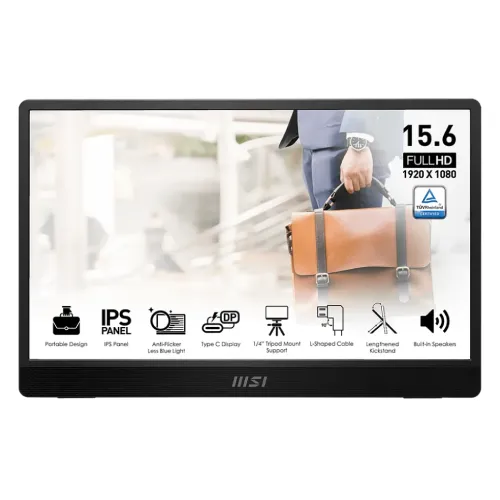
The MSI PRO MP161 E2 is a 15.6-inch portable monitor designed to add a second screen to a compatible laptop, tablet, phone, console, or desktop setup. Its exact model suffix matters: this is the E2 revision, with 800:1 native contrast, a lengthened built-in kickstand, a standard 1/4-inch tripod socket, and L-shaped cables. It is not the first-generation PRO MP161 and it is not the PRO MP165 E6. MSI lists the PRO MP161 E2U as an eco-packaging sibling with matching core hardware, so check the printed model on the box and invoice when comparing an E2 listing with an E2U offer.
15.6-inch Full HD IPS picture
The display uses a flat 15.6-inch IPS LED-backlit panel with Full HD resolution of 1920 × 1080 and a 16:9 aspect ratio. The active image area measures 344.16 × 193.59 mm. Pixel pitch is 0.17925 mm in both directions, approximately 141 pixels per inch, which produces a familiar laptop-like text size at typical desk or travel viewing distances. The screen surface is anti-glare. MSI specifies 170-degree horizontal and vertical viewing angles. Some retailer tables say 178 degrees; this product page uses MSI's published 170° × 170° figure.
60Hz refresh, response time and Adaptive-Sync
The native refresh rate is 60Hz at 1920 × 1080, and MSI lists 4ms gray-to-gray response time. Adaptive-Sync support is listed in MSI's specification notes. This combination suits documents, presentations, dashboards, coding, video calls, streaming, and casual console play. It is not a high-refresh esports display, and the 4ms GtG value should not be relabeled as 1ms MPRT. HDMI and Type-C inputs support Full HD up to 60Hz. For portrait use, rotate the display orientation in the operating system; the monitor has no automatic rotation sensor.
Brightness, contrast and color limits
MSI rates typical brightness at 250 cd/m² and native contrast at 800:1, with Dynamic Contrast Ratio listed separately as 100,000,000:1. Color output is 16.7 million colors using an 8-bit signal path described as 6-bit plus FRC. The official color gamut is 53% sRGB under the CIE 1976 measurement. That is a modest gamut intended for ordinary work and media, not color-critical photo retouching or video grading. A separate color-calibrated wide-gamut monitor is a better fit when matching print or broadcast color is essential.
Eye-care modes and display controls
The panel includes MSI's TÜV Rheinland-certified Anti-Flicker and Less Blue Light features. These settings can help some users tune a screen for long reading or office sessions, but personal comfort still depends on breaks, brightness, viewing distance, and room lighting. The on-screen display provides image presets and adjustments including brightness, contrast, color temperature, Office, Movie, Eco, Anti-Blue, and monochrome-style modes. MSI Display Kit software is available for supported Windows systems; software options depend on the connected device and operating system.
USB-C video and power connections
The left edge carries the power button, OSD rocker, speaker vents, two USB Type-C ports, and one Mini-HDMI 2.0b input. Both Type-C inputs support DisplayPort 1.2a Alternate Mode video and up to 15W power input/delivery. A compatible laptop's USB-C or Thunderbolt port must support DP Alt Mode to send video. A USB-C connector that only handles charging or data will not provide a picture. The included L-shaped USB-C cable can carry Full HD video and operating power in one cable when the host supports both functions and provides sufficient power.
Mini-HDMI setup and external power
If the host cannot provide enough USB-C power, connect a suitable external USB-C source to the second Type-C port. MSI specifies USB Type-C external power and 15W power support; a power bank or charger must meet the required output for stable operation. There is no internal battery. Mini-HDMI carries video and digital audio but does not power the monitor, so Mini-HDMI use also requires a separate USB-C power connection. The box includes an L-shaped Mini-HDMI-to-full-size-HDMI cable, which is useful for PCs and consoles with standard HDMI sockets.
Device compatibility and setup
MSI lists compatibility with PC, Mac, PlayStation 5, PlayStation 4, Xbox, mobile devices, and notebooks. Compatibility depends on the source device's output: USB-C devices need video-capable DP Alt Mode, while HDMI devices use the included cable plus separate USB-C power. The supported signal is up to 1920 × 1080 at 60Hz. Check the device's own output settings and, for phones or handhelds, confirm that it supports external display output before purchase. The monitor has no touch input.
Kickstand, portrait position and tripod socket
The E2 revision uses an integrated rear fold-out kickstand with an adjustment range listed as 0° to 180°. MSI describes the support as lengthened by 13 mm compared with the original PRO MP161. It can be arranged for landscape or portrait positioning, but changing to portrait requires a manual display-orientation setting on the connected computer. A standard 1/4-inch tripod socket is built into the rear hinge area for tripod or compatible tabletop stand use. MSI does not list 75 × 75 mm VESA mounting holes for this model; do not buy a VESA arm plate expecting those holes.
Speakers, dimensions and carry weight
Two built-in speakers are rated at 1.5W each. They are convenient for system sounds, meetings, lessons, and casual playback when travelling light. MSI does not list a 3.5mm headphone jack, so connect headphones to the source device. The monitor's dimensions are 362.26 × 233.84 × 18.8 mm overall, and the panel edge is about 10.8 mm thick. Net weight is 0.75 kg; gross packaged weight is 1.6 kg. Carton dimensions are 425 × 55 × 290 mm.
Box contents and power accessories
The listed package includes the monitor, one L-shaped Mini-HDMI-to-HDMI cable, one L-shaped USB-C-to-USB-C cable, a protective carry sleeve, and a quick guide. MSI's listed contents do not include an AC wall adapter, so arrange a compatible USB-C power source when the connected laptop or phone cannot power the display. Confirm exact regional box contents with the seller before ordering because accessory bundles can vary.
Bangladesh price and warranty
Bangladesh retailers currently list this exact model at different offer prices. The observed pages show about ৳20,949–৳22,000, with other listings or regular prices higher; availability and promotions change. BiponiBD's existing variant price is ৳21,000, which remains within this observed offer range and is left unchanged. Several local retailers advertise a three-year warranty. Ask the seller to confirm in writing which local distributor handles claims, whether the invoice and box are required, and how the policy treats panel defects and bundled accessories.
Who this portable monitor suits
For a second screen at a shared office, a hotel desk, a classroom, or a temporary workstation, the PRO MP161 E2 combines a lightweight panel, protective sleeve, kickstand, tripod thread, and two connection methods in one travel-ready package. Before buying, verify the exact model code, source-device video output, available USB-C power, preferred mounting method, current stock and price, and local warranty terms. If the work requires more than 60Hz, a VESA wall mount, a headphone jack, high brightness, or wide-gamut color, compare another monitor whose official specifications explicitly include those requirements.