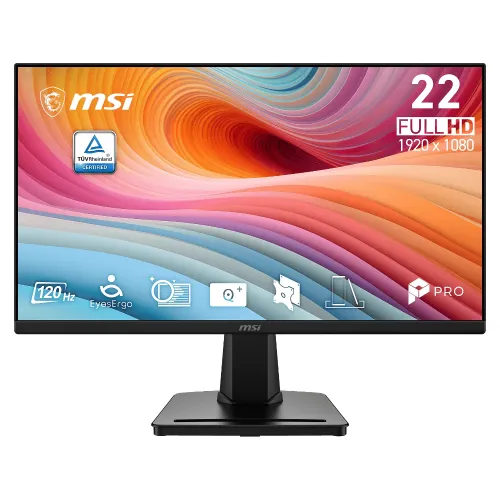
Exact model, panel size and product identity
The MSI PRO MP225 E12L is a PRO Series business and productivity monitor. The full model code is important: E12L identifies this 120Hz IPS revision and should not be shortened to “MP225” in the manufacturer part number. MSI markets the display in the 22-inch class, while its technical specification identifies a 21.5-inch (54.6cm) viewable panel. Both expressions appear in search and retail listings, so this page states them together. The monitor is black, flat and uses an IPS panel. Keep it distinct from the original PRO MP225, which is a 100Hz IPS model with different brightness and power/audio details, and from the MP225V or E12VL VA-family models.
Full HD IPS display for everyday productivity
The panel resolution is Full HD 1920 × 1080 in a 16:9 format. MSI lists an IPS panel with an anti-glare surface and 178-degree horizontal and vertical viewing angles. The active display area is 476.064 × 267.786mm and the listed pixel pitch is approximately 0.24795mm in both directions. This is a standard desktop resolution for spreadsheets, documents, web tools, video and general office tasks. The viewing-angle figure is a manufacturer specification and does not mean brightness or color remain perfectly identical from every possible position. The flat panel fits conventional desk setups; the published size refers to diagonal viewable screen rather than the outer frame.
120Hz through HDMI and the VGA limit
The PRO MP225 E12L supports Full HD up to 120Hz through its HDMI 1.4b input. MSI specifies Full HD up to 60Hz through the D-Sub/VGA input. That per-port difference is important when choosing cables and connecting computers: the headline 120Hz mode is not available over VGA. To use the higher refresh rate, connect a compatible graphics output to HDMI with a suitable cable and select the supported mode in the computer’s display settings. A 120Hz panel can display up to 120 refreshes per second, but actual rendered frame rate depends on the computer and software. Adaptive-Sync support is listed for compatible modes; do not assume separate G-SYNC or FreeSync certification unless MSI states it for this exact model.
Response time: keep MPRT and GtG separate
MSI publishes two response figures: 1ms MPRT and 4ms GtG. MPRT (motion picture response time) and GtG (gray-to-gray pixel transition) describe different measurement methods and should remain labeled wherever these numbers appear. The 1ms figure is not a 1ms GtG result. Response figures are not a promise that all motion will be free of blur or ghosting; perceived motion depends on refresh rate, frame rate, overdrive or display settings, content and viewing conditions. Including both numbers helps shoppers compare the E12L with monitors whose marketing lists only one method. The 120Hz refresh rate and Adaptive-Sync are separate capabilities and do not change what the response-time measurement means.
Brightness, static contrast and dynamic contrast
MSI lists brightness at 300 cd/m² and static contrast at 1300:1. The same materials list a dynamic contrast ratio (DCR) of 100,000,000:1. Dynamic contrast is a separate operating figure and should not be substituted for static contrast in product comparisons. These are manufacturer published values, not independent instrument measurements. The brightness level may be useful in a typical office environment, but display comfort depends on room lighting and the user’s chosen setting. The 1300:1 static figure is the one to compare with other monitors’ native contrast specifications. The page avoids exaggerated claims about sunlight visibility, HDR or guaranteed black-level performance because those are not established by the model’s listed specifications.
Color coverage and bit-depth qualification
MSI lists 119% sRGB, 93% Adobe RGB and 93% DCI-P3 using the CIE 1976 measurement convention, with 16.7 million colors and 8-bit output described as 6-bit + FRC. The measurement standard matters: gamut percentages using CIE 1976 are not directly interchangeable with values stated using CIE 1931. These published coverage values suggest a broader gamut than many basic office displays, but they do not establish color accuracy, uniformity or a factory calibration result. For design, photo and print work, buyers should distinguish coverage from calibration and verify the color workflow they need. This product description preserves the published basis and avoids calling the monitor professionally calibrated without evidence.
MSI EyesErgo, Anti-Flicker and Eye-Q Check
MSI positions the E12L with its EyesErgo features. The official materials list TÜV-certified Anti-Flicker and Less Blue Light technologies, an Eye-Q Check on-screen tool and MSI Display Kit software support. Eye-Q Check includes visual self-check aids; it is not medical diagnosis or eye treatment. Less Blue Light can change the display’s color balance depending on the chosen mode. These features may be useful for a long workday, but they do not guarantee that a user will avoid tired eyes. Appropriate brightness, viewing distance, breaks and room lighting remain part of a comfortable setup. The copy describes features as documented and avoids promises of medical benefit.
HDMI, VGA and the absence of audio
The documented connectors are one HDMI 1.4b input and one D-Sub/VGA input. HDMI supports Full HD at up to 120Hz and HDCP 1.4; VGA supports Full HD at up to 60Hz. MSI lists no built-in speakers and no audio output port for the E12L. Users who need sound should connect headphones or speakers to the computer, laptop or other source. This is a model-specific distinction: the original base PRO MP225 has been listed with an audio jack, but its audio features should not be copied to the E12L. Check a source device’s video output and audio arrangement before purchase, especially when connecting a console or media player that expects audio through the monitor.
Stand, mounting and desk details
The included tool-less stand tilts from approximately −5 to +20 degrees. The stand base includes a slot designed to hold a small accessory such as a smartphone or pen. Height adjustment, swivel and pivot are not listed in the official specification. MSI provides a standard 100 × 100mm VESA mounting pattern and a Kensington lock slot. A VESA arm can provide additional positioning when its load rating and mounting hardware suit the display. Measurements with the stand are listed as 489.4 × 182.36 × 384.77mm (W × D × H), while the monitor without stand is 489.4 × 53.05 × 291.51mm. One retailer lists slightly different outer dimensions; the official MSI values are retained and the regional difference is noted.
Internal power supply, weight and package
Unlike the original base MP225, the PRO MP225 E12L has an internal power board. MSI specifies AC 100–240V, 50/60Hz input, and the box includes a standard power cord rather than an external DC power brick. Published net weight is 2.42kg and gross shipping weight is 3.96kg. The carton is listed at 567 × 120 × 365mm (W × D × H), which describes packaging rather than the monitor’s desk footprint. MSI package contents include the monitor, tool-less stand, HDMI 1.4 cable, AC power cord and quick guide. Retail package content can vary by market or shipment, so check the delivered box.
Bangladesh warranty and market references
Bangladesh exact-model retailer pages list a three-year warranty, and MSI distributors such as UCC and Distribution Hub appear in local distribution references. Public sources do not establish which distributor supplied an individual BiponiBD unit or which service route applies to it. The buyer should confirm the named warranty provider on the invoice and warranty card. Retailer price observations for the E12L were roughly ৳10,500–৳11,500 at the time of review. Those market observations are not BiponiBD’s live sale price or stock status. Check the product’s current BiponiBD offer and delivery information before placing an order.
Choosing the right MP225 family model
Choose the E12L when you specifically need the IPS version with HDMI Full HD up to 120Hz, 300 cd/m² brightness and the internal power supply. The original PRO MP225 is a separate 100Hz IPS model with different brightness and external adapter/audio details. MP225V and PRO MP225 E12VL model names identify VA-family siblings; their contrast and panel characteristics differ. Do not let the shorter family name hide these differences when comparing retailer listings. For this E12L, confirm the full model code on the box and warranty paperwork, use HDMI for the 120Hz mode, and plan a separate audio path because it has neither integrated speakers nor a monitor audio jack.
Category fit and search clarity
The product belongs in Monitors, with useful subcategory or filter paths for MSI, IPS, business monitors and 120Hz displays. Search terms may include MSI PRO MP225 E12L price in Bangladesh, MSI 22-inch 120Hz IPS monitor, 21.5-inch Full HD business display, EyesErgo monitor or MP225 E12L versus MP225. The product title and metadata use both the marketing class and exact viewable panel context, while the manufacturer part number preserves the E12L suffix. The existing canonical slug remains unchanged to protect links and indexing history. Detailed, model-specific copy, attributes and FAQs help shoppers understand port limits, sound, response methods and warranty qualifications without inventing an offer price, stock claim or customer review.