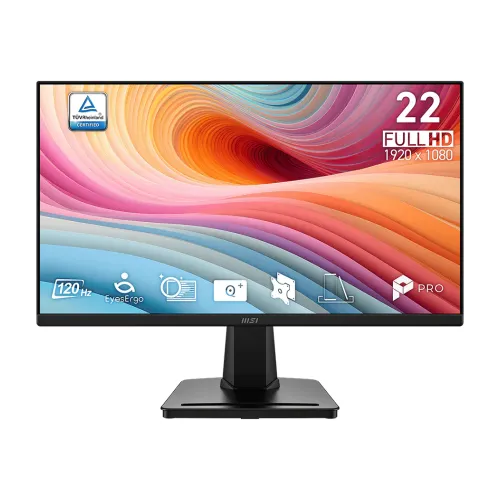
MSI PRO MP225 E12VL 22-inch 120Hz Full HD VA Business Monitor
A 22-inch class display with a precise panel size
The MSI PRO MP225 E12VL is a business and productivity monitor for users who want a compact Full HD screen with a higher refresh rate and strong native contrast. MSI classifies it in the 22-inch segment and lists the actual panel diagonal as 21.45 inches. The active display area measures 478.656 × 260.28 mm. This distinction explains why retail titles may say 22-inch while the manufacturer specification says 21.45-inch. It is a flat VA LCD with a native 1920 × 1080 resolution and a 16:9 aspect ratio. MSI specifies a 0.2493 mm horizontal and 0.241 mm vertical pixel pitch. The size works well for a single desk display, office desktop, study area or a multi-monitor arrangement where users want to keep the footprint moderate. Resolution, diagonal and pixel pitch are manufacturer figures; the visible image also depends on scaling and the computer’s output settings.
VA contrast, brightness and color
The E12VL uses a Vertical Alignment panel, which MSI rates at 4000:1 static contrast and 300 cd/m² brightness. Compared with many ordinary office screens, the high native contrast can make dark interface backgrounds and shadow detail appear deeper in a dim room. The published contrast ratio is a specification under stated measurement conditions, not a guarantee that every screen or room will look identical. The anti-glare surface helps reduce distracting reflections, while MSI lists 178-degree horizontal and vertical viewing angles. MSI also lists 16.7 million colors and a 100% sRGB figure under CIE 1976. Treat that as a gamut specification, not proof of factory calibration, uniformity, or professional color-proofing accuracy. For color-critical work, use a calibrated display workflow and verify that the application and source files are managed correctly.
120Hz motion and the two response ratings
The model supports a maximum Full HD timing of 120Hz over HDMI 1.4b. A higher refresh rate can make pointer movement, window dragging, scrolling and supported video appear smoother than a 60Hz display, provided the computer can output the selected mode. MSI lists both 1ms MPRT and 4ms GtG response ratings. They describe different measurement methods and should be stated together. The manufacturer manual notes an important mode limitation: enabling MPRT disables Adaptive-Sync and prevents adjustment of some picture settings, including brightness. Buyers should therefore choose the motion mode that suits their use rather than assume every feature operates simultaneously. For normal office use, the standard picture settings may be more useful; for fast motion, users can review the on-screen options and consult the manual.
HDMI and VGA timing is different
The back panel provides one HDMI 1.4b port and one D-Sub (VGA) port. MSI specifies Full HD up to 120Hz through HDMI and Full HD up to 60Hz through VGA. That port-by-port distinction matters when choosing a cable or connecting older office equipment. Use HDMI when 120Hz is required, then select a supported refresh rate in the operating system or graphics utility. VGA is an analog connection and the listed timing is lower. The reviewed exact-model specifications do not list DisplayPort, USB-C, a USB hub, built-in speakers or an audio output jack. A computer that lacks HDMI may need an appropriate adapter, but a simple connector shape does not ensure that a specific refresh rate will work. Check the source device, adapter direction, cable and selected resolution together.
EyesErgo and the Eye-Q Check tools
MSI groups several viewing and ergonomic options under EyesErgo. The exact-model materials identify Anti-Flicker, Less Blue Light and Eye-Q Check. The Eye-Q Check utilities include an Amsler Grid, an astigmatism check and a posture reminder accessible through the monitor’s on-screen display. These are on-screen tools and display features; they are not a medical diagnosis or substitute for appropriate breaks, lighting and viewing distance. Less Blue Light and Anti-Flicker settings can change how a picture looks, so adjust them to your comfort and work. The manufacturer also lists Adaptive-Sync for compatible HDMI use. As described above, the manual says MPRT disables Adaptive-Sync. Retail listings sometimes label Adaptive-Sync as FreeSync compatibility, but we did not find exact-model MSI evidence establishing a G-Sync certification.
Stand, adjustment, VESA and desk setup
The included stand is designed for tool-less assembly and provides tilt adjustment from -5° to +20°. MSI’s materials show an accessory slot on the base that can hold a phone or small desk item, together with a cable-management feature. The included stand is tilt-only: height adjustment, swivel and pivot are not listed. If you need a higher or portrait orientation, a separate compatible mount may be more appropriate. The rear chassis supports a standard 100 × 100 mm VESA pattern. MSI’s manual identifies M4 × 10 mm screws for VESA mounting; verify the manual and bracket before installation, and avoid longer screws than specified. A Kensington lock slot is also listed for compatible physical security cables. Ensure the desk or arm supports the monitor’s weight and that cables can bend without pulling on the ports.
Power, dimensions and what is included
Unlike the base PRO MP225 version that may use a separate DC adapter, the E12VL specification describes an internal power board with AC 100–240V, 50/60Hz, 0.75A input. MSI lists typical consumption below 24W, standby below 0.5W and off-state below 0.3W. With its stand, the monitor measures 492.8 × 182.4 × 378.0 mm and weighs 2.4 kg. Without the stand, MSI lists 492.8 × 49.9 × 283.1 mm and 2.1 kg. The carton is 567 × 120 × 365 mm and 4.23 kg gross. The stated standard package includes the monitor, stand neck and base, an HDMI cable, AC power cord and quick guide. Regional package contents can vary; check the supplied box and model label at delivery.
Choose the E12VL suffix carefully
The PRO MP225 name is shared by several displays, so the suffix should remain in the product title, model and product identifiers. The PRO MP225 E12VL reviewed here is the 120Hz VA version with 4000:1 contrast, 300-nit brightness and an internal power board. The PRO MP225 E12L is a different 120Hz IPS sibling with different panel characteristics. The base PRO MP225 and PRO MP225V are also separate variants, including versions with lower refresh ratings or different port and power layouts. Do not copy IPS, external-adapter, audio-jack or other specifications from a sibling listing just because the base name is similar. The six BiponiBD gallery images show a black MSI display from front, angled, side and rear views and visually fit the E12VL form. They do not clearly expose the port labels in the rear view, so the model label and box should still be checked against the delivered unit. No obvious third-party retailer watermark is visible; image licensing and source ownership remain unverified.
Bangladesh price and warranty context
At the time of this review, public Bangladesh retailers referenced prices around ৳9,949 to ৳11,500 for this model and often stated a three-year brand warranty. These are changing seller listings, not a quote for BiponiBD. They do not confirm current availability, delivery terms, promotion, inventory provenance or the warranty provider for a particular serial number. Confirm the live BiponiBD offer before purchase and use the invoice and supplied warranty documentation to understand the applicable claim process. The existing BiponiBD variant SKU and listed price were preserved because competitor product IDs and market prices cannot establish BiponiBD inventory details. The official model identity is MSI PRO MP225 E12VL; Star Tech’s 50886 and Ryans’ 08.02.033.230 are retailer-specific listing codes, not this product’s manufacturer part number.
Technical summary for buyers
In summary, the MSI PRO MP225 E12VL is a flat 21.45-inch VA business monitor in the 22-inch class, with Full HD 1920 × 1080 resolution, 120Hz HDMI timing, 60Hz VGA timing, 300 cd/m² brightness, 4000:1 static contrast and MSI-listed 1ms MPRT / 4ms GtG ratings. It has Anti-Flicker, Less Blue Light and Eye-Q Check features, a tilt-only stand, 100 × 100 mm VESA mounting, HDMI and VGA inputs, and an internal AC power board. It does not have built-in speakers according to the reviewed exact-model specification. For best results, connect by HDMI when using 120Hz, check the computer’s supported modes, and read the manual before enabling MPRT or wall mounting. These details distinguish the E12VL from other MP225 suffixes and give buyers a practical basis for comparing it with other compact monitors without turning unverified retailer claims into product facts.