A compact Full HD display for daily tasks
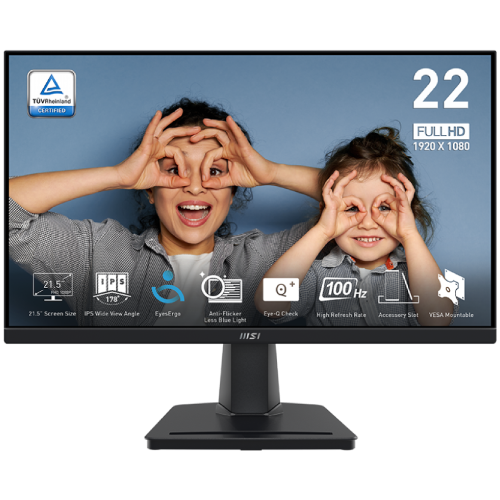
The MSI PRO MP225 is a 21.5-inch desktop monitor with an IPS panel and native Full HD resolution of 1920 × 1080 pixels. MSI’s published name is PRO MP225, and its official datasheet identifies Part No 9S6-3PC6CM-007 and model code 3PC6. The product listing in Bangladesh may be styled as a 22-inch class display, but the active diagonal is 21.5 inches. MSI Malaysia’s regional datasheet names Part No 9S6-3PC6CM-007, while MSI pages for other regions use different suffixes; the exact Bangladesh unit suffix is not established, so the catalog MPN remains blank and the verified model is PRO MP225. That size is suitable for a compact desk, home study table or shared workstation where a standard 24-inch screen would take more space. Its 16:9 shape is suited to common desktop applications, browser windows, video meetings and Full HD media.
The panel has an active area of 476.064 × 267.786 mm and a pixel pitch of 0.24795 × 0.24795 mm in MSI’s current specification. The resulting pixel density is approximately 102.46 PPI, calculated from the screen diagonal and native resolution. One Bangladesh retailer page incorrectly lists 413 PPI, a value that does not agree with the 21.5-inch diagonal or Full HD pixel count. This description uses the manufacturer panel figures and the transparent calculation rather than repeating that seller data error. Text and interface items should be clear at normal desktop distances, while users who want a larger canvas for several full-size windows may prefer a larger monitor.
IPS image characteristics and color data
MSI specifies an IPS panel with 178° horizontal and vertical viewing angles. Wide viewing angles can help keep the image usable when the user shifts position or shares the screen with a colleague, although viewing angle ratings do not promise identical brightness or color from every position. The panel is rated at 250 cd/m² brightness and 1300:1 contrast. MSI lists 16.7 million colors and 8-bit processing using a 6-bit panel with FRC. The current MSI page lists 107.39% sRGB (CIE 1976); an earlier official regional datasheet lists 107.76% on the same CIE 1976 basis. This small revision difference is disclosed, and the exact batch is not inferred. The CIE 1976 notation is preserved as MSI publishes it; it is not silently relabeled as a different measurement.
The surface is anti-glare, which can reduce visible reflections from nearby light sources. Anti-glare does not make the panel immune to direct sunlight or strong reflections. The display is flat and uses an LED backlight. For writing, spreadsheets, programming, presentations and general browsing, these published values describe an everyday productivity monitor. They are not an independent calibration report, and the product should not be presented as a factory-calibrated professional proofing display. MSI also documents EyesErgo and Anti-Flicker technology and the Eye-Q Check feature, which reminds users to take a break. Those are monitor features, not medical claims.
100Hz over HDMI and the response-time methods
The PRO MP225 supports up to 100Hz at 1920 × 1080 through its HDMI 1.4b input. MSI specifies the VGA input up to 1920 × 1080 at 60Hz. To use 100Hz, the monitor must be connected through HDMI and the source computer, graphics output, cable and operating-system display mode must also support the setting. When a system connects by VGA, the official limit is 60Hz at Full HD. This distinction prevents the 100Hz headline from being treated as the limit for both inputs.
MSI lists response time as 1ms MPRT and 4ms GTG. MPRT and gray-to-gray are different measurement methods. The 1ms value describes MPRT and should not be represented as a 1ms GTG response. The 4ms GTG value is included separately where MSI’s current product page states it; the older official PDF marks GTG as N/A, so confirm the current local specification if the exact test method is important. A 100Hz refresh mode can make supported scrolling and pointer motion appear smoother than a 60Hz mode, but it does not by itself guarantee a particular competitive-gaming performance. Adaptive Sync is supported according to MSI’s specification.
Inputs, headphones and no built-in speakers
The rear connections are one HDMI 1.4b input, one D-Sub (VGA) input and one headphone-out. HDMI is the digital input for modern PCs and laptops; VGA can support older desktop or business equipment that provides an analog output. MSI’s published timing table specifies 1920 × 1080 up to 100Hz over HDMI and up to 60Hz over VGA. The headphone-out can pass audio from a compatible HDMI source to headphones or external powered speakers. A VGA connection carries no audio, so the source computer needs a separate sound path if audio is required.
The exact PRO MP225 does not have built-in speakers. The MSI datasheet explicitly lists the headphone output and does not list integrated speakers; the exact-model Ryans listing also says built-in speaker: no. Buyers who rely on monitor speakers should select another model or plan separate audio equipment. This model also does not list USB ports or USB-C video input. Similar MSI PRO MP225 E12L or E12VL product names describe different models and revisions, so their 120Hz rates, panel types or alternative ports must not be copied into this record.
Stand, VESA mount and desk fit
The included stand supports tilt from −5° to +20°. MSI does not list height adjustment, swivel or pivot movement for the stand, so users who need those positions can use a compatible monitor arm. The official VESA pattern is 100 × 100 mm. This point matters because some local retailer specification tables show 75 × 75 mm; those values conflict with MSI’s official product specification and its exact-model 2025 datasheet, and with Ryans’ exact-model specification. This description therefore uses 100 × 100 mm. Confirm the bracket’s stated VESA pattern and supported monitor weight before installation.
MSI’s current product page lists assembled dimensions of 489.4 × 384.8 × 182.3 mm, net weight 2.3 kg, carton 567 × 365 × 118 mm and gross weight 4.1 kg. An earlier official regional sheet gives slightly different assembled dimensions (489.5 × 385.8 × 182.1 mm), carton dimensions (582 × 364 × 119 mm) and gross weight (3.4 kg). The net weight remains 2.3 kg. These are revision differences; exact Bangladesh batch is not established, so check the supplied carton label. The product is black and includes a Kensington lock slot. The stand’s accessory slot can hold a small personal item such as a phone when positioned as designed. Measurements describe the monitor and package separately; carton size is not the desk footprint.
Power adapter details and revision differences
MSI’s current PRO MP225 product page identifies an external 12V 2A adapter and AC input of 100–240V, 50–60Hz. MSI’s official regional datasheet dated 2025-04-11 lists an external 12V 2.5A adapter. This is a real regional or document-revision difference in manufacturer material. The exact adapter delivered with the local unit should be checked on its label. Use the included adapter or an approved replacement matching the voltage, current requirement, polarity and connector. A connector that physically fits does not by itself establish electrical compatibility.
The official product specification reviewed does not publish a separate typical or maximum monitor power-consumption figure, so no wattage consumption claim is added. The 12V adapter output rating is not the same as a measured typical draw. This avoids turning an adapter’s capacity into an unverified usage estimate. The external adapter arrangement also means the AC-side cord may depend on the regional package; MSI’s datasheet box list enumerates an AC adapter, not a separate power cord.
Package contents and Bangladesh warranty
MSI’s official datasheet lists the monitor, HDMI cable, AC adapter and quick guide in the box. It does not list a VGA cable, separate power cord, speakers, VESA screws, or warranty card in the box contents table. Regional packaging can vary, so check the delivered package against the seller invoice. The model’s published warranty in the datasheet is 36 months. Star Tech, Ryans and other Bangladesh sellers advertise a three-year warranty for the exact PRO MP225. The warranty provider, registration requirements and claim conditions depend on the local supplier and supplied unit; confirm those details on the invoice and applicable warranty terms.
Public Bangladesh listings reviewed showed different asking prices, from Tk 9,999 at Ultra Technology to Tk 12,900 at Star Computer Technology, with Star Tech and Ryans around Tk 10,200 at the time of review. These figures are retailer offers that can change. They are recorded as external market evidence only and do not change the BiponiBD variant’s current MSRP or establish BiponiBD stock. Buyers should check the current BiponiBD listing for its own price and availability.
Who the PRO MP225 suits
This monitor is a sensible fit for a compact office or home desk where a 21.5-inch Full HD IPS screen, HDMI, VGA and headphone-out cover the required setup. The 100Hz HDMI mode adds a smoother desktop refresh option for compatible PCs, while VGA keeps a legacy connection available at 60Hz. IPS viewing angles and the anti-glare surface support shared work and ordinary desktop use. Adaptive Sync, Anti-Flicker and Eye-Q Check add features useful for longer sessions, while the user can use the tilt stand or 100 × 100 mm VESA mount to set the screen position.
Before purchase, check whether the connected computer can output Full HD at 100Hz through HDMI, whether the stand’s tilt-only adjustment fits the desk, and whether built-in sound is required. The PRO MP225 has no built-in speakers and no USB-C input; its audio connection is a headphone-out. Check the adapter label for the local power rating because official MSI documents show 12V 2A and 12V 2.5A variants. If precise color matching is central to the work, request the exact unit’s color documentation or consider a calibrated monitor. These distinctions help identify the model’s actual capabilities without blending it with the E12L/E12VL revisions.
Specification summary
The manufacturer identifies the exact monitor as MSI PRO MP225, part number 9S6-3PC6CM-007, model code 3PC6. Core display ratings are 21.5-inch IPS, 1920 × 1080 Full HD, 16:9, 100Hz, 250 cd/m², 1300:1, 178° horizontal and vertical viewing angles, 16.7 million colors and 8-bit processing (6-bit + FRC). MSI lists 107.39% (CIE 1976) for color gamut, anti-glare surface and response time of 1ms MPRT / 4ms GTG on the current product specification.
Connections are HDMI 1.4b, D-Sub (VGA), headphone-out and Kensington lock. HDMI timing is Full HD up to 100Hz; VGA is Full HD up to 60Hz. Adaptive Sync is supported. The stand tilts from −5° to +20° and the official VESA pattern is 100 × 100 mm. Assembled dimensions are 489.4 × 384.8 × 182.3 mm; net weight is 2.3 kg. The carton is 567 × 365 × 118 mm and 4.1 kg gross. MSI’s current page lists a 12V 2A external adapter, while an official regional datasheet lists 12V 2.5A. The manufacturer does not publish a separate typical power-draw figure in the specifications reviewed.