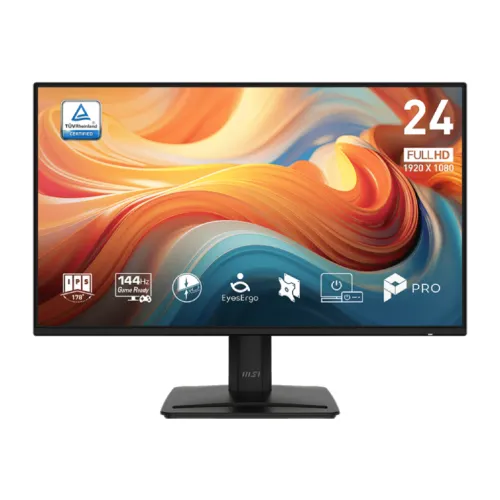
A 23.8-inch Full HD display for work and entertainment
The MSI PRO MP242 E14A is a 23.8-inch Full HD IPS monitor that combines business-oriented features with a 144Hz refresh rate. MSI lists a 1920 × 1080 resolution, 16:9 format, 300 cd/m² typical brightness and a flat, anti-glare display. Its built-in 2W × 2 speakers, headphone output, HDMI, DisplayPort and VGA give it a broader everyday setup range than a basic display with one digital port. Adaptive-Sync and the high refresh rate are useful for compatible games and smooth desktop motion, while MSI’s EyesErgo feature set is intended to support comfortable viewing. The model code is PRO MP242 E14A; it should not be confused with nearby PRO MP242 variants that may use different panels, refresh rates, stands or power supplies. The product images show a black monitor from front, angled and side views, plus its rear housing. The saved catalog slug contains “gaming-monitor,” but the model itself is presented by MSI as a PRO business monitor.
Resolution, screen size and pixel density
The native resolution is 1920 × 1080 pixels, commonly called Full HD, across a 23.8-inch diagonal. That combination gives a familiar desktop layout for office documents, spreadsheets, web apps, video calls, study and streaming. It is less dense than QHD or 4K at a comparable size, so users who work with fine visual details or several crowded windows may want a higher-resolution panel. The relatively moderate pixel count can also reduce the rendering workload compared with higher-resolution screens, which can help a computer maintain a high frame rate in games. Text clarity depends on scaling, application settings, viewing distance and eyesight. If interface labels seem small, operating-system scaling or browser zoom can increase them. MSI lists an active display area of 527.04 × 296.46mm and a pixel pitch of 0.2745mm. The 23.8-inch diagonal is the viewable panel size; the overall footprint is larger because of the frame and stand.
144Hz refresh rate and Adaptive-Sync
MSI lists a maximum 144Hz refresh rate and an Adaptive-Sync activated range from 48Hz to 144Hz. Refresh rate describes how many times per second the screen can update. At compatible frame rates, a higher refresh can make pointer motion, scrolling, animations and games appear smoother than on a 60Hz display. Adaptive-Sync can coordinate compatible graphics output and display timing to reduce tearing within its supported range. The monitor does not generate additional game frames, so the graphics card, game, cable, input and selected display mode all affect the result. MSI lists 1920 × 1080 up to 144Hz on HDMI 2.0 and DisplayPort 1.2a, while VGA is listed up to 60Hz. For 144Hz use HDMI or DisplayPort and check the computer’s settings after installation. If 144Hz is missing, confirm the port, cable, graphics driver, monitor input and resolution. The refresh figure is a maximum mode, not a guarantee that every source will output it.
Response time: MPRT and GTG are different
MSI specifies response time as 1ms MPRT and 4ms GTG. MPRT, or Moving Picture Response Time, relates to motion-picture persistence; GTG, or gray-to-gray, describes pixel transitions between shades. They are not interchangeable measurements. A concise product title that says only “1ms” can mislead if it hides the method, so this listing keeps both labels. Actual motion clarity also depends on refresh rate, frame rate, pixel behavior and monitor settings. Overdrive or motion-blur reduction controls may change the visual experience, and very aggressive settings can introduce artifacts. Use MSI’s recommended configuration and test the display with the content you use. Response-time figures do not tell you the total input lag from a keyboard or controller to the screen. Competitive players should consider measured input lag and transition performance from a reliable review in addition to manufacturer specifications. For everyday productivity, readable text, brightness and screen position may matter more than a headline millisecond number.
IPS panel, color and brightness
The PRO MP242 E14A uses an IPS panel and MSI lists a 178-degree horizontal and vertical viewing angle. Its specifications include 300 cd/m² typical brightness, 1500:1 contrast and 16.7 million display colors using 8-bit signaling (6-bit plus FRC). MSI lists a gamut of 86% AdobeRGB, 91% DCI-P3 and 121% sRGB under the CIE 1976 measurement convention. These values help describe the panel, but they do not by themselves establish factory calibration, uniformity or suitability for print proofing. Color-sensitive users should check whether their exact application and workflow need a calibrated wide-gamut monitor. The matte anti-glare surface can reduce reflections, but it cannot eliminate strong light directed at the screen. Brightness should be adjusted for the room rather than left at maximum. The black cabinet color describes the monitor exterior, not the colors the panel can reproduce. The listed contrast ratio is a specification value and should not be read as a guarantee of identical results in every room.
HDR Ready and display expectations
MSI identifies the PRO MP242 E14A as HDR Ready. This wording should not be expanded into a claim of high-end HDR performance or a particular HDR certification. The display remains a Full HD IPS monitor with a typical brightness of 300 cd/m², and the available product specification does not present it as a high-brightness HDR reference panel. HDR behavior depends on the source, operating system, application, signal path and display processing. If HDR support is important for a game or video workflow, consult MSI’s manual for how to enable the function and confirm what the source sends. A “Ready” label does not mean that all HDR formats or content will look the same as on a specialized HDR television. For daily desktop work, color mode, brightness and glare control are often more relevant. Product copy should identify the manufacturer’s feature name accurately and avoid promising vivid HDR highlights or local dimming when those specifications are not documented.
Ports and compatible devices
MSI lists one HDMI 2.0b input, one DisplayPort 1.2a input, one D-Sub VGA input and one headphone output. HDMI and DisplayPort support Full HD at up to 144Hz according to MSI’s timing table. VGA is specified up to Full HD at 60Hz, so use a digital input for the maximum refresh mode. The ports can connect compatible desktops, laptops, consoles and other video sources, but a connector shape alone does not guarantee a particular resolution or refresh. Check the output capabilities of the computer or dock and use a cable that supports the desired mode. The product does not list USB data ports or USB-C. If your laptop only has USB-C, you will need a compatible video adapter or dock; verify its bandwidth before expecting 144Hz. A headphone output is available for audio from a supported connected source. The built-in speakers provide another option, although dedicated external speakers or headphones may offer a different volume and sound quality.
Built-in speakers and audio
The monitor has two built-in speakers rated at 2W each and one headphone output. These speakers can be convenient for system sounds, meetings or casual video when desk space is limited. Their presence does not imply the sound quality or bass output of separate desktop speakers. Audio behavior depends on the source connection and operating-system output selection. With HDMI or DisplayPort, select the monitor as the audio output device when supported. VGA is an analog video input and does not carry digital audio, so a separate audio connection may be needed for that setup. Connect headphones to the monitor output when the source sends audio through a supported digital input. MSI lists no built-in microphone, so calls still require a computer, headset or separate microphone. The speakers and headphone output distinguish this model from monitors that offer video inputs only, but they should not be confused with a dedicated conferencing speakerphone.
EyesErgo, flicker-free and low blue light
MSI promotes its EyesErgo feature set for the PRO MP242 E14A, and the model specifications list flicker-free operation and low-blue-light features. These display functions can be adjusted to suit personal preferences and ambient lighting. A blue-light mode may shift the white point and make colors warmer, which may not suit color-sensitive work. Flicker-free technology is a manufacturer-listed feature, not a guarantee that every viewer will avoid fatigue. Comfort also depends on brightness, text size, posture, viewing distance, glare and breaks. The ergonomic benefit of a monitor can also depend on desk height and the stand position. MSI lists tilt adjustment from −5 degrees to +20 degrees; this lets you angle the screen but does not provide height adjustment, swivel or portrait rotation. Choose a viewing position that keeps the display comfortable and follow normal break habits during long sessions. No monitor feature should be described as a medical treatment.
Stand, VESA mounting and desk fit
The factory stand offers tilt adjustment from −5° to +20° according to MSI. The listed mounting pattern is 100 × 100mm VESA, which can suit compatible arms and wall brackets. Confirm screw requirements, bracket clearance and arm load rating before mounting. Tilt changes the screen angle; it is not the same as raising the monitor, rotating it into portrait orientation or swiveling it sideways. MSI lists the monitor body dimensions with stand as 540.13 × 188.20 × 408.72mm and without stand as 540.13 × 45.89 × 316.37mm. The box dimensions are 600 × 123 × 410mm. These help estimate desk and shelf fit, but the actual position of cables and accessories also needs room. The product images show the stand from several angles, including a side profile and rear view. They do not prove that a wall bracket, arm or additional stand hardware is included in the package.
Power and package contents
MSI specifies an internal power board with 100–240V AC, 50/60Hz input. This differs from similar monitor variants that use an external adapter, so do not order a power brick based on a nearby model’s specifications. The exact supplied power cord and regional plug can vary; inspect the carton and product manual. MSI’s specification page lists an HDMI cable (1.4), quick guide and power cord among included accessories. Regional package contents can differ, and the HDMI cable version listed in the box does not necessarily describe the monitor’s HDMI input version. If 144Hz over HDMI is required, use a cable and source that support that signal. No country of origin or exact box contents for the BiponiBD unit are established from this product record. Confirm the contents with the seller before relying on a cable, warranty card or accessory being present.
Images and what they can confirm
The gallery contains five views. The first is a front-facing image showing the screen, colorful demonstration wallpaper, narrow bezel, MSI logo and stand. It also includes feature badges in the artwork. The second and third images show angled front views that reveal the panel profile and the rectangular base. The fourth is a slim side profile of the screen and stand. The fifth image shows the rear housing, mounting points and stand connection. These images help a shopper understand the appearance and approximate design. They do not independently verify 144Hz output, speaker performance, exact port revision, color gamut, VESA screw depth, local warranty or stock. Promotional labels in the first image should be checked against MSI’s official specifications; they are not independent test results. The image alt text should identify the model and the view in that frame rather than repeat a long sequence of search terms. Existing media IDs and URLs are preserved, while the alternative text is rewritten specifically for the visible image.
Warranty, catalog price and live availability
The product variant stores a BDT 15,800 MSRP. That database value is a catalog price field and does not confirm live BiponiBD inventory, checkout availability or the amount payable after delivery charges. Bangladesh retailers publish their own prices, stock indicators and warranty terms. Star Tech and some other sellers list three-year coverage for their own units, but those terms do not prove the warranty provider or eligibility of this catalog item. Before purchase, ask BiponiBD to confirm the unit’s serial-number coverage, importer or service provider, dead-pixel policy, claim process and invoice requirements. Check the current stock and final checkout total directly. Keep any invoice and warranty documentation supplied with the unit. Static copy should avoid hard-coding a temporary market price because those figures can change faster than a product description. The product’s Active status and an active variant record are not proof that a physical unit is ready to ship.
Who should consider this monitor
The MSI PRO MP242 E14A may suit someone seeking a compact 23.8-inch Full HD IPS screen with a 144Hz maximum refresh rate, Adaptive-Sync, built-in speakers and multiple input choices. It offers HDMI, DisplayPort and VGA, with a headphone output for compatible audio. The 144Hz mode can be useful for smooth desktop motion and compatible gaming, while the Full HD resolution remains practical for general office work and study. It may be less suitable if you want a larger QHD workspace, a height-adjustable stand, USB-C video, extensive USB hub functions or a high-end HDR display. Match the monitor to the output ports and frame rates your computer can deliver. Confirm the exact model suffix, cable and warranty terms with the seller. This guide describes the documented product features; it does not promise a particular game frame rate, seller stock position or warranty outcome for an individual unit.