Overview
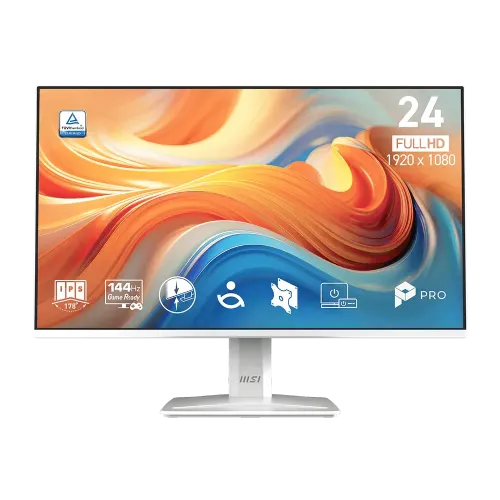
MSI PRO MP243W E14 is a white 23.8-inch monitor in MSI’s Business Productivity Monitor family. It combines a 1920 × 1080 IPS panel with a maximum 144Hz refresh rate, Adaptive-Sync, built-in speakers and a tilt stand. MSI presents it for work and home use, while the high refresh rate can also support smoother casual gaming when a connected computer can deliver compatible frames. The 4-side slim-bezel design is called PerfectEdge and the product images show the white screen frame, pedestal, narrow side profile and rear housing. The exact model code is important: the product is PRO MP243W E14, not the related PRO MP243 E14 without W or older PRO MP243W variants. Product page slugs and retailer copy can reuse “gaming monitor” wording, but MSI classifies this model in its business/productivity range. This guide follows MSI’s global model datasheet and English manual when local retailer descriptions differ.
Screen size and Full HD resolution
MSI specifies a 23.8-inch flat display with a 16:9 aspect ratio and 1920 × 1080 Full HD resolution. FHD is a common desktop format supported by office PCs, laptops, mini PCs, game consoles and streaming devices. At 23.8 inches it offers familiar text and interface sizing for documents, spreadsheets, web browsing, calls, learning and secondary-screen use. Higher resolutions show more desktop space or finer detail, but may need additional graphics performance and interface scaling. Select the resolution and refresh rate in the connected computer’s display settings, because a device can initially use a lower refresh mode. MSI lists an active display area of 527.04 × 296.46 mm and a pixel pitch of 0.2745 mm. The anti-glare surface is designed to reduce reflections, but room lighting and screen position still affect readability. Choose scaling and viewing distance for the user rather than relying only on a screen-size label.
IPS panel and four-side slim bezel
The panel type is IPS and the manufacturer lists 178-degree horizontal and vertical viewing angles. IPS monitors are often selected for a broad usable viewing area when a user shifts position or when more than one person views the screen. The viewing-angle figure is a specification, not a promise that contrast and color remain perfectly unchanged from every position. MSI’s PerfectEdge design uses slim bezels on all four sides and advertises a 92% screen-to-body ratio. This can reduce the visual gap in a multi-monitor arrangement and gives the white display a clean appearance on a bright desk. The five supplied product images show a front image with feature badges, two angled views, a side profile and a rear view. They do not show every connector close-up or prove the color of a physical regional shipment, so confirm the exact product label and package with the seller if color matching is essential.
144Hz refresh rate and Adaptive-Sync
The maximum refresh rate is 144Hz. A higher refresh rate can make supported motion, scrolling and pointer movement appear smoother than at 60Hz. MSI also lists Adaptive-Sync with an activated range of 48–144Hz. These benefits rely on the source device, connection, driver, frame rate, display mode and monitor settings. MSI’s global datasheet states that HDMI 1.4b supports Full HD at up to 144Hz and DisplayPort 1.2a supports Full HD at up to 144Hz. Once connected, open the operating system’s advanced display settings and check that the intended 144Hz mode is actually selected. A cable, adapter, dock or source output can constrain the available modes. Variable refresh behavior can also depend on the graphics device and software. The “Game Ready” product language does not by itself promise a particular competitive gaming result; response mode, input lag, game frame rate and the user’s preferences also matter.
MPRT and GTG response-time figures
MSI publishes two response figures: 1ms MPRT and 4ms GTG. MPRT, or moving-picture response time, describes motion-picture visibility; GTG, or gray-to-gray, describes a pixel transition between gray levels. They are not interchangeable measurements. Neither value is the same as end-to-end input lag. MSI’s English manual also notes that MPRT and Adaptive-Sync affect each other: activating Adaptive-Sync sets MPRT to off, and enabling MPRT can make Adaptive-Sync unavailable. These options therefore should not be presented as simultaneously active in every mode. The 1ms value should remain labelled MPRT wherever it appears in product copy. Buyers comparing another display should match response-time methodology and operating mode before comparing the number. Refresh rate, overdrive behavior, frame consistency and the actual content all affect perceived motion clarity.
Brightness, contrast and color
The global MSI datasheet lists 300 cd/m² brightness and 1500:1 contrast. It gives color coverage as 87% Adobe RGB, 91% DCI-P3 and 121% sRGB, based on CIE 1976, and states 16.7 million display colors at 8 bits using 6-bit plus FRC. These coverage figures describe gamut volume under a named method; they do not prove factory calibration, color accuracy, uniformity or suitability for print-critical work. The sheet also lists HDR Ready, which should not be interpreted as a specified high-tier HDR experience because the document does not give a peak HDR brightness tier or local-dimming system. Perceived image quality changes with viewing mode, brightness, room conditions, color profile and panel sample. If color-critical production is the main task, seek independent calibration data for this exact model and decide whether its measured gamut, uniformity and controls meet the workflow.
Video inputs and headphone output
The exact MSI datasheet lists one HDMI 1.4b input and one DisplayPort 1.2a input, plus one headphone-out connector. It specifies FHD at up to 144Hz on HDMI and DisplayPort. Some Bangladesh retailer prose mistakenly describes HDMI 2.1 or D-Sub, while the manufacturer’s global datasheet and rear-connection drawing list HDMI 1.4b and DP 1.2a, with no VGA port. Use MSI’s model-specific documentation for the exact connector versions. Connect a computer or console with a compatible cable and verify the selected input from the OSD. The headphone output is for a wired audio device; the monitor also has built-in speakers. MSI’s documentation lists HDMI CEC and MSI Power Link support, while it does not support PIP/PBP or KVM. Check compatibility with the connected device before planning a control workflow around these functions.
Built-in speakers and everyday audio
Two built-in speakers are rated at 2W each. This can be convenient for notification sounds, calls, tutorials and casual video without placing separate speakers on a small desk. MSI does not publish measured loudness, frequency response or sound-quality test data in the global datasheet, so the power rating should not be treated as a promise of room-filling audio. For music, films, gaming chat or shared spaces, external speakers or headphones may provide a better fit. The monitor also includes a headphone-out connector. When using internal speakers, select the monitor as the audio output device on the PC or console and ensure the source is carrying audio over HDMI or DisplayPort. Volume can be adjusted in the OSD. If the display is used as a second monitor, check the audio routing each time the active display or input changes.
EyesErgo, Eye-Q Check and viewing comfort
MSI describes its EyesErgo technology with Eye Care, Anti-Flicker and Eye-Q Check. The product page lists anti-flicker, low-blue-light and anti-glare features and refers to TÜV certification. Eye-Q Check includes visual self-check patterns such as an Amsler grid and astigmatism test, plus a posture-correction reminder; these are user prompts and display tools, not a medical diagnosis. Low-blue-light mode changes color temperature toward a warmer image, which can affect color-sensitive work. Anti-flicker and anti-glare functions are intended to improve comfort, but they do not guarantee freedom from eye fatigue. Adjust brightness to the room, reduce reflections, set readable text scaling, use a suitable viewing distance and take breaks. For creative work, review color mode and calibration after enabling comfort features.
HDR Ready and realistic expectations
MSI labels the display HDR Ready. The designation signals support for HDR-related input or compatibility but the global model sheet does not state a dedicated HDR peak brightness rating, local dimming zones or a high-tier certification. The specified SDR brightness is 300 cd/m². As a result, the HDR Ready label should not be used to promise the highlight range or contrast performance of a display built for high-brightness HDR mastering. HDR results depend on the source, software, connection, operating-system settings and display mode. For ordinary desktop work and compatible entertainment, it can accept supported HDR content; buyers who need HDR for professional grading should compare measured luminance and contrast data and look for a verified certification matched to the intended workflow.
Stand adjustment and VESA mounting
The included stand supports tilt from −5 degrees to +20 degrees. MSI lists no height, swivel or pivot adjustment for this exact model. The stand and base are visible in the front and angled gallery images, and the side image shows the display’s profile. A separate 100 × 100 mm VESA mount is specified, with M4 × 10 mm mounting screws in MSI’s manual. A compatible arm can add adjustments that the included stand lacks, but verify arm load rating, mounting plate, screw length and clearance. MSI lists a net weight of 3.10 kg without packaging. Do not use the 4.80 kg gross shipment value when checking the monitor arm’s supported display weight. Always follow the manual and support the screen during mounting.
Dimensions, weight and package contents
With its stand, MSI lists dimensions of 540.13 × 188.20 × 408.72 mm in width, depth and height. Without the stand, the monitor measures 540.13 × 45.89 × 316.37 mm. Net weight is 3.10 kg, while gross weight is 4.80 kg. The carton measures 600 × 123 × 410 mm. These values serve different purposes: monitor dimensions help plan desk space and mount clearance, while package dimensions and gross weight help plan shipping and handling. The manual and global datasheet list a stand, stand base, power cord, High Speed HDMI cable and quick guide. MSI’s datasheet identifies the standard HDMI cable as version 1.4. Actual cable, plug type, quick-start documentation, warranty card and included accessories may vary by regional distributor, so confirm the local box contents with the seller.
Power, lock slot and workspace features
The monitor uses an internal power board and accepts 100–240V AC, 50/60Hz. MSI lists typical power-on consumption below 33W, standby below 0.5W and power-off below 0.3W. No separate external adapter is listed for this model. The rear connection layout includes an AC input, headphone out, DisplayPort, HDMI and a Kensington lock. A security lock can help attach the display to compatible cable security hardware, but the lock itself is typically an optional separate item. The product page also highlights an accessory slot for a phone or MSI pen and MSI Power Link through HDMI CEC with supported MSI mini PCs. These convenience features help organize a compact desktop but do not add USB ports, a webcam, a hub or KVM functionality.
Warranty, seller offer and model verification
Bangladesh retailer pages show three-year warranty statements for their own offers. These references do not establish the seller, coverage or process for a BiponiBD listing. Confirm who provides the warranty, whether the serial is eligible for local service, what the coverage includes, whether the original carton is mandatory, and how a panel or dead-pixel claim is handled. The manufacturer datasheet establishes the specification but not a local seller’s stock or discount. Current price, promotional price, delivery charge and return terms can change; check the current product offer before checkout. The exact white model is PRO MP243W E14. Verify the model label and package if the white color, region, cable version or warranty matters. The existing product slug remains stable so any previously shared product link continues to resolve.
Who may choose this display
This monitor may suit a home-office or small-business user who wants a white 23.8-inch FHD IPS display, 144Hz refresh, Adaptive-Sync, built-in speakers, Eye-Q Check tools and VESA mounting. It can also serve for casual gaming when the source can deliver FHD at high frame rates, but refresh rate alone does not determine gaming performance. It may be less suitable for a buyer who needs QHD or 4K detail, a height-adjustable stand, USB hub, VGA port, webcam, KVM or professional HDR mastering. Check the actual HDMI/DisplayPort version and source resolution before buying. The images depict the front, two angled front views, the side and rear; the product card does not guarantee that every carton, accessory or warranty matches a regional image. Choose based on ergonomic needs, desk space, output ports and the tasks that matter most.
Specification summary
Features
- 23.8-inch IPS LCD panel with Full HD 1920 × 1080 resolution, anti-glare surface and 16:9 ratio.
- 144Hz maximum refresh rate with Adaptive-Sync support; MSI lists an activated range of 48–144Hz.
- Response specifications are 1ms MPRT and 4ms GTG; these are different metrics.
- 300 cd/m² brightness, 1500:1 contrast and 178° horizontal/vertical viewing angles per MSI.
- Color coverage is listed as 87% Adobe RGB, 91% DCI-P3 and 121% sRGB under CIE 1976; panel output is 16.7M colors, 8-bit (6-bit + FRC).
- HDMI 1.4b and DisplayPort 1.2a each support FHD at up to 144Hz; one headphone-out port is included.
- Two built-in speakers are rated at 2W each.
- MSI EyesErgo includes Eye Care, Anti-Flicker and Eye-Q Check; MSI also lists Anti-Glare and Low Blue Light features.
- HDR Ready is a compatibility label; the datasheet does not claim a high peak-brightness HDR tier or local dimming.
- The white PerfectEdge design uses four slim bezels and is listed with a 92% screen-to-body ratio.
- The stand supports tilt from −5° to +20°; height, swivel and pivot are not available in MSI specifications.
- 100 × 100 mm VESA mounting, Kensington lock and a rear accessory slot support desk organization.
- Internal power board accepts 100–240V AC, 50/60Hz; typical power is below 33W, standby below 0.5W and power-off below 0.3W.
- MSI lists 540.13 × 188.20 × 408.72 mm with stand, 3.10kg net, 4.80kg gross and a 600 × 123 × 410 mm carton.
Advantages
- Exact-model MSI product information and manual identify this as a PRO business/productivity monitor, with white finish and a 144Hz refresh option.
- HDMI 1.4b and DP 1.2a are both specified for Full HD at 144Hz, while Adaptive-Sync can operate over a 48–144Hz range.
- Built-in 2 × 2W speakers and a headphone output provide basic audio paths without external desktop speakers.
- MSI EyesErgo functions include anti-flicker, low-blue-light controls and Eye-Q Check reminders/tools.
- A 100 × 100 mm VESA pattern, Kensington lock, white chassis and accessory slot can help fit a compact or coordinated workspace.
Points to consider
- The panel is Full HD rather than QHD; at 23.8 inches it provides standard desktop detail but less workspace than a higher-resolution display.
- The stand is tilt-only; there is no manufacturer-listed height, swivel or pivot adjustment.
- 1ms MPRT is not 1ms GTG: MSI also lists 4ms GTG, and enabling MPRT affects Adaptive-Sync according to the manual.
- HDR Ready does not establish HDR peak brightness, local dimming or a certified high-tier HDR experience.
- The 2 × 2W speakers are integrated convenience speakers; MSI does not publish measured loudness or sound quality.
- Bangladesh warranty and current price/stock are seller-specific; confirm the exact BiponiBD seller, box requirement and serial eligibility.
Frequently asked questions
What is the exact model and product category?
The exact model is MSI PRO MP243W E14, a white monitor in MSI’s Business Productivity Monitor line. The model name ends in W; do not replace its specifications with another MP243 or MP243W variant.
What are its screen size and resolution?
MSI specifies a 23.8-inch flat IPS panel with a 1920 × 1080 Full HD resolution and 16:9 aspect ratio.
Does it support 144Hz over HDMI?
Yes. MSI lists HDMI 1.4b with FHD at up to 144Hz, and DisplayPort 1.2a also supports FHD at up to 144Hz. A compatible source, cable and selected display mode are still required.
What do 1ms MPRT and 4ms GTG mean?
They describe different response measures. MSI lists 1ms MPRT and 4ms gray-to-gray. The manual notes that enabling MPRT affects Adaptive-Sync, so check the OSD and choose the feature that suits the task.
Does it have Adaptive-Sync?
Yes. MSI specifies Adaptive-Sync with an activated range of 48–144Hz. Performance also depends on the source device, driver, frame rate and display settings.
What are the brightness, contrast and color-gamut specifications?
MSI lists 300 cd/m² brightness and 1500:1 contrast. It lists 87% Adobe RGB, 91% DCI-P3 and 121% sRGB in CIE 1976, with 16.7 million colors using 8-bit (6-bit + FRC) output.
What video and audio ports are included?
The global MSI datasheet lists one HDMI 1.4b input, one DisplayPort 1.2a input and one headphone-out connector. HDMI and DisplayPort support Full HD at up to 144Hz. The sheet does not list VGA/D-Sub.
Does it have built-in speakers?
Yes. MSI specifies two built-in 2W speakers. They are useful for basic audio, though external speakers or headphones may be preferred for fuller sound.
What does HDR Ready mean for this monitor?
MSI calls it HDR Ready. That label does not itself specify a high peak brightness, local dimming or a particular HDR certification tier. Consider it a compatibility feature and check content/device settings.
Can the stand be adjusted for height?
The stand tilts from −5° to +20°. MSI does not list height, swivel or pivot adjustment. The monitor supports a separate 100 × 100 mm VESA mount.
What is included in the box and what are its dimensions?
MSI lists a stand, stand base, power cord, High Speed HDMI cable and quick guide. With stand it measures 540.13 × 188.20 × 408.72 mm; the carton is 600 × 123 × 410 mm. Actual regional package contents should be confirmed.
What warranty and price apply to the BiponiBD offer?
Bangladesh retailer pages list their own three-year warranty and current price information. They do not establish BiponiBD price, stock, provider, coverage or claim terms. Confirm the seller’s warranty, serial eligibility and any required original box before ordering.
Technical information is based on MSI’s PRO MP243W E14 global datasheet and English manual. Confirm current BiponiBD price, stock, seller warranty and package contents for the specific offer.