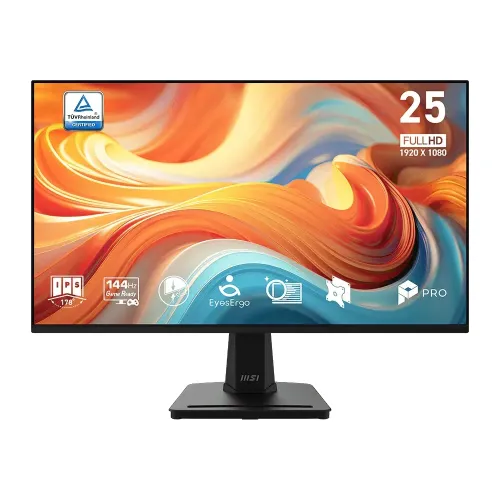
MSI PRO MP251 E14L overview
The MSI PRO MP251 E14L is a 24.5-inch Full HD IPS monitor designed for office, study and everyday entertainment use, with a high refresh ceiling for compatible PC gaming. The exact E14L version is specified at 144Hz. MSI’s official documentation identifies a 1ms MPRT response figure and a separate 4ms GtG figure, 300 cd/m² SDR brightness, 1500:1 native contrast and one HDMI 1.4b input alongside one analog D-Sub/VGA input. It also specifies AMD FreeSync, a tilt stand, a VESA pattern and Kensington lock. Keep the E14L suffix in product data: other monitors in the MP251 family are 100Hz or 120Hz variants with different feature combinations.
24.5-inch Full HD IPS panel
The display measures 24.5 inches diagonally and has a native resolution of 1920 × 1080 pixels in a 16:9 widescreen format. MSI identifies the panel as IPS and specifies 178-degree horizontal and vertical viewing angles. Full HD is widely supported by computers and consoles and can be easier to drive at high frame rates than a higher-resolution panel. At this size, it provides a familiar desktop balance for documents, spreadsheets, web browsing, learning, video playback and games. Buyers who prefer more pixels for detailed editing, dense multi-window workflows or fine text should compare QHD monitors as well. The screen is flat and has an anti-glare treatment.
144Hz refresh and compatible timing
The E14L supports a maximum 144Hz refresh rate. A higher refresh rate can make pointer movement, scrolling and compatible games appear smoother when the computer generates and sends enough frames. MSI’s exact-model specifications make input limits clear: HDMI 1.4b supports Full HD up to 144Hz, while D-Sub/VGA supports Full HD up to 60Hz. Use HDMI for the stated high-refresh mode. A capable graphics output, suitable cable and correct operating-system display selection are also required. The monitor itself cannot make a 60-frame-per-second game render at 144 frames per second; refresh capability and application frame rate work together.
Response time: MPRT and GtG
MSI lists two response figures for this monitor: 1ms MPRT and 4ms GtG. MPRT, or moving-picture response time, describes perceived persistence or motion blur under a particular display mode. GtG, or gray-to-gray, describes a pixel transition between gray levels. These are different measurement approaches, so the advertised 1ms MPRT should not be rewritten as 1ms GtG. Actual motion appearance depends on the panel, frame rate, overdrive or blur-reduction settings, content and viewer. The product documentation includes gaming-oriented refresh and adaptive-sync functions, but the response number alone does not predict every user’s experience or eliminate all motion artifacts.
Brightness, contrast and color gamut
The MSI specification lists 300 cd/m² SDR brightness and a 1500:1 contrast ratio. It also publishes 80.5% Adobe RGB, 77.9% DCI-P3 and 99% sRGB gamut values measured under CIE 1976. The CIE 1976 notation matters: the percentage should be kept with its measurement standard, and it does not mean the panel is factory hardware-calibrated to a particular Delta E value. MSI separately labels a 100,000,000:1 DCR value as dynamic contrast; keep it distinct from the 1500:1 static ratio. The display supports 16.7 million colors with 8-bit processing described as 6-bit plus FRC.
HDMI, VGA and adaptive sync
There is one HDMI 1.4b connector and one D-Sub/VGA connector. MSI explicitly lists 1920 × 1080 up to 144Hz on HDMI and 1920 × 1080 up to 60Hz on VGA. The manufacturer does not list a DisplayPort input. AMD FreeSync technology is specified with an activated range of 48–144Hz. For variable refresh to work, the source graphics device and software must also be compatible and the feature must be enabled in settings. Buyers with a USB-C-only laptop, DisplayPort-only workstation or older system should check adapter compatibility before ordering. Using an adapter does not guarantee that the original input’s maximum refresh timing will be retained.
Eye care and OSD functions
MSI describes the E14L as using its EyesErgo technology and lists Low Blue Light and Anti-Flicker features; the screen surface is anti-glare. Its user guide describes OSD tools and an Eye-Q Check feature. These options can alter the image and user workflow, but they do not replace appropriate breaks, comfortable room lighting or a suitable viewing position. Low Blue Light changes the screen’s color temperature, while anti-glare treatment helps reduce reflections from the display surface. The exact appearance depends on selected settings and ambient light. MSI’s official product material positions the monitor for work as well as play, with a four-side slim-bezel design and VESA mounting.
Stand, tilt, VESA and security
The supplied stand supports tilt adjustment from −5° to +20°. MSI does not list stand height adjustment, swivel or pivot, so users who need those movements should budget for a monitor arm or choose a model with a more adjustable stand. The E14L supports a 100 × 100 mm VESA mounting plate; the English manual specifies M4 × 10 mm screws, with a 4mm thread diameter and 0.7mm pitch. A Kensington lock is also listed. Check the mounting surface, screw depth and arm capacity before installation. The package and documentation should be consulted if the included stand hardware is being replaced.
Dimensions, weight and power
MSI lists dimensions of 557.2 × 419.3 × 182.4 mm with the stand and 557.2 × 321.6 × 51.7 mm without it. The carton is listed at 630 × 114 × 411 mm. Net weight is 2.89kg. There is a source discrepancy for gross weight: MSI’s current specification webpage says 4.89kg, while its English user manual says 4.65kg. Product data retains the webpage value while documenting the mismatch. Power is supplied by an external 12V, 2.5A adapter rated at 30W, with 100–240V, 50/60Hz AC input. Verify local packaging and adapter label for the exact regional bundle.
Included accessories and audio
MSI lists one HDMI 1.4 cable, one external power adapter and a quick guide. The power cord is marked optional, and MSI notes that adapter type can differ by region and may change. Confirm the local box contents with the seller before purchase if a particular cable or cord is necessary. MSI’s specification and I/O table do not list built-in speakers or DisplayPort. Exact-model local retailer pages also indicate that integrated speakers are absent. Plan to route audio through a computer, console, headset or separate speakers. Do not assume that the HDMI cable bundle or audio features from another MP251-family model apply to the E14L.
Exact model and warranty in Bangladesh
The E14L suffix identifies the 144Hz model covered by the MSI page and manual. It should not be confused with the PRO MP251 100Hz version or PRO MP251L E2 120Hz model. Bangladesh catalog and seller records list a three-year warranty, but the specific importer, service provider and terms should be confirmed on the seller invoice. External retail prices change with promotions, availability and seller. They do not determine BiponiBD’s own variant price, offer or stock, so shoppers should consult the live BiponiBD listing for current commercial information. Origin and barcode/GTIN are not established by the available catalog evidence and remain blank rather than guessed.
Who this monitor may suit
The MP251 E14L may suit a desk setup that needs a 24.5-inch IPS Full HD screen, a 144Hz HDMI mode and a tilt stand, with everyday office and study features alongside adaptive sync. It may be less suitable for people who need a higher resolution, an adjustable-height stand, DisplayPort, integrated speakers or a published factory-calibration report. The port timing makes it important to use HDMI rather than VGA when seeking the documented 144Hz mode. The MPRT and GtG response claims should be read as separate metrics. Comparing the exact suffix on the carton, checking local warranty details and confirming accessories help keep the delivered unit aligned with the intended model.
Features
- 24.5-inch flat IPS panel with Full HD 1920 × 1080 native resolution and 16:9 format.
- 144Hz maximum refresh rate for compatible PC and console output modes.
- MSI response figures distinguish 1ms MPRT motion-picture response from 4ms gray-to-gray pixel transition.
- 300 cd/m² rated SDR brightness and 1500:1 native contrast; 100,000,000:1 dynamic contrast is separately designated DCR.
- Manufacturer-listed gamut: 80.5% Adobe RGB / 77.9% DCI-P3 / 99% sRGB under CIE 1976 measurement.
- One HDMI 1.4b input supports 1920 × 1080 up to 144Hz; one D-Sub/VGA input supports 1920 × 1080 up to 60Hz per MSI timing table.
- AMD FreeSync / Adaptive-Sync operating range 48–144Hz.
- Anti-glare surface and MSI EyesErgo features including Low Blue Light, Anti-Flicker and Eye-Q Check.
- Tilt stand from −5° to +20°, plus 100 × 100 mm VESA mount and Kensington lock.
- External 12V 2.5A (30W) supply; MSI lists an HDMI cable and adapter, quick guide and an optional power cord subject to regional bundle changes.
Advantages
- 144Hz IPS specification is backed by the exact E14L product page and documentation, and HDMI timing explicitly includes 1080p at 144Hz.
- MPRT and GtG are both published (1ms MPRT / 4ms GtG), which is clearer than an unqualified single “1ms” claim.
- MSI provides unusually complete ergonomic and compatibility details: tilt range, VESA pattern/screw and per-input timing.
- 300 cd/m² brightness, 1500:1 contrast and published CIE 1976 gamut figures give buyers more useful display context.
- Anti-glare, Low Blue Light, Anti-Flicker and Eye-Q Check features support everyday office use.
Considerations
- Native Full HD resolution has less workspace and pixel density than QHD at 24.5 inches.
- The stand provides tilt only; no height, swivel or pivot adjustment is specified.
- The VGA input is limited to 1920 × 1080 at 60Hz in MSI’s published timing table.
- No integrated speakers or DisplayPort are documented; buyers needing those features require another device or model.
- MSI pages differ on carton gross weight (4.89kg versus 4.65kg in the manual), and the power cord is optional by region.
Frequently asked questions
What is the exact monitor model?
The model is MSI PRO MP251 E14L. Keep the E14L suffix: the similarly named PRO MP251 and MP251L E2 have different refresh rates and may have different features.
What are the screen size and resolution?
MSI specifies a 24.5-inch flat IPS panel with native Full HD 1920 × 1080 resolution and a 16:9 aspect ratio.
Does the E14L support 144Hz?
Yes. MSI lists a maximum 144Hz refresh rate and explicitly lists HDMI 1.4b at 1920 × 1080 up to 144Hz. The computer, graphics output and cable must support the selected mode.
What does 1ms MPRT / 4ms GtG mean?
MSI publishes two different response measures: 1ms MPRT (motion-picture response time) and 4ms GtG (gray-to-gray pixel transition). They describe different measurement methods and should not be collapsed into a claim of 1ms GtG.
What color gamut does this monitor cover?
MSI lists 80.5% Adobe RGB, 77.9% DCI-P3 and 99% sRGB using CIE 1976. These coverage figures do not certify factory calibration or a Delta E accuracy result.
What brightness and contrast are specified?
The exact-model MSI specification lists 300 cd/m² SDR brightness and 1500:1 contrast. The 100,000,000:1 figure is separately labeled DCR (dynamic contrast ratio).
Which inputs are available, and what timings do they support?
There is one HDMI 1.4b input, listed for Full HD up to 144Hz, and one D-Sub/VGA input, listed for Full HD up to 60Hz. MSI does not list DisplayPort for this model.
Does it support adaptive refresh?
Yes. MSI lists AMD FreeSync Technology, with an activated range of 48–144Hz. The source graphics system and selected input/mode must also support variable refresh.
Does it have built-in speakers?
MSI’s specification table does not list integrated speakers, and exact-model local seller listings indicate none. Plan for audio from the computer or separate speakers/headphones.
Can the stand be height-adjusted or can the screen rotate?
MSI lists tilt adjustment from −5° to +20°. Height adjustment, swivel and pivot are not listed. A compatible 100 × 100 mm VESA mount is supported.
What are its dimensions, weight and power requirements?
MSI lists 557.2 × 419.3 × 182.4 mm with stand, 557.2 × 321.6 × 51.7 mm without stand, and a 630 × 114 × 411 mm carton. Net weight is 2.89kg. The specification page lists gross weight 4.89kg, while the English manual says 4.65kg. The external adapter is 12V 2.5A (30W), with 100–240V AC input.
Which accessories and warranty are included?
MSI’s specification lists one HDMI 1.4 cable, one power adapter and quick guide; the power cord is marked optional and regional bundles may vary. Bangladesh catalog/seller records list a three-year warranty; confirm the importer, provider and terms on the purchase invoice.