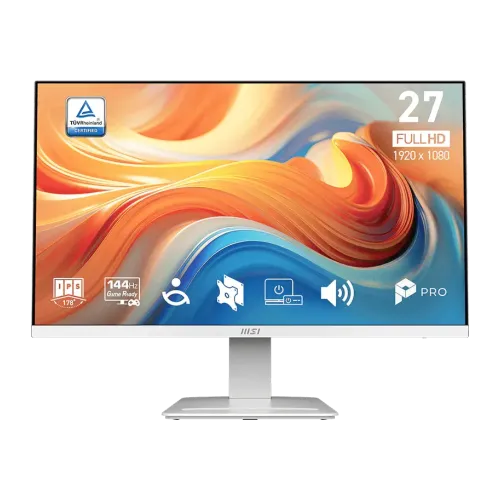
MSI PRO MP273W E14A 27-inch 144Hz FHD IPS White Monitor
27-inch Full HD IPS panel
The MSI PRO MP273W E14A is a 27-inch flat IPS monitor with a native Full HD resolution of 1920 × 1080 and a 16:9 aspect ratio. It is part of MSI’s PRO business-productivity line, with a white housing and stand. The exact model suffix matters: this listing is MP273W E14A, not a QHD MP273Q or an Ultra HD MP273U. Its screen is anti-glare, has a 597.888 × 336.312 mm active area and a 0.3114 mm pixel pitch. That is roughly 82 pixels per inch. Full HD provides familiar, readable text at normal desk distance, though users who need finer detail across a 27-inch workspace may prefer a higher-resolution panel.
144Hz refresh and input limits
The display refreshes at up to 144Hz. MSI’s exact-model datasheet states that HDMI 2.0 and DisplayPort 1.2a can each run 1920 × 1080 at up to 144Hz, while the analog D-Sub/VGA input supports up to 1920 × 1080 at 60Hz. A compatible computer or console, a suitable cable and the selected operating-system mode are all needed to reach the maximum. A 144Hz panel can make pointer movement, scrolling and supported games look smoother than a 60Hz display; it does not make the resolution higher or guarantee that a game will render 144 frames per second.
4ms GtG, 1ms MPRT and FreeSync
MSI specifies a 4ms gray-to-gray response time and a separate 1ms MPRT mode. These measure different things. GtG describes pixel transition under the specified test conditions, while MPRT is a motion-picture response-time mode intended to reduce perceived blur. Do not describe this panel as having 1ms GtG. The monitor also supports AMD FreeSync with a stated active range of 48–144Hz. Adaptive-Sync can reduce tearing when a compatible graphics source varies frame delivery within a supported range. Feature interactions and console support can vary by source and configuration, so FreeSync should not be represented as a guarantee of a particular frame rate or as NVIDIA G-SYNC certification.
Brightness, color and HDR Ready
The IPS panel is rated at 250 cd/m² brightness, a 1500:1 static contrast ratio and 178-degree horizontal and vertical viewing angles. MSI lists 16.7 million colors at 8 bits (6-bit plus FRC) and 102% sRGB coverage under CIE 1976, with DCI-P3 coverage of 78% under that same test standard. Gamut coverage describes the range of colors the display can reproduce; it is not an individual-unit calibration or color-accuracy report. The monitor is marked HDR Ready. That label does not establish a VESA DisplayHDR certification, peak HDR brightness tier or a true high-dynamic-range viewing experience. Use the manufacturer’s stated “HDR Ready” phrase and avoid stronger HDR promises.
EyesErgo and on-screen tools
For everyday viewing, MSI includes its EyesErgo feature family and eye-care controls such as Anti-Flicker, Less Blue Light and an anti-blue mode, along with Eye-Q Check options for visual checks and posture reminders. The on-screen display provides image modes and controls; software or the OSD does not remove the need for sensible breaks, suitable ambient lighting and a comfortable viewing position. MSI also lists a 5-way navigation key, refresh-rate display, alarm clock, screen assistance and image-enhancement settings. These are practical convenience features, not medical claims.
HDMI, DisplayPort, VGA and sound
The exact input panel includes one HDMI 2.0 port, one DisplayPort 1.2a port, one D-Sub/VGA input, a headphone-out jack and DC power input. HDMI and DisplayPort support Full HD up to 144Hz; VGA supports Full HD up to 60Hz. MSI specifies no USB ports on this model. The built-in speakers are rated at 3W × 2. A 3.5 mm headphone-out jack is also present for private listening or connection to external powered audio equipment. The headphone output is not a microphone input. HDMI CEC support includes MSI Power Link for compatible devices; this should not be confused with USB-C or USB power delivery, because the monitor has no USB-C connection.
White housing, stand and VESA
The white finish extends across the rear housing, stand and base. MSI’s accessory-slot design on the base can hold a small item such as a phone or stylus. The supplied stand tilts from -5 to +20 degrees, but does not provide listed height adjustment, swivel or pivot. A standard 100 × 100 mm VESA mounting pattern is provided, using M4 × 10 mm screws according to the manual. The monitor weighs 4.1 kg net and 6.3 kg packaged. With the stand, the manufacturer lists dimensions of 613.49 × 201.01 × 470.61 mm; without the stand the panel is 613.49 × 59.56 × 364.46 mm. Measure the desk, arm load rating and cable route before installation.
Power adapter and carton items
Power is supplied by an external 12V, 3A adapter. The input rating is 100–240V AC at 50/60Hz, making the adapter suitable for common mains ranges when the correct local plug and cable are provided. MSI’s datasheet lists a 36W power supply. The accessory list includes an HDMI 2.0b cable, quick guide, power adapter and an optional C13 power cord; the power cord can vary by region. Confirm the actual Bangladesh package, plug type and warranty card with the seller instead of assuming every regional carton is identical. A VGA cable and DisplayPort cable are not listed among the supplied accessories.
Bangladesh price and warranty
In Bangladesh, currently visible listings from Star Tech, Ryans and TechLand show the exact MP273W E14A around ৳19,500. Listings may display a higher regular price, discounts or a changing stock label; those values are retailer snapshots rather than a fixed manufacturer price. The BiponiBD variant’s existing ৳19,500 price is retained. The same three local retailer pages advertise a three-year warranty. The seller and distributor determine coverage, claim process and whether the original box is required, so buyers should confirm those written terms on the invoice and warranty documents.
Confirm the exact MSI model
When comparing this model, verify the complete rear label and E14A suffix. MSI’s PRO MP273W E14A is white, Full HD, 144Hz and includes HDMI, DisplayPort and VGA, dual 3W speakers and FreeSync. Related PRO MP273 family members can differ in panel resolution, color, connectivity, refresh or exterior finish. Local page titles that call this monitor “WQHD” are inconsistent with the product’s own listed 1920 × 1080 resolution; treat those as a title error. The word “gaming” on a retailer URL is not the model class: MSI positions this as a business productivity monitor that also supports high refresh and adaptive sync.
Set up 144Hz and audio
For a desk setup, connect a PC to HDMI or DisplayPort if you want the full 144Hz mode. In Windows, open Advanced display settings and select 144Hz after connecting; on other operating systems, choose the highest supported mode in the display panel. If the available list stops at 60Hz, check the source output, cable, graphics driver, input selection and resolution. An older device connected through VGA is limited to 60Hz according to MSI. FreeSync requires a compatible graphics device and a supported connection and driver configuration. If speakers are used, set the computer’s audio output to the monitor over HDMI or DisplayPort and adjust the monitor volume; VGA does not carry digital audio.
Who should consider this monitor?
The monitor is suited to office applications, study, browsing, video and casual or competitive gaming where a 27-inch Full HD screen and high refresh are useful. Its strengths include an IPS viewing angle, a 144Hz ceiling, multiple video inputs, built-in stereo speakers, a white appearance, VESA mounting and a locally advertised three-year warranty. Its limitations include modest 82-PPI sharpness compared with QHD at the same size, a tilt-only supplied stand, no USB hub or USB-C, and 250-nit brightness. HDR Ready should be treated as a signal/feature label, not a certified HDR performance rating. These details help shoppers choose the display for their actual desk, computer ports, audio needs and image-quality expectations.
Product identity and URL notes
The catalog name and existing URL identify this as a white professional monitor, but the slug currently ends in “gaming-monitor.” The URL is retained to avoid breaking the established product address; it should be tracked as an SEO cleanup candidate that requires a deliberate redirect plan before changing. Brand is corrected from the generic “Others” to MSI, while model and manufacturer part number are normalized to the exact model “PRO MP273W E14A.” Product identity, variant, SKU, current price, status and image files remain the same. Product-page SEO text can explain the business monitor’s 144Hz capabilities without presenting it as a different MSI gaming-series product.