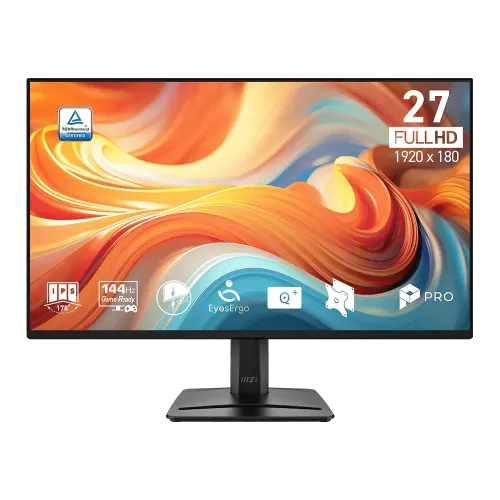
MSI PRO MP275 E14L পরিচিতি ও সঠিক model
MSI PRO MP275 E14L হলো 27-inch Full HD IPS productivity monitor, native 1920 × 1080 resolution এবং 144Hz refresh rate-সহ। এটি office spreadsheet, browser, study, video meeting, entertainment ও compatible casual gaming-এ ব্যবহার করা যায়। MSI-এর official product page ও datasheet-এ panel, 144Hz, 300-nit brightness, eye-care features ও dual speakers আছে। Catalog-এ আগে brand “Others” ছিল; এখন MSI-তে normalize করে modelName/MPN exact PRO MP275 E14L রাখা হয়েছে।
এই model-কে PRO MP275 E14, MP275 E14V, MP275 E14L বা MP275 E2-এর সঙ্গে গুলিয়ে ফেলবেন না—শেষ অক্ষর/variant ও ports আলাদা হতে পারে। E14L-এ HDMI, D-Sub (VGA), line-in ও headphone-out আছে; USB-C, DisplayPort বা USB hub listed নয়। Built-in audio দুইটি 2W speaker থেকে আসে। Monitor-টি 144Hz পর্যন্ত refresh দিতে পারে; 144Hz বেছে নিতে display settings, GPU output, cable ও application source mode compatible হতে হবে।
MSI datasheet HDMI 2.0-তে FHD@144Hz support বলে, আর VGA legacy analog input হিসেবে আছে। HDMI-তে computer যুক্ত করে Windows/GPU control panel-এ 1920 × 1080 ও 144Hz নির্বাচন করুন। Option না থাকলে cable, source port, driver ও active signal যাচাই করুন। VGA-তে high refresh mode প্রত্যাশা করবেন না। Device connector ও box cable regionভেদে পরিবর্তিত হতে পারে—delivery-এর contents পরীক্ষা করুন।
Panel, image quality ও color
IPS panel 178° horizontal/vertical viewing angle, 16:9 aspect ratio, anti-glare surface এবং 0.3114 × 0.3114mm pixel pitch দেয়। 27-inch Full HD screen-এ pixel density প্রায় 82 PPI। সাধারণ productivity ও entertainment-এ এটি বড় workspace দেয়; একই size QHD panel-এ text/detail আরও ঘন হবে। ছোট font বা high-density design কাজের জন্য OS scaling adjust করুন অথবা 1440p display তুলনা করুন। 300 cd/m² SDR brightness ও typical 1500:1 static contrast MSI specification-এ listed।
Color gamut সংখ্যা convention অনুযায়ী দেখতে হবে: MSI measurement CIE 1976-এ Adobe RGB area 80%, DCI-P3 area 85%, sRGB area 110%। Area ratio target gamut-এর coverage নয়; sRGB 110% area মানে 110% colorspace coverage বা calibration accuracy নয়। Panel 16.7M colors এবং 8-bit (6-bit + FRC) signal support করে। Color-critical print/photo work-এ calibration instrument দিয়ে unit profile তৈরি করুন; datasheet gamut figures factory Delta-E guarantee নয়।
HDR Ready label HDR signal feature নির্দেশ করে, VESA DisplayHDR certification নয়। Contrast, peak brightness, backlight dimming বা HDR grading capability certified monitor-এর মতো হবে ধরে নেবেন না। Anti-Flicker, Less Blue Light ও Eye-Q Check-এর মতো MSI EyesErgo feature দীর্ঘক্ষণ screen ব্যবহারে settings/check reminder দেয়। Blue-light mode চালু করলে color temperature পরিবর্তিত হতে পারে; color judging-এর আগে normal mode ব্যবহার করুন।
144Hz, response time ও eye-comfort tools
144Hz refresh standard 60Hz screen-এর তুলনায় cursor movement, scrolling এবং game motion মসৃণ দেখাতে পারে। GPU ও game যথেষ্ট frame render না করলে monitor 144 new frames per second পাবে না। 1920 × 1080/144Hz mode HDMI 2.0 input-এর জন্য MSI datasheet-এ explicitly listed। Graphics control panel-এ refresh rate manually set করুন এবং OSD information screen-এ active signal মিলিয়ে নিন। Adaptive-Sync/FreeSync feature-compatible source-এ variable refresh ব্যবহারে tearing বা stutter কমাতে পারে; driver এবং OSD setting পরীক্ষা করুন।
Response metrics 1ms MPRT এবং 4ms GTG—এরা আলাদা measurement। MPRT moving-picture response/persistence, আর GTG pixel transition-এর time; কোনোটাই complete input latency নয়। MSI-এর claimed 1ms MPRT-কে সব response transition 1ms বা lag-free gameplay বলা যাবে না। OSD response-time/overdrive option-এ overshoot/bright trail দেখা দিলে less aggressive preset বেছে নিন। Frame rate, cable, GPU render time ও panel setting বাস্তব অনুভূতিতে প্রভাব ফেলে।
MSI EyesErgo-তে Anti-Flicker, Less Blue Light ও Eye-Q Check আছে। Anti-Flicker screen brightness setting-এ visible flicker কমাতে কাজ করে; Eye-Q Check চোখের অবস্থান/বিরতি নিয়ে self-check reminder। এগুলো স্বাস্থ্যসেবা বা eye-strain নিশ্চয়তা নয়। Room lighting, text scale, viewing distance ঠিক রাখা এবং বিরতি নেওয়া গুরুত্বপূর্ণ। Eye-Q feature ব্যবহার করে দীর্ঘ সময় পর focus/eye condition self-check করুন; এতে color-critical কাজের picture mode পরিবর্তিত হচ্ছে কি না খেয়াল করুন।
Ports, speaker ও stand
Rear input/output: একটি HDMI 2.0 (FHD@144Hz), একটি D-Sub/VGA, line-in, headphone-out, AC-in এবং Kensington lock। HDMI/OS audio output থেকে dual integrated 2W speakers চালানো যায়; volume OSD বা computer-এর audio device-এ adjust করুন। External headphones-এ 3.5mm output ব্যবহার করুন। VGA analog video-তে sound থাকে না, তাই audio আলাদা path দিয়ে নিতে হবে। একসঙ্গে PC, laptop বা older machine যুক্ত করতে HDMI ও VGA input-এ সুবিধা পাওয়া যায়।
Stand tilt angle −5° থেকে +20° adjust করে, কিন্তু height adjustment, swivel বা pivot listed নয়। Monitor-এ VESA 100 × 100mm mount ও accessory slot আছে। Desk-এ height ergonomic না হলে VESA compatible arm/wall mount বিবেচনা করুন; arm weight capacity, screw fit, desk clearance ও cable length আগে পরীক্ষা করুন। MSI product guide-এর rear-view port labels অনুযায়ী HDMI, VGA, line-in, headphone-out এবং power আছে। Kensington lock cable physical security point, screen lock feature নয়।
MSI datasheet external page specification অনুযায়ী net/gross package weight 3.94kg/6.05kg। Retail listing-এ dimensions, regional adapter, HDMI cable ও packaging details ভিন্ন হতে পারে। Adapter-এ input voltage এবং supplied cable মিলিয়ে নিন; approved adapter ব্যবহার করুন। Monitor-এর ventilation slot ঢাকবেন না। VESA mounting করলে original stand dismount করার আগে power/cables খুলুন এবং panel face-down stable padded surface-এ রাখুন।
সুবিধা, সীমাবদ্ধতা, দাম ও warranty
মূল সুবিধা: 27-inch IPS Full HD, 144Hz, FreeSync/Adaptive-Sync, dual 2W speakers, HDMI+VGA, eye-care software/firmware features, VESA mount ও Kensington lock। Office setting-এ large workspace এবং familiar input options আছে; home setup-এ speaker দিয়ে basic sound external speaker ছাড়া পাওয়া যায়। MSI Power Link supported MSI desktop-এ compatible setup-এ monitor power button দিয়ে system wake/on operation সহজ করতে পারে।
সীমাবদ্ধতা: 27-inch size-এ Full HD density QHD-এর চেয়ে কম; stand tilt-only, USB-C/USB hub/DisplayPort নেই। Dual speakers basic 2W units, cinema-level sound নয়। HDR Ready certified HDR performance নয়। Gamut area percentages coverage/calibration guarantee নয়। 1ms MPRT marketing metric-কে input latency বা universal GtG response হিসেবে তুলনা করা যাবে না।
বাংলাদেশের exact-model listings-এ UltraTech ৳18,000 in stock, Techland promotional page ৳18,000 (regular ৳21,500), Skyland ৳18,400, Ryans ৳18,500 এবং MSI Mega Buy category list ৳17,500 দেখিয়েছে। Product variant price ৳18,000-এ রাখা হয়েছে lowest exact-product page offer অনুসারে। এগুলো seller observations, BiponiBD offer নয়। Local sellers তিন বছরের warranty উল্লেখ করে; MSI datasheet/region warranty vary করতে পারে। Warranty invoice, provider/distributor, dead-pixel policy, service location ও written coverage claim terms কেনার আগে মিলিয়ে নিন।
Setup, care ও কেনার আগে checklist
Monitor stand assemble করে stable desk-এ রাখুন, AC cable লাগিয়ে HDMI 2.0 দিয়ে PC যুক্ত করুন। OSD input নির্বাচন করে Windows display settings-এ 1920 × 1080 এবং 144Hz সেট করুন। 144Hz option না এলে cable, GPU output, driver, input port এবং application mode একে একে পরীক্ষা করুন। HDMI sound-এ Windows output “MSI monitor” নির্বাচন করুন; speaker mute/volume OSD এবং operating system উভয় জায়গায় দেখুন। VGA ব্যবহার করলে audio আলাদা সংযুক্ত করুন।
Adaptive-Sync ব্যবহার করতে supported GPU/driver panel-এ FreeSync/VRR চালু করুন এবং OSD setting মিলিয়ে নিন। Game-এ tearing/flicker থাকলে frame cap, V-Sync এবং overdrive level tune করুন। Eye-Q Check reminder এবং Less Blue Light mode পছন্দমতো ব্যবহার করুন; color work-এর সময় neutral color preset ফিরিয়ে দিন। HDR content চালালে OS/game HDR option পরীক্ষা করুন, কিন্তু VESA DisplayHDR certification আশা করবেন না।
প্রথম দিন panel dead pixel, brightness uniformity, port, speaker, headphone-out, refresh option, stand tilt ও warranty sticker পরীক্ষা করুন। Soft microfiber cloth দিয়ে screen পরিষ্কার করুন; liquid সরাসরি panel-এ spray করবেন না। Stand mount-এ arm লাগালে VESA 100 × 100mm pattern ও screw depth মিলিয়ে নিন। Serial number, invoice, warranty booklet এবং shipping carton সংরক্ষণ করুন। স্থানীয় seller warranty তিন বছর বললেও exact imported SKU, box seal এবং claim policy লিখিতভাবে নিশ্চিত করুন।