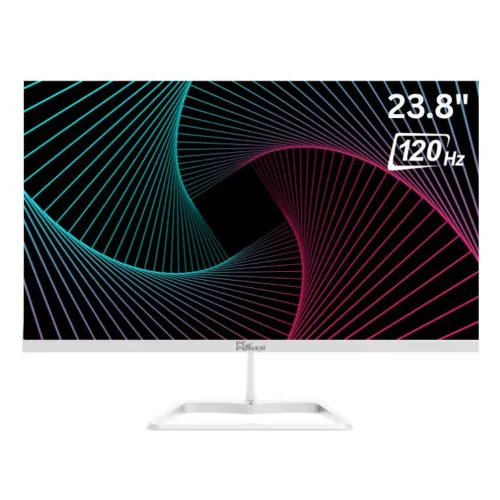
The PC Power PCG24F120DW is a 23.8-inch Full HD IPS monitor with a 120Hz maximum refresh rate, 5ms listed response time, HDMI and VGA. This guide covers the exact model, display and gaming capabilities, connections, mounting and setup, retailer-verified specifications, current Bangladesh seller prices and warranty checks.
Model identity and overview
The PC Power PCG24F120DW is a white 23.8-inch Full HD IPS monitor with a listed maximum refresh rate of 120Hz. The exact model number matters because PC Power offers several monitors with similar screen sizes and similar model codes but different refresh rates, panel types and finishes. Match PCG24F120DW on the unit label and seller invoice before comparing prices or asking for service.
PC Power Technology’s product listing identifies this exact model and gives the 23.8-inch FHD 120Hz IPS description. Bangladesh retailer specification tables provide the detailed numeric information used on this page, including brightness, ports, power, tilt and VESA dimensions. Where local seller fields are more detailed than the manufacturer page, they are treated as retailer-listed figures rather than independently attributed to the manufacturer.
Screen size, resolution and panel
The monitor uses a 23.8-inch diagonal display with a native resolution of 1920 × 1080 pixels, commonly called Full HD. Retailers often market this as a 24-inch class monitor. Its 16:9 aspect ratio fits common desktop interfaces, video and game content. A 23.8-inch Full HD panel can work well for general browsing, schoolwork, office applications and entertainment, while users who need more room for large spreadsheets, timelines or detailed design may prefer a higher-resolution display.
The panel is listed as IPS with 178-degree horizontal and vertical viewing angles. IPS viewing angles can help preserve a consistent picture when the viewer is not exactly centered, although the appearance of color and contrast can still vary with position, room lighting and settings. Sellers list 16.7 million colors, a 100% sRGB gamut and 72% NTSC coverage. These are gamut and color-support specifications; they do not indicate factory calibration or guarantee color accuracy for professional print or grading work.
Local sellers list 250 cd/m² brightness and 1500:1 contrast. The brightness figure is typical of many general-purpose monitors and may feel limited in a room with direct sun or strong reflected light. Repositioning the screen and reducing glare can improve comfort. Contrast ratio is a specification measured under stated conditions; perceived contrast also depends on the room and displayed content.
120Hz refresh and 5ms response
The PCG24F120DW is specified with a maximum refresh rate of 120Hz. A higher refresh can make compatible movement such as cursor travel, scrolling and supported game action appear smoother than on a 60Hz screen. To use the higher mode, the computer must generate enough frames, the connection must carry the selected mode, and the operating system or graphics settings must be set to 120Hz. A monitor does not create extra frames for a game or video by itself.
The product and retailer listings state a 5ms response time but do not consistently identify the measurement method. For that reason, this profile preserves the 5ms figure without relabeling it as GtG, MPRT or a guaranteed input-lag result. Response time and refresh rate measure different behaviors. Actual motion clarity depends on pixel transitions, refresh mode, frame delivery, overdrive settings and the content shown.
Before buying for a specific PC or console, check that its video output supports 1920 × 1080 at 120Hz over the chosen input. Retailer tables identify HDMI and VGA; HDMI is the appropriate first connection to check for a modern digital source. If the 120Hz option is not visible, confirm the cable, input selection, graphics driver and source display settings. VGA is an analog connection and its supported modes may depend on the source and cable.
Color and visual features
PC Power and retailer listings describe a Full HD IPS display with a white chassis. Local product tables list low-blue-light support and some seller pages also mention flicker-free behavior. These are display settings that may be useful for long reading or general work. Individual comfort differs; choose a comfortable brightness, reduce reflections and take normal breaks. The features are not medical treatments and should not be interpreted as a promise to prevent eye fatigue.
TrustTech and Nexus list FreeSync support. Adaptive refresh can help reduce tearing when paired with compatible graphics hardware, supported settings and the monitor’s operating range. The available product pages do not provide a complete region-specific FreeSync range or certification details, so check with the seller if that capability is important. The 120Hz maximum remains dependent on the connected device, cable and selected resolution.
Connections and audio planning
The reviewed local specifications list one HDMI input and one VGA (D-Sub) input. This provides one digital and one analog video connection. The pages consulted do not list DisplayPort, USB-C, a USB hub or an audio output for this exact model. If your computer only has USB-C or DisplayPort, check a compatible adapter’s supported resolution and refresh rate before purchase; not every adapter can pass Full HD at 120Hz.
Ryans lists built-in speakers as No, and the other seller specifications reviewed do not list integrated speakers. Plan for separate speakers, headphones or a suitable audio device if you need sound. A display appearing as an audio output in a computer menu is not proof that it has built-in speakers. Confirm how audio should be connected to your source and external equipment.
Stand, mounting and physical setup
Retailer specifications list tilt adjustment from -5 degrees to +15 degrees and a 100 × 100mm VESA mounting pattern. The reviewed listing does not show height adjustment, swivel or pivot. If you need more ergonomic movement, check whether a monitor arm with the correct VESA spacing is suitable. Follow the arm’s load rating and use the supplied fasteners or the hardware specified in the manuals.
The product is described with a white body and a three-side borderless design by local listings. Check the exact delivered finish and included base against the seller’s current stock because listing images can differ from the physical unit. Leave space for the stand, adapter, ventilation and cable bends. Use a stable desk surface and avoid pulling on the HDMI or VGA connectors when adjusting the screen.
Power, installation and care
The local specifications list an external 12V, 2.5A power supply and a rated power consumption of up to 30W. Use the supplied adapter and confirm the output label if the unit is moved between locations. Do not substitute a power adapter with a different voltage or connector. Route power and video cables so they are not pinched or pulling against the monitor.
For setup, connect the external adapter, attach a supported video source, select the correct input, and set the computer to the native 1920 × 1080 resolution. Then select 120Hz if the source, cable and input mode support it. Adjust tilt and picture brightness for the desk and room. If there is no image, check power, input selection, source output and cable seating before assuming the monitor is defective.
To clean the screen, power it down and follow the supplied manual. A soft dry cloth is suitable for routine dust. Avoid pressing on the LCD surface and do not spray liquid directly onto the display. Keep the carton, invoice and serial/model details in case the seller needs them for a warranty request.
Current Bangladesh seller listings and warranty
At the time of the Chrome check, Nexus listed the exact PCG24F120DW at ৳13,600 and showed it in stock. TrustTech listed it at ৳14,700 and also showed in stock. This supports an approximate observed seller range of ৳13,600–৳14,700. Star Tech currently marks the item Upcoming with price to be announced, while Ryans displays Out of Stock and no current price. Their older or search-result prices are not used in the estimate. Retail price and stock can change; the estimate is not a live BiponiBD offer or an MSRP.
Star Tech, Ryans, TrustTech and Nexus product information list a three-year warranty. These are seller listing terms and do not establish identical service, registration, exclusions or replacement policies across stores. Confirm the warranty provider, duration, claim requirements and included accessories with the seller in writing, and retain the purchase invoice. A listing title or manufacturer brand name alone does not establish a specific local service entitlement.
Before checkout, verify the model code, white color, refresh-rate support, cable needs, sound setup and desk or mounting fit. Compare the delivery charge and payment terms as well as the displayed product price. If your setup requires USB-C, DisplayPort, built-in speakers, height adjustment or QHD resolution, this model’s listed configuration may not meet those requirements.
Key features
- 23.8-inch IPS panel with 1920 × 1080 Full HD resolution
- 120Hz maximum refresh rate for compatible source devices
- 5ms gray-to-gray response specification
- 1500:1 contrast ratio and 250 cd/m² typical brightness (seller specifications)
- 100% sRGB and 72% NTSC color gamut listed by sellers
- 16.7 million display colors and 178° horizontal/vertical viewing angles
- One HDMI input and one VGA (D-Sub) input
- FreeSync support listed by Nexus; verify regional unit and supported mode
- Low-blue-light and flicker-free features listed by sellers
- -5° to +15° tilt adjustment and 100 × 100mm VESA pattern
- White chassis and three-side borderless design listed by sellers
- External 12V/2.5A power adapter; rated consumption ≤30W
Advantages
- 120Hz is a higher refresh ceiling than a standard 60Hz screen when the source and connection can deliver compatible frames.
- The IPS panel and stated 178° viewing angles support viewing from different seating positions.
- Full HD is widely supported and can be less demanding to render than QHD or 4K.
- HDMI and VGA provide digital and legacy analog connectivity options.
- Tilt and 100 × 100mm VESA mounting provide basic placement flexibility.
Points to consider
- Full HD resolution offers less desktop workspace than QHD or 4K at a similar screen size.
- The seller lists 250 cd/m² brightness; direct sunlight or strong reflections may reduce visibility.
- Only one HDMI and one VGA input are listed; USB-C and DisplayPort are not specified.
- The stand offers tilt adjustment only in the reviewed specifications; height and swivel are not listed.
- No built-in speakers are listed; plan separate audio equipment if sound is required.
Frequently asked questions
What is the screen size and resolution?
It is a 23.8-inch IPS monitor with 1920 × 1080 Full HD resolution and a 16:9 aspect ratio; 24-inch is the rounded size class.
Does it support 120Hz?
PC Power and the seller specifications list a maximum 120Hz refresh rate. The source device, cable, input and display settings must support the selected mode.
What is the response time?
The manufacturer listing and local retailer tables specify 5ms. The source does not state the measurement method, so this page does not label it as GtG or MPRT.
What ports does it have?
The checked Bangladesh seller specifications list one HDMI port and one VGA (D-Sub) port. Check your device output and cable before buying.
Does it support adaptive sync?
Nexus lists FreeSync support. Confirm availability and supported refresh range for the exact regional unit and connected graphics source.
Does it have built-in speakers?
Ryans lists built-in speakers as No. The reviewed seller specification does not list speakers, so use separate speakers or headphones for audio.
Can I mount it on a monitor arm?
Seller specifications list a 100 × 100mm VESA pattern. Confirm the mount supports that spacing and the screen weight.
Can the stand tilt?
Star Tech and TrustTech list a -5° to +15° tilt range. Height adjustment, swivel and pivot are not listed.
What is its brightness and contrast?
Local seller tables list 250 cd/m² brightness and a 1500:1 contrast ratio. PC Power’s accessible product page confirms the model but does not expose the complete numeric table in its rendered product view.
What warranty is listed?
Star Tech, Ryans, TrustTech and Nexus show three years in their product information. Warranty handling depends on the seller and invoice; verify coverage and service terms before payment.
What is the current Bangladesh price?
Nexus showed ৳13,600 in stock and TrustTech showed ৳14,700 in stock when checked. Star Tech marked it Upcoming with price to be announced, and Ryans showed out of stock.
Is this a gaming monitor?
It is listed as a 120Hz IPS monitor and can be used for compatible games. Actual motion and responsiveness depend on the computer, connection, settings and game.
Confirm stock, final price, included accessories and seller warranty terms before ordering.