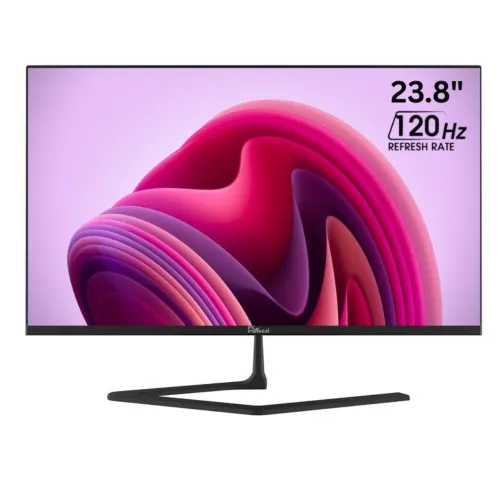
PC Power PCG24F120U: a balanced 23.8-inch Full HD monitor
The PC Power PCG24F120U is a mainstream desktop display built around a 23.8-inch IPS panel, Full HD resolution and a 120Hz refresh rate. It is designed for a practical mix of office work, study, browsing, streaming and casual gaming. The screen size fits a typical desk without requiring the space of a 27-inch display, while 1920×1080 pixels keep text, video and everyday applications clear at normal viewing distances. Check the exact carton and unit model before purchase because similarly named PC Power monitors can have different sizes, refresh rates and ports.
What the 120Hz panel changes
A 120Hz refresh rate can redraw motion more frequently than a conventional 60Hz display. Scrolling through long pages, moving windows and supported games can look smoother when the connected computer is configured for 120Hz. The monitor alone does not make every game run at 120 frames per second: the PC, graphics hardware, application, resolution, input and cable all affect the result. Set the display refresh rate in the operating system after connection, and check that the selected port and device expose the intended mode. This model is an IPS office and general-use screen, not a dedicated high-end esports panel.
Retailer specifications list a 5ms response time. Response-time numbers may use different measurement methods and do not by themselves describe every transition or guarantee zero blur. Buyers sensitive to motion should compare hands-on reviews and the return policy. There is no verified adaptive-sync capability in the sources reviewed for this listing, so do not assume a particular variable-refresh technology from the 120Hz figure alone.
IPS picture, Full HD detail and color
The 23.8-inch panel uses IPS technology and a 16:9 aspect ratio at 1920×1080 resolution. IPS is commonly selected for broad viewing angles and consistent everyday viewing when the screen is shared or viewed from slightly off-center. Listings specify 178° horizontal and vertical viewing angles, 250 cd/m² brightness and a 1500:1 contrast ratio. These are specification claims rather than a calibrated brightness or contrast test. Room lighting, screen settings and panel variation affect what a user sees.
Color specifications list 100% sRGB and 72% NTSC coverage, with support for 16.7 million colors. That makes the monitor a reasonable fit for web-oriented content, study and general photo viewing when expectations are set for a standard Full HD display. It is not a substitute for a calibrated professional reference monitor where measured color accuracy, uniformity, factory calibration or a wider cinema gamut is required. No independent calibration report for this exact unit was found.
Connections and setup
Reviewed listings identify one HDMI input and one VGA input. HDMI is the straightforward choice for current computers and many media devices; VGA can help connect older systems. The source device must support the desired resolution and refresh rate over the chosen interface. No DisplayPort, USB hub, audio output or built-in speakers are documented in the sources checked, so plan for external speakers or a headset if sound is needed. Confirm connector versions and supported timings with the seller before relying on a particular legacy device.
The monitor is listed with a tilt-adjustable stand and an approximate range from −5° to +15°. A 100×100mm VESA mounting pattern is also listed for compatible arms or wall mounts. Check the mount's weight rating, screw length and clearance against the unit manual before installation. Available product copy disagrees or is incomplete about height adjustment; treat the stand as tilt-only unless the delivered unit and official manual confirm otherwise. A stable desk, correct viewing height and reduced glare can make long work sessions more comfortable.
Eye-comfort claims and power
Retailer pages describe flicker-free operation and a low-blue-light feature. Those features may help some users adjust the display for comfort, but they do not prevent eye strain or replace sensible breaks, suitable room lighting and a comfortable viewing distance. The sources do not establish a certification level or a measured flicker result for this individual unit. Buyers who are particularly sensitive to flicker should verify the exact hardware revision and available settings before purchase.
Listings specify an external 12V/2.5A power adapter and maximum consumption of up to 30W. The adapter is part of the setup, so keep it accessible and use the supplied, correctly rated adapter. Do not infer the adapter plug polarity or replacement compatibility solely from the voltage and current figures; check the label and manual. Actual energy use varies with brightness and operating mode.
Who should consider it?
This display is best considered by a home or office user who wants a compact Full HD IPS screen and smoother-than-60Hz motion for everyday work, study, media and casual play. Its HDMI plus VGA combination may suit a mixed fleet of newer and older computers. The listed sRGB coverage is useful for ordinary web graphics and hobby photo viewing, while VESA support allows a compatible desk arm. It may be less suitable if the priority is a higher pixel density, a large multitasking canvas, verified height-adjustable ergonomics, USB-C docking, built-in audio, DisplayPort, HDR, or a documented adaptive-sync feature.
Strengths and trade-offs
- Advantages: 23.8-inch Full HD IPS format; listed 120Hz refresh rate; listed 100% sRGB coverage; HDMI and VGA connectivity; tilt stand and 100×100mm VESA pattern.
- Trade-offs: Full HD provides less workspace than QHD; only one HDMI and one VGA input are documented; no built-in speakers are listed; height adjustment and adaptive sync are unconfirmed; current Bangladesh stock is unclear.
These points summarize the available specification data and do not imply that every feature has been independently tested. The exact package contents, stand revision and adapter should be checked on delivery.
Bangladesh price, stock and warranty
During this catalog review, Bangladesh listings showed approximately ৳13,490–৳13,600 for this model. The checked retailer pages marked the item out of stock or gave conflicting availability signals, so this range is a dated comparison reference rather than a live offer or promise that the monitor can be purchased at that price. Active BiponiBD store offers, when available, take precedence. Contact the selected seller to confirm stock, delivery charge, payment terms and the final invoice price before ordering.
Retailer specifications list a three-year warranty. Warranty service provider, geographic coverage, panel-pixel policy, exclusions and the start date can vary by seller and invoice. Confirm whether the warranty is manufacturer-authorized or retailer-provided, retain the invoice and packaging, and have the seller write the coverage clearly on the sales document. This page does not represent a warranty commitment by a particular merchant.
Specification recap and source confidence
- Model: PC Power PCG24F120U; display: 23.8-inch IPS, 16:9, 1920×1080 Full HD.
- Refresh and response: 120Hz and 5ms as listed by the brand and retailers; real results depend on source device and settings.
- Picture: 250 cd/m², 1500:1, 178°/178°, 16.7 million colors, 100% sRGB / 72% NTSC as listed.
- Ports: one HDMI and one VGA; stand: tilt approximately −5° to +15°; VESA: 100×100mm.
- Power: external 12V/2.5A adapter, consumption up to 30W; color: black; listed warranty: three years.
The PC Power model page and multiple Bangladesh retailer pages were compared for this exact model. The brand page supports the core panel, resolution, refresh, response, color and warranty identity; local sellers provide the more detailed port, stand, VESA and power figures. Retailer copy is not perfectly consistent: one seller repeats the adapter specification in a VGA row, and local stand details are incomplete. The VGA count therefore follows the other exact-model retailer listings and is not interpreted as an additional power connector. No package weight, carton dimensions, barcode or GTIN was verified, so these identifiers have intentionally not been guessed. Check the supplied manual or manufacturer support if a specification is critical to your setup.