PC Power PCG27Q200DW: exact model and buyer fit
The PC Power PCG27Q200DW is a 27-inch, flat IPS monitor built around a 2560 × 1440 QHD panel and a maximum 200Hz refresh rate. PC Power’s exact-model product page confirms the model, 27-inch IPS panel, QHD resolution, 200Hz, 1ms response with overdrive, white finish, adjustable height and 180-degree rotation. Bangladesh retailer specifications add brightness, contrast, ports and warranty; where details conflict or the manufacturer does not publish them, this guide says so. The catalog record identifies PC Power as the maker but assigns the store’s existing brand entry Others; that mapping is preserved. Its strongest verified appeal is the combination of QHD detail, high refresh and a pivoting adjustable stand in a white chassis. Check your GPU, connection and local warranty before ordering.
27-inch QHD resolution, workspace and viewing distance
The 16:9 screen has 2560 × 1440 pixels, often called QHD or 2K in Bangladesh listings. At 27 inches this is about 109 pixels per inch, a denser desktop than a 27-inch Full HD screen. It provides extra room for timelines, documents and side-by-side windows, while games can show more fine detail. Actual sharpness depends on viewing distance, operating-system scaling and application settings. To drive games at native resolution and 200 frames per second, the graphics card must render those frames; the monitor cannot create them when a game or GPU is below that rate. The panel is flat. PC Power lists an IPS panel and 178° horizontal and vertical viewing angles. Wide-angle viewing can help when you move around the desk, though color and contrast may still vary with angle and room lighting.
200Hz refresh and the qualified 1ms response claim
The maximum refresh rate is 200Hz, so a compatible source can send up to 200 new frames each second. This can make pointer movement, scrolling and fast game motion look more continuous than 60Hz or 144Hz, provided the computer produces enough frames and the selected input supports the mode. PC Power describes response time as 1ms with overdrive. Some retailer tables label a 1ms figure as MPRT; these are different measurement methods, and the reviewed pages do not establish one unified transition test. We describe the rating as 1ms OD while some retailer summaries say MPRT, rather than promise every pixel transition takes one millisecond. Overdrive settings may change overshoot or visible artifacts. Start moderately, inspect moving scenes, and select the level that looks clean on your unit.
Color reproduction, brightness and HDR qualification
Retailer specification sheets commonly list 300 cd/m² brightness, 1000:1 static contrast, 16.7 million colors and HDR support. PC Power’s exact-model page instead publishes 100% sRGB coverage; several Bangladesh sellers publish 120% sRGB gamut. Coverage and gamut volume are not interchangeable, so this record discloses both rather than treating them as equivalent or guaranteeing calibration. Retailer pages do not name a VESA DisplayHDR certification tier, and the manufacturer page reviewed does not provide an HDR certification. A basic HDR signal claim alone does not establish high peak brightness, local dimming or reference HDR performance. Buyers seeking color-critical work should look for measured factory calibration and a named coverage standard; none was found for this listing. Treat brightness, contrast and HDR support as retailer-reported specifications and verify the exact revision with the seller.
Adaptive Sync and graphics-card compatibility
Bangladesh retailers advertise FreeSync, G-Sync or Adaptive-Sync compatibility, but the manufacturer’s exact-model page reviewed does not publish a detailed VRR range, certification list or supported connection table. Compatibility depends on the graphics card, driver, firmware and input. The evidence supports a retailer-reported synchronization claim, not a guarantee that every NVIDIA or AMD configuration will enable variable refresh rate. No VRR frequency range was found. Ask the seller which input and GPU combinations they tested, and confirm the control-panel option during the return period. Do not assume an Adaptive-Sync or G-Sync Compatible label means formal NVIDIA certification. HDMI and DisplayPort revisions are absent from public manufacturer material; a high refresh rate at QHD can require a particular mode, so check the monitor’s on-screen information and source output after setup.
Ports, audio and connected devices
Retailer listings describe two HDMI inputs and two DisplayPort inputs, with a 3.5mm audio-out jack also listed by several sellers. The exact HDMI and DP revisions are not stated on the manufacturer page reviewed. Four digital inputs can make it convenient to leave a gaming PC, laptop or console connected, but maximum resolution and refresh vary by port, cable, GPU and device. Confirm those details before buying if a console mode matters. Built-in speakers are a material source conflict: Star Tech, TechLand and other sellers say 2W × 2, while Ryans’ detailed specification says there are no built-in speakers. The manufacturer page reviewed does not confirm speakers. This guide flags that feature as unverified; check the unit or ask the seller before relying on monitor audio. The 3.5mm jack is listed as audio out, not a microphone input.
Ergonomic stand, portrait pivot and mounting
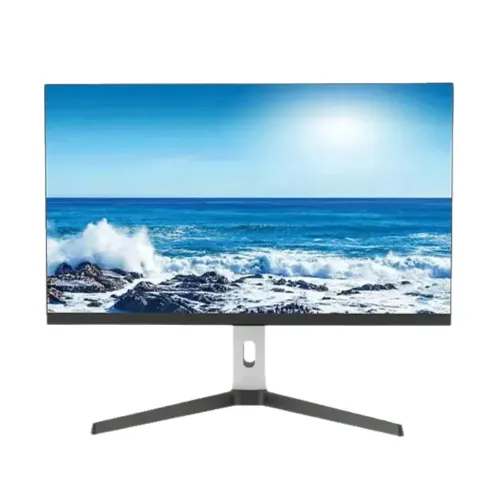
The exact-model manufacturer page confirms adjustable height and 180-degree rotation. The second catalog image visibly shows the screen in portrait orientation, supporting the pivot claim. Bangladesh retailers commonly specify 150mm height adjustment, -5° to +15° tilt and a 100 × 100mm VESA pattern. These details are retailer-reported because the manufacturer listing reviewed does not enumerate the full stand range or mounting pattern. The first image shows a wide V-shaped base and cable-routing opening in the upright. The rear image shows a white shell, purple accent strips, rear OSD buttons and a stand with vertical rails. Allow desk depth for the base and check arm load rating and screw fit before removing the stand. A rotating screen is useful for code, portrait documents and chat panes, but OS rotation may need to be enabled separately.
Appearance, controls and physical dimensions
The supplied images show a white rear housing with a dark front bezel, white height-adjustable column, dark metallic V-shaped base and purple rear lighting accents. The third view also shows physical controls and a security-lock opening. These are visual observations, not a claim that the lighting is RGB-addressable or every revision has identical details. Retailers list assembled dimensions of approximately 615.7 × 239.2 × 527.3mm and net weight of 5.7kg. Confirm the seller’s width-depth-height order and whether measurements include the stand before planning a desk or arm. No verified carton dimensions or gross shipping weight were found, so fulfillment fields remain blank rather than reusing assembled dimensions as package measurements. Ask for a current carton label if courier billing needs exact packed measurements.
Power input and energy use
Retailer pages report 46W consumption and a 12V/4A DC input. These values are not shown on the manufacturer’s exact-model page reviewed, so they remain retailer data rather than independently confirmed measurements. A 12V/4A rating describes input capacity; it does not mean the monitor draws 48W continuously. Consumption varies with brightness, refresh rate, content and settings. Check that the supplied adapter is included, correctly rated and has a suitable plug. Do not substitute an adapter based only on connector fit: voltage, polarity and current capacity must match the unit label. No energy-efficiency certification or standby consumption figure was found. If low power use is a deciding factor, ask for the label or manual for the exact batch.
Gaming, productivity and setup expectations
A 27-inch QHD image and 200Hz maximum refresh make this monitor relevant to PC gamers whose graphics card can drive high frame rates at 1440p. The adjustable-height and portrait-pivot stand can also help with coding, spreadsheets and long documents. For competitive play, use DisplayPort if the seller confirms that it supports the full 200Hz mode; public material reviewed does not specify port revisions or guarantee an input’s maximum timing. Enable the intended refresh rate in the OS and verify it in the monitor menu. For consoles, check that the console output and monitor input agree; do not infer 120Hz, HDR quality or VRR range from the 200Hz headline alone. The white finish may suit a light-colored setup, while visible purple rear strips add contrast.
Warranty, current price and Bangladesh purchase checks
The catalog’s existing variant price is ৳25,799 and is preserved. Retailer pages reviewed show promotional values in roughly the ৳23,500–৳25,799 range, with regular prices varying by seller. PC Power and multiple Bangladesh retailers list a three-year warranty. Ryans states that the original box is mandatory for claims; verify this policy and the actual service provider on the invoice. Ask whether the unit is the exact PCG27Q200DW model, which input reaches 200Hz at QHD, whether speakers are present, and what is in the box. Public information reviewed does not verify the exact unit’s country or barcode, so those fields stay blank. Stock, discounts, warranty terms and included cables can change; confirm them at checkout.
Who this monitor suits—and who should compare alternatives
Consider the PCG27Q200DW if you want a large QHD workspace, high refresh ceiling, portrait-pivot stand and white chassis, and can verify the graphics and connection path for your intended refresh rate. It can serve gaming, coding, general desktop work and media viewing. Compare alternatives if you need a certified HDR tier, measured color accuracy, manufacturer-confirmed speaker output, a published VRR range, USB-C video or guaranteed port revisions. Those details are not established consistently in public sources reviewed. For color-critical work, prefer a model with a calibration report or recognized coverage and accuracy specification. If speakers matter, confirm the exact unit. Preserve the carton for the warranty period if the seller requires it. This distinction between confirmed, retailer-reported and unresolved details lets buyers choose based on their hardware and priorities.