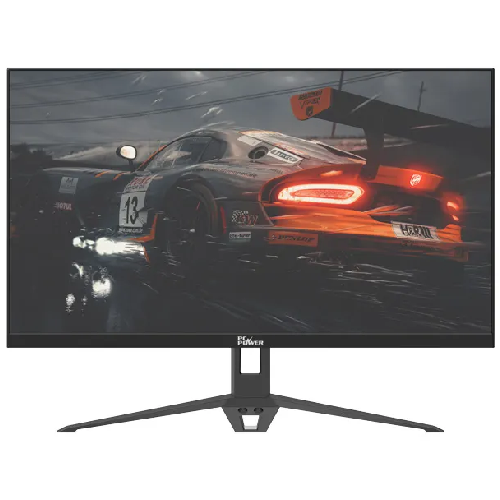
PC Power PCGM22: compact Full HD with smooth 100Hz motion
The PC Power PCGM22 is a 21.45-inch flat IPS monitor for everyday computing, study, office work, video and casual gaming. Its native 1920 × 1080 resolution gives a 16:9 Full HD canvas that fits common desks while keeping text, webpages and HD video clear at a practical viewing distance. The catalog identifies the exact model as PCGM22. Check the model label on the supplied unit because similarly named PCGM22U, PCGM22UB and PCGM22WSY products are separate variants with different colors or specifications.
IPS screen and Full HD detail
The IPS panel is specified for 178° horizontal and vertical viewing angles. That wide viewing specification can help the picture remain visible when viewed away from the center, though brightness and color perception still vary with angle, room lighting and display settings. A 250-nit brightness rating and 1000:1 typical contrast ratio are listed for this model. The matte, anti-glare surface can help reduce reflections from nearby lights, but it does not eliminate glare in a bright room.
PC Power lists 16.7 million colors and 120% sRGB gamut coverage. Gamut coverage figures describe the range of colors a panel can reproduce; they do not certify factory calibration or guarantee that every unit will match a professional reference display. For color-critical photo, print or video work, calibrate the monitor and compare its measured performance with the needs of the project.
100Hz refresh rate and response-time note
At a supported input resolution, the panel can refresh up to 100 times per second. Compared with a 60Hz screen, that higher refresh ceiling can make pointer movement, scrolling and compatible games appear smoother. To use 100Hz, your computer, graphics output, cable and selected display mode must all support it. The manufacturer lists a 5ms GTG response time and an Overdrive function. Response-time results depend on the measurement method and overdrive setting; they should not be read as a promise of zero blur or zero ghosting. This is an everyday 100Hz Full HD display, not a high-refresh competitive gaming monitor.
Inputs, audio and built-in speakers
The listed connections are one HDMI input and one VGA input, so the PCGM22 can connect to a current computer over HDMI or to compatible legacy equipment through VGA. Retailer specifications differ on the HDMI revision, so check the label or manual for the exact supplied revision if a particular bandwidth or device compatibility is essential. VGA is an analogue connection and may need manual tuning for the sharpest image. The monitor also includes a 3.5mm headphone output according to product listings.
PC Power describes integrated speakers rated at 2W per channel with a 4-ohm impedance. These speakers provide basic sound for system alerts, calls or casual video, but their small enclosures are not a substitute for dedicated speakers or headphones when you need stronger bass or higher volume. The headphone jack is an output; do not assume it is a microphone input. Confirm the included cable and exact audio routing in the manual for the unit you receive.
Eye comfort and useful display modes
The product information lists Flicker-Free operation and a Blue Light Shift setting. These options can be useful for adjusting the image to your preference during long work or study sessions. They do not prevent eye fatigue for everyone. Take regular breaks, set comfortable brightness for the room and position the top of the screen near eye level. The monitor is flat rather than curved, which suits spreadsheets, documents and general desktop use.
Stand, dimensions and mounting
The included stand supports tilt from approximately -5° to +15°, allowing a modest adjustment to reduce reflections and find a comfortable viewing angle. It does not provide the height, swivel or pivot movement of an ergonomic arm. PC Power marks the product as VESA-mountable; some Bangladesh retailer specifications list a 75 × 75mm pattern, but check the monitor’s rear label or manual before buying a bracket. Confirm the stand, screws and package contents with the seller, as bundles can vary by shipment.
Retailer listings give cabinet dimensions of approximately 494.4 × 370.1 × 138.2mm with the stand and 494.4 × 284.15 × 15.36mm without it. Listings also report around 2.3kg with stand, 2.0kg without stand and 3.7kg gross packaged weight. Treat those figures as retailer-reported and verify them if desk clearance, a monitor arm or shipping weight is critical.
Power and setup
Product listings specify a DC 12V, 2A adapter and power consumption below 24W, with below 0.5W in off or standby modes in some retailer specifications. Use the supplied adapter rated for the unit and check the printed input label before connecting power. Keep ventilation openings clear, place the screen on a stable level surface and avoid pulling the power cable tight across a walkway.
Who this monitor suits
The PCGM22 is a sensible fit for a home or office desk when you need an IPS Full HD picture, a compact 21.45-inch footprint, HDMI and VGA connectivity, and a 100Hz refresh option. It can handle documents, web browsing, online classes, streaming and casual games. Consider a larger or higher-resolution monitor for detailed creative work or extensive multi-window layouts, an adjustable stand or arm if posture adjustment matters, and a higher-end gaming display if you need a faster refresh rate or adaptive-sync behavior verified for your specific graphics setup.
Warranty and buying checklist
PC Power’s product information states a three-year warranty. Local warranty handling, eligible serial numbers, dead-pixel policy, repair location and claim process depend on the Bangladesh seller and authorized channel; confirm those terms in writing before purchase. BiponiBD’s estimated online market price is reference information, not a store offer or a guarantee of current stock. Compare active seller offers, delivery cost, return conditions and the exact model code before ordering.
Before checkout, verify the black PCGM22 model, 21.45-inch panel, 1920 × 1080 mode, included stand and adapter, port revision, VESA pattern and local warranty. Save the packaging and invoice until you have tested the display for image defects and confirmed that your computer can select its intended refresh rate.