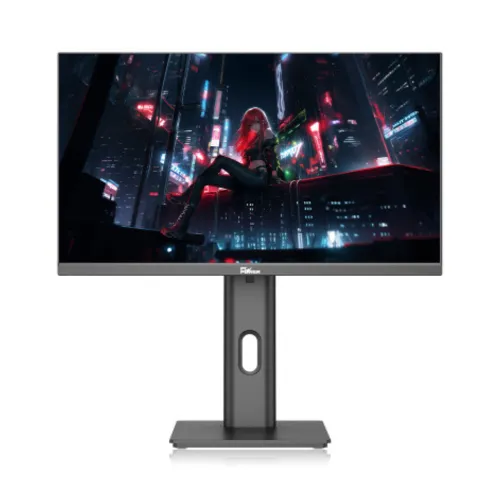
A compact Full HD IPS monitor with a 120Hz ceiling
The PC Power PCM24FRX is a 23.8-inch flat desktop monitor. PC Power Technology’s exact-model page identifies an IPS panel, a 16:9 format, Full HD 1920 × 1080 resolution and a 120Hz refresh rate. It also lists a 178-degree viewing angle, 1000:1 contrast and 1ms MPRT response time. These are the core specifications that make the model relevant to work, study, home computing and casual gaming. The 23.8-inch diagonal places the screen in the familiar 24-inch monitor class while keeping its footprint manageable on many desks. Full HD offers a common pixel format supported by desktop computers, laptops, streaming sources and game systems. The 120Hz maximum is a display capability, not a guarantee that every input source will run at that rate. A computer, cable, connection, graphics driver and selected operating-system mode must all support the desired timing. The seller page identifies 120Hz for this exact model; buyers who rely on a particular connector at 120Hz should confirm that combination with the manual or retailer before purchase.
How the IPS panel and Full HD resolution work together
IPS is the panel technology identified for the PCM24FRX by its manufacturer page. It is commonly used for desktop displays where users may look at the screen from slightly different positions or share content with someone beside them. The manufacturer lists a 178-degree viewing-angle figure, although the actual image can still change with angle, room light and the content being displayed. The 1920 × 1080 pixel grid gives a familiar workspace for documents, spreadsheets, browser tabs, video calls, photos and games. At a 23.8-inch diagonal, text size and perceived sharpness depend on viewing distance and operating-system scaling. Users can increase interface scaling or application zoom if text is too small. Full HD does not provide as much detail as QHD or 4K, so people working with dense visual layouts or needing a large high-resolution canvas may prefer a higher-resolution model. At the same time, Full HD requires fewer pixels to render than those higher resolutions, which can reduce the graphics workload when a user is trying to maintain a high frame rate in games.
What 120Hz means for everyday use
The manufacturer lists a maximum refresh rate of 120Hz. A display refreshes its image repeatedly; a higher rate can make pointer movement, scrolling, window animations and compatible games appear smoother than they do on a 60Hz display. The monitor does not create extra frames when the computer or game is producing fewer frames. The benefit is most visible when the graphics system supplies a sufficiently high frame rate and the signal path can carry the selected mode. After connecting the monitor, a user may need to open the operating system’s display settings, choose 1920 × 1080 and select 120Hz. If the option does not appear, check the graphics driver, cable, adapter, input selection and the supported timing chart for the chosen port. The manufacturer page confirms the model’s 120Hz headline but does not clearly publish a port-by-port timing matrix. Avoid promising that 120Hz works through every adapter, dock, console or USB-C cable. Refresh rate is also separate from response time: a high refresh ceiling does not itself prove a particular pixel transition time or eliminate all motion blur.
Response time and the 1ms MPRT figure
PC Power’s exact-model page lists a 1ms MPRT response-time figure. MPRT refers to moving-picture response time and is not the same measurement as gray-to-gray pixel transition time or input lag. It should not be rewritten as 1ms GTG. MPRT results depend on the measurement method and operating conditions; the number does not promise that all pixel changes complete in one millisecond or that moving objects will show no blur. The 120Hz refresh rate describes how often a new image can be shown when supported, while response-time behavior concerns changes between pixel states. Both affect perceived motion, along with frame rate, overdrive settings, the content itself and the viewer’s sensitivity to blur. The manufacturer page’s explicit MPRT wording is retained so buyers can see what the figure means. A retailer may abbreviate this as “1ms,” but the catalog does not treat that shorthand as evidence of a GTG result. Anyone who needs a specific benchmark for competitive play or motion-critical work should ask for the exact product revision’s measurement method or independent test results.
Color, viewing angles and realistic expectations
The manufacturer lists IPS, a 178-degree viewing angle and a 1000:1 contrast ratio for the PCM24FRX. Several Bangladesh retailers additionally report 99% sRGB and 16.7 million colors. Those color figures are retailer-listed and are not accompanied by a measurement report, calibration profile, tolerance or factory Delta E result in the material reviewed. They should not be turned into a professional color-accuracy guarantee. IPS technology and a wide viewing-angle specification can be useful for everyday media, study, office tasks and general creative work, but the actual color result depends on calibration, brightness, room lighting, software color management and panel-to-panel variation. The source material does not establish HDR support or a wide-gamut certification. Buyers doing print proofing, broadcast mastering or color-critical client work should request a full specification and consider a calibrated reference display. For ordinary home and office use, set brightness to a comfortable level and check that the display mode matches the connected computer. A stated gamut percentage describes color coverage rather than guaranteeing that every color is accurate.
Ports: USB Type-C, HDMI and VGA
PC Power’s exact-model page lists one USB Type-C connection and describes HDMI and VGA inputs. Bangladesh exact-model retailers commonly identify one HDMI 2.0, one VGA and one USB Type-C port, along with an audio output. This combination can accommodate a modern computer, an older video source and compatible USB-C devices. However, a USB-C connector alone does not prove that the port supplies laptop charging, USB Power Delivery, data-hub functions or video over every cable. Confirm the signal and power functions for the exact unit before planning a one-cable laptop setup. HDMI and VGA also differ in how they carry digital and analog signals; choose a source output and cable that match the display input and desired resolution/refresh rate. Retailers list HDMI 2.0, but the official public page does not provide the full per-input timing matrix in the specification text reviewed. Do not assume that all combinations of USB-C, HDMI, VGA, docks and adapters support 120Hz. The rear-view product image helps show a connection area, but it is not sharp enough to establish every port version or exact count on its own.
Audio output and built-in speakers
Some local retailer specification tables report built-in speakers and an audio output, while other listings focus on video inputs and do not clearly document audio functions. The exact PC Power manufacturer page reviewed does not prominently specify speaker wattage or audio output characteristics. This listing therefore treats speaker presence as a seller-listed detail that buyers should confirm on the actual revision. If the monitor has the reported audio output, it may pass sound from a compatible HDMI or USB-C source to headphones or external speakers; exact routing depends on the computer and connection. A built-in speaker, if present, is usually a convenience for system sounds and video calls rather than a replacement for a dedicated speaker system. Check the on-screen menu and manual for volume controls, mute behavior and audio routing. If speakers are essential, ask the retailer for a photo of the exact unit’s connections or a copy of the manual. Do not assume that VGA carries audio, since it is an analog video connector and normally requires a separate audio path.
Stand adjustment, desk placement and mounting
The catalog images show a central upright stand, a front view, an angled view and the rear of the monitor. The rear view includes a stand post and mounting area; the side view shows the screen on the stand. Several Bangladesh retailer specifications report tilt from approximately −5 to +15 degrees, 90-degree pivot, swivel and a 75 × 75 mm VESA pattern. Retailer information about height adjustment is inconsistent or incomplete, and product images alone cannot establish every range of movement. The product page preserves the reported tilt and pivot with seller-source qualification and marks height adjustment as needing confirmation. If portrait orientation, a specific eye-level setting or desk-arm mounting matters, check the stand mechanism, VESA spacing, screw length and monitor weight for the delivered unit. A VESA pattern indicates mounting-hole spacing, not that a bracket is included. The desk should have enough depth for the stand base and room behind the display for cables. Confirm whether the stand arrives assembled and which screws or adapters are included in the package.
Power, adapter and operating consumption
Bangladesh retailer listings describe the PCM24FRX as using an external power adapter and report maximum power consumption of 30W. The exact manufacturer product page does not provide the adapter output voltage/current or a complete electrical rating table in the accessible material. Use the adapter shipped with the display and follow the label and manual; do not substitute an adapter based only on its connector shape. Actual electricity use can vary with brightness, picture mode, refresh setting, content and standby behavior. The published 30W figure is a retailer-listed maximum and should not be treated as a laboratory measurement of typical daily consumption. Keep the adapter and monitor cables away from heat, liquid and points where furniture can pinch them. Make sure ventilation openings are not blocked. When setting up the display, connect power and one compatible video source, then select the matching input and set the resolution and refresh rate in the computer. If a USB-C connection is expected to power a laptop, verify that function first; the presence of the USB-C receptacle is not proof of charging support.
Low-blue-light and eye-comfort claims
PC Power’s exact-model product page describes low-blue-light support. Retailers also mention flicker-free operation and eye-care features, but the sources do not provide a certification number or measurement standard for this exact model. Low-blue-light modes can change the screen’s color temperature and may be useful for some viewing preferences, but they do not guarantee the prevention of eye strain. Screen comfort also depends on brightness, reflections, font size, posture, viewing distance and breaks. Adjust the display for the ambient light rather than using maximum brightness in a dark room. If the image appears too warm after a low-blue-light mode is enabled, choose a different picture preset for color-sensitive work. The catalog records the general low-blue-light claim only where supported by the manufacturer page and keeps more specific comfort/certification assertions qualified. No visual-comfort feature replaces appropriate medical care for ongoing symptoms. The product images show the monitor’s appearance but do not prove any flicker measurement, hardware filter design or certification.
Where the PCM24FRX fits among similar PC Power models
Use the model code PCM24FRX when comparing specifications, warranty cards and retailer offers. PC Power also sells other monitors with similar 24-inch dimensions and different model numbers, panel details or refresh rates. PCM22FRX is a smaller 21.5-inch model often listed at 100Hz, while PCG24F120U and PCG24F120DW are other 23.8-inch models with their own specifications. Those related products should not be used to fill missing values for this product. The exact PCM24FRX manufacturer page and multiple local listings identify 120Hz; that value is retained. Before purchase, compare the model printed on the carton, rear label and invoice. Check that a seller’s warranty card uses the same model, not a visually similar monitor. This is especially important when online listings reuse gallery images or copied descriptions. The product images show PC Power branding and a stand with a centered cable opening, but only the model label or exact product documentation can establish which revision is being sold.
Bangladesh warranty, price and offer context
Bangladesh sellers commonly list a three-year warranty for the PCM24FRX, but the responsible distributor, service center, coverage, dead-pixel policy, required carton and claim process depend on the particular seller and product serial. Confirm the written warranty terms and keep the invoice and box if the retailer requires them for a claim. Prices also vary with promotion, stock, payment method and time. Current seller pages checked for this review show reference prices from roughly BDT 15,500 to BDT 18,000. These are third-party listing observations, not a live BiponiBD offer, confirmed stock statement or guaranteed checkout price. BiponiBD’s existing BDT 15,500 MSRP is retained as the product’s catalog reference. Ask the seller for a dated quotation and confirm delivery cost and payment conditions directly. The catalog does not claim that any particular merchant has the monitor available now. Package contents should be checked as well: the manufacturer page and local listings do not provide one consistent detailed box inventory for every regional shipment.
Gallery images and truthful alternative text
Four product images are saved in the BiponiBD gallery. The first shows the monitor front-on with a neon city-scene image and a tall central stand. The second is a slightly angled front view with the same displayed scene and stand. The third is a direct rear view showing the PC Power logo, central stand post and a cluster of ports near the lower left. The fourth is a side profile that shows the slim panel edge, articulated stand connection and base. These visuals help shoppers understand the general design and viewing angles. They do not independently verify refresh rate, color coverage, exact port versions, supplied accessories, dimensions or a warranty. The new alt text identifies the model and the visible viewpoint without repeating a long keyword list. Image descriptions should remain useful to a reader using assistive technology and avoid claims that cannot be seen in that specific frame. The original image URLs and media IDs remain unchanged so existing product-image relationships and page rendering are preserved.
What to verify before ordering
The exact-model manufacturer page supports the core description: PC Power PCM24FRX, 23.8-inch IPS, 1920 × 1080, 16:9, 120Hz, 178-degree viewing-angle listing, 1000:1 contrast and 1ms MPRT. It also mentions USB Type-C, HDMI and VGA. Local seller pages add detail about HDMI 2.0, audio, speakers, 99% sRGB, stand adjustment, 30W power, 75 × 75 mm VESA and three-year local warranty. Those additional values are retailer-derived and should be checked against the delivered revision where important. Height adjustment, USB-C video/power behavior, speaker configuration, exact port timing at 120Hz, adapter ratings, unit weight and carton contents remain especially useful questions for the seller. Do not infer that USB-C charges a laptop, that an arm is included, or that a product price guarantees stock. If any of those facts determines whether the product fits a desk or device setup, request written confirmation or a photo of the exact item label and port panel. This listing keeps the source distinction visible instead of turning every copied retailer detail into an unqualified guarantee.