Philips 222B9TA 21.5-inch Full HD Smart Touch Monitor: Complete Buyer Guide
Product identity and regional model
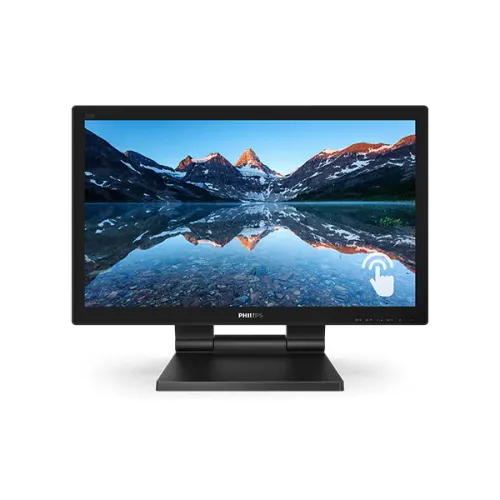
Philips 222B9TA is a 21.5-inch Full HD interactive monitor in the Philips B Line. The reliable base model and manufacturer part number for this catalog entry are 222B9TA. Regional listings include part numbers such as 222B9TA/00 and 222B9TA/69. A Bangladesh listing for a /69 unit does not establish the suffix on every offer; confirm the physical carton and serial label. The existing product title correctly names Philips, size, Full HD and Smart Touch, and should remain stable. The catalog currently assigns a generic Others brand and stores a cut-off title fragment in model and MPN. Map the brand to Philips and normalize both fields to the base model code. This guide describes manufacturer family specifications and separates exact-unit details that must be checked before purchase.
Panel and image detail
The display uses a 21.5-inch or 54.6-centimetre diagonal VA LCD panel with white LED backlighting and a 16:9 aspect ratio. Its optimum and native image is 1920 × 1080 pixels, Full HD, at 60Hz. Philips lists 0.24825 × 0.248285mm pixel pitch, 102 pixels per inch and 476.64 × 268.11mm active area. This gives everyday desktop text and interface elements reasonable clarity, while the wide format suits office software and video. Philips rates viewing angle at 178 degrees horizontally and vertically at a contrast ratio above 10. That describes the angular viewing specification; it does not mean every angle preserves identical color and contrast. The listed scanning range is input dependent, so use the source device timing rather than assuming every connector supports the maximum refresh frequency.
Brightness, contrast and coatings
Typical display brightness is 250cd/m² with 3000:1 typical static contrast. SmartContrast is shown as 50,000,000:1, a dynamic processing figure rather than native static contrast. Philips lists 16.7 million colors and typical NTSC gamut of 72 percent. Brightness for touch mode is separately listed at 210cd/m², so the image may appear dimmer while using interactive input. Philips literature lists a 7H front touch-glass rating and a 3H LCD-surface layer with 25 percent haze. These values refer to different layers and must not be collapsed into one hardness claim. The front has an anti-glare treatment, but bright windows can still reflect. The specification does not establish professional color calibration or outdoor high-brightness performance.
Touch input and host connection
SmoothTouch uses projected-capacitive touch for ten simultaneous points. Philips lists finger, stylus and selected glove input, subject to material and thickness. The active area follows the 476.64 × 268.11mm view. Touch uses USB, so connect the USB-B upstream link to the computer in addition to VGA, DVI-D, DisplayPort or HDMI video. Without that upstream data link, the display can show video but will not send touch events and its USB hub will not connect to the host. The manufacturer compatibility list names Windows and Android versions; standard USB HID support may work in other systems, but native Apple macOS touch support is not specified. Confirm operating-system behavior and driver needs before purchasing for a Mac or specialized kiosk host.
Front-only ingress protection
Philips states the front surface meets IP65 for dust and water ingress. The scope is the monitor front only, not rear housing, ventilation, connectors, power adapter or complete device. This is useful for a public-facing touch surface when installed as the manual describes, but it is not permission to immerse the display or clean it with high-pressure jets. Philips says the touch screen is sealed to the bezel and LCD. Keep rear ports and power away from spills and use compatible cleaning guidance. The 7H glass figure also does not make the panel scratch-proof: abrasive cleaning, impact and metal objects can damage glass or coating. For a kiosk, plan cable routing, ventilation and rear access so the front rating does not create a false sense of protection for unprotected connections.
SmartStand and physical mounting
The SmartStand is a dual-hinge Z-shaped arm. Philips lists tilt from -5 to 90 degrees and folding from 0 to 70 degrees. It can stand upright for desktop touch, recline for writing and customer interaction, or fold close to horizontal on a counter. The product sheet reports 76mm height change upright and 184mm when horizontal. This is stand geometry, not a conventional post that slides vertically by 184mm. The screen supports standard 100 × 100mm VESA, so a wall arm or POS mount can replace the supplied stand. Use hardware rated for assembled monitor mass and follow the manufacturer's removal steps. A Kensington slot accepts a physical security cable; it does not electronically lock the monitor or replace a secure mount.
Video, USB and audio connections
The Philips product sheet lists analogue VGA, digital DVI-D with HDCP, DisplayPort 1.2 and HDMI 1.4. Some local quick specifications omit DVI-D, so the complete manufacturer input list should be shown while buyers verify their regional unit. Two USB 3.2 downstream ports make a hub, and one supports USB Battery Charging 1.2. The USB-B upstream cable is necessary for touch data and hub communication. Audio connections are PC audio-in and separate headphone-out. Two built-in speakers are rated at 2W each. HDMI or DisplayPort sources may carry audio, while VGA or DVI setups may need the separate PC audio cable. The Kensington slot is another convenience for public installations. Check the actual input panel and cables before planning an older PC connection.
Refresh and response definitions
Philips specifies optimum Full HD at 60Hz and lists vertical scanning from 48 to 75Hz. The scan range can accommodate signal timings, but should not be used to promise a 75Hz Full HD mode on every port. List this product as 60Hz unless a regional manual and source timing demonstrate another mode. Typical response is 2ms grey-to-grey; Philips notes the published value equals SmartResponse. Response time describes pixel transitions under the stated method, while refresh rate describes how often a new image can be displayed. These are separate measurements. A 2ms response claim does not mean 1ms MPRT or turn this display into a high-refresh gaming model. Philips also lists SmartImage presets, Flicker-Free, LowBlue Mode and EasyRead for general viewing and reading preferences.
Dimensions, weight and parcel limits
With the stand, the monitor measures 515 × 394 × 226mm; without it, 515 × 318 × 50mm. Net mass is 7.24kg with stand and 3.95kg without. A Philips /00 sheet gives a package size of 575 × 420 × 161mm and gross weight of 9.88kg. A Bangladesh retailer reports a similar package size but 9.30kg gross, and the catalog offer suffix is unknown. Keep variant freight fields empty until BiponiBD verifies the physical carton. Monitor dimensions and net weight belong in specifications with clear labels, not in courier fields. The assembled mass matters when selecting a wall arm or counter. Measure the actual packed item if the carrier needs billable dimensions.
Power and daily energy use
The monitor uses an external power supply rated 100–240V AC at 50–60Hz. Philips lists typical on-mode use at 15.96W using the Energy Star test method, 13.2W in ECO mode and 0.3W for standby/off. Actual consumption varies with settings, connected USB devices, touch activity and brightness. One downstream USB port supports USB Battery Charging 1.2 when the upstream connection is attached. These are monitor specifications and do not replace checking the rating label on the regional adapter. Use the supplied or approved power supply and a safe local mains plug. For a POS installation, secure the adapter and allow airflow. When budgeting a group of displays, use measured duty-cycle consumption rather than multiplying a maximum adapter rating.
Who should choose this model
The 222B9TA is designed for interactive work such as retail counters, POS, classrooms, reception, public information and collaborative forms. It combines touch, front-only IP65, a folding stand, speakers, USB hub and older video inputs. It is less suited to competitive gaming, HDR entertainment, outdoor sunlight or professional color work because its optimum is 60Hz Full HD, brightness 250cd/m² and gamut 72 percent NTSC, without a reviewed HDR certification. Before buying, confirm video connector, USB-B touch cable, operating system, mounting load and stand space. Ask whether the exact regional carton includes a stylus and cables for the intended host. Confirm the suffix, live offer, seller stock and written warranty provider. The saved catalog price is a reference, not a promise of checkout availability.
Warranty, origin and accessories
Bangladesh shops commonly advertise a three-year brand warranty, including /69 listings. This is a retailer market claim and does not verify the importer, serial eligibility, touch-panel coverage or claim terms for a specific BiponiBD offer. Confirm the provider and coverage with the seller. Philips documentation for /00 lists D-Sub, HDMI, DisplayPort, USB-A-to-B, audio and power cables, a stylus and user material, while warning that regional products and accessories may differ. Do not assume an exact Bangladesh unit contains the same items without checking its carton. Country of origin is not confirmed for this physical catalog item; headquarters or another seller's copy does not prove the unit label. Leave origin and regional barcode values blank unless the actual box and serial are inspected.
Installation and final checklist
For desktop use, place the SmartStand on a stable surface, connect video, then attach USB-B upstream for touch and hub. Select 1920 × 1080 at 60Hz and enable touch mapping if needed. For VESA mounting, use 100 × 100mm hardware rated for the 7.24kg assembled mass. Keep rear connectors and the external adapter protected because IP65 covers only the front. Clean glass with a compatible soft method. On purchase, verify 222B9TA and any suffix, stylus and cables, serial-specific warranty, current price and availability. Manufacturer carton data is only a guide for /00; courier measurements should come from the actual package. Confirm that the computer supports the chosen video mode and has a USB port for touchscreen data. These checks align specifications with the host and installation environment.